



随机取值是较为简单一种取值方式
以用户登录为例,将数据放入list中,数组元素下标从0开始,最大下标为数组长度减1
userdatas = ["ali001", "ali002", "ali003", "ali004", "ali005"]
userdatas 数组长度为5
userdatas 中元素下标依次为0, 1, 2, 3, 4
使用random.randint(0, 4)函数,生成下标范围的随机整数
代码示例如下
# coding=utf-8
''' Created on 2019-11-08

    author: ali
'''
import os
import random
from locust import HttpLocust, task, TaskSet

class userTaskSet(TaskSet):
    # 定义请求头
    webheaders = {
        "Accept-Encoding": "gzip, deflate",
        "User-Agent": "Mozilla/5.0 (Windows NT 6.1; WOW64) AppleWebKit/537.36 (KHTML, like Gecko) Chrome/70.0.3538.77 Safari/537.36",
        "Content-Type": "application/x-www-form-urlencoded;charset=UTF-8",
        "Accept": "application/json, text/javascript, */*; q=0.01",
        "Connection": "Keep-Alive",
    }

    # 用户登录
    @task(1)
    def userLogin(self):
        # 请求url
        test_url = "/zentao/user-login.json"

        # 用户名随机取值
        userdatas = ["ali001", "ali002", "ali003", "ali004", "ali005"]
        index = random.randint(0, len(userdatas)-1)
        username = userdatas[index]
        test_data = {
            "account":username,
            "password": "q1w2e3r4t5y6", # 所有用户密码相同
            "referer":"/zentao/",
            "passwordStrength":1
        }
        with self.client.post(test_url, test_data, headers=self.webheaders, catch_response=True) as response:
            try:
                json_res = response.json()
                # 断言
                if json_res["status"] == 'success':
                    print("用户%s" % username + " login success!")
                    response.success()
                else:
                    response.failure("用户%s" % username + " login failed!")
                    print(json_res)
            except Exception as e:
                response.failure(e)
                print(e)


class websiteUser(HttpLocust):
    task_set = userTaskSet
    host = 'http://127.0.0.1:8088'
    min_wait = 1000  # 单位为毫秒
    max_wait = 2000  # 单位为毫秒


if __name__ == "__main__":
    os.system("locust -f zentaoLogin.py --host=http://127.0.0.1:8088")
运行结果

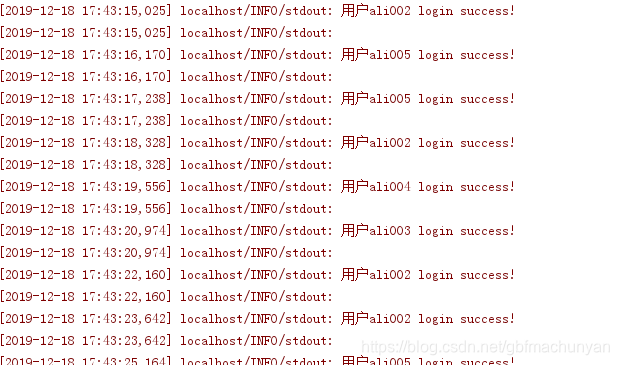
同时控制台输出用户登录信息,可以看到登录用户名是随机的





 扫一扫
扫一扫


 201
201

 被折叠的 条评论
为什么被折叠?
被折叠的 条评论
为什么被折叠?
 到【灌水乐园】发言





