



1. template
el-upload导入excel , el-table本地渲染excel数据
    <template>
       <div>
            <el-upload
              class="upload"
              action=""
              :multiple="false"
              :show-file-list="false"
              accept="csv, application/vnd.ms-excel, application/vnd.openxmlformats-officedocument.spreadsheetml.sheet"
              :http-request="httpRequest"
            >
              <el-button
                type="primary"
                ><i class="el-icon-upload"></i> 导 入</el-button
              >
           </el-upload>

      <!-- 渲染excel数据 -->
      <el-table
        border
        :data="tableData.slice((currpage - 1) * pagesize, currpage * pagesize)"
        @selection-change="handleSelectionChange"
      >
        <el-table-column
          type="index"
          :index="typeIndex"
          label="序号"
          width="50"
        ></el-table-column>
        <el-table-column
          :label="names"
          v-for="(names, key) in keyName"
          :key="key"
        >
          <template slot-scope="scope">
            {{
              tableData.slice((currpage - 1) * pagesize, currpage * pagesize)[
                scope.$index
              ][names]
            }}
          </template>
        </el-table-column>
      </el-table>

      <!-- 分页 -->
      <pagination
        v-show="total > 0"
        :total="total"
        :page.sync="currpage"
        :limit.sync="pagesize"
      />
       </div>
    </template>
2.script
<script>
  export default {
  data() {
    return {
      tableData: [],
      currpage: 1,
      pagesize: 10,
      total: 0,
      keyName: [],
    }
  },

  methods: {
 // excel导入数据
    httpRequest(e) {
      this.dialogVisible = true;
      let that = this;
      let file = e.file; // 文件信息
      if (!file) {
        that.$message.error("没有文件");
        // 没有文件
        return false;
      } else if (!/\.(xls|xlsx)$/.test(file.name.toLowerCase())) {
        // 判断是否excel格式
        that.$message.error("上传格式不正确,请上传xls或者xlsx格式");
        return false;
      }
      const fileReader = new FileReader();
      fileReader.onload = (ev) => {
        try {
          const data = ev.target.result;
          const workbook = XLSX.read(data, {
            type: "binary", // 以字符编码的方式解析
            cellDates: true, // 将日期转化为正确格式
          });
          console.log(workbook.Sheets["模板"]);
          const exlname = workbook.SheetNames[0]; // 取第一张表
          const exl = XLSX.utils.sheet_to_json(workbook.Sheets[exlname], {
            defval: ""
          }); // 生成json表格内容  //  { defval: "" } 当表格为空时,赋值为""
          // 将 JSON 数据挂到 data 里
          that.tableData = exl;
          let arr = this.tableData[0]; //获取json键名
          for (let i in arr) {
            that.keyName.push(i); //把json键名加入表头数组
          }
          that.total = that.tableData.length;
        } catch (e) {
          console.log("出错了");
          return false;
        }
      };
      fileReader.readAsBinaryString(file);
    },

    //el-table序号处理
    typeIndex(index) {
      let vm = this; //处理分页数据的 index
      return (vm.currpage - 1) * vm.pagesize + index + 1;
    },
  }
}
</script>
3.将excel解析后的数据,导入API接口
 // 确定导入
    submit() {
      console.log(this.keyName);
      console.log(this.tableData);
      let fieldList = [
        "orderId",
        "name",
        "orderCreateTime",
        "price",
        "productName",
        "qty",
        "orderAmount",
        "phone",
        "writeOffCity",
        "writeOffCompany",
        "source",
        "batchNo",
      ];
      const list = this.tableData.map((item) => {
        const arr = Object.keys(item);
        for (const i in arr) {
          item[fieldList[i]] = item[arr[i]];
        }
        return item;
      });
      let importReportDtos = [];
      list.map((x) => {
        let excelitem = {
          orderId: JSON.stringify(x.orderId),
          name: JSON.stringify(x.name),
          orderCreateTime: moment(x.orderCreateTime).format("YYYY-MM-DD"),
          price: x.price,
          productName: x.productName,
          qty: x.qty,
          orderAmount: x.orderAmount,
          phone: JSON.stringify(x.phone),
          writeOffCity: x.writeOffCity,
          writeOffCompany: x.writeOffCompany,
          source: x.source,
          batchNo: JSON.stringify(x.batchNo),
        };
        importReportDtos.push(excelitem);
      });
      console.log(importReportDtos);
      this.$request("reportExcel", importReportDtos).then((res) => {
        console.log(res);
      });
      this.tableData = [];
      this.keyName = [];
    },
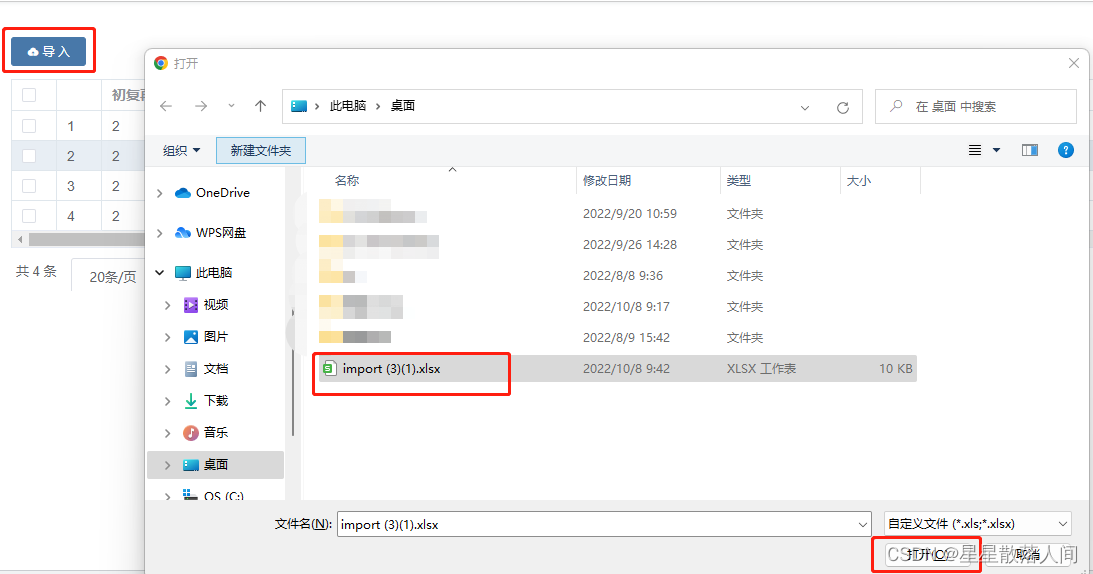
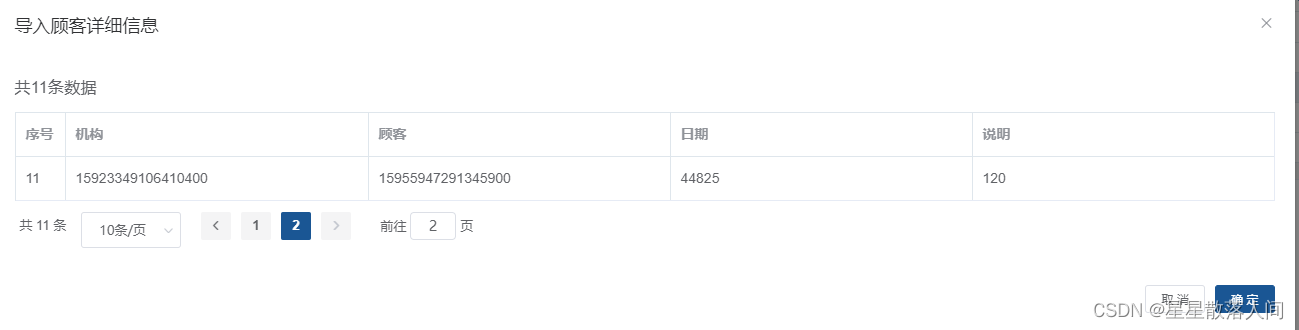
4.结果






 扫一扫
扫一扫


 1162
1162

 被折叠的 条评论
为什么被折叠?
被折叠的 条评论
为什么被折叠?
 到【灌水乐园】发言





