





 本文深入探讨了HTML和CSS的应用技巧,包括区块<section>与文章<article>的区别、视频元素<video>的使用、表格<table>的设计与样式定制、表单<form>的构建等,强调了实战经验的重要性。
目录
-
区块<section>和文章<article>的区别
无明确区别,一般组织相关内容用<section>,独立内容用<article>,组织不相关内容可用<div>
-
<vedio>
<!--一种视频格式-->
<video controls autoplay
        width="512" height="288"
        src="video/tweetsip.mp4"
        poster="images/poster.png"
>
</video>
<!--多种视频格式-->
<video controls autoplay width="512" height="288">
	<source src="video/tweetsip.mp4">
	<source src="video/tweetsip.webm">
	<source src="video/tweetsip.ogv">
	<p>Sorry, your browser doesn't support the video element.</p>
</video>-
<table>表格
<table>
	<caption>
		The cities I visited on my
		Segway'n USA travels
	</caption>
	<tr>
		<th>City</th>
		<th>Date</th>
		<th>Temperature</th>
		<th>Altitude</th>
		<th>Population</th>
		<th>Diner Rating</th>
	</tr>
	<tr class="cellcolor">
		<td>Walla Walla, WA</td>
		<td>June 15th</td>
		<td class="temp">75</td>
		<td>1,204 ft</td>
		<td class="pup">29,686</td>
		<td>4/5</td>
	</tr>
	<tr class="cellcolor">
		<td>Magic City, ID</td>
		<td>June 25th</td>
		<td class="temp">74</td>
		<td>5,312 ft</td>
		<td class="pup">50</td>
		<td>3/5</td>
	</tr>
</table>
table{
	margin-left:20px;
	margin-right:20px;
	border:thin solid black;
	caption-side:bottom;
	border-collapse:collapse;
}
th{
	background-color:#cc6600;
}
.cellcolor{
	background-color:#fcba7a;
}
.temp{
	text-align:center;
}
.pup{
	text-align:right;
}
td,th{
	border:thin dotted gray;
	padding:5px;
}
caption{
	font-style:italic;
	padding-top:8px;
}
-
列表定制样式 list-style-image
li{
	list-style-image:url(images/backpack.gif);
	padding-top:5px;
	margin-left:20px;
}-
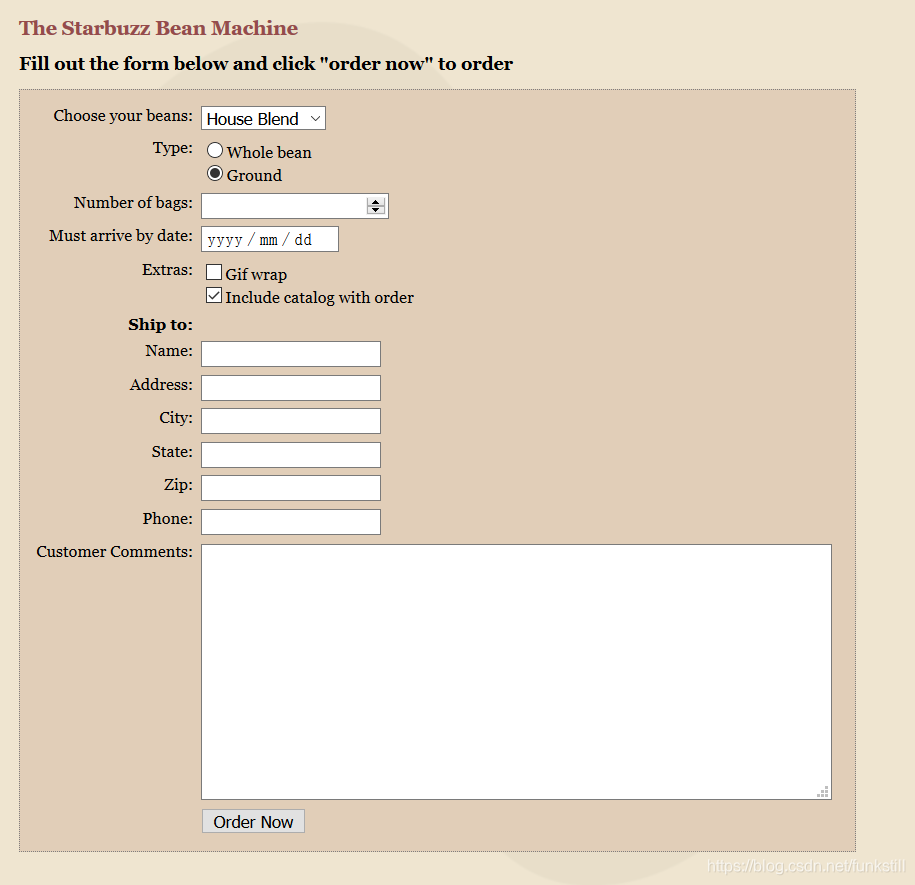
<form>表单
<!doctype html>
<html>
  <head>
    <meta charset="utf-8">
    <title>The Starbuzz Bean Machine</title>
	<link rel="stylesheet" href="starbuzz.css">
	<link rel="stylesheet" href="styledform.css">
  </head>
  <body>
	<h1>The Starbuzz Bean Machine</h1>
	<h2>Fill out the form below and click "order now" to order</h2>
	<form action="http://satrbuzzcoffee.com/processorder.php"
		  method="POST">
		<div class="tableRow">
			<p>
				Choose your beans:
			</p>
			<p>
				<select name="beans">
					<option value="House Blend">House Blend</option>
					<option value="Bolivia">Bolivia</option>
					<option value="Guatemala">Guatemala</option>
					<option value="Kenya">Kenya</option>
				</select>
			</p>
		</div>
		<div class="tableRow">
			<p>Type:</p>
			<p>
				<input type="radio" name="beantype" value="whole">Whole bean<br>
				<input type="radio" name="beantype" value="ground" checked>Ground
			</p>
		</div>
		<div class="tableRow">
			<p>Number of bags:</p>
			<p>
				<input type="number" name="bags" min="1" max="10">
			</p>
		</div>
		<div class="tableRow">
			<p>Must arrive by date:</p>
			<p>
				<input type="date" name="date">
			</p>
		</div>
		<div class="tableRow">
			<p>Extras:</p>
			<p>
				<input type="checkbox" name="extras[]" value ="gifwrap">Gif wrap<br>
				<input type="checkbox" name="extras[]" value="catalog" checked>Include catalog with order
			</p>
		</div>
		<div class="tableRow">
			<p class="heading">Ship to:</p><br>
			<p></p>
		</div>
		<div class="tableRow">
			<p>Name:</p>
			<p><input type="text" name="name"></p>
		</div>
		<div class="tableRow">
			<p>Address:</p>
			<p><input type="text" name="address"></p>
		</div>
		<div class="tableRow">
			<p>City:</p>
			<p><input type="text" name="city"></p>
		</div>
		<div class="tableRow">
			<p>State:</p>
			<p><input type="text" name="state"></p>
		</div>
		<div class="tableRow">
			<p>Zip:</p>
			<p><input type="text" name="zip"></p>
		</div>
		<div class="tableRow">
			<p>Phone:</p>
			<p><input type="tel" name="phone"></p>
		</div>

		<div class="tableRow">
			<p>Customer Comments:</p>
			<p>
				<textarea name="comments"></textarea>
			</p>
		</div>
		<div class="tableRow">
			<p></p>
			<p><input type="submit" value="Order Now"></p>
		</div>
	</form>
  </body>
</html>
body {
	background: #efe5d0 url(images/background.gif) top left;
	margin: 20px;
}

form {
	display: table;
	padding: 10px;
	border: thin dotted #7e7e7e;
	background-color: #e1ceb8;
}

form textarea {
	width: 500px;
	height: 200px;
}

div.tableRow {
	display: table-row;
}

div.tableRow p {
	display: table-cell;
	vertical-align: top;
	padding: 3px;
}
div.tableRow p:first-child {
	text-align: right;
}
p.heading {
	font-weight: bold;
}
-
End
对HTML和CSS算是有一个整体的把握了,感觉具体的属性技巧还需要在实战过程中不断去摸索熟悉,不能靠硬生生的记忆。
距离考研还有19天,距离春招还有88天。
加油!加油!加油!





 扫一扫
扫一扫


 2072
2072

 被折叠的 条评论
为什么被折叠?
被折叠的 条评论
为什么被折叠?
 到【灌水乐园】发言





