



 本文分析了keras在加载cifar10数据集时遇到的在线下载失败问题,指出当C:Userssunxu.kerasdatasets路径下没有cifar-10-batches-py.tar.gz文件时,keras会尝试联网下载。解决方案是提前将下载好的数据集文件放置到指定路径,以确保keras能正确加载数据集。
1、原因分析:
keras中cifar10.py模块的load_data(),其中的path = get_file(dirname, origin=origin, untar=True)将从默认的 C:\Users\sunxu\.keras\datasets 路径下返回数据集路径,如果该路径下有cifar-10-batches-py.tar.gz文件则不用从网上在线下载,否则将会联网下载(数据集100多兆,可能下载不成功)
keras中的cifar10.py模块
"""CIFAR10 small images classification dataset.
"""
from __future__ import absolute_import
from __future__ import division
from __future__ import print_function

from .cifar import load_batch
from ..utils.data_utils import get_file
from .. import backend as K
import numpy as np
import os


def load_data():
    """Loads CIFAR10 dataset.

    # Returns
        Tuple of Numpy arrays: `(x_train, y_train), (x_test, y_test)`.
    """
    dirname = 'cifar-10-batches-py'
    origin = 'https://www.cs.toronto.edu/~kriz/cifar-10-python.tar.gz'
    path = get_file(dirname, origin=origin, untar=True)

    num_train_samples = 50000

    x_train = np.empty((num_train_samples, 3, 32, 32), dtype='uint8')
    y_train = np.empty((num_train_samples,), dtype='uint8')

    for i in range(1, 6):
        fpath = os.path.join(path, 'data_batch_' + str(i))
        (x_train[(i - 1) * 10000: i * 10000, :, :, :],
         y_train[(i - 1) * 10000: i * 10000]) = load_batch(fpath)

    fpath = os.path.join(path, 'test_batch')
    x_test, y_test = load_batch(fpath)

    y_train = np.reshape(y_train, (len(y_train), 1))
    y_test = np.reshape(y_test, (len(y_test), 1))

    if K.image_data_format() == 'channels_last':
        x_train = x_train.transpose(0, 2, 3, 1)
        x_test = x_test.transpose(0, 2, 3, 1)

    return (x_train, y_train), (x_test, y_test)
其中get_file()函数
定义在 里
里
def get_file(fname,
             origin,
             untar=False,
             md5_hash=None,
             file_hash=None,
             cache_subdir='datasets',
             hash_algorithm='auto',
             extract=False,
             archive_format='auto',
             cache_dir=None):
    """Downloads a file from a URL if it not already in the cache.

    By default the file at the url `origin` is downloaded to the
    cache_dir `~/.keras`, placed in the cache_subdir `datasets`,
    and given the filename `fname`. The final location of a file
    `example.txt` would therefore be `~/.keras/datasets/example.txt`.

    Files in tar, tar.gz, tar.bz, and zip formats can also be extracted.
    Passing a hash will verify the file after download. The command line
    programs `shasum` and `sha256sum` can compute the hash.

    # Arguments
        fname: Name of the file. If an absolute path `/path/to/file.txt` is
            specified the file will be saved at that location.
        origin: Original URL of the file.
        untar: Deprecated in favor of 'extract'.
            boolean, whether the file should be decompressed
        md5_hash: Deprecated in favor of 'file_hash'.
            md5 hash of the file for verification
        file_hash: The expected hash string of the file after download.
            The sha256 and md5 hash algorithms are both supported.
        cache_subdir: Subdirectory under the Keras cache dir where the file is
            saved. If an absolute path `/path/to/folder` is
            specified the file will be saved at that location.
        hash_algorithm: Select the hash algorithm to verify the file.
            options are 'md5', 'sha256', and 'auto'.
            The default 'auto' detects the hash algorithm in use.
        extract: True tries extracting the file as an Archive, like tar or zip.
        archive_format: Archive format to try for extracting the file.
            Options are 'auto', 'tar', 'zip', and None.
            'tar' includes tar, tar.gz, and tar.bz files.
            The default 'auto' is ['tar', 'zip'].
            None or an empty list will return no matches found.
        cache_dir: Location to store cached files, when None it
            defaults to the [Keras Directory](/faq/#where-is-the-keras-configuration-filed-stored).

    # Returns
        Path to the downloaded file
    """  # noqa
    if cache_dir is None:
        if 'KERAS_HOME' in os.environ:
            cache_dir = os.environ.get('KERAS_HOME')
        else:
            cache_dir = os.path.join(os.path.expanduser('~'), '.keras')
    if md5_hash is not None and file_hash is None:
        file_hash = md5_hash
        hash_algorithm = 'md5'
    datadir_base = os.path.expanduser(cache_dir)
    if not os.access(datadir_base, os.W_OK):
        datadir_base = os.path.join('/tmp', '.keras')
    datadir = os.path.join(datadir_base, cache_subdir)
    if not os.path.exists(datadir):
        os.makedirs(datadir)

    if untar:
        untar_fpath = os.path.join(datadir, fname)
        fpath = untar_fpath + '.tar.gz'
    else:
        fpath = os.path.join(datadir, fname)

    download = False
    if os.path.exists(fpath):
        # File found; verify integrity if a hash was provided.
        if file_hash is not None:
            if not validate_file(fpath, file_hash, algorithm=hash_algorithm):
                print('A local file was found, but it seems to be '
                      'incomplete or outdated because the ' + hash_algorithm +
                      ' file hash does not match the original value of ' +
                      file_hash + ' so we will re-download the data.')
                download = True
    else:
        download = True

    if download:
        print('Downloading data from', origin)

        class ProgressTracker(object):
            # Maintain progbar for the lifetime of download.
            # This design was chosen for Python 2.7 compatibility.
            progbar = None

        def dl_progress(count, block_size, total_size):
            if ProgressTracker.progbar is None:
                if total_size == -1:
                    total_size = None
                ProgressTracker.progbar = Progbar(total_size)
            else:
                ProgressTracker.progbar.update(count * block_size)

        error_msg = 'URL fetch failure on {} : {} -- {}'
        try:
            try:
                urlretrieve(origin, fpath, dl_progress)
            except HTTPError as e:
                raise Exception(error_msg.format(origin, e.code, e.msg))
            except URLError as e:
                raise Exception(error_msg.format(origin, e.errno, e.reason))
        except (Exception, KeyboardInterrupt):
            if os.path.exists(fpath):
                os.remove(fpath)
            raise
        ProgressTracker.progbar = None

    if untar:
        if not os.path.exists(untar_fpath):
            _extract_archive(fpath, datadir, archive_format='tar')
        return untar_fpath

    if extract:
        _extract_archive(fpath, datadir, archive_format)

    return fpath
2、解决方法:
把下载好的cifar-10-batches-py.tar.gz文件放在C:\Users\sunxu\.keras\datasets 路径下:
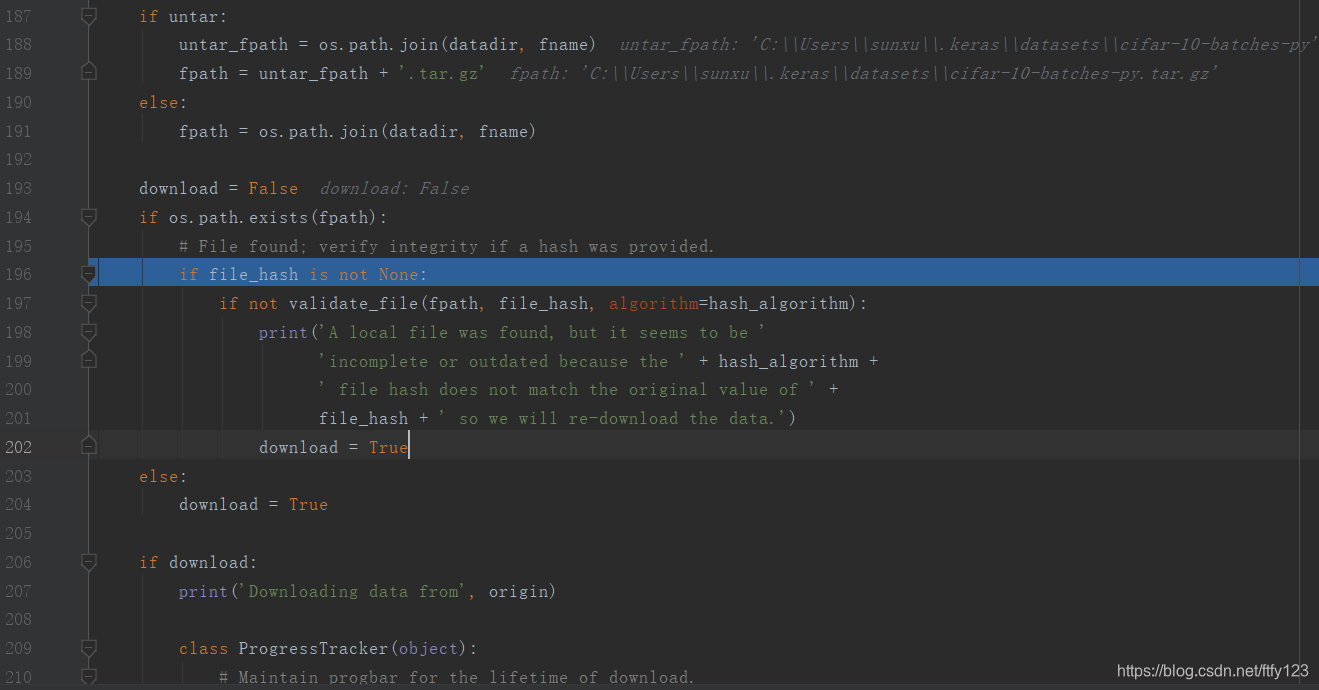
此时,在的get_file()函数里设置断点调试,if os.path.exists(fpath): 条件判断正确,在目录下发现了下载好的数据集文件,数据集将正确加载:





 扫一扫
扫一扫


 1344
1344

 被折叠的 条评论
为什么被折叠?
被折叠的 条评论
为什么被折叠?
 到【灌水乐园】发言





