


 本文介绍了如何在SpringBoot应用中集成Nacos配置中心,通过添加依赖并配置数据Id和分组,实现配置的动态读取。使用@NacosConfigurationProperties注解读取JSON配置,并在测试代码中验证配置的正确加载。同时提醒注意版本匹配以避免冲突。
添加依赖
<dependency>
    <groupId>com.alibaba.boot</groupId>
    <artifactId>nacos-config-spring-boot-starter</artifactId>
    <version>${latest.version}</version>
</dependency>
注意:版本 0.2.x.RELEASE 对应的是 Spring Boot 2.x 版本,版本 0.1.x.RELEASE 对应的是 Spring Boot 1.x 版本。
本文使用版本为:0.2.9
注意:nacos-config-spring-boot-starter中包含了nacos-spring-context的依赖,为了避免版本冲突,就不要再自定义nacos-spring-context的依赖了。
注:0.2.9版本依赖的Spring boot版本为2.0.3.RELEASE,请使用对应的版本的Spring Boot 否则会有版本冲突,导致测试代码无法运行报错找不到类或找不到方法异常。
读取配置示例
package com.yyoo.nacos.boot;

import org.springframework.boot.SpringApplication;
import org.springframework.boot.autoconfigure.SpringBootApplication;

@SpringBootApplication
public class NacosConfigApplication {

    public static void main(String[] args) {
        SpringApplication.run(NacosConfigApplication.class, args);
    }
}
编写普通的Spring boot启动类即可
package com.yyoo.nacos.boot;

import com.alibaba.nacos.api.config.ConfigType;
import com.alibaba.nacos.api.config.annotation.NacosConfigurationProperties;
import lombok.Data;
import org.springframework.context.annotation.Configuration;

@Data
@Configuration
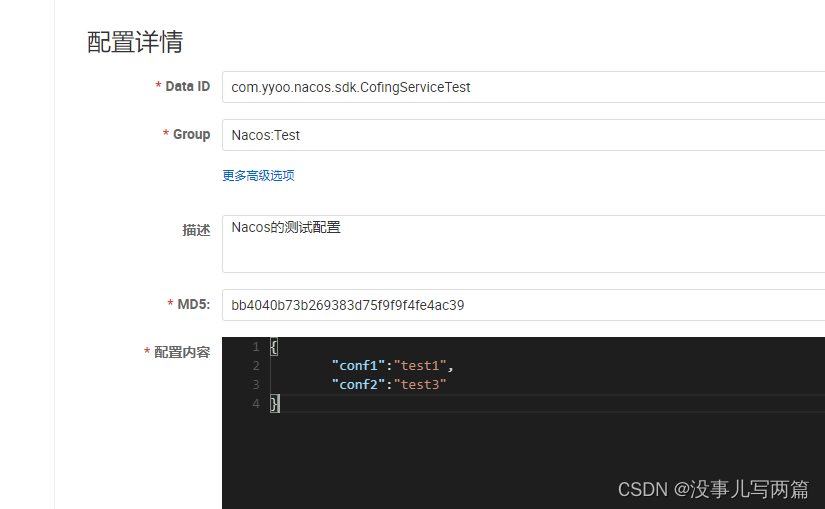
@NacosConfigurationProperties(dataId = "com.yyoo.nacos.sdk.CofingServiceTest",groupId = "Nacos:Test"
        ,autoRefreshed = true,prefix = "",type = ConfigType.JSON)
public class NacosConfigBean {

    private String conf1;

    private String conf2;

}
使用@NacosConfigurationProperties读取配置,我们的配置没有prefix ,所以prefix 配置为空
测试代码
package com.yyoo.nacos.boot.test;

import com.yyoo.nacos.boot.NacosConfigApplication;
import org.junit.runner.RunWith;
import org.springframework.boot.test.context.SpringBootTest;
import org.springframework.test.context.junit4.SpringJUnit4ClassRunner;

@RunWith(SpringJUnit4ClassRunner.class)
@SpringBootTest(classes = NacosConfigApplication.class,webEnvironment = SpringBootTest.WebEnvironment.RANDOM_PORT)
public class BaseTest {
}
package com.yyoo.nacos.boot.test;


import com.yyoo.nacos.boot.NacosConfigBean;
import org.junit.Test;

import javax.annotation.Resource;

public class ConfTest extends BaseTest{

    @Resource
    private NacosConfigBean bean;

    @Test
    public void testConf(){
        System.out.println(bean);
    }

}
打印结果:NacosConfigBean(conf1=test1, conf2=test3)
测试代码为Spring Boot的,需要添加如下依赖
        <dependency>
            <groupId>org.springframework.boot</groupId>
            <artifactId>spring-boot-starter-test</artifactId>
            <scope>test</scope>
        </dependency>
        <dependency>
            <groupId>junit</groupId>
            <artifactId>junit</artifactId>
            <scope>test</scope>
        </dependency>
服务发现
在Spring Boot中使用服务发现,与Spring中使用没有说明区别,所以这里我们为了节约时间,就不再列举了。






 扫一扫
扫一扫


 2802
2802

 被折叠的 条评论
为什么被折叠?
被折叠的 条评论
为什么被折叠?
 到【灌水乐园】发言





