


 文章介绍了Kubernetes中Ingress的概念和作用,作为7层负载均衡器,它通过Ingress规则将外部请求转发给内部Service。IngressController负责解析和应用这些规则。文中还展示了创建Ingress的YML配置文件以及创建和查看Ingress的步骤。
一、环境安装
参考
二、Ingress介绍
1 基本概念
Ingress相当于一个7层的负载均衡器,是Kubernetes对反向代理的一个抽象,它的工作原理类似于Nginx,可以理解成在** Ingress 里建立诸多映射规则,Ingress Controller 通过监听这些配置规则并转化成 Nginx 的反向代理配置,然后对外部提供服务**。
两个核心概念:
Ingress:Kubernetes中的一个对象,作用是定义请求如何转发到Service的规则Ingress Controller:具体实现反向代理及负载均衡的程序,对Ingress定义的规则进行解析,根据配置的规则来实现请求转发,实现方式有很多,比如Nginx,Contour,Haproxy等
2 工作原理
- 用户编写
Ingress规则,说明哪个域名对应Kubernetes集群中的哪个Service Ingress控制器动态感知Ingress服务规则的变化,然后生成一段对应的Nginx反向代理配置Ingress控制器会将生成的Nginx配置写入到一个运行着的Nginx服务中,并动态更新
查看Ingress官方帮助
kubectl explain ingressKIND: Ingress
VERSION: networking.k8s.io/v1
DESCRIPTION:
Ingress is a collection of rules that allow inbound connections to reach
the endpoints defined by a backend. An Ingress can be configured to give
services externally-reachable urls, load balance traffic, terminate SSL,
offer name based virtual hosting etc.
FIELDS:
apiVersion <string>
APIVersion defines the versioned schema of this representation of an
object. Servers should convert recognized schemas to the latest internal
value, and may reject unrecognized values. More info:
https://git.k8s.io/community/contributors/devel/sig-architecture/api-conventions.md#resources
kind <string>
Kind is a string value representing the REST resource this object
represents. Servers may infer this from the endpoint the client submits
requests to. Cannot be updated. In CamelCase. More info:
https://git.k8s.io/community/contributors/devel/sig-architecture/api-conventions.md#types-kinds
metadata <Object>
Standard object's metadata. More info:
https://git.k8s.io/community/contributors/devel/sig-architecture/api-conventions.md#metadata
spec <Object>
Spec is the desired state of the Ingress. More info:
https://git.k8s.io/community/contributors/devel/sig-architecture/api-conventions.md#spec-and-status
status <Object>
Status is the current state of the Ingress. More info:
https://git.k8s.io/community/contributors/devel/sig-architecture/api-conventions.md#spec-and-status三、Ingress使用
1 创建yml文件
tomcat-nginx.yml
apiVersion: apps/v1
kind: Deployment
metadata:
  name: nginx-deployment
  namespace: dev
spec:
  replicas: 3
  selector:
    matchLabels:
      app: nginx-pod
  template:
    metadata:
      labels:
        app: nginx-pod
    spec:
      containers:
      - name: nginx
        image: nginx:1.17.1
        ports:
        - containerPort: 80

---

apiVersion: apps/v1
kind: Deployment
metadata:
  name: tomcat-deployment
  namespace: dev
spec:
  replicas: 3
  selector:
    matchLabels:
      app: tomcat-pod
  template:
    metadata:
      labels:
        app: tomcat-pod
    spec:
      containers:
      - name: tomcat
        image: tomcat:8.5-jre10-slim
        ports:
        - containerPort: 8080

---

apiVersion: v1
kind: Service
metadata:
  name: nginx-service
  namespace: dev
spec:
  selector:
    app: nginx-pod
  clusterIP: None
  type: ClusterIP
  ports:
  - port: 80
    targetPort: 80

---

apiVersion: v1
kind: Service
metadata:
  name: tomcat-service
  namespace: dev
spec:
  selector:
    app: tomcat-pod
  clusterIP: None
  type: ClusterIP
  ports:
  - port: 8080
    targetPort: 8080
2 创建service和deploy实例
kubectl create -f tomcat-nginx.yml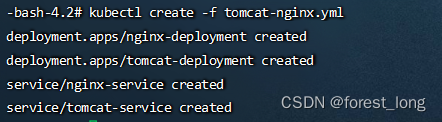
3 查看service服务
kubectl get svc -n dev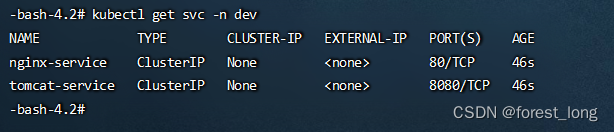
4 创建Ingress HTTP 代理
ingress-http.yml
apiVersion: networking.k8s.io/v1
kind: Ingress
metadata:
  name: ingress-http
  namespace: dev
spec:
  rules:
  - host: nginx.example.com
    http:
      paths:
      - path: /
        pathType: Prefix
        backend:
          service:
            name: nginx-service # svc 中配置的名字
            port:
              number: 80 # svc 中配置的端口
  - host: tomcat.example.com
    http:
      paths:
      - path: /
        pathType: Prefix
        backend:
          service:
            name: tomcat-service
            port:
              number: 8080
kubectl create -f ingress-http.yml
5 查看 Ingress
kubectl get ing -n dev






 扫一扫
扫一扫


 872
872

 被折叠的 条评论
为什么被折叠?
被折叠的 条评论
为什么被折叠?
 到【灌水乐园】发言





