


Introduction
Creating your first web service is incredibly easy. In fact, by using the wizards in Visual Studio. NET you can have your first service up and running in minutes with no coding.
For this example I have created a service called MyService in the /WebServices directory on my local machine. The files will be created in the /WebServices/MyService directory.

A new namespace will be defined called MyService, and within this namespace will be a set of classes that define your Web Service. By default the following classes will be created:
| Global (in global.asax) | Derived from HttpApplication. This file is the ASP.NET equivalent of a standard ASP global.asa file. |
| WebService1 (in WebService1.cs) | Derived from System.Web.Services.WebService. This is your WebService class that allows you to expose methods that can be called as WebServices. |
There are also a number of files created:
| AssemblyInfo.cs | Contains version and configuration information for your assembly. |
| web.config | Defines how your application will run (debug options, the use of cookies etc). |
| MyService.disco | Discovery information for your service. |
| WebService1.asmx | Your WebService URL. Navigate to this file in a browser and you will get back a user-friendly page showing the methods available, the parameters required and the return values. Forms are even provided allowing you to test the services through the web page. |
| bin/MyService.dll | The actual WebService component. This is created when you build the service. |
The class for your service that is created by default is called (in this case) WebService1, and is within the MyService namespace. The code is partially shown below.
namespace MyService
{
    ...
    /// <summary>
    ///    Summary description for WebService1.
    /// </summary>
    [WebService(Namespace="http://codeproject.com/webservices/",
	            Description="This is a demonstration WebService.")]
    public class WebService1 : System.Web.Services.WebService
    {
        public WebService1()
        {
            //CODEGEN: This call is required by the ASP+ Web Services Designer
            InitializeComponent();
        }

        ...

        [WebMethod]
        public string HelloWorld()
        {
            return "Hello World";
        }
    }
}
A default method HelloWorld is generated and commented out. Simply uncomment and build the project. Hey Presto, you have a walking talking WebService.
A WebService should be associated with a namespace. Your Wizard-generated service will have the name space http://tempuri.org. If you compile and run the service as-is you'll get a long involved message indicating you should choose a new namespace, so we add the namespace, and the WebService description as follows:
[WebService(Namespace="http://codeproject.com/webservices/",
            Description="This is a demonstration WebService.")]
public class WebService1 : System.Web.Services.WebService
{
    ...
To test the service you can right click on WebService1.asmx in the Solution Explorer in Visual Studio and choose "View in Browser". The test page is shown below,
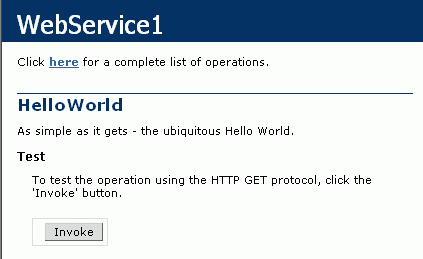
When invoked this returns the following:

Getting the demo application to run
If you downloaded the source code with this article then you will need to create a directory 'WebServices' in your web site's root directory and extract the downloaded zip into there. You should then have:
/WebServices
/WebServices/bin
/WebServices/WebService1.asmx
...
Navigating to http://localhost/WebServices/WebService1.asmx won't show you the WebService because you need to ensure that the webservice's assembly is in the application's /bin directory. You will also find that you can't load up the solution file MyService.sln. To kill two birds with one stone you will need to fire up the IIS management console, open your website's entry, right click on the WebServices folder and click Properties. Click the 'Create' button to create a new application the press OK. The /WebServices directory is now an application and so the .NET framework will load the WebService assembly from the /WebServices/bin directory, and you will be able to load and build the MyService.sln solution.

Extending the example
So we have a WebService. Not particularly exciting, but then again we haven't exactly taxed ourselves getting here. To make things slightly more interesting we'll define a method that returns an array of custom structures.
Within the MyService namespace we'll define a structure called ClientData:
    public struct ClientData
    {
        public String Name;
        public int    ID;
    }
and then define a new method GetClientData. Note the use of the WebMethod attribute in front of the method. This specifies that the method is accessible as a WebService method.
    [WebMethod]
    public ClientData[] GetClientData(int Number)
    {
        ClientData [] Clients = null;

        if (Number > 0 && Number <= 10)
        {
            Clients = new ClientData[Number];
            for (int i = 0; i < Number; i++)
            {
                Clients[i].Name = "Client " + i.ToString();
                Clients[i].ID = i;
            }
        }
        return Clients;
    }
If we compile, then navigate to the the .asmx page then we are presented with a form that allows us to enter a value for the parameter. Entering a non-integer value will cause a type-error, and entering a value not in the range 1-10 will return a null array. If, however, we manage to get the input parameter correct, we'll be presented with the following XML file:

It's that easy.
Caching WebServices
Often a WebService will return the same results over multiple calls, so it makes sense to cache the information to speed things up a little. Doing so in ASP.NET is as simple as adding a CacheDuration attribute to your WebMethod:
[WebMethod(CacheDuration = 30)]
public ClientData[] GetClientData(int Number)
{
The CacheDuration attribute specifies the length of time in seconds that the method should cache the results. Within that time all responses from the WebMethod will be the same.
You can also specify the CacheDuration using a constant member variable in your class:
private const int CacheTime = 30;	// seconds

[WebMethod(CacheDuration = CacheTime)]
public ClientData[] GetClientData(int Number)
{
Adding Descriptions to your WebMethods
In the default list of WebMethods created when you browse to the .asmx file it's nice to have a description of each method posted. The Description attribute accomplishes this.
[WebMethod(CacheDuration = 30,
 Description="Returns an array of Clients.")]
public ClientData[] GetClientData(int Number)
{
Your default .asmx page will then look like the following:

There are other WebMethod attributes to control buffering, session state and transaction support.
Deploying the WebService
Now that we have a WebService it would be kind of nice to allow others to use it (call me crazy, but...). Publishing your WebService on your server requires that your solution be deployed correctly. On the Build menu of Visual Studio is a "Deploy" option that, when first selected, starts a Wizard that allows you to add a Deployment project to your solution. This creates an installation package that you can run on your server which will create the necessary directories, set the correct parameters and copy over the necessary files.
This doesn't really give you an idea of what, exactly, is happening, so we'll deploy our MyService manually.
Deploying the application is done using the steps in Getting the demo application to run. We need to create a directory for our service (or use an existing directory) for our .asmx file, and we need to have the service's assembly in the application's bin/ directory. Either place the .asmx file in a subdirectory on your website and place the assembly in the /bin folder in your website's root, or place the /bin in the subdirectory containing the .asmx file and mark that directory as an application (see above).
If you choose to create a separate directory and mark it as an application then Within this directory you need to add the following files and directories:
| MyService.asmx | This file acts as the URL for your service |
| MyService.disco | The discovery document for your service |
| web.config | Configuration file for your service that overrides default web settings (optional). |
| /bin | This directory holds the assembly for your service |
| /bin/MyService.dll | The actual service asembly. |

 448


 扫一扫


 被折叠的 条评论
为什么被折叠?
 到【灌水乐园】发言


