





 本文探讨了uni-app在开发中的表单处理问题,尤其是针对申报页面的常见设计,提出了进行公共部分封装的需求。作者分享了在封装过程中遇到的挑战,如UI组件的不成熟,特别是ThorUI的时间格式和方法调用等问题,并鼓励读者交流解决方案。
uni-app出现较长时间了,优势也是不言而喻(一次开发能应用小程序、app、网页等),但一直觉得伴随其出现的UI组件相当不成熟,开发起来总是遇到很多难题。
这里描述一下uni-app开发中表单的处理,页面样式大体:
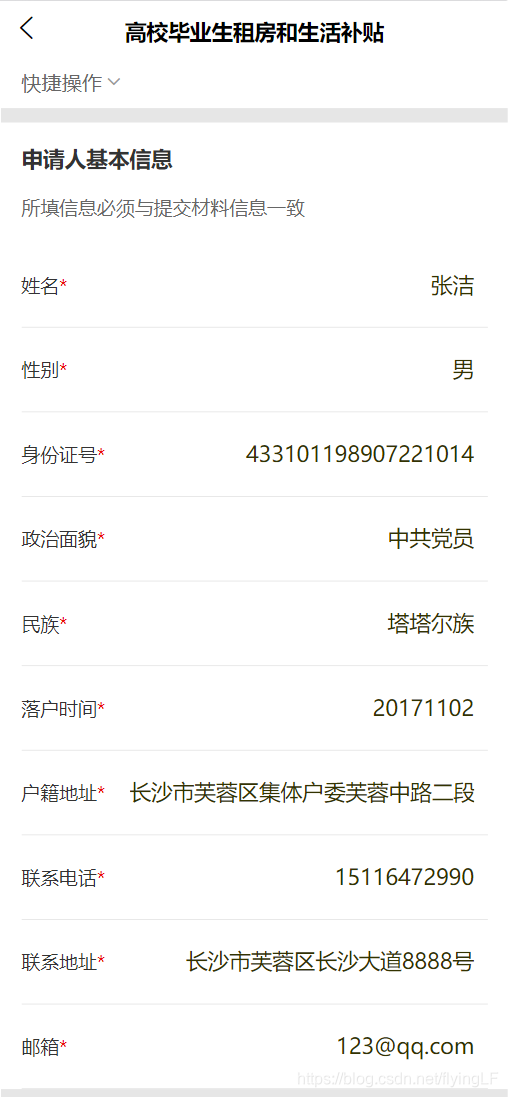
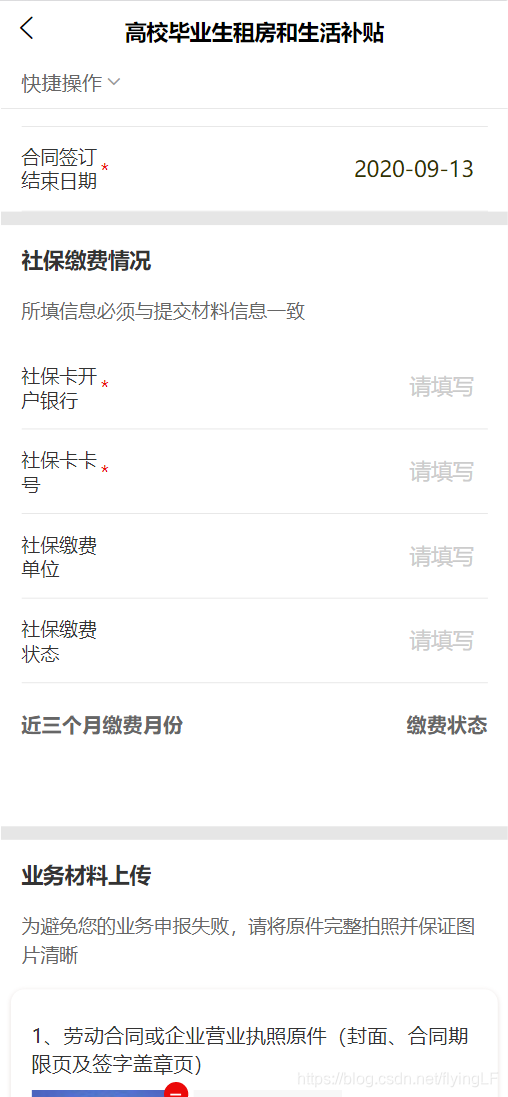
废话也不多说了,类似这种的申报页面多的很,那肯定要提取公共部分进行封装咯。
大体借鉴一下思想吧,此处代码多是应对本次项目开发,不具备 多项目的一般性
<!-- **基于uni-forms和ThorUI简单封装的表单组件**
	**itemsDatas的prop 对应的是 fromData的数据字段**
	**注意:码表部分prop对应其name,value对应其码值,dict_key为码表类型,hidden是否展示行**
-->
<template>
	<uni-forms class="formStyle" ref="form" :value="formData" :rules="rules">
		<block v-for="item in itemsDatas" :key="item.label + item.prop">
			<!-- title样式,a标签做锚点 -->
			<view class="formTitle" v-if="item.type==='headTitle'&&item.hidden!==false">
				<a :name="item.label"></a>
				<view class="tit">{{item.label}}</view>
				<view class="discri">{{item.prop}}</view>
			</view>
			<!-- 基本input -->
			<uni-forms-item class="side-padding" :name="item.prop" :required="item.required||false" :label="item.label" v-else-if="item.type==='input'&&item.hidden!==false">
				<input :disabled="formData.disabled || item.disabled || false" type="text" v-model="formData[item.prop]" class="uni-input-border" placeholder-style="font-size: 32rpx;color:#CCCCCC;text-align: right;" @blur="binddata(item.prop, $event.detail.value)" :placeholder="item.placeholder||'请输入'" />
			</uni-forms-item>
			<!-- 嵌套底部弹出层和列表选项 -->
			<uni-forms-item class="side-padding" :name="item.prop" :required="item.required||false" :label="item.label" v-else-if="item.type==='actionsheet'&&item.hidden!==false">
				<input :disabled="formData.disabled || false" type="text" v-model="formData[item.prop]" class="uni-input-border" placeholder-style="font-size: 32rpx;color:#CCCCCC;text-align: right;" @focus="getsyscode(item)" @blur="binddata(item.prop, $event.detail.value)" :placeholder="item.placeholder||'请选择'" />
				<tui-actionsheet
				  :show="item.showActionSheet || false"
				  :item-list=" item.itemList||'' "
				  @click="itemClick($event,item)"
				  @cancel="()=>{item.showActionSheet=false}">
				</tui-actionsheet>
			</uni-forms-item>
			<!-- 底部弹出时间选择,年月日 -->
			<uni-forms-item class="side-padding" :name="item.prop" :required="item.required||false" :label="item.label" v-else-if="item.type==='date'&&item.hidden!==false">
				<input :disabled="formData.disabled || false" type="text" v-model="formData[item.prop]" class="uni-input-border" placeholder-style="font-size: 32rpx;color:#CCCCCC;text-align: right;" @focus="showDate(item.prop)" @blur="binddata(item.prop, $event.detail.value)" :placeholder="item.placeholder||'请选择'" />
				<tui-datetime :ref="item.prop" @confirm="change($event,item)" :type="2"></tui-datetime>
			</uni-forms-item>
			<!-- 单选checkbox -->
			<uni-forms-item class="side-padding" :name="item.prop" :required="item.required||false" :label="item.label" v-else-if="item.type==='checkbox'&&item.hidden!==false">
				<checkbox-group :disabled="formData.disabled || false" class="textRight" @change="binddata(item.prop, $event.detail.value)">
					<label>
						<checkbox value="1" :checked="formData[item.prop]" />{{item.context}}
					</label>
				</checkbox-group>
			</uni-forms-item>

			<!-- 自定义样式 -->
			<view v-else-if="item.type==='custom'">
				<slot
				  :name="item.prop"
				  :item="item"
				  :form-data="formData"
				/>
			</view>
		</block>

		<block>
			<view class="footerStyle">
				<slot />
			</view>
		</block>
	</uni-forms>
</template>

<script>
	export default{
		props:{
			formData: {
			  type: Object,
			  default: () => {}
			},
			rules: {
			  type: Object,
			  default: () => {}
			},
			itemsDatas: {
			  type: Array,
			  default: () => []
			},
		},
		methods:{
			/**获取码表*/
			getsyscode(item) {
				item.showActionSheet=true
				if (item.dict_key) { // 码表类型不为空时执行,为空则默认读取静态数据
					this.$getType(item.dict_key, res => {
						item.itemList = res.map(item => {
							return {
								value: item.id,
								text: item.text,
								color: "#2B2B2B"
							}
						})

					})
				}

			},
			/** tui-actionsheet方法封装
				获取操作菜单各项值*/
			itemClick(index,item) {
				let i = index.index
				this.formData[item.prop] = item.itemList[i].text // 码表name
				this.$refs.form.setValue(this.formData[item.prop],item.itemList[i].text)
				this.formData[item.value] = item.itemList[i].value // 码值
				this.$refs.form.setValue(this.formData[item.value],item.itemList[i].value)
				item.showActionSheet=false
			},
			/** 日期 */
			showDate(edot){
				// this.$refs[edot].show();
				this.$refs[edot][0].isShow = true;
			},
			/**选择的结果
			e:{
				day: "07"
				month: "04"
				result: "2021-04-07"
				year: 2021
			}
			*/
			change(e,item) {
				this.formData[item.prop] = e.result
				this.$refs.form.setValue(this.formData[item.prop],e.result)
				this.$forceUpdate() // 回显有点问题,加了一个强制更新
			},

		}
	}
</script>

<style lang="scss" scoped>
	.formStyle{
		box-sizing: border-box;
		background-color: #fff;
		.side-padding{
			padding: 0 30rpx;
		}
	}
	.uni-input-border {
			padding: 0 10px;
			height: 35px;
			width: 100%;
			font-size: 32rpx;
			color: #333300;
			box-sizing: border-box;
		}
	.formTitle{
		border-top: 20rpx #E6E6E6 solid;
		padding: 30rpx;
		.tit{
			font-size: 32rpx;
			font-weight: 600;
			color: #333333;
			line-height: 45rpx;
		}
		.discri{
			font-size: 28rpx;
			font-weight: 400;
			color: #666666;
			line-height: 44rpx;
			margin-top: 30rpx;
		}
	}
	.footerStyle{
		box-sizing: border-box;
		padding: 60rpx 30rpx;
	}
	.textRight{
		text-align: right;
		font-size: 30rpx;
		font-weight: 400;
		color: #333333;
		line-height: 42rpx;
	}
	/deep/.uni-forms-item__inner{
		padding-bottom: 27rpx;
		padding-top: 27rpx;
		border-bottom: 1rpx #E6E6E6 solid;
	}
	/deep/.uni-input-input{
		text-align: right;
	}
</style>
像头部啊,headTitle部分,就是自定义的,但是这里项目较多体现就直接写里面了,还有ThorUI组件的一些坑,比如时间格式的间隔符“-”、“/”,就没找到好的方式转化,以及它官方文档里的show()方法没法调用,最后自己去$refs找到的,其他等等,不一一列了,有问题,多交流。





 扫一扫
扫一扫


 2323
2323

 被折叠的 条评论
为什么被折叠?
被折叠的 条评论
为什么被折叠?
 到【灌水乐园】发言





