


 本文深入探讨Java8中引入的新时间日期API,包括LocalDate、LocalTime、LocalDateTime、Instant、Duration、Period等类的使用方法,以及时间格式化、时间校正器和与Date类型转换的技巧。
我们一直以来在写代码使用的时间无外乎两种,Date和Calender。
但是传统的时间 API 存在线程安全的问题,在多线程开发中必须要上锁,所以 java8 现在为我们提供了一套全新的时间日期 API ,今天进来学习一下java8 的时间日期 API。
一、LocalDate、LocalTime、LocalDateTime
LocalDate、LocalTime、LocalDateTime类的实例是不可变的对象,分别表示使用 ISO-8601 (ISO-8601 日历系统是国际化组织制定的现代化公民的日期和时间的表达法)日历系统的日期、时间、日期和时间。从名称也可以看出来,第一种表示日期 年月日,第二种表示时间 时分秒,第三种表示年月日时分秒。
由于的实例是不可变的对象,所以我们如果对时间对象进行更改,包括修改时间,加减时间都需要重新返回一个新的实例。
 /**
     * 测试 LocalDate,LocalTime,LocalDateTime
     */
    @Test
    public void testLocalDate(){
        //获取当前日期
        LocalDate localDate = LocalDate.now();
        //获取当前日期
        LocalTime localTime = LocalTime.now();
        //获取当前日期时间
        LocalDateTime localDateTime = LocalDateTime.now();

        System.out.println("localDate:"+localDate+"  localTime:"+localTime+" localDateTime:"+localDateTime);

    }
localDate:2020-07-01 localTime:21:24:19.925 localDateTime:2020-07-01T21:24:19.925
一般来说我们用的最多的就是LocalDateTime:
1.获取指定日期
使用LocalDateTime.of()可以获取指定时间:

我们可以看到LocalDateTime内置了很多静态方法,可以用于获取指定时间。
//获取指定时间
    @Test
    public void testLocalDateTime(){
        LocalDateTime localDateTime = LocalDateTime.of(2020,06,02,12,22,23);
        System.out.println("指定时间:"+localDateTime);
    }
指定时间:2020-06-02T12:22:23
2.对日期时间进行加减
//获取指定时间
    @Test
    public void testLocalDateTime(){
        LocalDateTime localDateTime = LocalDateTime.of(2020,06,02,12,22,23);
        System.out.println("指定时间:"+localDateTime);
        //对时间进行加减
        LocalDateTime localDateTime1 = localDateTime.plusYears(2);
        System.out.println("指定时间添加2年:"+localDateTime1);

        /**
         * 对日期时间进行加操作,使用 localDateTime.plus***(num)
         * 对日期时间进行减操作,使用 localDateTime.minus***(num)
         * 修改不限于,年、月、日、时、分、秒、纳秒
         */
        LocalDateTime localDateTime2 = localDateTime.plusMonths(2);
        System.out.println("指定时间添加2月:"+localDateTime2);

        LocalDateTime localDateTime3 = localDateTime.minusDays(2);
        System.out.println("指定时间减少2天:"+localDateTime3);

    }
指定时间:2020-06-02T12:22:23
指定时间添加2年:2022-06-02T12:22:23
指定时间添加2月:2020-08-02T12:22:23
指定时间减少2天:2020-05-31T12:22:23
对日期时间进行加操作,使用 localDateTime.plusXXX(num)
对日期时间进行减操作,使用 localDateTime.minusXXX(num)
修改不限于,年、月、日、时、分、秒、纳秒
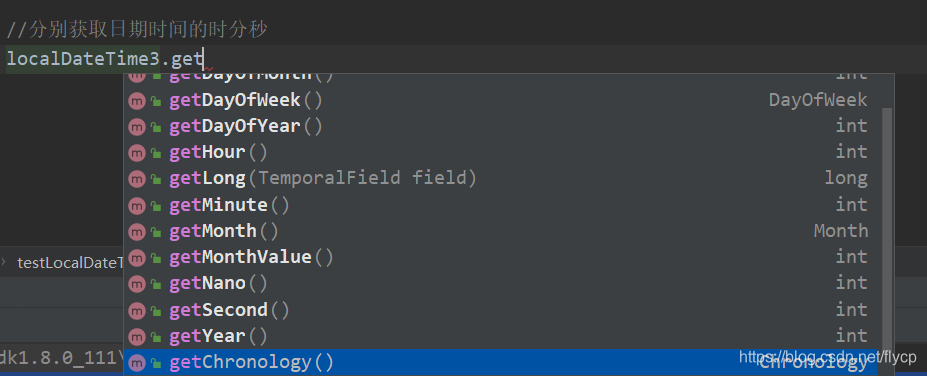
通过LocalDateTime对象,可分别获取相应的年、月、日、时、分、秒、纳秒等。
二、Instant: 时间戳(以Unix 元年 : 1970-01-01 00:00:00 到某个时间之间的毫秒数)
1.获取当前时间
/**
     * 获取时间戳(UTC)时间
     */
    @Test
    public void testInstant(){
        //获取当前时间戳   时间戳已UTC 时间展示,与中国时间差距8小时
        Instant instant = Instant.now();
        System.out.println("UTC instant:"+instant);
        //如果想要获取中国时间  可以通过设置偏移量来获取
        OffsetDateTime offsetDateTime = instant.atOffset(ZoneOffset.ofHours(8));
        System.out.println("中国时间 offsetDateTime:"+offsetDateTime);
    }
UTC instant:2020-07-01T13:52:58.106Z
中国时间 offsetDateTime:2020-07-01T05:52:58.106+08:00
注:使用Instant获取当前时间戳默认为UTC格式时间,我们如果想要获取中国时间的话,必须给instant设置偏移量,instant.atOffset(ZoneOffset.ofHours(8));可以设置偏移量为加8小时,即为中国时间。也可设置负值,则为减8小时。
2.获取毫秒数(时间戳)
我们与前来获取当前时间戳是用:new Date().getTime() 以及 System.currentTimeMillis获取。
现在可用使用instant.toEpochMilli()来获取,他们三个获取的时间戳是一样的。
//toEpochMilli 获取毫秒数
long l = instant.toEpochMilli();
System.out.println("使用instant获取当前时间戳:"+l);
System.out.println("使用new Date()获取当前时间戳"+new Date().getTime());
System.out.println("使用System.currentTimeMillis获取当前时间戳:"+System.currentTimeMillis());
使用instant获取当前时间戳:1593612101298
使用new Date()获取当前时间戳1593612101373
使用System.currentTimeMillis获取当前时间戳:1593612101373
三、Duration、Period计算两个日期时间的时间差
1.Duration获取连个时间之间的间隔(LocalDateTime、Instant)
使用Duration.between(instant, instant1)获取两个时间时间差返回一个 Duration对象,可以通过对象内部的实例方法获取时间间隔。
要注意的是:这里获取秒与纳秒的方式有点特别:

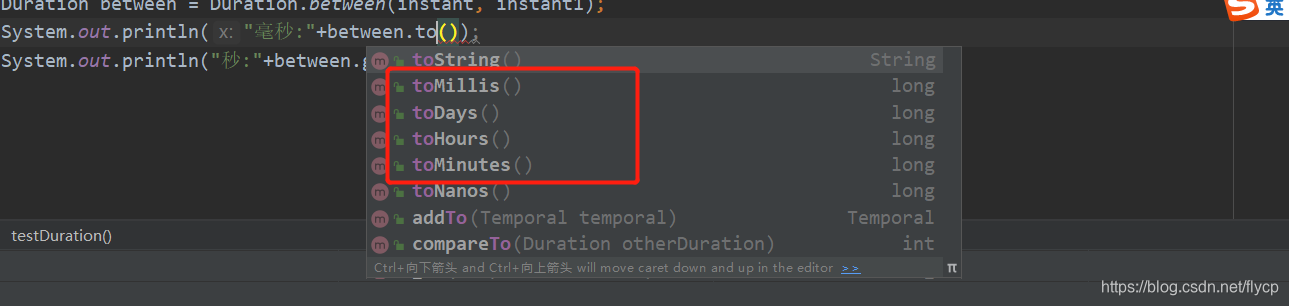
可以看到获取毫秒间隔包括天数、小时、分钟与获取秒的方法前缀是不一样的。一个是toXXX()
一个是getXXX();
//使用Duration 获取两个时间时间差
    @Test
    public void testDuration() throws InterruptedException {
        Instant instant = Instant.now();

        Thread.sleep(4899);

        Instant instant1 = Instant.now();

        Duration between = Duration.between(instant, instant1);
        System.out.println("毫秒:"+between.toMillis());
        System.out.println("秒:"+between.getSeconds());

    }
毫秒:4899
秒:4
这里Duration不仅可以获取Instant时间的间隔,获取LocalDateTime 的时间间隔也是可以的。
LocalDateTime localDateTime = LocalDateTime.now();

LocalDateTime localDateTime1 = LocalDateTime.of(2020,07,01,01,02,03);

 Duration between1 = Duration.between(localDateTime, localDateTime1);

 System.out.println("LocalDateTime间隔小时:"+between1.toHours());
LocalDateTime间隔小时:-21
2.Period获取两个时间之间的间隔 (LocalDate)
 Period between2 = Period.between(LocalDate.now(), LocalDate.of(2020, 07, 06));
 System.out.println("日期间隔天数:"+between2.getDays());
日期间隔天数:5
四、时间校正器
TemporalAdjuster:时间矫正器。有时我们可能需要获取一个周末,或者下一个工作日等时间,这里 java8 就为我们提供了一个时间校正器,让我们对时间进行校准。
TemporalAdjusters:该类通过静态方法提供了大量的常用的TemporalAdjuster的实现供我们使用。
在localDateTime中,有一个with方法,其中可以让我们去写一TemporalAdjuster接口,而TemporalAdjusters类中,有许多常用的方法
//时间校正器
    @Test
    public void testTemporalAdjuster(){
        LocalDateTime localDateTime = LocalDateTime.now();
        System.out.println("当前时间:"+localDateTime);
        LocalDateTime localDateTime1 = localDateTime.withDayOfMonth(10);
        System.out.println("手动指定日期时间:"+localDateTime1);

        //获取当月第一天
        LocalDateTime with = localDateTime.with(TemporalAdjusters.firstDayOfMonth());
        System.out.println("使用TemporalAdjuster获取当月第一天:"+with);

        System.out.println(localDateTime.with(TemporalAdjusters.firstDayOfMonth()));
         //获取下一年的第一天
        System.out.println(localDateTime.with(TemporalAdjusters.firstDayOfNextYear()));
         //获取年中第一天
        System.out.println(localDateTime.with(TemporalAdjusters.lastDayOfYear()));
         //获取月中最后一天
        System.out.println(localDateTime.with(TemporalAdjusters.lastDayOfMonth()));
         //获取下个星期一
        System.out.println(localDateTime.with(TemporalAdjusters.next(DayOfWeek.MONDAY)));
    }
我们可以使用withXXX()来获取指定的nian、月、日、时、分、秒等。
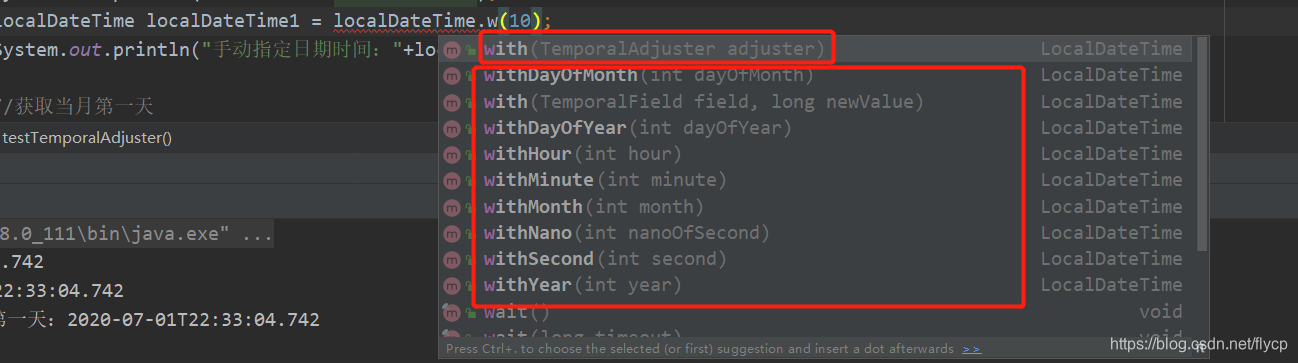
但是如果上述方法已经不能够满足我们的需求,我们需要获取下一年,下一月等日期时可以使用TemporalAdjusters时间校正器来针对获取,里面提供了大量实例。
//自定时时间:下一个工作日,因为这里需要一个接口,所以完全可以自定义方法
        LocalDateTime with1 = localDateTime.with((e) -> {
            LocalDateTime now = (LocalDateTime) e;
            DayOfWeek dow = now.getDayOfWeek();
            if (dow.equals(DayOfWeek.FRIDAY)) {
                return now.plusDays(3);
            } else if (dow.equals(DayOfWeek.SATURDAY)) {
                return now.plusDays(2);
            }
            return now.plusDays(1);
        });
        System.out.println("下一个工作日是:"+with1);
也可以自定义日期的实现方法逻辑,获取自己想要的日期,比如上面的下一个工作日。
五、时间格式化工具 DateTimeFormatter
DateTimeFormatter是专门为LocalDateTime进行格式化的工具类,内置了很多基本格式,也可自定义时间格式化公式。
写法也比较特别,可以是formatter.format(dateTime),也可以是dateTime.format(formatter);
@Test
    public void formatDateTest(){
        //本身内置了很多格式化格式
        DateTimeFormatter formatter = DateTimeFormatter.ISO_LOCAL_DATE_TIME;
        // 也可自定义格式
        DateTimeFormatter formatter1 = DateTimeFormatter.ofPattern("yyyy年MMdd hh:mm:ss");
        //当前时间
        LocalDateTime dateTime = LocalDateTime.now();

        /**
         * 两种写法效果一样
         */
        System.out.println("格式化日期一:"+formatter.format(dateTime));
        System.out.println("格式化日期二:"+dateTime.format(formatter));

        System.out.println("自定义格式化日期一:"+formatter1.format(dateTime));
        System.out.println("自定义格式化日期二:"+dateTime.format(formatter1));

        //字符串转换时间
        String format = dateTime.format(formatter1);
        LocalDateTime parse = LocalDateTime.parse(format, formatter1);
        System.out.println("自定义格式化日期三:"+parse);
    }
格式化日期一:2020-07-04T11:48:26.297
格式化日期二:2020-07-04T11:48:26.297
自定义格式化日期一:2020年07月04日 11:48:26
自定义格式化日期二:2020年07月04日 11:48:26
自定义格式化日期三:2020-07-04T11:48:26
这里需要注意一点,在吧时间转换成字符串时,必须使用与时间格式相同的formatter,否则会报错。
自定义时间格式化类型的 时:HH必须是大写,否则转换成时间也会报错。
DateTimeFormatter formatter1 = DateTimeFormatter.ofPattern(“yyyy年MM月dd日 HH:mm:ss”);
。
六、LocalDateTime 与 Date 互转
LocalDateTime 与 Date 互转主要是利用两者共有的属性Instant进行相互转换。
- LocalDateTime --> Date:
LocalDateTime.ofInstant(date.toInstant(), ZoneId.systemDefault());或者date.toInstant().atZone(ZoneId.systemDefault()).toLocalDateTime(); - Date–> LocalDateTime :
Date.from(localDateTime.atZone(ZoneId.systemDefault()).toInstant());
@Test
    public void LocalDateToDate(){
        Date date = new Date();
        LocalDateTime localDateTime1 = date.toInstant().atZone(ZoneId.systemDefault()).toLocalDateTime();
        System.out.println("date转换成LocalDateTime一:"+localDateTime1);
        LocalDateTime localDateTime2 = LocalDateTime.ofInstant(date.toInstant(), ZoneId.systemDefault());
        System.out.println("date转换成LocalDateTime二:"+localDateTime2);

        LocalDateTime localDateTime = LocalDateTime.now();

        Date from = Date.from(localDateTime.atZone(ZoneId.systemDefault()).toInstant());
        System.out.println("LocalDateTime转换成date:"+from);
        SimpleDateFormat ss = new SimpleDateFormat("yyyy-MM-dd HH:mm:ss");
        System.out.println(ss.format(from));
    }





 扫一扫
扫一扫


 1241
1241

 被折叠的 条评论
为什么被折叠?
被折叠的 条评论
为什么被折叠?
 到【灌水乐园】发言





