


如何在 USB 内种出《黑苹果》
这里的一切操作都是在微软视窗 10 内运行的。本人买了两条 USB 3.0 硬盘,分别是 32GB(一般) 和 256GB(300MB/秒)。其实,用 M.2 SSD + 3.1 外挂更快啊😍,可惜 256GB 都已经送上来了,凑合着用呗😅。
本人不建议你在主机内硬盘划来划去,这可是无法合并的🤢。外挂多好,插上就能用了。
😁1,硬件资料搜集
首先,要知己知彼。我的是英文视窗,你们应该看得明白。打开硬件列表,逐个抄呗。
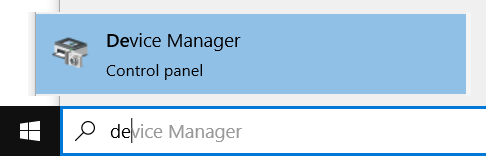
[ ✔️ ] 蓝牙
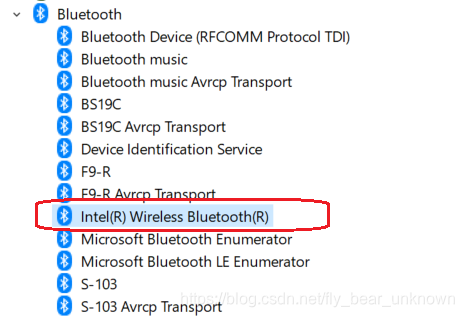
我的是 Intel 版本的。
[ ✔️ ] 显卡
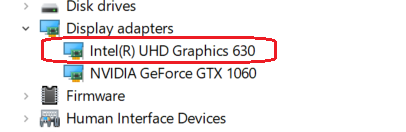
黑苹果没法用 GTX1060,真掉价啊。又不是打游戏,Intel 心内的就可以,想知道 AMD 做的更好啊。
[ ✔️ ] 声卡
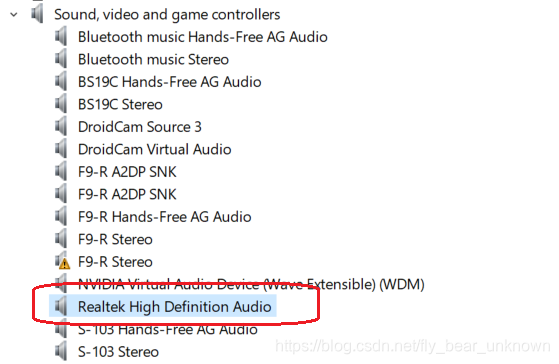
本人是 Realtek 的。
[ ✔️ ] 网卡
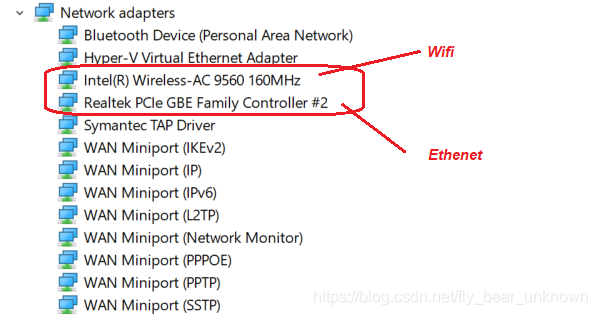
网卡有两种,黑苹果要先用插线的,然后再装无线的驱动。这里有线网卡是 Realtek (查找型号 RTL8411)
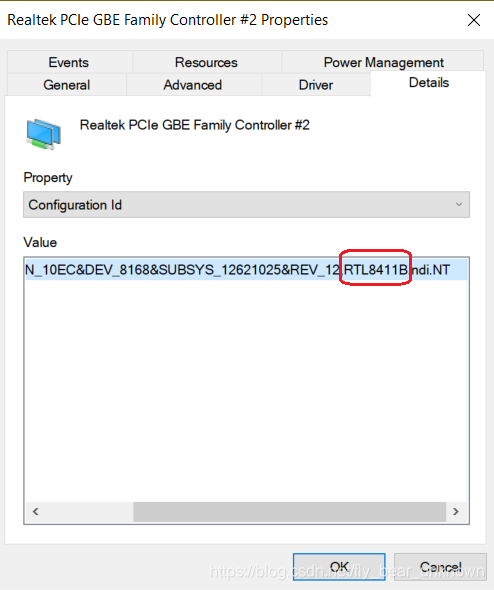
和 无线的 Intel 9560 卡。
🙄2. GibMacOS: 下载 OSX
地址: GibMacOS
解压后,点 gibMacOS.bat 。
#######################################################
 #                      gibMacOS                       #
#######################################################
Available Products:
...
M. Change Max-OS Version (Currently 10.15)
C. Change Catalog (Currently publicrelease)
I. Only Print URLs (Currently False)
R. Toggle Recovery-Only (Currently Off)
U. Show Catalog URL
Q. Quit
Please select an option:
很长啊,一个都不要吖,选 R 。
#######################################################
 #                      gibMacOS                       #
#######################################################
Available Products:
1. Security Update 2020-006 10.13.6 (17G14042)
   - 001-72525 - Added 2020-11-12 19:33:55 - 486.12 MB
2. Security Update 2020-006 10.14.6 (18G6042)
   - 001-72538 - Added 2020-11-12 19:33:00 - 482.23 MB
3. macOS Catalina 10.15.7 (19H15)
   - 001-68446 - Added 2020-11-11 17:48:09 - 500.66 MB - FULL Install
4. macOS Catalina 10.15.7 Supplemental Update 10.15.7 (19H15)
   - 001-73001 - Added 2020-11-05 18:13:06 - 500.66 MB
5. macOS Catalina 10.15.7 Update 10.15.7 (19H15)
   - 001-57230 - Added 2020-11-05 18:12:55 - 500.66 MB
...
M. Change Max-OS Version (Currently 10.15)
C. Change Catalog (Currently publicrelease)
I. Only Print URLs (Currently False)
R. Toggle Recovery-Only (Currently On)
U. Show Catalog URL
Q. Quit
Please select an option:
选 3 :
> 3. macOS Catalina 10.15.7 (19H15)
有 Big Sur 的话你可以试试,我现在装不了,老卡🐼。
#######################################################
 #              Downloading File 1 of 1                #
#######################################################
Downloading RecoveryHDMetaDmg.pkg for 001-68446 - 10.15.7 macOS Catalina...
Downloaded 29.36 MB of 500.66 MB (5.86%)
完了之后:
#######################################################
 #                 Downloaded 1 of 1                   #
#######################################################
Succeeded:
  RecoveryHDMetaDmg.pkg
Failed:
  None
Files saved to:
  .\macOS Downloads\publicrelease\001-68446 - 10.15.7 macOS Catalina
Press [enter] to return...
接着点 MakeInstall.bat:
#######################################################
 #             Potential Removable Media               #
#######################################################
!WARNING!  This list includes both Removable AND
!WARNING!  Unknown disk types.  Be ABSOLUTELY sure
!WARNING!  before selecting a disk!
2.  USB  SanDisk 3.2Gen1 USB Device - 30.76 GB (Removable)
   0. F: (UBUNTU 20_1) FAT32 - 30.75 GB
Q. Quit
Usage: [drive number][option (only one allowed)] r[Clover revision (optional)]
  (eg. 1B r5092)
  Options are as follows with precedence B > E > U > G:
    B = Only install the boot manager to the drive's first partition.
    O = Use OpenCore instead of Clover.
    E = Sets the type of the drive's first partition to EFI.
    U = Similar to E, but sets the type to Basic Data (useful for editing).
    G = Format as GPT (default is MBR).
    D = Used without a drive number, toggles showing all disks (currently DISABLED).
Please select a disk or press [enter] with no options to refresh:
输入 USB # 和 O : 2O
#######################################################
# Erase USB SanDisk 3.2Gen1 USB Device #
#######################################################
2. USB SanDisk 3.2Gen1 USB Device - 30.76 GB (Removable)
If you continue - THIS DISK WILL BE ERASED
A 最低0.47元/天 解锁文章






 扫一扫
扫一扫


 5501
5501

 被折叠的 条评论
为什么被折叠?
被折叠的 条评论
为什么被折叠?
 到【灌水乐园】发言





