


 本文介绍了Vue.js中如何实现父子组件之间的数据传递。通过示例展示了父组件如何使用props向子组件传递数据,以及子组件如何通过emit触发事件向父组件发送数据。
首先,想要进行传值的话,就要先搞清楚哪个是父哪个是子
引入其他组件的是父组件,被引入的是子组件
父组件给子组件传值prop
父组件
<template>
  <div style="border:1px solid red;width:200px;height:200px">
    <h1>父组件</h1>
    <HelloWorld :msg="msg"/>
  </div>
</template>

<script>
import HelloWorld from './components/HelloWorld.vue'

export default {
  name: 'App',
  components: {
    HelloWorld,
  },
  data(){
    return{
      msg:'我是你爸'
    }
  }
}
</script>
子组件
<template>
  <div style="border: 1px solid green; height: 100px; width: 100px">
    <h2>子组件</h2>
    {{ msg }}
  </div>
</template>

<script>
export default {
  name: 'HelloWorld',
  props: {
    msg: String,
  }

}
</script>
子组件给父组件传值emit
父组件
<template>
  <div style="border:1px solid red;width:400px;height:400px">
    <h1>父组件</h1>
    {{ddd}}
    <HelloWorld :msg="msg" @send="send"/>
  </div>
</template>

<script>
import HelloWorld from './components/HelloWorld.vue'

export default {
  name: 'App',
  components: {
    HelloWorld,
  },
  data(){
    return{
      msg:'我是你爸',
      ddd:''
    }
  },
  methods:{
    send(mm){
      this.ddd=mm
    }
  }
}
</script>
子组件
<template>
  <div style="border: 1px solid green; height: 200px; width: 200px">
    <h2>子组件</h2>
    <button @click="send">发送</button>
    {{ msg }}
  </div>
</template>

<script>
export default {
  name: 'HelloWorld',
  props: {
    msg: String,
  },
  data(){
    return{
      mm:'11111'
    }
  },
  methods:{
    send(){
      this.$emit('send',this.mm)
    }
  }

}
</script>
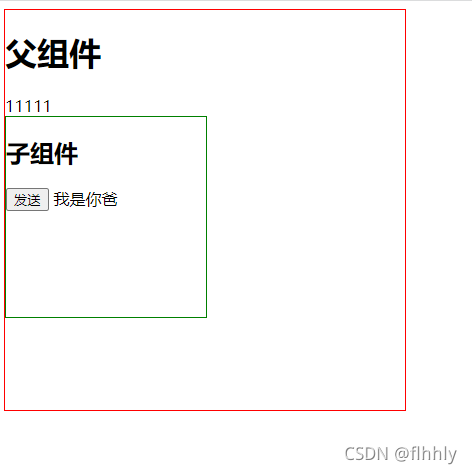
点击发送按钮,出现11111





 扫一扫
扫一扫


 1914
1914

 被折叠的 条评论
为什么被折叠?
被折叠的 条评论
为什么被折叠?
 到【灌水乐园】发言





