 Spring框架配置与注入示例


 这篇博客展示了如何在Spring框架中配置和注入不同类型的属性,包括基本类型、对象、数组、List、Map、Set和Properties。通过XML配置文件,创建了Address和Student实体类,并详细说明了各种注入方式,如属性值、引用已有bean、数组、集合等。
首先创建两个实体类
package com.zkw.pojo;

public class Address {
    private String address;

    public String getAddress() {
        return address;
    }

    public void setAddress(String address) {
        this.address = address;
    }

    @Override
    public String toString() {
        return "Address{" +
                "address='" + address + '\'' +
                '}';
    }
}
package com.zkw.pojo;

import java.util.*;

public class Student {
    private String name;
    private Address address;
    private String[] books;
    private List<String> hobbies;
    private Map<String,String> card;
    private Set<String> games;
    private String wife;
    private Properties info;

    public String getName() {
        return name;
    }

    public void setName(String name) {
        this.name = name;
    }

    public Address getAddress() {
        return address;
    }

    public void setAddress(Address address) {
        this.address = address;
    }

    public String[] getBooks() {
        return books;
    }

    public void setBooks(String[] books) {
        this.books = books;
    }

    public List<String> getHobbies() {
        return hobbies;
    }

    public void setHobbies(List<String> hobbies) {
        this.hobbies = hobbies;
    }

    public Map<String, String> getCard() {
        return card;
    }

    public void setCard(Map<String, String> card) {
        this.card = card;
    }

    public Set<String> getGames() {
        return games;
    }

    public void setGames(Set<String> games) {
        this.games = games;
    }

    public String getWife() {
        return wife;
    }

    public void setWife(String wife) {
        this.wife = wife;
    }

    public Properties getInfo() {
        return info;
    }

    public void setInfo(Properties info) {
        this.info = info;
    }

    @Override
    public String toString() {
        return "Student{" +
                "name='" + name + '\'' +
                "\n address=" + address.toString() +
                "\n books=" + Arrays.toString(books) +
                "\n hobbies=" + hobbies +
                "\n card=" + card +
                "\n games=" + games +
                "\n wife='" + wife + '\'' +
                "\n info=" + info +
                '}';
    }
}
配置文件(重点)
<?xml version="1.0" encoding="UTF-8"?>
<beans xmlns="http://www.springframework.org/schema/beans"
       xmlns:xsi="http://www.w3.org/2001/XMLSchema-instance"

       xsi:schemaLocation="http://www.springframework.org/schema/beans
       http://www.springframework.org/schema/beans/spring-beans.xsd">

    <bean id="address" class="com.zkw.pojo.Address">
        <property name="address" value="上海"/>
    </bean>

    <bean id="student" class="com.zkw.pojo.Student">

        <!--第一种注入方式-->
        <property name="name" value="琪琪"/>

        <!--第二种注入方式-->
        <property name="address" ref="address"/>

        <!--数组注入-->
        <property name="books">
            <array>
                <value>《三国演义》</value>
                <value>《红楼梦》</value>
                <value>《西游记》</value>
                <value>《水浒传》</value>
            </array>
        </property>

        <!--list注入-->
        <property name="hobbies">
            <list>
                <value>听歌</value>
                <value>打篮球</value>
                <value>跑步</value>
                <value>玩游戏</value>
            </list>
        </property>

        <!--map注入-->
        <property name="card">
            <map>
                <entry key="身份证" value="111111222222224444"/>
                <entry key="银行卡" value="456897213174980456465"/>
                <entry key="社保卡" value="45643213546416654"/>
                <entry key="护照" value="131654651316541"/>
            </map>
        </property>

        <!--set注入-->
        <property name="games">
            <set>
                <value>PUBG</value>
                <value>永劫无间</value>
                <value>LOL</value>
            </set>
        </property>


        <!--null值的注入
        区别于:<property name="wife" value=""/> 这个是空字符串的注入和null值不等价
        -->
        <property name="wife">
            <null/>
        </property>

        <!--properties注入-->
        <property name="info">
            <props>
                <prop key="StudentCard">201805010221</prop>
                <prop key="sex">男</prop>
                <prop key="name">琪琪</prop>
                <prop key="age">23</prop>
                <prop key="school">PUBG-PCL赛区</prop>
                <prop key="identity">PUBG职业选手</prop>
            </props>
        </property>

    </bean>

</beans>
测试代码
import com.zkw.pojo.Student;
import com.zkw.pojo.User;
import org.junit.Test;
import org.springframework.context.ApplicationContext;
import org.springframework.context.support.ClassPathXmlApplicationContext;

public class MyTest {
    @Test
    public void cpTest1() {
        ApplicationContext context = new ClassPathXmlApplicationContext("ApplicationContext.xml");
        Student student = (Student) context.getBean("student");
        System.out.println(student.toString());
    }
}
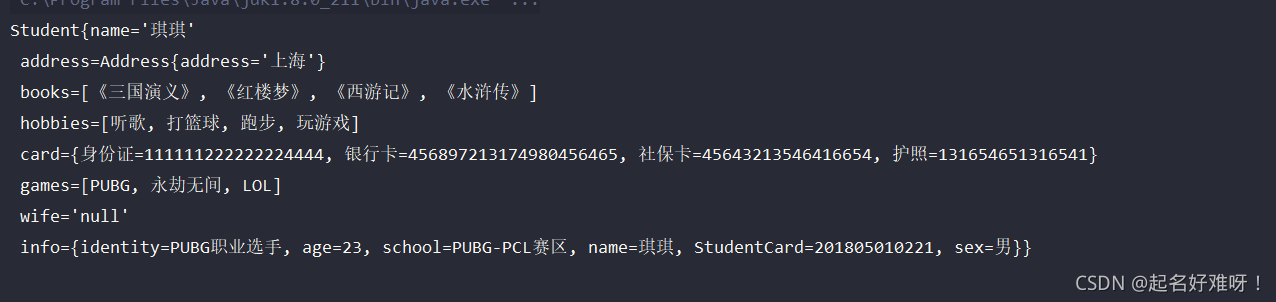
结果如下





 扫一扫
扫一扫


 378
378

 被折叠的 条评论
为什么被折叠?
被折叠的 条评论
为什么被折叠?
 到【灌水乐园】发言





