



 本文详细介绍了Java Web应用中Servlet过滤器的实现与配置过程。包括如何通过实现javax.servlet.Filter接口创建过滤器,以及如何在web.xml文件中进行配置来拦截特定URL请求。此外还展示了过滤器如何检查请求参数并决定是否阻止或转发请求。
转载自http://tutorials.jenkov.com/java-servlets/servlet-filters.html
突然觉得这个箭头标志有点错误,filter到Servlet,JSP.Static File,应该是双向的。
A Servlet filter is an object that can intercept HTTP requests targeted at your web application.
A servlet filter can intercept requests both for servlets, JSP's, HTML files or other static content, as illustrated in the diagram below:
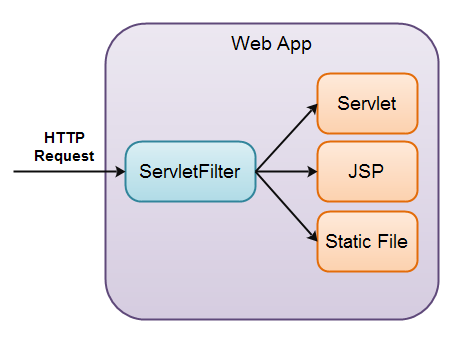 |
| A Servlet Filter in a Java Web Application |
In order to create a servlet filter you must implement the javax.servlet.Filter interface. Here is an example servlet filter implementation:
import javax.servlet.*;
import java.io.IOException;

/**

 */
public class SimpleServletFilter implements Filter {

    public void init(FilterConfig filterConfig) throws ServletException {
    }

    public void doFilter(ServletRequest request, ServletResponse response,
                         FilterChain filterChain)
    throws IOException, ServletException {

    }

    public void destroy() {
    }
}
When the servlet filter is loaded the first time, its init() method is called, just like with servlets.
When a HTTP request arrives at your web application which the filter intercepts, the filter can inspect the request URI, the request parameters and the request headers, and based on that decide if it wants to block or forward the request to the target servlet, JSP etc.
It is the doFilter() method that does the interception. Here is a sample implementation:
public void doFilter(ServletRequest request, ServletResponse response,
                     FilterChain filterChain)
throws IOException, ServletException {

    String myParam = request.getParameter("myParam");

    if(!"blockTheRequest".equals(myParam)){
        filterChain.doFilter(request, response);
    }
}
Notice how the doFilter() method checks a request parameter, myParam, to see if it equals the string "blockTheRequest". If not, the request is forwarded to the target of the request, by
calling thefilterChain.doFilter() method. If this method is not called, the request is not forwarded, but just blocked.
The servlet filter above just ignores the request if the request parameter myParam equals "blockTheRequest". You can also write a different response back to the browser. Just use theServletResponse object
to do so, just like you would inside a servlet.
You may have to cast the ServletResponse to a HttpResponse to obtain a PrintWriter from it. Otherwise you only have the OutputStream available
via getOutputStream().
Here is an example:
public void doFilter(ServletRequest request, ServletResponse response,
                     FilterChain filterChain)
throws IOException, ServletException {

    String myParam = request.getParameter("myParam");

    if(!"blockTheRequest".equals(myParam)){
        filterChain.doFilter(request, response);
        return;
    }

    HttpResponse httpResponse = (HttpResponse) httpResponse;
    httpResponse.getWriter().write("a different response... e.g in HTML");
}
Configuring the Servlet Filter in web.xml
You need to configure the servlet filter in the web.xml file of your web application, before it works. Here is how you do that:
<filter>
    <filter-name>myFilter</filter-name>
    <filter-class>servlets.SimpleServletFilter</filter-class>
</filter>

<filter-mapping>
    <filter-name>myFilter</filter-name>
    <url-pattern>*.simple</url-pattern>
</filter-mapping>
With this configuration all requests with URL's ending in .simple will be intercepted by the servlet filter. All others will be left untouched.





 扫一扫
扫一扫


 35
35

 被折叠的 条评论
为什么被折叠?
被折叠的 条评论
为什么被折叠?
 到【灌水乐园】发言





