


在管理系统项目中经常会用到excel表格的导出。表格导出分为后端接口导出和纯前端导出
通过后端接口导出相对较为方便,只需要正确调用接口,将文件以bolb的方式,在通过a标签进行下载保存。
纯前端导出excel表格时,必不可少的xlsx.js,一般情况还会用到file-saver,在vue项目中安装 npm i,这就不用说了。
这了可以通过 const wb = XLSX.utils.table_to_book(table);,table是表格元素,wb是xlsx将table中的数据按照表格单元格形式进行保存
只直接导出表格数据那就使用xlsx和fileSave就够了
const table = document.getElementById(elementId);
      const wb = XLSX.utils.table_to_book(table);
      console.log(wb);
      const wbout = XLSX.write(wb, { bookType: "xlsx", type: "array" });
      FileSaver.saveAs(
        new Blob([wbout], { type: "application/octet-stream" }),
        `${fileName}.xlsx`
      );
导出的表格没有边框和样式,想要加上边框样式就很麻烦了,百度上有说使用exceljs,xlsx-style,
特别是xlsx-style貌似在安装后还需要修改源码。最终找到一款叫xlsx-style-medalsoft库,简单的只是添加表格边款及文字居中显示
let wbs = wb.Sheets.Sheet1;
//获取表格数据单元
for (const key in wbs) {
        if (key.indexOf("!") === -1) {
          wbs[key].s = {
            font: {
              sz: 11, // 字体大小
              bold: false, // 加粗
              name: "宋体", // 字体
              color: {
                rgb: "000000", // 十六进制,不带#
              },
            },
            alignment: {
              // 文字居中
              horizontal: "center",
              vertical: "center",
              wrapText: true, // 文本自动换行
            },
            border: {
              // 设置边框
              top: { style: "thin" },
              bottom: { style: "thin" },
              left: { style: "thin" },
              right: { style: "thin" },
            },
          };
        }
      }
//添加样式
let table_write = write(wb, {
        bookType: "xlsx",
        type: "buffer",
      });
//转换成buffer
 FileSaver.saveAs(
        new Blob([table_write], { type: "application/octet-stream" }),
        `${time}.xlsx`
      );
//导出文件
到这里导出文件已经有边款和文字居中了,但是,table中会有单元格合并,对于合并的单元格,例如第一行的第一列和第二例合并后导出加边框,他只有一个单元格的边款长度, 怎么办?问度娘,没找到好办法,再看wbs表格数据,
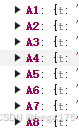 突然发现A1在,B1不在,突发奇想,这里没有B1我给你加一个是不是可以?一通操作猛如虎
let str = wbs["!ref"];
      let parts = str.split(":"); // 分割字符串
      let number = parts[1]
        .split("")
        .filter((char) => !isNaN(char))
        .join(""); // 过滤出数字并连接
      console.log(number);

      number = parseInt(number);

      for (let i = 1; i < number + 1; i++) {
        if (arr.indexOf("A" + i) != -1) {
          console.log("存在A" + i);
        } else {
          wbs["A" + i] = { t: "s", v: "" };
        }
        if (i >= 2) {
          if (arr.indexOf("C" + i) != -1) {
          } else {
            wbs["C" + i] = { t: "s", v: "" };
          }
          if (arr.indexOf("B" + i) != -1) {
          } else {
            wbs["B" + i] = { t: "s", v: "" };
          }
        }
      }
这里就是找到表格最大的一行是多少(number),我这里只需要处理ABC列的数据,直接写死。然后遍历wbs,少谁加谁。最后再导出。边框线全部闭合了。到这里纯前端导出excel就完成了。用到了xlsx/file-saver/xlsx-style-medalsoft,xlsx-style-medalsoft这个库说是有点偏,网上关于他的问题处理比较少。有其他好办法最好不要用。





 扫一扫
扫一扫


 887
887

 被折叠的 条评论
为什么被折叠?
被折叠的 条评论
为什么被折叠?
 到【灌水乐园】发言





