



有时候,我们发现很多页面内容不多的时候,页面底部内容飘到了中间:

这个页面底部没有固定,结果...,一个前端工程师是无法接受这样的结果的。
这里介绍一种通用的解决办法,让页面底部固定。
思路: 首先需要一个容器包裹所有的页面元素,这里使用<div id="container"></div>来做。id为container的容器需要设置高度100%,否则,当内容较少的时候,还是会飘起来。最后,主要的是footer底部元素需要绝对定位,让他固定在底部。
下面直接上代码:
content.html
<!DOCTYPE html>
<html lang="en">
<head>
	<meta charset="UTF-8">
	<title>layout</title>
	<link rel="stylesheet" type="text/css" href="css/base.css">
	<link rel="stylesheet" type="text/css" href="css/public.css">
</head>
<body>
	<div id="container">
		<header class="clearfix">
		     <div class="user-info fr">
			       <a class="user-name" href="" title="用户名">admin</a>
				   <a class="logout"  href="">退出</a>
			 </div>
			 <div class="logo fl">xxx管理系统</div>
		</header>
		<main class="content">
			<aside class="grid-left">菜单</aside>
			<section class="grid-right">
				<p>内容变多了</p>
				<p>内容变多了</p>
				<p>内容变多了</p>
				<p>内容变多了</p>
				<p>内容变多了</p>
				<p>内容变多了</p>
				<p>内容变多了</p>
				<div style="height:300px;background:lightgreen;"></div>
				<p>内容变多了</p>
				<p>内容变多了</p>
				<p>内容变多了</p>
				<p>内容变多了</p>
				<p>内容变多了</p>
				<p>内容变多了</p>
				<p>内容变多了</p>
				<p>内容变多了</p>
				<p>内容变多了</p>
				<p>内容变多了</p>
				<p>内容变多了</p>
				<p>内容变多了</p>
				<p>内容变多了</p>
				<p>内容变多了</p>
			</section>
		</main>
		<footer class="footer">
			<div class="sub-foot">
				<ul>
					<li><a>法律条款</a></li>
					<li><a>隐私保护</a></li>
					<li><a>联系我们</a></li>
					<li><a>常见问题</a></li>
				</ul>
				<p>版权所有@1998-2018xx集团</p>
			</div>
		</footer>
	</div>
</body>
<script type="text/javascript">
	window.onload = function(){
		var height = document.body.offsetHeight;
		var ele = document.querySelector(".content");
		ele.style.height = (height-140)+"px";
	}
</script>
</html>
base.css
*{margin:0;padding:0;}
html,body,div,input,h1,h2,h3,h4,h5,h6,p{font-size:100%;font-weight: normal;font-family: Helvetica;}
.clearfix{*zoom:1;}
.clearfix:after{
	display:table;
	content:'';
	clear: both;
	line-height:0;
}
.fr{float:right;}
.fl{float:left;}
a{color:#0088cc;text-decoration: none;}
public.css
html,body{width:100%;height:100%;}
#container{min-height: 100%;position: relative;height:auto !important;}
header{height:59px;border-bottom: 1px solid #ddd;background: #f7f7f7;}
header .logo{cursor: pointer;height: 59px;line-height: 59px;margin-left: 20px;}
.user-info{margin-right: 20px;}
.user-info a{text-decoration: none;color:#000;}
.user-info .user-name{height:59px;line-height: 50px;}
.content{display:flex;}
.grid-left{flex:none;float:left;border-right:1px solid #ddd;width:160px;}
.grid-right{flex:1;float:right;overflow-x:hidden;overflow-y: auto;}
footer{
	position: absolute;
	bottom:0px;
	height:79px;
	border-top:1px solid #ddd;
	width:100%;
	background: #f7f7f7;
}
.sub-foot{width:1000px;margin:0 auto;text-align: center;}
.sub-foot ul{}
.sub-foot li{display:inline-block;height:30px;line-height:30px;}
.sub-foot p{height:30px;line-height: 30px;}
最终的结果:
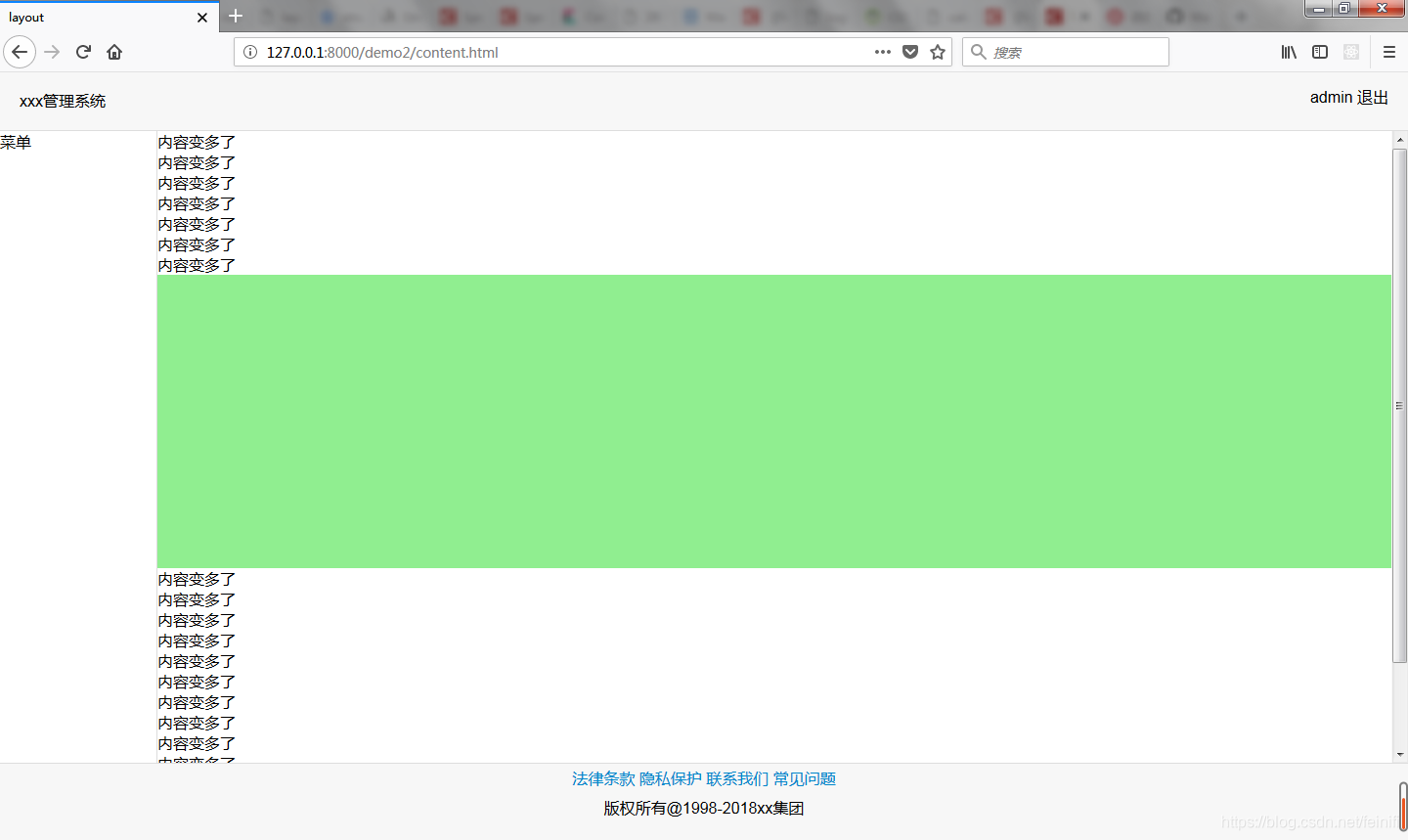
这里的关键地方:html,body均需要设置高度为100%,另外,id=container 的元素需要设置min-height:100%,这样页面就会被撑起来。而不是随着内容高度自适应。当页面内容过多之后,让多出容器的部分滚动,这样,页脚相当于就固定在了底部。





 扫一扫
扫一扫


 2948
2948

 被折叠的 条评论
为什么被折叠?
被折叠的 条评论
为什么被折叠?
 到【灌水乐园】发言





