
vue转electron项目以及使用fs报错:Module not found: Error: Can‘t resolve ‘fs‘ in解决办法

    前面写了一篇博客,通过vue ui创建electron+vue项目,其实关键的一步就是增加vue-cli-plugin-electron-builder插件依赖。这一步可以通过界面上添加,也可以手动添加。

    手动添加就是在命令行下运行如下命令:

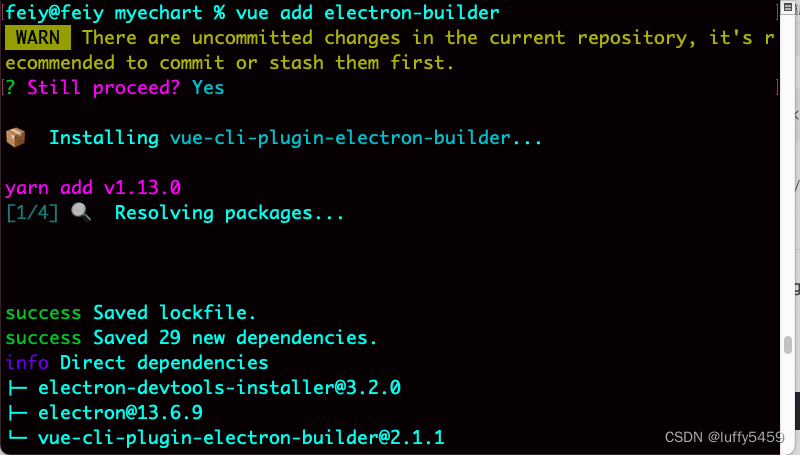
vue add electron-builder

    该命令可以安装vue-cli-plugin-electron-builder并且安装electron,它会提供几个版本给你选择,一般默认选择最高版本即可。

    构建electron项目主要是安装electron环境,在使用上面的命令添加electron-builder的时候,会下载electron版本,为了提高下载速度,一般会设置一个npm变量electron_mirror。我一般是设置在npmrc配置文件中,和npm registry一起:

registry=https://registry.npm.taobao.org
electron_mirror=https://npm.taobao.org/mirrors/electron/

注意electron_mirror设置后面的/,如果丢失,那么下载electron一定会失败,导致安装失败。     

    设置了electron镜像地址,那么vue add electron-builder命令会很快执行成功:
 

    最后,启动项目,执行命令:npm run electron:serve

//////////////

     上面增加了electron,该项目就是一个桌面程序了,可以使用node环境,当我高兴的引入fs的时候,启动项目竟然报错了:

    Module not found: Error: Can't resolve 'fs' in 

     这个错误,并不是缺少依赖,而是系统默认不支持node,需要将node集成进来,好在vue项目有一个配置文件vue.config.js,在这个文件里面,添加一个配置:pluginOptions:{electronBuilder:{nodeIntegration:true}},如下所示:

module.exports = defineConfig({
  transpileDependencies: true,
  pluginOptions:{
    electronBuilder:{
      nodeIntegration:true
    }
  }
})

    最后就可以像下面这样使用fs了。

<template>
  ...
</template>
<script>
import fs from 'fs'


...

fs.readFile("/etc/profile",function(err,data){
    console.log(data.toString())
})
</script>

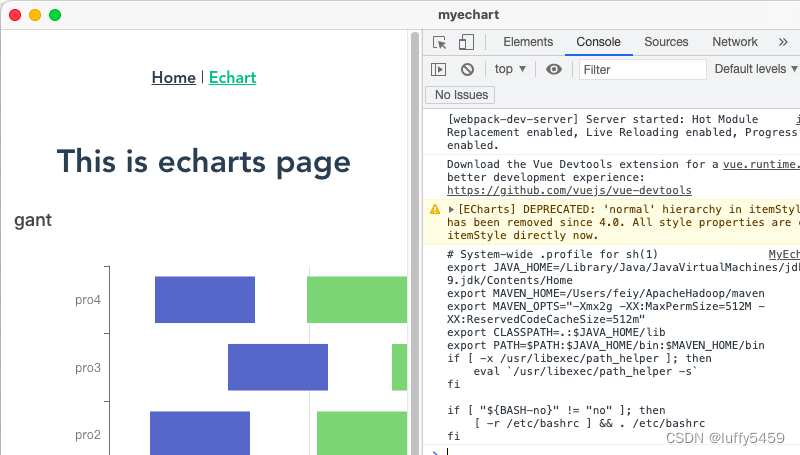
    如下所示,我读取mac系统下的profile配置文件,最后成功读取并通过控制台打印出来了:
 

     这篇文章是根据自己今天在实际工作中遇到问题总结,以前也做过electron项目,但是没有遇到过node环境这个问题,总算解决了。我看有的项目使用webpack管理,如果遇到无法使用fs,那么就需要把fs加入到webpack.config.js的配置项中,好像叫fs:empty,我没试过。

ERROR Failed to compile with 17 errors 上午11:41:19 error in ./node_modules/@serialport/bindings-cpp/dist/linux-list.js Module not found: Error: Can't resolve 'child_process' in 'E:\WorkProj\0-全创\0-生产\webProj\chuantool\node_modules\@serialport\bindings-cpp\dist' error in ./node_modules/@serialport/bindings-cpp/dist/serialport-bindings.js Module not found: Error: Can't resolve 'path' in 'E:\WorkProj\0-全创\0-生产\webProj\chuantool\node_modules\@serialport\bindings-cpp\dist' BREAKING CHANGE: webpack < 5 used to include polyfills for node.js core modules by default. This is no longer the case. Verify if you need this module and configure a polyfill for it. If you want to include a polyfill, you need to: - add a fallback 'resolve.fallback: { "path": require.resolve("path-browserify") }' - install 'path-browserify' If you don't want to include a polyfill, you can use an empty module like this: resolve.fallback: { "path": false } error in ./node_modules/@serialport/bindings-cpp/dist/unix-read.js Module not found: Error: Can't resolve 'fs' in 'E:\WorkProj\0-全创\0-生产\webProj\chuantool\node_modules\@serialport\bindings-cpp\dist' error in ./node_modules/@serialport/bindings-cpp/node_modules/@serialport/parser-delimiter/dist/index.js Module not found: Error: Can't resolve 'stream' in 'E:\WorkProj\0-全创\0-生产\webProj\chuantool\node_modules\@serialport\bindings-cpp\node_modules\@serialport\parser-delimiter\dist' BREAKING CHANGE: webpack < 5 used to include polyfills for node.js core modules by default. This is no longer the case. Verify if you need this module and configure a polyfill for it. If you want to include a polyfill, you need to: - add a fallback 'resolve.fallback: { "stream": require.resolve("stream-browserify") }' - install 'stream-browserify' If you don't want to include a polyfill, you can use an empty module like this: resolve.fallback: { "stream": false } 调用const { SerialPort } = require('serialport')报错
最新发布
09-16
D:\vue_project\e-commerce-visualization> npm run serve > e-commerce-visualization@0.1.0 serve > vue-cli-service serve INFO Starting development server... ERROR Failed to compile with 2 errors 00:12:52 error in ./src/App.vue?vue&type=script&lang=js Module not found: Error: Can't resolve './components/HelloWorld.vue' in 'D:\vue_project\e-commerce-visualization\src' error in ./src/App.vue?vue&type=script&lang=js Module not found: Error: [CaseSensitivePathsPlugin] `D:\vue_project\e-commerce-visualization\src\components\test01.vue` does not match the corresponding path on disk `Test01.vue`. ERROR in ./src/App.vue?vue&type=script&lang=js (./node_modules/babel-loader/lib/index.js??clonedRuleSet-40.use[0]!./node_modules/vue-loader/dist/index.js??ruleSet[0].use[0]!./src/App.vue?vue&type=script&lang=js) 1:0-53 Module not found: Error: Can't resolve './components/HelloWorld.vue' in 'D:\vue_project\e-commerce-visualization\src' @ ./src/App.vue?vue&type=script&lang=js 1:0-189 1:0-189 1:190-368 1:190-368 @ ./src/App.vue 2:0-54 3:0-49 3:0-49 8:49-55 @ ./src/main.js 2:0-28 3:10-13 ERROR in ./src/App.vue?vue&type=script&lang=js (./node_modules/babel-loader/lib/index.js??clonedRuleSet-40.use[0]!./node_modules/vue-loader/dist/index.js??ruleSet[0].use[0]!./src/App.vue?vue&type=script&lang=js) 2:0-45 Module not found: Error: [CaseSensitivePathsPlugin] `D:\vue_project\e-commerce-visualization\src\components\test01.vue` does not match the corresponding path on disk `Test01.vue`. @ ./src/App.vue?vue&type=script&lang=js 1:0-189 1:0-189 1:190-368 1:190-368 @ ./src/App.vue 2:0-54 3:0-49 3:0-49 8:49-55 @ ./src/main.js 2:0-28 3:10-13 webpack compiled with 2 errors
07-09
我是在vue3+ts+webpack项目的基础上去集成的electron,安装了依赖后,单独建立一个新的目录electron-main,负责存放electron相关的文件,原本electron的主进程和渲染进程使用js,现在改为使用ts,所以我在vue.config.js中新增了对electron的配置, electronBuilder: { mainProcessFile: 'electron-main/main.ts', // 指定主进程 TypeScript 文件 mainProcessArgs: ['--trace-warnings'], preload: 'electron-main/preload.ts', // 指定预加载 TypeScript 文件 builderOptions: { // 打包配置(见步骤 4) } } 而我的全局tsconfig.json配置修改后如下: { "compilerOptions": { // "target": "esnext", // "module": "esnext", "strict": true, "jsx": "preserve", "noImplicitAny": true, "importHelpers": true, "moduleResolution": "node", "skipLibCheck": true, "esModuleInterop": true, "allowSyntheticDefaultImports": true, "experimentalDecorators": true, "sourceMap": true, "baseUrl": ".", "types": ["webpack-env", "jest"], "paths": { "@/*": ["src/*"], "electron": ["node_modules/electron"] }, "lib": ["esnext", "dom", "dom.iterable", "scripthost"], }, "include": ["src/**/*.ts", "src/**/*.tsx", "src/**/*.vue", "tests/**/*.ts", "tests/**/*.tsx", "electron-main/*.ts", "electron-main/test.ts"], "exclude": ["node_modules"] } 我的package.json中添加了 "main": "electron-main/main.ts",使用electron .来运行electron项目。现在的问题是只要是main.ts我就无法运行,如果是main.js的话就可以正常运行。main.ts的情况下始终会报错annot find module 'D:\TPlearning\vct\vms\electron' imported from D:\TPlearning\vct\vms\electron-main\main.ts。我的main.ts的前两行为const { app, BrowserWindow, Menu, ipcMain, shell } = require('electron') const path = require('path')。到底怎么做才能让electron集成ts,能够在运行时编译文件并且正常启动?
09-12
评论 5
成就一亿技术人!
拼手气红包6.0元
还能输入1000个字符
 
红包 添加红包
表情包 插入表情
 条评论被折叠 查看
添加红包

请填写红包祝福语或标题

红包个数最小为10个

红包金额最低5元

当前余额3.43前往充值 >
需支付:10.00
成就一亿技术人!
领取后你会自动成为博主和红包主的粉丝 规则
hope_wisdom
发出的红包

打赏作者

luffy5459

你的鼓励将是我创作的最大动力

¥1 ¥2 ¥4 ¥6 ¥10 ¥20
扫码支付:¥1
获取中
扫码支付

您的余额不足,请更换扫码支付或充值

打赏作者

实付
使用余额支付
点击重新获取
扫码支付
钱包余额 0

抵扣说明:

1.余额是钱包充值的虚拟货币,按照1:1的比例进行支付金额的抵扣。
2.余额无法直接购买下载,可以购买VIP、付费专栏及课程。

余额充值


