


 本文介绍了如何在Maui项目中使用SQLite数据库,详细步骤包括安装必要的Nuget包,创建模型、常量类和数据库服务类。同时,文章提到了Maui的CommunityToolkit和依赖注入系统的便捷性,以及在不同页面间传递自定义值的方法,最终实现了预期的运行效果。
在maui项目中使用sqlite数据库,先在Nuget中搜索sqlite-net-pcl安装 ,再在搜索中输入sqlite空格green,搜索安装sqlitepclraw.bundle_green,如果不安装后者,将会报错。
在maui中体验一下sqlite,设计一个简单的笔记本simpleNotes,先建模型,在文件夹models中创建Note.cs。
using SQLite;

namespace SimpleNotes.Models
{
    public class Note
    {
        [PrimaryKey,AutoIncrement]
        public int NoteId { get; set; }

        public string Title { get; set; }
        public string Content { get; set; }

        public DateTime CreationTime { get; set; }

        public DateTime LastModifiedTime { get; set; }
    }
}
在models文件夹中再建一个常量类,方便使用,文件名constants.cs。
namespace SimpleNotes.Models
{
    public class Constants
    {
        private const string DBName = "notes.db3";
        public const SQLite.SQLiteOpenFlags Flags = SQLite.SQLiteOpenFlags.Create |
            SQLite.SQLiteOpenFlags.ReadWrite | SQLite.SQLiteOpenFlags.SharedCache;

        public static string DatabasePath => Path.Combine(FileSystem.AppDataDirectory, DBName);
    }
}
再在services文件夹建一个DatabaseService.cs,使用sqlite数据库的类。
using SimpleNotes.Models;
using SQLite;

namespace SimpleNotes.Services
{
    public class DatabaseService
    {
        SQLiteAsyncConnection conn;

        async Task Init()
        {
            if (conn is null)
            {
                conn = new SQLiteAsyncConnection(Constants.DatabasePath, Models.Constants.Flags);
                await conn.CreateTableAsync<Note>();
            }
        }

        public async Task<List<Models.Note>> GetAll()
        {
            await Init();
            return await conn.Table<Models.Note>().ToListAsync();
        }

        public async Task<Models.Note> GetNote(Note note)
        {
            await Init();
            var local = note;
            if (local is not null)
            {
                return await conn.Table<Models.Note>().Where(n => n.NoteId == local.NoteId).FirstOrDefaultAsync();
            }

            return null;
        }

        public async Task<int> AddNoteAsync(Note note)
        {
            await Init();
            var local = note;
            if (local is not null)
            {
                if (local.NoteId == 0)
                {
                    local.CreationTime = DateTime.Now;
                    local.LastModifiedTime = DateTime.Now;
                    return await conn.InsertAsync(local);
                }
                else
                {
                    local.LastModifiedTime = DateTime.Now;
                    return await conn.UpdateAsync(local);
                }
            }
            return -1;
        }

        public async Task<int> DeleteNoteAsync(Note note)
        {
            await Init();
            var local = note;
            if(local is not null)
            {
                var matchedNote = conn.Table<Note>().Where(n => n.NoteId == local.NoteId).FirstOrDefaultAsync();
                if(matchedNote is not null)
                {
                    return await conn.DeleteAsync(local);
                }
            }
            return 0;
        }
    }
}
使用maui,不安装社区工具是不行的,真的是太方便了,提高效率,用nuget搜索安装communitytoolkit.maui和communitytoolkit.mvvm。
在viewmodels文件夹中创建AboutPageViewModel.cs。
namespace SimpleNotes.ViewModels
{
    public class AboutPageViewModel
    {
        public static string AppName => $"程序名称:{AppInfo.Name}";
        public static string Vertion => $"版本:{AppInfo.VersionString}";

        public static string MoreMessage => $"使用MAUI架构,C#语言,xaml设计界面,使用IOC容器技术。";
    }
}
在viewmodels文件夹中创建NotePageViewModel.cs。
using CommunityToolkit.Mvvm.ComponentModel;
using CommunityToolkit.Mvvm.Input;
using SimpleNotes.Models;
using SimpleNotes.Services;

namespace SimpleNotes.ViewModels
{
    public class NotePageViewModel : ObservableObject, IQueryAttributable
    {
        DatabaseService db;
        Note _note = new Note();
        public NotePageViewModel(DatabaseService databaseService)
        {
            db = databaseService;
            AddNoteCommand = new AsyncRelayCommand(AddNote);
            DeleteNoteCommand = new AsyncRelayCommand(DeleteNote);
        }

        public void ApplyQueryAttributes(IDictionary<string, object> query)
        {
            if (query.ContainsKey("load"))
            {
                Note local = query["load"] as Note;
                _note = local;
                OnRefresh();
            }
            else if (query.ContainsKey("name"))
            {
                var name = query["name"] as string;
                if (name == "new")
                {
                    _note = new Note();
                    OnRefresh();
                }
            }
        }

        private void OnRefresh()
        {
            OnPropertyChanged(nameof(Title));
            OnPropertyChanged(nameof(Content));
            OnPropertyChanged(nameof(CreationTime));
            OnPropertyChanged(nameof(LastModifiedTime));
        }

        public string Title
        {
            get => _note.Title;
            set => SetProperty(_note.Title, value, _note, (n, v) => n.Title = v);
        }

        public string Content
        {
            get => _note.Content;
            set => SetProperty(_note.Content, value, _note, (n, v) => n.Content = v);
        }

        public DateTime CreationTime
        {
            get => _note.CreationTime;
            set => SetProperty(_note.CreationTime, value, _note, (n, v) => n.CreationTime = v);
        }

        public DateTime LastModifiedTime
        {
            get => _note.LastModifiedTime;
            set => SetProperty(_note.LastModifiedTime, value, _note, (n, v) => n.LastModifiedTime = v);
        }

        async Task AddNote()
        {
            await db.AddNoteAsync(_note);
            await Shell.Current.GoToAsync("..");
        }

        public IAsyncRelayCommand AddNoteCommand { get; private set; }

        async Task DeleteNote()
        {
           await db.DeleteNoteAsync(_note);
            await Shell.Current.GoToAsync("..");
        }

        public IAsyncRelayCommand DeleteNoteCommand { get; private set; }
    }
}
再在viewmodels文件夹下创建主页面MainPageViewModels.cs。
using CommunityToolkit.Mvvm.ComponentModel;
using CommunityToolkit.Mvvm.Input;
using SimpleNotes.Models;
using SimpleNotes.Services;
using SimpleNotes.Views;
using System.Collections.ObjectModel;

namespace SimpleNotes.ViewModels
{
    public class MainPageViewModel : ObservableObject
    {
        ObservableCollection<Note> notes;
        DatabaseService db;
        public ObservableCollection<Note> Notes
        {
            get => notes ??= new ObservableCollection<Note>();
            set => SetProperty(ref notes, value);
        }

        public MainPageViewModel(DatabaseService databaseService)
        {
            db = databaseService;
            InitializeCollectionCommand = new AsyncRelayCommand(InitializeCollection);
            SelectedNoteCommand = new AsyncRelayCommand<Note>(SelectedNote);
            NewNoteCommand = new AsyncRelayCommand(NewNote);
        }

        async Task InitializeCollection()
        {
            Notes.Clear();
            foreach (Note note in await db.GetAll())
            {
                Notes.Add(note);
            }
        }

        public IAsyncRelayCommand InitializeCollectionCommand { get; private set; }

        async Task SelectedNote(Note note)
        {
            if (note is not null)
            {
                var parameter = new Dictionary<string, object>()
                {
                    {"load",note }
                };
                await Shell.Current.GoToAsync($"{nameof(NotePage)}", parameter);
            }

        }

        public IAsyncRelayCommand SelectedNoteCommand { get; private set; }

        async Task NewNote()
        {
            string name = "new";
            await Shell.Current.GoToAsync($"{nameof(NotePage)}?name={name}");
        }

        public IAsyncRelayCommand NewNoteCommand { get; private set; }
    }
}
再在views文件夹下创建AboutPage.xaml界面文件。
<?xml version="1.0" encoding="utf-8" ?>
<ContentPage xmlns="http://schemas.microsoft.com/dotnet/2021/maui"
             xmlns:x="http://schemas.microsoft.com/winfx/2009/xaml"
             xmlns:viewmodel="clr-namespace:SimpleNotes.ViewModels"
             x:Class="SimpleNotes.Views.AboutPage"
             Title="AboutPage">
    <VerticalStackLayout Margin="5">
        <HorizontalStackLayout Spacing="5">
            <Label Text="{x:Static viewmodel:AboutPageViewModel.AppName}" FontSize="20" FontAttributes="Bold" VerticalOptions="Center"/>
            <Label Text="{x:Static viewmodel:AboutPageViewModel.Vertion}" FontSize="18" VerticalOptions="Center"/>
        </HorizontalStackLayout>
        <Label Text="{x:Static viewmodel:AboutPageViewModel.MoreMessage}" FontSize="17"/>
    </VerticalStackLayout>
</ContentPage>
在views文件夹下创建NotePage.xaml界面文件。
<?xml version="1.0" encoding="utf-8" ?>
<ContentPage xmlns="http://schemas.microsoft.com/dotnet/2021/maui"
             xmlns:x="http://schemas.microsoft.com/winfx/2009/xaml"
             x:Class="SimpleNotes.Views.NotePage"
             Title="NotePage">
    <Grid RowDefinitions="Auto,*,Auto" ColumnDefinitions="*,*" Margin="5" ColumnSpacing="5">
        <Entry Placeholder="键入标题" Text="{Binding Title}" FontAttributes="Bold" FontSize="18" Grid.ColumnSpan="2"/>
        <Editor Placeholder="键入内容" Text="{Binding Content}" IsSpellCheckEnabled="False"
                FontSize="16" IsTextPredictionEnabled="False" Grid.Row="1" Grid.ColumnSpan="2" AutoSize="TextChanges"/>
        <Button Text="删除" Command="{Binding DeleteNoteCommand}" Grid.Row="2" Grid.Column="0"/>
        <Button Text="保存" Command="{Binding AddNoteCommand}" Grid.Row="2" Grid.Column="1"/>
    </Grid>
</ContentPage>
在views文件夹下创建MainPage.xaml界面文件。
<?xml version="1.0" encoding="utf-8" ?>
<ContentPage xmlns="http://schemas.microsoft.com/dotnet/2021/maui"
             xmlns:x="http://schemas.microsoft.com/winfx/2009/xaml"
             x:Class="SimpleNotes.Views.MainPage" Appearing="MainPage_Appearing" NavigatedTo="MainPage_NavigatedTo"
             Title="MainPage">
    <ContentPage.ToolbarItems>
        <ToolbarItem Text="添加新笔记" IconImageSource="{FontImage Glyph='+',Color=White,Size=22}" Command="{Binding NewNoteCommand}"/>
    </ContentPage.ToolbarItems>
    <Grid RowDefinitions="Auto,*" Margin="5" RowSpacing="5">
        <Label Text="{Binding Notes.Count,StringFormat='笔记总数:{0}'}"/>
        <CollectionView ItemsSource="{Binding Notes}" SelectionMode="Single" Grid.Row="1" SelectionChangedCommand="{Binding SelectedNoteCommand}"
                        SelectionChangedCommandParameter="{Binding Source={RelativeSource Self}, Path=SelectedItem}" x:Name="notesCollection">
            <CollectionView.ItemTemplate>
                <DataTemplate>
                    <Grid RowDefinitions="*,*,*" ColumnDefinitions="Auto,*" ColumnSpacing="5" RowSpacing="5">
                        <Image Source="documents.png" HeightRequest="32" Aspect="AspectFit"/>
                        <Label Text="{Binding Title}" Grid.Row="0" Grid.Column="1" FontAttributes="Bold" FontSize="18"/>
                        <Label Text="{Binding Content}" Grid.Row="1" Grid.ColumnSpan="2" MaxLines="1" FontSize="16"/>
                        <Label Text="{Binding LastModifiedTime,StringFormat='修改时间:{0:yyyy-MM-dd HH:mm:ss}'}" Grid.Row="2" Grid.ColumnSpan="2" TextColor="SlateGray"/>
                    </Grid>
                </DataTemplate>
            </CollectionView.ItemTemplate>
        </CollectionView>
    </Grid>
</ContentPage>
修改AppShell.xaml文件。
<?xml version="1.0" encoding="UTF-8" ?>
<Shell
    x:Class="SimpleNotes.AppShell"
    xmlns="http://schemas.microsoft.com/dotnet/2021/maui"
    xmlns:x="http://schemas.microsoft.com/winfx/2009/xaml"
    xmlns:view="clr-namespace:SimpleNotes.Views"
    Shell.FlyoutBehavior="Flyout" FlyoutBackgroundColor="Teal">
    <Shell.ItemTemplate>
        <DataTemplate>
            <Grid ColumnDefinitions="0.2*,0.8*" Margin="5">
                <Image Source="{Binding FlyoutIcon}" Margin="5" HeightRequest="32" VerticalOptions="Center"/>
                <Label Text="{Binding Title}" TextColor="White" FontSize="20" Grid.Column="1" VerticalOptions="Center"/>
            </Grid>
        </DataTemplate>
    </Shell.ItemTemplate>

    <ShellContent
        Title="主页"
        Icon="documents.png"
        ContentTemplate="{DataTemplate view:MainPage}"
        Route="MainPage" />
    <ShellContent
        Title="关于"
        Icon="about.png"
        ContentTemplate="{DataTemplate view:AboutPage}"
        Route="AboutPage" />

</Shell>
再修改mauiProgram.cs文件,由于maui自带容器,我们可以用用,最好用的是它的扩展builder.Services.AddSingleton<MainPage, MainPageViewModel>(),大家看看,把view和viewmodel一起注册,是不是非常非常方便?还有以下扩展builder.Services.AddSingletonWithShellRoute<NotePage, NotePageViewModel>($"{nameof(NotePage)}"),不仅注册了view和viewmodel,还顺带把shell的路由也注册了,真是方便,完整内容。
using CommunityToolkit.Maui;
using Microsoft.Extensions.Logging;
using SimpleNotes.Services;
using SimpleNotes.ViewModels;
using SimpleNotes.Views;

namespace SimpleNotes;

public static class MauiProgram
{
	public static MauiApp CreateMauiApp()
	{
		var builder = MauiApp.CreateBuilder();
		builder
			.UseMauiApp<App>()
			.UseMauiCommunityToolkit()
			.ConfigureFonts(fonts =>
			{
				fonts.AddFont("OpenSans-Regular.ttf", "OpenSansRegular");
				fonts.AddFont("OpenSans-Semibold.ttf", "OpenSansSemibold");
			});

		//注册service,viewmodels views;
		builder.Services.AddSingleton<DatabaseService>();
		builder.Services.AddSingleton<MainPage, MainPageViewModel>();
		builder.Services.AddSingletonWithShellRoute<NotePage, NotePageViewModel>($"{nameof(NotePage)}");

#if DEBUG
		builder.Logging.AddDebug();
#endif

		return builder.Build();
	}
}
修改NotePage.xaml.cs文件,由于我们在容器中注册了,所以可以在构造函数中直接引用注册的类型。
using SimpleNotes.ViewModels;
namespace SimpleNotes.Views;

public partial class NotePage : ContentPage
{
	public NotePage(NotePageViewModel viewmodel)
	{
		InitializeComponent();
		BindingContext = viewmodel;
	}
}
再修改MainPage.xaml.cs文件。
using SimpleNotes.ViewModels;

namespace SimpleNotes.Views;

public partial class MainPage : ContentPage
{
	public MainPage(MainPageViewModel viewmodel)
	{
		InitializeComponent();
		BindingContext = viewmodel;
	}

    private void MainPage_Appearing(object sender, EventArgs e)
    {
		((MainPageViewModel)BindingContext).InitializeCollectionCommand.Execute(null);
    }

    private void MainPage_NavigatedTo(object sender, NavigatedToEventArgs e)
    {
        notesCollection.SelectedItem = null;
    }
}
在maui页面间传递自定义的值是这样写,使用shell.current.GogoAsync的第二个签名。
var parameter = new Dictionary<string, object>()
{
{"load",note }
};
await Shell.Current.GoToAsync($"{nameof(NotePage)}", parameter);
第一个签名是这样写,自定义的只能用第二个。
string name = "new";
await Shell.Current.GoToAsync($"{nameof(NotePage)}?name={name}");
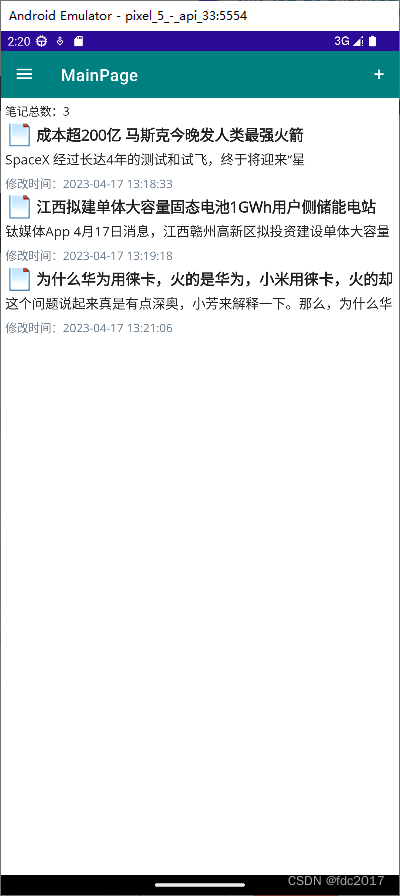
看看运行效果,达到预期。





 扫一扫
扫一扫


 29
29

 被折叠的 条评论
为什么被折叠?
被折叠的 条评论
为什么被折叠?
 到【灌水乐园】发言





