



C语言实现俄罗斯方块
- 1、效果展示
- 2、系统设计
- 3、所需开发环境
- 4、代码展示
- 5、具体项目实现
- 5.1 游戏欢迎界面welcome( )
- 5.2 游戏背景initGameScreen( )
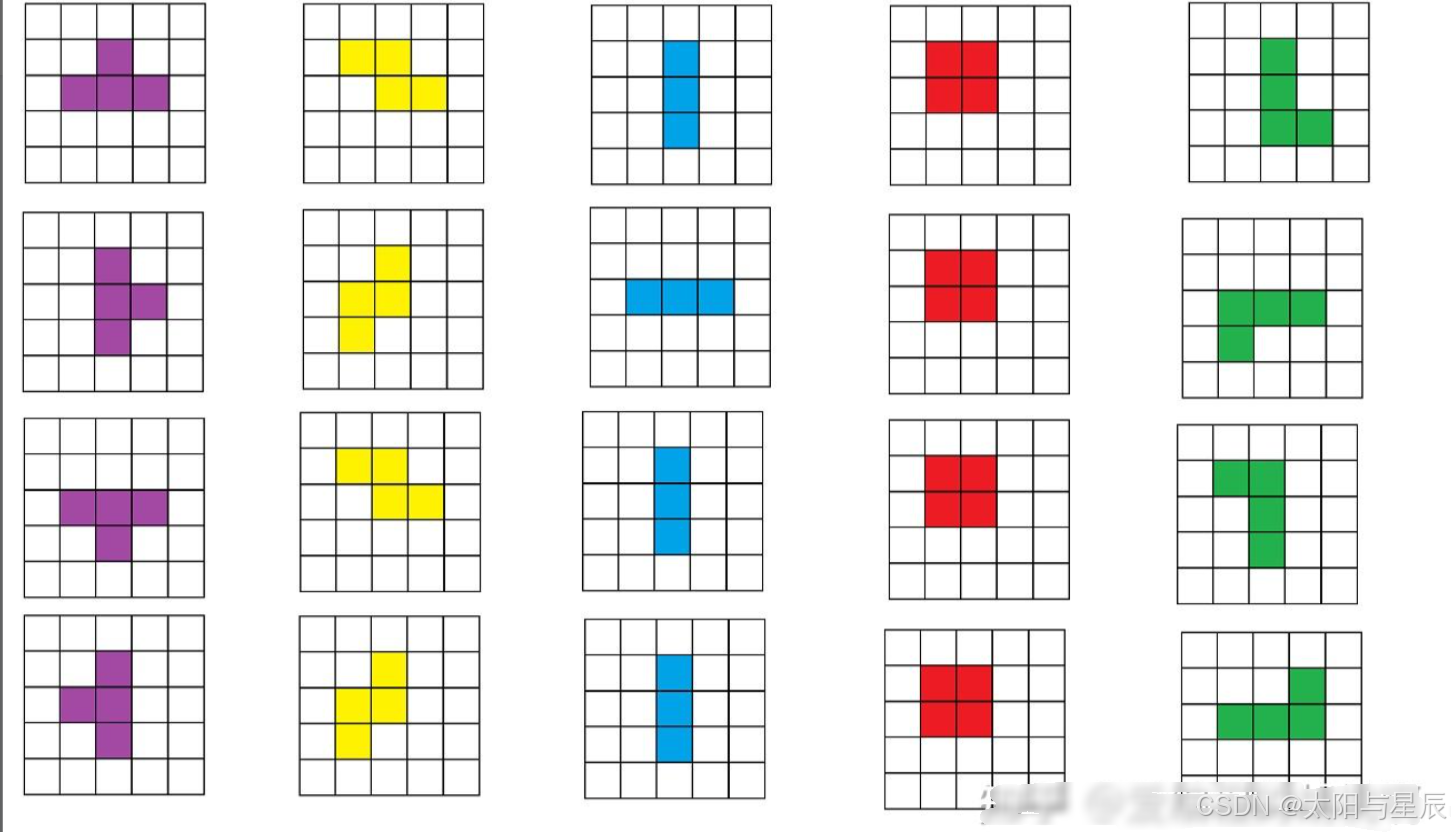
- 5.3 方块表示int block[ ][ ][ ]
- 5.4 新方块表示nextBlock( )
- 5.5 设计游戏循环main( )
- 5.6 搭建用户操作框架move( )
- 5.7 判断方块能否向指定方向移动moveable( )
- 5.8 游戏失败检查failCheck( )
- 5.9 清除下降过程中的方块clearBlock( )
- 5.10 判断方块旋转rotatable( )
- 5.11 绘制下降过程中的方块drawBlock( )
- 5.12 延时等待wait( )
- 5.13 固定方块mark( )
- 5.14 用户操作框架完善mov( )
- 5.15 消除方块check( )+down( )
- 5.16 更新分数和等级addScore( )+updateGrade( )
1、效果展示
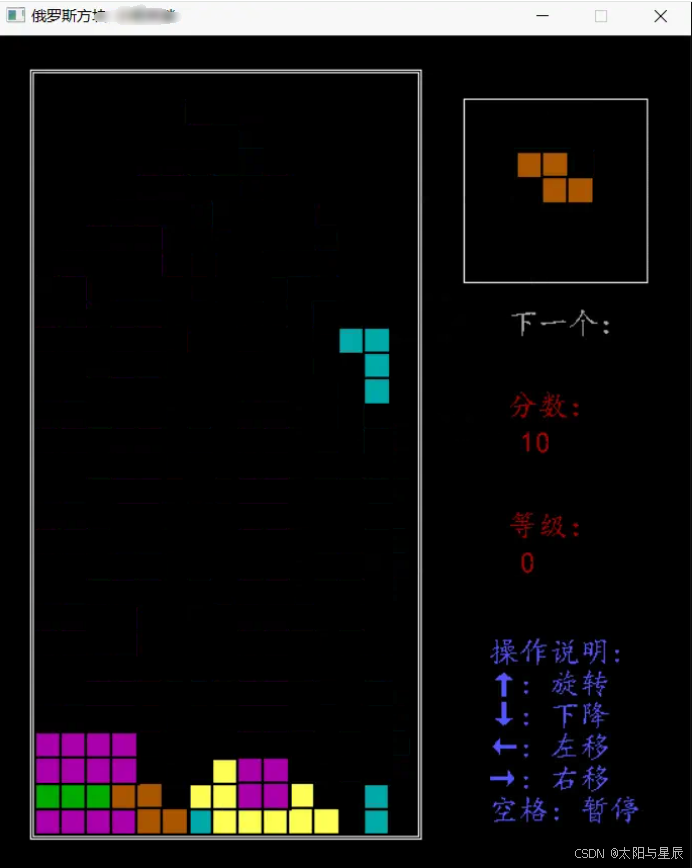
每个方块的朝向使用二维数组表示:
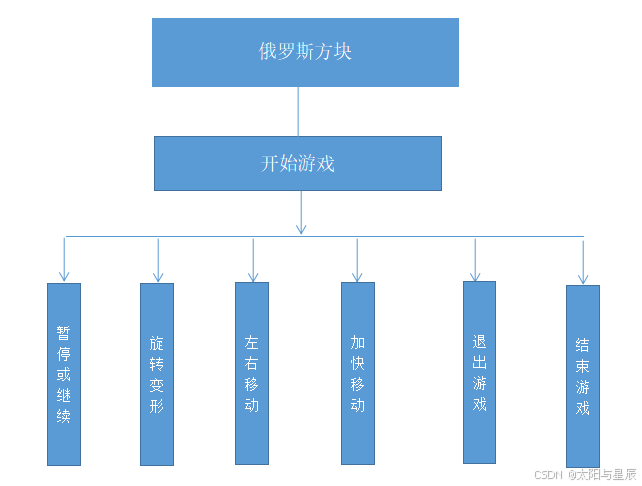
2、系统设计
俄罗斯方块游戏一共需要实现以下几个功能
- (1)开始游戏(按任意键进入游戏主界面)
- (2)暂停或继续游戏(按空格键)
- (3)将图形向左向右移动(键盘上向左向右键)
- (4)将方块变形(向上键)
- (5)使某一方块向下移动速度加快(向下键)
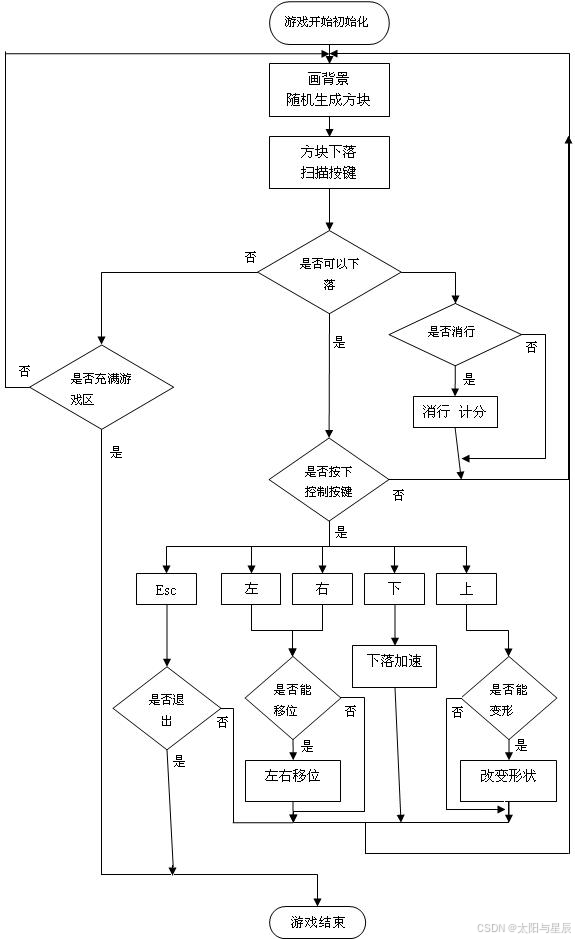
流程图如下:
3、所需开发环境
- 安装VS2019,或VS其他版本
- 安装easyX图形库
4、代码展示
#include<graphics.h>
#include<stdio.h>
#include<time.h>
#include<conio.h> //kbhit()
int score = 0; //总分
int rank = 0; //等级
#define BLOCK_COUNT 5
#define BLOCK_WIDTH 5
#define BLOCK_HEIGHT 5
#define UNIT_SIZE 20 //小方块宽度
#define START_X 130 //方块降落框,方块降落起始位置
#define START_Y 30
#define KEY_UP 87 //用户操作
#define KEY_LEFT 65
#define KEY_RIGHT 68
#define KEY_DOWN 83
#define KEY_SPACE 32
#define MinX 30 //游戏左上角位置
#define MinY 30
int speed = 500; //方块降落速度
int NextIndex = -1; //下一个方块
int BlockIndex = -1; //当前方块
typedef enum { //方块朝向
  BLOCK_UP,
  BLOCK_RIGHT,
  BLOCK_LEFT,
  BLOCK_DOWN
} block_dir_t;
typedef enum { //方块移动方向
  MOVE_DOWN,
  MOVE_LEFT,
  MOVE_RIGHT
} move_dir_t;
//方块颜色
int color[BLOCK_COUNT] = {
  GREEN,
  CYAN,
  MAGENTA,
  YELLOW,
  BROWN
};
int visit[30][15]; //访问数组visit[i][j] = 1表示该位置有方块
int markColor[30][15]; //对应位置颜色
int block[BLOCK_COUNT * 4][BLOCK_WIDTH][BLOCK_HEIGHT] = {
  // | 形方块
  { 0,0,0,0,0,0,0,1,0,0,0,0,1,0,0,0,0,1,0,0,0,0,0,0,0 },
  { 0,0,0,0,0,0,0,0,0,0,0,1,1,1,0,0,0,0,0,0,0,0,0,0,0 },
  { 0,0,0,0,0,0,0,1,0,0,0,0,1,0,0,0,0,1,0,0,0,0,0,0,0 },
  { 0,0,0,0,0,0,0,0,0,0,0,1,1,1,0,0,0,0,0,0,0,0,0,0,0 },
  // L 形方块
  { 0,0,0,0,0,0,0,1,0,0,0,0,1,0,0,0,0,1,1,0,0,0,0,0,0 },
  { 0,0,0,0,0,0,0,0,0,0,0,1,1,1,0,0,1,0,0,0,0,0,0,0,0 },
  { 0,0,0,0,0,0,1,1,0,0,0,0,1,0,0,0,0,1,0,0,0,0,0,0,0 },
  { 0,0,0,0,0,0,0,0,1,0,0,1,1,1,0,0,0,0,0,0,0,0,0,0,0 },
  // 田 形方块
  { 0,0,0,0,0,0,1,1,0,0,0,1,1,0,0,0,0,0,0,0,0,0,0,0,0 },
  { 0,0,0,0,0,0,1,1,0,0,0,1,1,0,0,0,0,0,0,0,0,0,0,0,0 },
  { 0,0,0,0,0,0,1,1,0,0,0,1,1,0,0,0,0,0,0,0,0,0,0,0,0 },
  { 0,0,0,0,0,0,1,1,0,0,0,1,1,0,0,0,0,0,0,0,0,0,0,0,0 },
  // T 形方块
  { 0,0,0,0,0,0,1,1,1,0,0,0,1,0,0,0,0,0,0,0,0,0,0,0,0 },
  { 0,0,0,0,0,0,0,0,1,0,0,0,1,1,0,0,0,0,1,0,0,0,0,0,0 },
  { 0,0,0,0,0,0,0,1,0,0,0,1,1,1,0,0,0,0,0,0,0,0,0,0,0 },
  { 0,0,0,0,0,0,1,0,0,0,0,1,1,0,0,0,1,0,0,0,0,0,0,0,0 },
  // Z 形方块
  { 0,0,0,0,0,0,1,1,0,0,0,0,1,1,0,0,0,0,0,0,0,0,0,0,0 },
  { 0,0,0,0,0,0,0,1,0,0,0,1,1,0,0,0,1,0,0,0,0,0,0,0,0 },
  { 0,0,0,0,0,0,1,1,0,0,0,0,1,1,0,0,0,0,0,0,0,0,0,0,0 },
  { 0,0,0,0,0,0,0,1,0,0,0,1,1,0,0,0,1,0,0,0,0,0,0,0,0 },
};
/***************************
* 功能:欢迎页面
* 输入:
* 无
* 返回:
* 无
**************************/
void welcome() {
  //1.初始化画布
  initgraph(550, 660);
  //2.设置窗口标题
  HWND window = GetHWnd();//获得窗口,获得当前窗口
  SetWindowText(window, _T("俄罗斯方块 小明来喽")); //设置标题
  //3.设置游戏初始页面
  setfont(40, 0, _T("微软雅黑")); //设置文本的字体样式(高,宽(0表示自适应),字体)
  setcolor(WHITE); // 设置颜色
  outtextxy(205, 200, _T("俄罗斯方法"));
  setfont(20, 0, _T("楷体"));
  setcolor(WHITE); // 设置颜色
  outtextxy(175, 300, _T("编程,从俄罗斯方块开始"));
  Sleep(3000);
}
/***************************
* 功能:初始化游戏场景
* 输入:
* 无
* 返回:
* 无
**************************/
void initGameSceen() {
  char str[16]; //存放分数
  //1.清屏
  cleardevice();
  //2.画场景
  rectangle(27, 27, 336, 635); //方块降落框外框
  rectangle(29, 29, 334, 633); //方块降落框内框
  rectangle(370, 50, 515, 195); //方块提示框
  setfont(24, 0, _T("楷体")); //写“下一个”
  setcolor(LIGHTGRAY); //灰色
  outtextxy(405, 215, _T("下一个:"));
  setcolor(RED); //写分数
  outtextxy(405, 280, _T("分数:"));
  //按指定格式,将score写入str
  sprintf_s(str, 16, "%d", score);
  //这里设置字符集为多字符,保证outtextxy可以写出变量str
  outtextxy(415, 310, str);
  outtextxy(405, 375, _T("等级:")); //等级
  //按指定格式,将rank写入str
  sprintf_s(str, 16, "%d", rank);
  //这里设置字符集为多字符,保证outtextxy可以写出变量str
  outtextxy(415, 405, str);
  setcolor(LIGHTBLUE); //操作说明
  outtextxy(390, 475, "操作说明:");
  outtextxy(390, 500, "↑: 旋转");
  outtextxy(390, 525, "↓: 下降");
  outtextxy(390, 550, "←: 左移");
  outtextxy(390, 575, "→: 右移");
  outtextxy(390, 600, "空格: 暂停");
}
/*****************************************
* 功能:清空方块提示框里的方块
* 输入:
* 无
* 返回:
* 无
****************************************/
void clearBlock() {
  setcolor(BLACK);
  setfont(23, 0, "楷体");
  for (int i = 0; i < BLOCK_HEIGHT; ++i) {
    for (int j = 0; j < BLOCK_WIDTH; ++j) {
    int x = 391 + j * UNIT_SIZE;
    int y = 71 + i * UNIT_SIZE;
    outtextxy(x, y, "■");
    }
  }
}
/*****************************************
* 功能:清除降落过程中的方块
* 输入:
* x,y - 方块的坐标(二维数组左上角位置)
* block_dir_t - 方块方向
* 返回:
* 无
****************************************/
void clearBlock(int x, int y, block_dir_t blockDir) {
  setcolor(BLACK);
  // setfont(23, 0, "楷体");
  int id = BlockIndex * 4 + blockDir;
  for (int i = 0; i < BLOCK_HEIGHT; ++i) {
    for (int j = 0; j < BLOCK_WIDTH; ++j) {
      if (block[id][i][j] == 1) {
        int x2 = x + j * UNIT_SIZE;
        int y2 = y + i * UNIT_SIZE;
        outtextxy(x2, y2, "■");
      }
    }
  }
}
/*****************************************
* 功能:在提示框 与 降落框的起始位置画方块
* 输入:
* x,y - 方块的坐标(二维数组左上角位置)
* 返回:
* 无
****************************************/
void nextblock() {
  clearBlock();
  //产生随机数,随机选择方块
  srand((unsigned)time(NULL)); //使用时间函数的返回值,来作为随机种子
  NextIndex = rand() % BLOCK_COUNT; //产生0~5的随机数
  drawBlock(391, 71);
}
/*****************************************
*功能:判断在指定位置向指定方向是否可以移动
*输入:
* x,y - 方块位置
* moveDir - 下一步想要移动的方向
* blockDir - 当前方块的方向
* 返回:
* true - 可以移动
* false - 不可以移动
****************************************/
bool moveable(int x0, int y0, move_dir_t moveDir, block_dir_t blockDir) {
  //计算方块左上角在30×15的游戏区位置(第多少行, 第多少列)
  int x = (y0 - MinY) / UNIT_SIZE;
  int y = (x0 - MinX) / UNIT_SIZE;
  int ret = 1;
  int id = BlockIndex * 4 + blockDir;
  if (moveDir == MOVE_DOWN) {
    for (int i = 0; i < BLOCK_HEIGHT; ++i) {
      for (int j = 0; j < BLOCK_WIDTH; ++j) {
        //向下不能运动的条件:实心方块已经达到底部(x+i+1==30),或者底部已有方块
        if (block[id][i][j] == 1 &&
        (x + i + 1 == 30 || visit[x + i + 1][y + j] == 1)) {
        ret = 0;
        }
      }
    }
  }
  else if (moveDir == MOVE_LEFT) {
    for (int i = 0; i < BLOCK_HEIGHT; ++i) {
      for (int j = 0; j < BLOCK_WIDTH; ++j) {
        //向左不能运动的条件:实心方块已经达到左边界(y+j==0),或者左边已有方块
        if (block[id][i][j] == 1 &&
        (y + j <= 0 || visit[x + i][y + j - 1] == 1)) {
        ret = 0;
        }
      }
    }
  }
  else if (moveDir == MOVE_RIGHT) {
    for (int i = 0; i < BLOCK_HEIGHT; ++i) {
      for (int j = 0; j < BLOCK_WIDTH; ++j) {
        //向下不能运动的条件:实心方块已经达到右边界(y+j+1>=15),或者右边已有方块
        if (block[id][i][j] == 1 &&
        (y + j + 1 >= 15 || visit[x + i][y + j + 1] == 1)) {
          ret = 0;
        }
      }
    }
  }
  return ret;
}
/*****************************
*功能:检测游戏是否结束
*输入:
* 无
* 返回:
* 无
*****************************/
void failCheck() {
  //游戏结束条件是顶部新被绘制出的方块就要“固化”,顶部新绘制的方块方向朝上,运动方向朝下
  if (!moveable(START_X, START_Y, MOVE_DOWN, (block_dir_t)BLOCK_UP)) {
    setcolor(WHITE);
    setfont(45, 0, "隶体");
    outtextxy(75, 300, "Game Over!");
    Sleep(1000);
    system("pause");
    closegraph();
    exit(0);
  }
}
/**************************
* 功能:延时等待
* 输入:
*
* 返回:
* 无
*************************/
void wait(int interval) {
  int count = interval / 10;
  for (int i = 0; i < count; ++i) {
    Sleep(10);
    //如果休眠期间用户有按键,则结束休眠
    if (_kbhit()) {
      return;
    }
  }
}
/*****************************************
* 功能:判断当前方块是否可以向指定方向旋转
* 输入:
* x,y - 方块位置(二维数组坐标)
* dir - 方块旋转方向
* 返回:
* true - 可以旋转
* false - 不可以旋转
****************************************/
bool rotatable(int x, int y, block_dir_t dir) {
  //首先判断是否可以继续向下移动
  if (!moveable(x, y, MOVE_DOWN, dir)) {
    return false;
  }
  int x2 = (y - MinY) / UNIT_SIZE;
  int y2 = (x - MinX) / UNIT_SIZE;
  int id = BlockIndex * 4 + dir;
  for (int i = 0; i < BLOCK_HEIGHT; ++i) {
    for (int j = 0; j < BLOCK_WIDTH; ++j) {
      //不能旋转条件:左右边界越界或者已有方块“阻挡”
      if (block[id][i][j] == 1 && (y2 + j < 0 || y2 + j >= 15 || visit[x2 + i][y2 + j] == 1)) {
        return false;
      }
    }
  }
  return true;
}
/*****************************************
* 功能:
* 输入:
*
* 返回:
* 无
****************************************/
void mark(int x, int y, block_dir_t dir) {
  int id = BlockIndex * 4 + dir;
  int x2 = (y - MinY) / UNIT_SIZE;
  int y2 = (x - MinX) / UNIT_SIZE;
  for (int i = 0; i < BLOCK_HEIGHT; ++i) {
    for (int j = 0; j < BLOCK_WIDTH; ++j) {
      if (block[id][i][j] == 1) {
        visit[x2 + i][y2 + j] = 1;
        markColor[x2 + i][y2 + j] = color[BlockIndex];
      }
    }
  }
}
/*****************************************
* 功能:读取用户操作,时时更新降落的方块
* 输入:
* 无
* 返回:
* 无
****************************************/
void move() {
  int x = START_X; //方块起始位置
  int y = START_Y;
  int k = 0;
  block_dir_t blockDir = (block_dir_t)BLOCK_UP;
  int curSpeed = speed; //定义当前方块降落速度
  //读取用户操作前判断游戏是否结束
  failCheck();
  //持续向下降落
  while (1) {
    int curSpeed = speed; //定义当前方块降落速度
    //清除方块
    clearBlock(x, k + y, blockDir);
    //判断选择的方向
    if (_kbhit()) {
      int key = _getch();
      if (key == KEY_SPACE) {
      system("pause");
      }else if (key == KEY_UP) {
        block_dir_t nextDir = (block_dir_t)((blockDir + 1) % 4);
        if (rotatable(x, y + k, nextDir)) {
          blockDir = nextDir;
        }
      }else if (key == KEY_LEFT) {
        if (moveable(x, y + k + 20, MOVE_LEFT, blockDir)) {
          x -= UNIT_SIZE;
        }
      }else if (key == KEY_RIGHT) {
        if (moveable(x, y + k + 20, MOVE_RIGHT, blockDir)) {
          x += UNIT_SIZE;
        }
      }else if (key == KEY_DOWN) {
      curSpeed = 50;
      }
    }
    k += 20;
    //绘制方块
    drawBlock(x, y + k, blockDir);
    //休眠
    wait(curSpeed);
    //方块的固化处理,方块固定后结束循环,当前一个方块的move执行完毕
    if (!moveable(x, y + k, MOVE_DOWN, blockDir)) {
      mark(x, y + k, blockDir);
      break;
    }
  }
}
/*****************************************
*功能:绘制刚从顶部降落的方块,更新提示框内的方块,调用方块降落函数move()
*输入:
* 无
* 返回:
* 无
****************************************/
void newblock() {
  BlockIndex = NextIndex;
  //绘制刚从顶部下降的方块
  drawBlock(START_X, START_Y);
  //让新出现方块暂停一会
  Sleep(200);
  //右上角区域绘制下一个方块
  nextblock();
  //方块降落
  move();
}
/*****************************************
* 功能:消除第i行,并把上面的行都往下移
* 输入:
* 无
* 返回:
* 无
****************************************/
void down(int x) {
  for (int i = x; i > 0; --i) {
    for (int j = 0; j < 15; ++j) {
      if (visit[i - 1][j] == 1) {
        visit[i][j] = 1;
        markColor[i][j] = markColor[i - 1][j];
        setcolor(markColor[i][j]);
        outtextxy(20 * j + MinX, 20 * i + MinY, "■");
      }else {
        visit[i][j] = 0;
        setcolor(BLACK);
        outtextxy(20 * j + MinX, 20 * i + MinY, "■");
      }
    }
  }
  //清除最顶层方格
  setcolor(BLACK);
  for (int j = 0; j < 15; ++j) {
    visit[0][j] = 0;
    outtextxy(20 * j + MinX, MinY, "■");
  }
}
/*****************************************
* 功能:更新分数
* 输入:
* 无
* 返回:
* 无
****************************************/
void addScore(int lines) {
  char str[32];
  score += lines * 10;
  sprintf_s(str, 32, "%d", score);
  setcolor(RED);
  outtextxy(415, 310, str);
}
/*************************
* 功能:更新等级
* 输入:
* 无
* 返回:
* 无
*************************/
void updateGrade() {
  //更新等级
  //假设50分一级
  rank = score / 50;
  char str[32];
  sprintf_s(str, 32, "%d", rank);
  setcolor(RED);
  outtextxy(415, 405, str);
  //更新速度
  if (speed <= 100) {
    speed = 100;
  }
  else {
    speed = 500 - rank * 20;
  }
}
/*************************
* 功能:检查是否有满行方块
* 输入:
* 无
* 返回:
* 无
*************************/
void check() {
  int i, j;
  int clearLines = 0;
  for (i = 29; i >= 0; i--) {
    // 检查第i行有没有满
    for (j = 0; j < 15 && visit[i][j]; j++);
    //执行到此处时,有两种情况:
    // 1. 第i行没有满,即表示有空位 此时 j<15
    // 2. 第i行已满了,此时 j>=15
    if (j >= 15) {
      // 此时,第i行已经满了,就需要消除第i行
      down(i); //消除第i行,并把上面的行都下移
      i++; // 因为最外层的循环中有 i--, 所以我们先i++, 使得下次循环时,再把这一行检查一下
      clearLines++;
    }
  }
  // 更新分数
  addScore(clearLines);
  // 更新等级(更新等级提示,更新速度)
  updateGrade();
}
int main() {
  welcome();
  initGameSceen();
  //产生新方块
  nextblock();
  // system("pause");
  Sleep(800);
  //初始化访问数组
  memset(visit, 0, sizeof(visit));
  while (1) {
    newblock();
    //消除满行,并更新分数和速度
    check();
  }
  system("pause");
  closegraph();
  return 0;
}
5、具体项目实现
5.1 游戏欢迎界面welcome( )
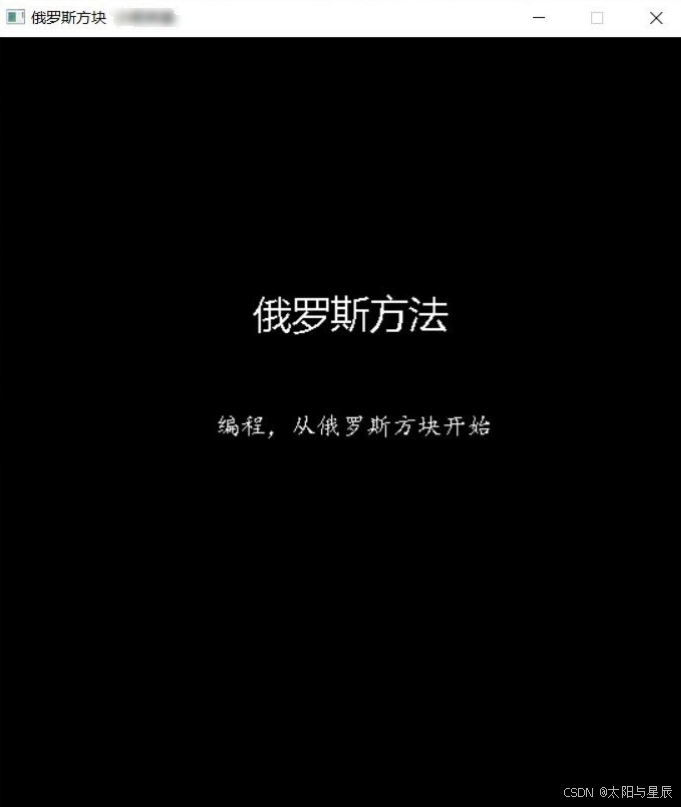
在游戏开始前会有一个游戏欢迎页面,整个页面会持续大概三秒,之后便进入游戏场景。在游戏欢迎页面中,除了将显示游戏名称外,还要修改窗口标题。
/***************************
* 功能:欢迎页面
* 输入:
* 无
* 返回:
* 无
**************************/
void welcome() {
  //1.初始化画布
  initgraph(550, 660);
  //2.设置窗口标题
  HWND window = GetHWnd();//获得窗口,获得当前窗口
  SetWindowText(window, _T("俄罗斯方块 小明来喽")); //设置标题
  //3.设置游戏初始页面
  setfont(40, 0, _T("微软雅黑")); //设置文本的字体样式(高,宽(0表示自适应),字体)
  setcolor(WHITE); // 设置颜色
  outtextxy(205, 200, _T("俄罗斯方法"));
  setfont(20, 0, _T("楷体"));
  setcolor(WHITE); // 设置颜色
  outtextxy(175, 300, _T("编程,从俄罗斯方块开始"));
  Sleep(3000);
}
5.2 游戏背景initGameScreen( )
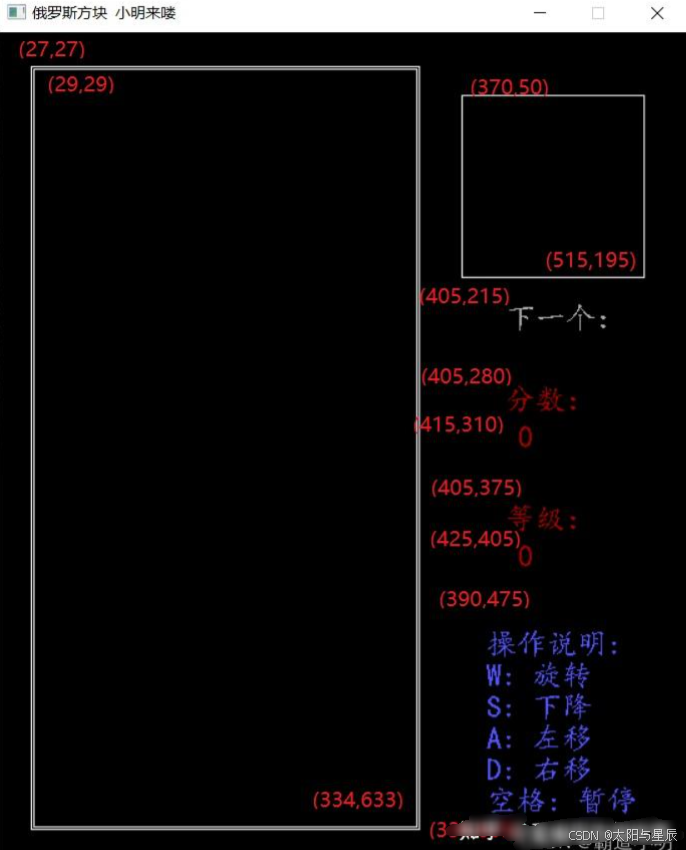
/***************************
* 功能:初始化游戏场景
* 输入:
* 无
* 返回:
* 无
**************************/
void initGameSceen() {
  char str[16]; //存放分数
  //1.清屏
  cleardevice();
  //2.画场景
  rectangle(27, 27, 336, 635); //方块降落框外框
  rectangle(29, 29, 334, 633); //方块降落框内框
  rectangle(370, 50, 515, 195); //方块提示框
  setfont(24, 0, _T("楷体")); //写“下一个”
  setcolor(LIGHTGRAY); //灰色
  outtextxy(405, 215, _T("下一个:"));
  setcolor(RED); //写分数
  outtextxy(405, 280, _T("分数:"));
  //按指定格式,将score写入str
  sprintf_s(str, 16, "%d", score);
  //这里设置字符集为多字符,保证outtextxy可以写出变量str
  outtextxy(415, 310, str);
  outtextxy(405, 375, _T("等级:")); //等级
  //按指定格式,将rank写入str
  sprintf_s(str, 16, "%d", rank);
  //这里设置字符集为多字符,保证outtextxy可以写出变量str
  outtextxy(415, 405, str);
  setcolor(LIGHTBLUE); //操作说明
  outtextxy(390, 475, "操作说明:");
  outtextxy(390, 500, "↑: 旋转");
  outtextxy(390, 525, "↓: 下降");
  outtextxy(390, 550, "←: 左移");
  outtextxy(390, 575, "→: 右移");
  outtextxy(390, 600, "空格: 暂停");
}
5.3 方块表示int block[ ][ ][ ]
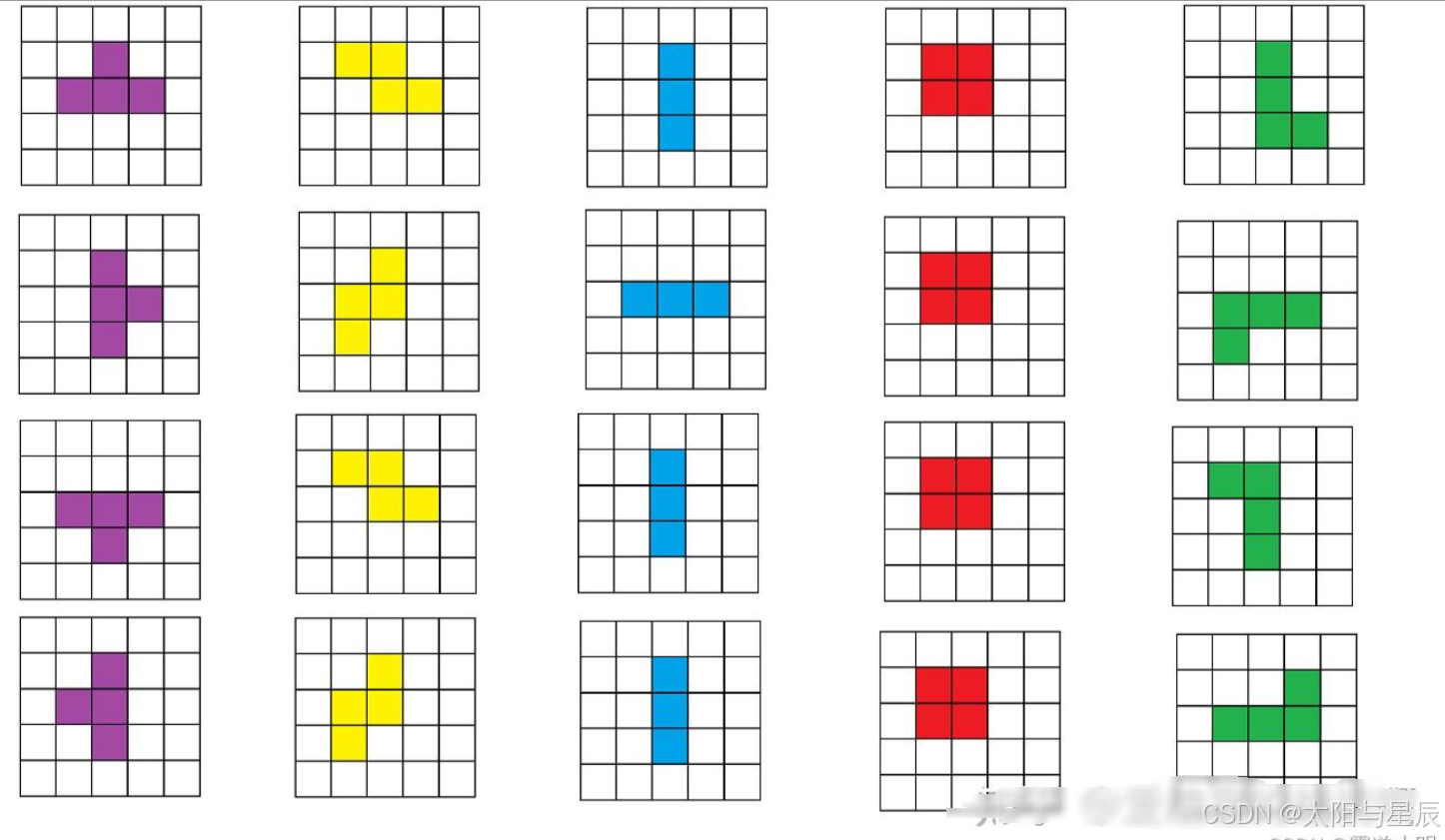
将每个方块的朝向用二维数组表示。此次共设计了五种方块,每个方块四种朝向,使用三维数组存储每个刚快及其朝向。1代表该点是方格。
#define BLOCK_COUNT 5
#define BLOCK_WIDTH 5
#define BLOCK_HEIGHT 5
int block[BLOCK_COUNT * 4][BLOCK_WIDTH][BLOCK_HEIGHT] = {
  // | 形方块
  { 0,0,0,0,0,0,0,1,0,0,0,0,1,0,0,0,0,1,0,0,0,0,0,0,0 },
  { 0,0,0,0,0,0,0,0,0,0,0,1,1,1,0,0,0,0,0,0,0,0,0,0,0 },
  { 0,0,0,0,0,0,0,1,0,0,0,0,1,0,0,0,0,1,0,0,0,0,0,0,0 },
  { 0,0,0,0,0,0,0,0,0,0,0,1,1,1,0,0,0,0,0,0,0,0,0,0,0 },
  // L 形方块
  { 0,0,0,0,0,0,0,1,0,0,0,0,1,0,0,0,0,1,1,0,0,0,0,0,0 },
  { 0,0,0,0,0,0,0,0,0,0,0,1,1,1,0,0,1,0,0,0,0,0,0,0,0 },
  { 0,0,0,0,0,0,1,1,0,0,0,0,1,0,0,0,0,1,0,0,0,0,0,0,0 },
  { 0,0,0,0,0,0,0,0,1,0,0,1,1,1,0,0,0,0,0,0,0,0,0,0,0 },
  // 田 形方块
  { 0,0,0,0,0,0,1,1,0,0,0,1,1,0,0,0,0,0,0,0,0,0,0,0,0 },
  { 0,0,0,0,0,0,1,1,0,0,0,1,1,0,0,0,0,0,0,0,0,0,0,0,0 },
  { 0,0,0,0,0,0,1,1,0,0,0,1,1,0,0,0,0,0,0,0,0,0,0,0,0 },
  { 0,0,0,0,0,0,1,1,0,0,0,1,1,0,0,0,0,0,0,0,0,0,0,0,0 },
  // T 形方块
  { 0,0,0,0,0,0,1,1,1,0,0,0,1,0,0,0,0,0,0,0,0,0,0,0,0 },
  { 0,0,0,0,0,0,0,0,1,0,0,0,1,1,0,0,0,0,1,0,0,0,0,0,0 },
  { 0,0,0,0,0,0,0,1,0,0,0,1,1,1,0,0,0,0,0,0,0,0,0,0,0 },
  { 0,0,0,0,0,0,1,0,0,0,0,1,1,0,0,0,1,0,0,0,0,0,0,0,0 },
  // Z 形方块
  { 0,0,0,0,0,0,1,1,0,0,0,0,1,1,0,0,0,0,0,0,0,0,0,0,0 },
  { 0,0,0,0,0,0,0,1,0,0,0,1,1,0,0,0,1,0,0,0,0,0,0,0,0 },
  { 0,0,0,0,0,0,1,1,0,0,0,0,1,1,0,0,0,0,0,0,0,0,0,0,0 },
  { 0,0,0,0,0,0,0,1,0,0,0,1,1,0,0,0,1,0,0,0,0,0,0,0,0 },
};
5.4 新方块表示nextBlock( )
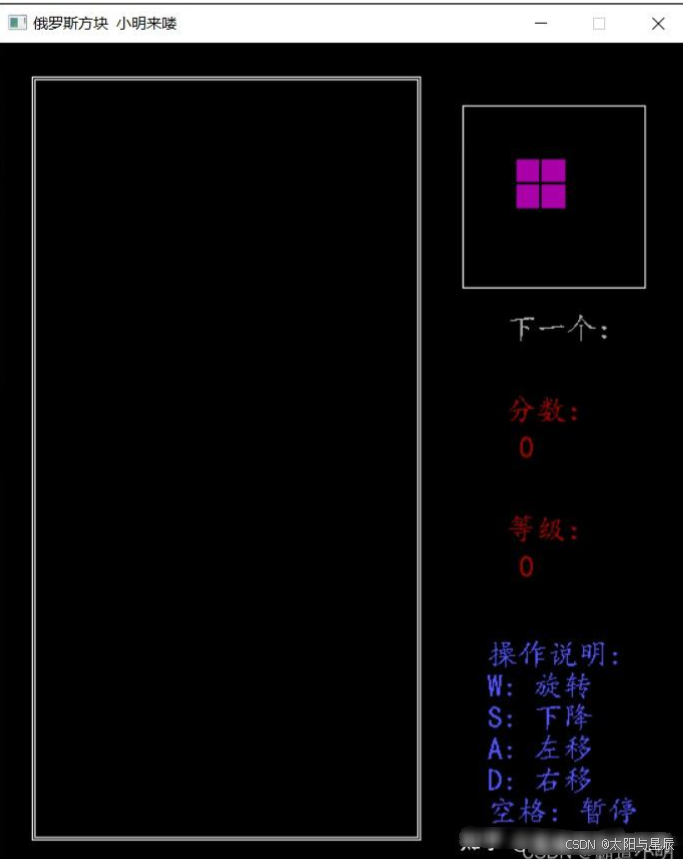
在方块提示框中每次生成新方块由两个动作组成,首先是擦除方块,接着是绘制新方块。
/*****************************************
* 功能:清除降落过程中的方块
* 输入:
* x,y - 方块的坐标(二维数组左上角位置)
* block_dir_t - 方块方向
* 返回:
* 无
****************************************/
void clearBlock(int x, int y, block_dir_t blockDir) {
  setcolor(BLACK);
  // setfont(23, 0, "楷体");
  int id = BlockIndex * 4 + blockDir;
  for (int i = 0; i < BLOCK_HEIGHT; ++i) {
    for (int j = 0; j < BLOCK_WIDTH; ++j) {
      if (block[id][i][j] == 1) {
        int x2 = x + j * UNIT_SIZE;
        int y2 = y + i * UNIT_SIZE;
        outtextxy(x2, y2, "■");
      }
    }
  }
}
/*****************************************
* 功能:在提示框 与 降落框的起始位置画方块
* 输入:
* x,y - 方块的坐标(二维数组左上角位置)
* 返回:
* 无
****************************************/
void nextblock() {
  clearBlock();
  //产生随机数,随机选择方块
  srand((unsigned)time(NULL)); //使用时间函数的返回值,来作为随机种子
  NextIndex = rand() % BLOCK_COUNT; //产生0~5的随机数
  drawBlock(391, 71);
}
5.5 设计游戏循环main( )
在游戏框中每次生成新方块会进入对新方块降落处理,等处理完后便会循环
int main() {
  welcome();
  initGameSceen();
  //产生新方块
  nextblock();
  // system("pause");
  Sleep(800);
  //初始化访问数组
  memset(visit, 0, sizeof(visit));
  while (1) {
    newblock();
    //消除满行,并更新分数和速度
    check();
  }
  system("pause");
  closegraph();
  return 0;
}
/*****************************************
*功能:绘制刚从顶部降落的方块,更新提示框内的方块,调用方块降落函数move()
*输入:
* 无
* 返回:
* 无
****************************************/
void newblock() {
  BlockIndex = NextIndex;
  //绘制刚从顶部下降的方块
  drawBlock(START_X, START_Y);
  //让新出现方块暂停一会
  Sleep(200);
  //右上角区域绘制下一个方块
  nextblock();
  //方块降落
  move();
}
5.6 搭建用户操作框架move( )
用户操作框架:断游戏是否结束 → 擦除当前方块 → 用户按键操作 → 绘制新的方块 → 延时等待 → 方块是否要固化(固化则则表明对当前方块操作结束)。
#define KEY_UP 87 //用户操作
#define KEY_LEFT 65
#define KEY_RIGHT 68
#define KEY_DOWN 83
#define KEY_SPACE 32
/*****************************************
* 功能:读取用户操作,时时更新降落的方块
* 输入:
* 无
* 返回:
* 无
****************************************/
void move() {
  int x = START_X; //方块起始位置
  int y = START_Y;
  int k = 0;
  block_dir_t blockDir = (block_dir_t)BLOCK_UP;
  int curSpeed = speed; //定义当前方块降落速度
  //读取用户操作前判断游戏是否结束
  failCheck();
  //持续向下降落
  while (1) {
    int curSpeed = speed; //定义当前方块降落速度
    //清除方块
    clearBlock(x, k + y, blockDir);
    //判断选择的方向
    if (_kbhit()) {
      int key = _getch();
      if (key == KEY_SPACE) {
      system("pause");
      }else if (key == KEY_UP) {
        block_dir_t nextDir = (block_dir_t)((blockDir + 1) % 4);
        if (rotatable(x, y + k, nextDir)) {
          blockDir = nextDir;
        }
      }else if (key == KEY_LEFT) {
        if (moveable(x, y + k + 20, MOVE_LEFT, blockDir)) {
          x -= UNIT_SIZE;
        }
      }else if (key == KEY_RIGHT) {
        if (moveable(x, y + k + 20, MOVE_RIGHT, blockDir)) {
          x += UNIT_SIZE;
        }
      }else if (key == KEY_DOWN) {
      curSpeed = 50;
      }
    }
    k += 20;
    //绘制方块
    drawBlock(x, y + k, blockDir);
    //休眠
    wait(curSpeed);
    //方块的固化处理,方块固定后结束循环,当前一个方块的move执行完毕
    if (!moveable(x, y + k, MOVE_DOWN, blockDir)) {
      mark(x, y + k, blockDir);
      break;
    }
  }
}
5.7 判断方块能否向指定方向移动moveable( )
当新方块刚从顶部绘制时就碰到了“固化”方块时则表明游戏结束,因此我们只需判断方块能否向下移动即可。这里先实现判断方块能否向指定方向移动功能。
/*****************************************
*功能:判断在指定位置向指定方向是否可以移动
*输入:
* x,y - 方块位置
* moveDir - 下一步想要移动的方向
* blockDir - 当前方块的方向
* 返回:
* true - 可以移动
* false - 不可以移动
****************************************/
bool moveable(int x0, int y0, move_dir_t moveDir, block_dir_t blockDir) {
  //计算方块左上角在30×15的游戏区位置(第多少行, 第多少列)
  int x = (y0 - MinY) / UNIT_SIZE;
  int y = (x0 - MinX) / UNIT_SIZE;
  int ret = 1;
  int id = BlockIndex * 4 + blockDir;
  if (moveDir == MOVE_DOWN) {
    for (int i = 0; i < BLOCK_HEIGHT; ++i) {
      for (int j = 0; j < BLOCK_WIDTH; ++j) {
        //向下不能运动的条件:实心方块已经达到底部(x+i+1==30),或者底部已有方块
        if (block[id][i][j] == 1 &&
        (x + i + 1 == 30 || visit[x + i + 1][y + j] == 1)) {
        ret = 0;
        }
      }
    }
  }
  else if (moveDir == MOVE_LEFT) {
    for (int i = 0; i < BLOCK_HEIGHT; ++i) {
      for (int j = 0; j < BLOCK_WIDTH; ++j) {
        //向左不能运动的条件:实心方块已经达到左边界(y+j==0),或者左边已有方块
        if (block[id][i][j] == 1 &&
        (y + j <= 0 || visit[x + i][y + j - 1] == 1)) {
        ret = 0;
        }
      }
    }
  }
  else if (moveDir == MOVE_RIGHT) {
    for (int i = 0; i < BLOCK_HEIGHT; ++i) {
      for (int j = 0; j < BLOCK_WIDTH; ++j) {
        //向下不能运动的条件:实心方块已经达到右边界(y+j+1>=15),或者右边已有方块
        if (block[id][i][j] == 1 &&
        (y + j + 1 >= 15 || visit[x + i][y + j + 1] == 1)) {
          ret = 0;
        }
      }
    }
  }
  return ret;
}
5.8 游戏失败检查failCheck( )
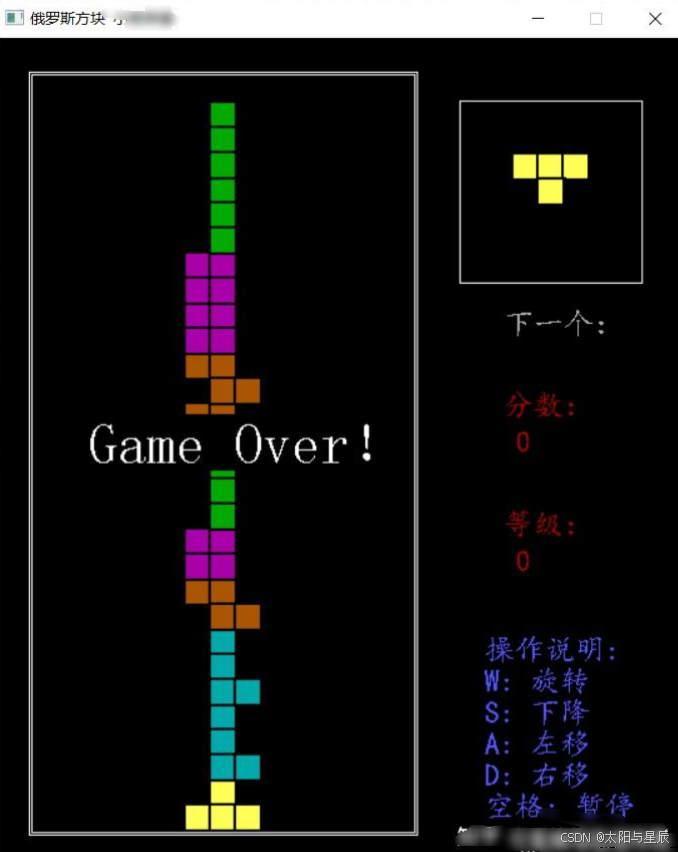
游戏失败检测,当新绘制方块无法向下移动时则表明游戏失败。
/*****************************
*功能:检测游戏是否结束
*输入:
* 无
* 返回:
* 无
*****************************/
void failCheck() {
  //游戏结束条件是顶部新被绘制出的方块就要“固化”,顶部新绘制的方块方向朝上,运动方向朝下
  if (!moveable(START_X, START_Y, MOVE_DOWN, (block_dir_t)BLOCK_UP)) {
    setcolor(WHITE);
    setfont(45, 0, "隶体");
    outtextxy(75, 300, "Game Over!");
    Sleep(1000);
    system("pause");
    closegraph();
    exit(0);
  }
}
5.9 清除下降过程中的方块clearBlock( )
如果游戏未失败,则表明用户可以继续操作,在读取用户操作前要先将降落框内的方块清除。
/*****************************************
* 功能:清空方块提示框里的方块
* 输入:
* 无
* 返回:
* 无
****************************************/
void clearBlock() {
  setcolor(BLACK);
  setfont(23, 0, "楷体");
  for (int i = 0; i < BLOCK_HEIGHT; ++i) {
    for (int j = 0; j < BLOCK_WIDTH; ++j) {
    int x = 391 + j * UNIT_SIZE;
    int y = 71 + i * UNIT_SIZE;
    outtextxy(x, y, "■");
    }
  }
}
5.10 判断方块旋转rotatable( )
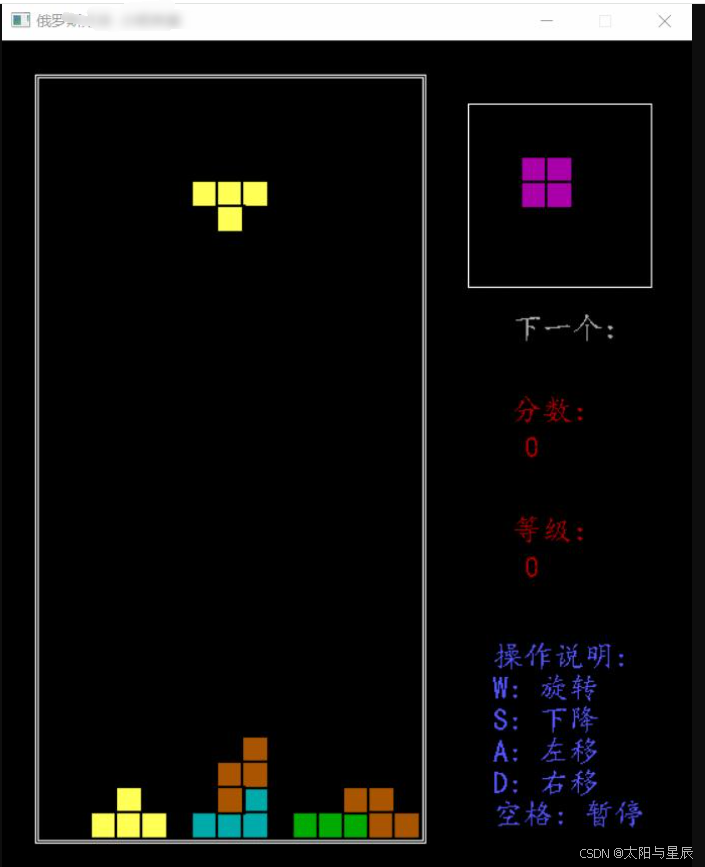
如果方块在待转方向可以向下运动则表明方块可以旋转,因此这里只需少加利用moveable函数即可实现。
/*****************************************
* 功能:判断当前方块是否可以向指定方向旋转
* 输入:
* x,y - 方块位置(二维数组坐标)
* dir - 方块旋转方向
* 返回:
* true - 可以旋转
* false - 不可以旋转
****************************************/
bool rotatable(int x, int y, block_dir_t dir) {
  //首先判断是否可以继续向下移动
  if (!moveable(x, y, MOVE_DOWN, dir)) {
    return false;
  }
  int x2 = (y - MinY) / UNIT_SIZE;
  int y2 = (x - MinX) / UNIT_SIZE;
  int id = BlockIndex * 4 + dir;
  for (int i = 0; i < BLOCK_HEIGHT; ++i) {
    for (int j = 0; j < BLOCK_WIDTH; ++j) {
      //不能旋转条件:左右边界越界或者已有方块“阻挡”
      if (block[id][i][j] == 1 && (y2 + j < 0 || y2 + j >= 15 || visit[x2 + i][y2 + j] == 1)) {
        return false;
      }
    }
  }
  return true;
}
5.11 绘制下降过程中的方块drawBlock( )
每次根据用户操作绘制新的方块
/*****************************************
*功能:绘制下降过程中的方块
*输入:
* x,y - 方块的坐标(二维数组左上角位置)
* block_dir_t - 方块方向
* 返回:
* 无
****************************************/
void drawBlock(int x, int y, block_dir_t dir) {
	setcolor(color[BlockIndex]);
	setfont(23, 0, "楷体");
	int id = BlockIndex * 4 + dir;
  for (int i = 0; i < BLOCK_HEIGHT; ++i) {
		for (int j = 0; j < BLOCK_WIDTH; ++j) {
			if (block[id][i][j] == 1) {
				//擦除该方块的第i行第j列
				outtextxy(x + j * UNIT_SIZE, y + i * UNIT_SIZE, "■");
			}
	   }
  }
}
5.12 延时等待wait( )
每次 处理完用户操作后会进入延时等待,等待时长会根据当前方块降落速度而定,在延时等待期间如果检测到用户有按键操作时则会结束等待。
/**************************
* 功能:延时等待
* 输入:
*
* 返回:
* 无
*************************/
void wait(int interval) {
  int count = interval / 10;
  for (int i = 0; i < count; ++i) {
    Sleep(10);
    //如果休眠期间用户有按键,则结束休眠
    if (_kbhit()) {
      return;
    }
  }
}
5.13 固定方块mark( )
每次绘制出新方块后判断方块是否还能继续移动,如果不能移动则表明方块需要固化。
/*****************************************
* 功能:
* 输入:
*
* 返回:
* 无
****************************************/
void mark(int x, int y, block_dir_t dir) {
  int id = BlockIndex * 4 + dir;
  int x2 = (y - MinY) / UNIT_SIZE;
  int y2 = (x - MinX) / UNIT_SIZE;
  for (int i = 0; i < BLOCK_HEIGHT; ++i) {
    for (int j = 0; j < BLOCK_WIDTH; ++j) {
      if (block[id][i][j] == 1) {
        visit[x2 + i][y2 + j] = 1;
        markColor[x2 + i][y2 + j] = color[BlockIndex];
      }
    }
  }
}
5.14 用户操作框架完善mov( )
将上述实现功能补充到操作框架中
/*****************************************
* 功能:读取用户操作,时时更新降落的方块
* 输入:
* 无
* 返回:
* 无
****************************************/
void move() {
  int x = START_X; //方块起始位置
  int y = START_Y;
  int k = 0;
  block_dir_t blockDir = (block_dir_t)BLOCK_UP;
  int curSpeed = speed; //定义当前方块降落速度
  //读取用户操作前判断游戏是否结束
  failCheck();
  //持续向下降落
  while (1) {
    int curSpeed = speed; //定义当前方块降落速度
    //清除方块
    clearBlock(x, k + y, blockDir);
    //判断选择的方向
    if (_kbhit()) {
      int key = _getch();
      if (key == KEY_SPACE) {
      system("pause");
      }else if (key == KEY_UP) {
        block_dir_t nextDir = (block_dir_t)((blockDir + 1) % 4);
        if (rotatable(x, y + k, nextDir)) {
          blockDir = nextDir;
        }
      }else if (key == KEY_LEFT) {
        if (moveable(x, y + k + 20, MOVE_LEFT, blockDir)) {
          x -= UNIT_SIZE;
        }
      }else if (key == KEY_RIGHT) {
        if (moveable(x, y + k + 20, MOVE_RIGHT, blockDir)) {
          x += UNIT_SIZE;
        }
      }else if (key == KEY_DOWN) {
      curSpeed = 50;
      }
    }
    k += 20;
    //绘制方块
    drawBlock(x, y + k, blockDir);
    //休眠
    wait(curSpeed);
    //方块的固化处理,方块固定后结束循环,当前一个方块的move执行完毕
    if (!moveable(x, y + k, MOVE_DOWN, blockDir)) {
      mark(x, y + k, blockDir);
      break;
    }
  }
}
5.15 消除方块check( )+down( )
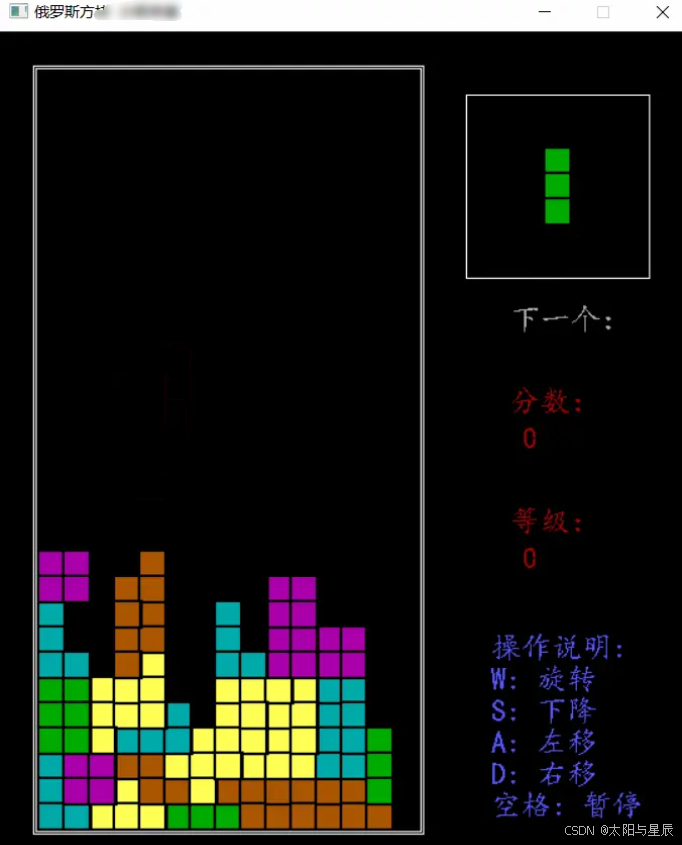
当对一个方块下降操作结束后,在已固化方块数组里查找“满行”方块,如果存在“满行”方块则要进行清除操作,接着更新用户分数和等级。
/*************************
* 功能:检查是否有满行方块
* 输入:
* 无
* 返回:
* 无
*************************/
void check() {
  int i, j;
  int clearLines = 0;
  for (i = 29; i >= 0; i--) {
    // 检查第i行有没有满
    for (j = 0; j < 15 && visit[i][j]; j++);
    //执行到此处时,有两种情况:
    // 1. 第i行没有满,即表示有空位 此时 j<15
    // 2. 第i行已满了,此时 j>=15
    if (j >= 15) {
      // 此时,第i行已经满了,就需要消除第i行
      down(i); //消除第i行,并把上面的行都下移
      i++; // 因为最外层的循环中有 i--, 所以我们先i++, 使得下次循环时,再把这一行检查一下
      clearLines++;
    }
  }
  // 更新分数
  addScore(clearLines);
  // 更新等级(更新等级提示,更新速度)
  updateGrade();
}
/*****************************************
* 功能:消除第i行,并把上面的行都往下移
* 输入:
* 无
* 返回:
* 无
****************************************/
void down(int x) {
  for (int i = x; i > 0; --i) {
    for (int j = 0; j < 15; ++j) {
      if (visit[i - 1][j] == 1) {
        visit[i][j] = 1;
        markColor[i][j] = markColor[i - 1][j];
        setcolor(markColor[i][j]);
        outtextxy(20 * j + MinX, 20 * i + MinY, "■");
      }else {
        visit[i][j] = 0;
        setcolor(BLACK);
        outtextxy(20 * j + MinX, 20 * i + MinY, "■");
      }
    }
  }
  //清除最顶层方格
  setcolor(BLACK);
  for (int j = 0; j < 15; ++j) {
    visit[0][j] = 0;
    outtextxy(20 * j + MinX, MinY, "■");
  }
}
5.16 更新分数和等级addScore( )+updateGrade( )
根据清除方块行数更新用户分数和等级。
/*****************************************
* 功能:更新分数
* 输入:
* 无
* 返回:
* 无
****************************************/
void addScore(int lines) {
  char str[32];
  score += lines * 10;
  sprintf_s(str, 32, "%d", score);
  setcolor(RED);
  outtextxy(415, 310, str);
}
/*************************
* 功能:更新等级
* 输入:
* 无
* 返回:
* 无
*************************/
void updateGrade() {
  //更新等级
  //假设50分一级
  rank = score / 50;
  char str[32];
  sprintf_s(str, 32, "%d", rank);
  setcolor(RED);
  outtextxy(415, 405, str);
  //更新速度
  if (speed <= 100) {
    speed = 100;
  }
  else {
    speed = 500 - rank * 20;
  }
}





 扫一扫
扫一扫


 被折叠的 条评论
为什么被折叠?
被折叠的 条评论
为什么被折叠?
 到【灌水乐园】发言





