


dnf install s-nail -y
vim /etc/s-nail.rc
set from=3578815894@qq.com
set smtp=smtp.qq.com
set smtp-auth-user=3578815894@qq.com
set smtp-auth-password=pwzmndsuktrmcgih
set smtp-auth=login
因为需要 QQ 邮箱的 SSL 证书,所以我们还需要手动的获取QQ 邮箱的证书保存到本地指定的目录里以备调用和验证,具体命令如下:
mkdir -p /root/.certs/
echo -n | openssl s_client -connect smtp.qq.com:465 | sed -ne '/-BEGIN CERTIFICATE-/,/-END CERTIFICATE-/p' > ~/.certs/qq.crt
certutil -A -n "GeoTrust SSL CA" -t "C,," -d ~/.certs -i ~/.certs/qq.crt
certutil -A -n "GeoTrust Global CA" -t "C,," -d ~/.certs -i ~/.certs/qq.crt
certutil -L -d /root/.certs
为了防止出现前文所说的发送邮件警告提示,还需要进入邮箱 SSL 证书存放目录 /root/.certs 里执行如下命令:
cd /root/.certs
certutil -A -n "GeoTrust SSL CA - G3" -t "Pu,Pu,Pu" -d ./ -i qq.crt
返回如下提示即可:
Notice: Trust flag u is set automatically if the private key is present.
验证测试
[root@localhost .certs]# echo 123 | mail -s test 1065372838@qq.com
echo 123 |mail -s “邮件” 3578815894@qq.com
crontab -e -u root
12 12 * * * /usr/bin/touch /file
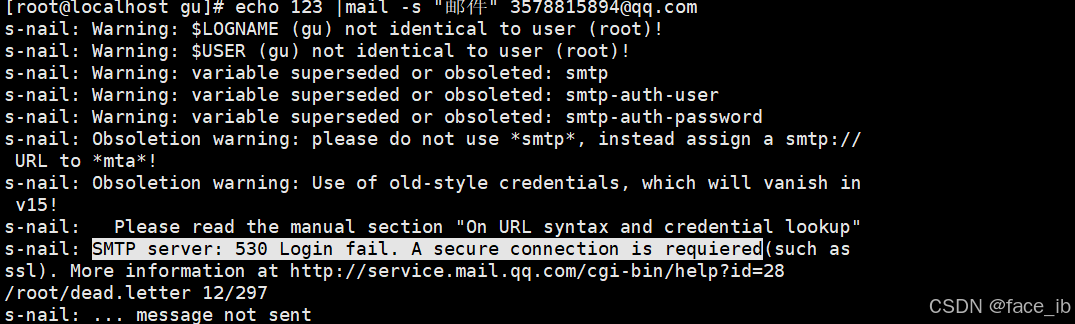
如出现如图情况最好转用163邮箱方法如上





 扫一扫
扫一扫


 6919
6919

 被折叠的 条评论
为什么被折叠?
被折叠的 条评论
为什么被折叠?
 到【灌水乐园】发言





