


 本文指导如何使用Jenkins配置pipeline,通过GitParameterPlugin参数化,SSH部署Vue和Node.js项目的npm打包成果,实现从代码分支到生产环境的无缝流程。
jenkins 部署 vue(nodejs)打包项目
准备:
- jenkins
- jenkins 插件 Git Parameter Plugin 参数化构建过程
- jenkins 插件 ssh Publisher 远程部署
- 全局配置好 ssh 远程服务器,测试联通
- 「可选」全局配置,git 仓库,或者 项目配置 git 仓库,建议使用 token 访问仓库
配置 pipeline 项目
def url = "https://oauth2:Lxxxxxxxxxxxxxx@gitlab.xxxx.com/good/good_project.git"
def remote_directory = "/data/project/web-back/"

pipeline {
  agent any
  parameters {
      // 需要安装 Git Parameter Plugin
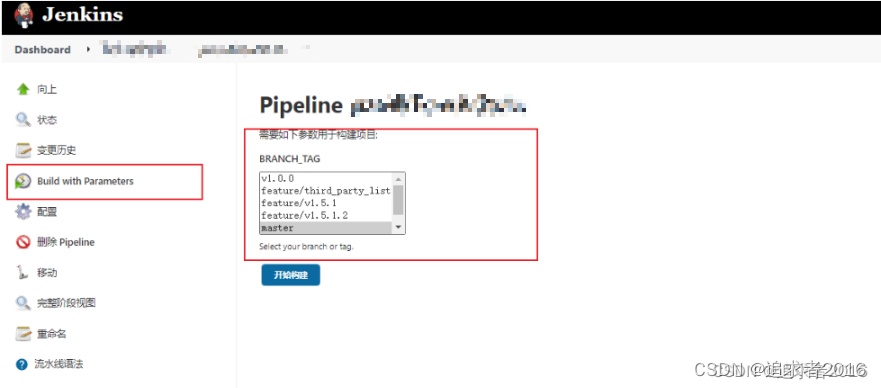
      gitParameter name: 'BRANCH_TAG',
                    type: 'PT_BRANCH_TAG',
                    branchFilter: 'origin/(.*)',
                    defaultValue: 'master',
                    selectedValue: 'DEFAULT',
                    sortMode: 'ASCENDING_SMART',
          description: 'Select your branch or tag.'
  }
  stages {
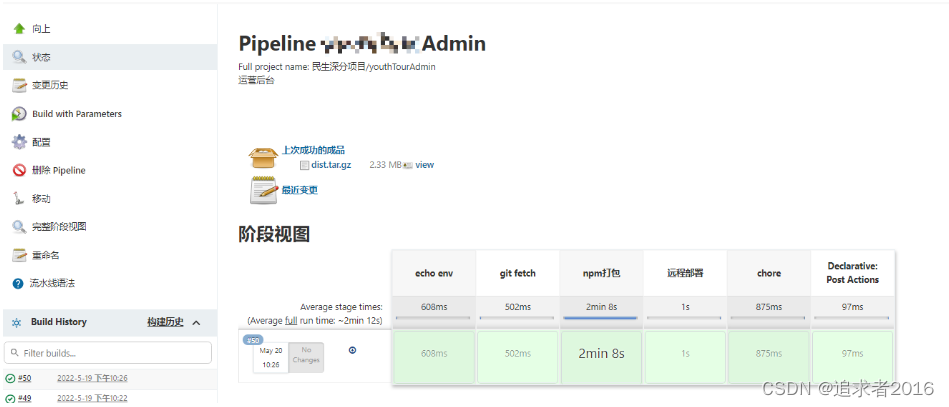
    stage('echo env') {
        steps {
          sh 'printenv'
        }
    }
    stage("git fetch") {
      steps {
         checkout([$class: 'GitSCM',
                          // branches: [[name: "*/${branch}"]],
                          branches: [[name: "${params.BRANCH_TAG}"]],
                          doGenerateSubmoduleConfigurations: false,
                          extensions: [],
                          submoduleCfg: [],
                          userRemoteConfigs: [[
                            url: "${url}",
                            // credentialsId: 'for_gitlab',
                          ]]
                        ])
      }
    }
    stage('npm打包') {
      steps {
          //使用NodeJS的npm进行打包
          nodejs('nodejs14'){
              sh '''
                  yarn
                  yarn build
                '''
          }
      }

    }
    stage('远程部署') {
      steps {
        //远程调用进行项目部署
        // *.js      所有js文件
        // *          只传输文件,文件夹不会传输
        // **         所有文件
        sshPublisher(publishers: [sshPublisherDesc(configName: '172.16.4.152',
                                                    transfers: [sshTransfer( cleanRemote: true,
                                                                              excludes: '',
                                                                              execCommand: '',
                                                                              execTimeout: 120000,
                                                                              flatten: false,
                                                                              makeEmptyDirs: false,
                                                                              noDefaultExcludes:false,
                                                                              patternSeparator: '[, ]+',
                                                                              remoteDirectory: "${remote_directory}",
                                                                              remoteDirectorySDF: false,
                                                                              removePrefix: 'dist/',
                                                                              sourceFiles: 'dist/**')],
                                                      usePromotionTimestamp: false,
                                                      useWorkspaceInPromotion: false,
                                                      verbose: true)])
      }
    }
    stage("chore") {
      steps {
        sh """
        pwd
        tar -zcf dist.tar.gz -C dist . # 打包dist目录的内容,不包括dist目录自身
        ls -al dist*
        """
      }
    }
  }
  post {
    success {
    // 打包成功就 归档
      archiveArtifacts artifacts: 'dist*.gz',
                       allowEmptyArchive: true,
                       fingerprint: true,
                       onlyIfSuccessful: true
    }
  }
}
参数化构建
流水线构建





 扫一扫
扫一扫


 636
636

 被折叠的 条评论
为什么被折叠?
被折叠的 条评论
为什么被折叠?
 到【灌水乐园】发言





