



 本文介绍了如何在C#中使用WindowsForms实现串口的打开、关闭、数据发送和接收功能,包括选择COM口和波特率,以及TextBox的多行显示和接收模式的切换。
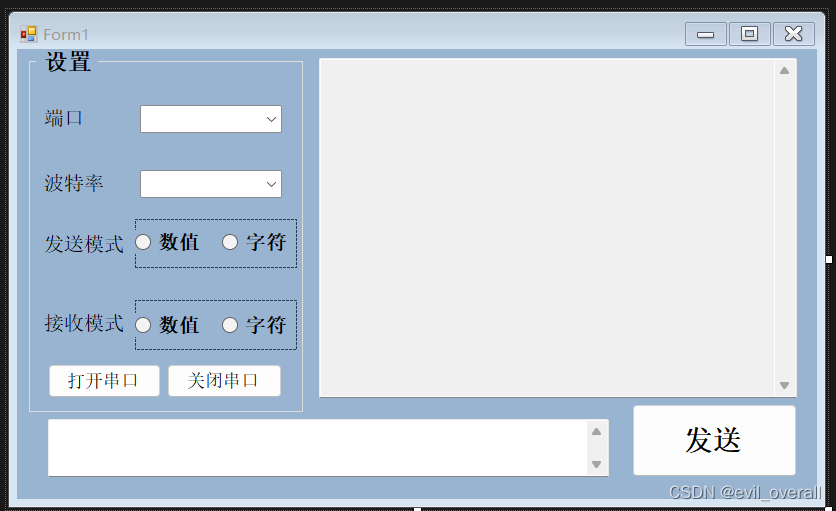
代码:
using System;
using System.Collections.Generic;
using System.ComponentModel;
using System.Data;
using System.Drawing;
using System.Linq;
using System.Text;
using System.Threading.Tasks;
using System.Windows.Forms;

namespace 串口助手开发
{
    public partial class Form1 : Form
    {
        public Form1()
        {
            InitializeComponent();
            Control.CheckForIllegalCrossThreadCalls = false;
        }
        //打开串口
        private void button2_Click(object sender, EventArgs e)
        {
            try {
                serialPort1.PortName = comboBox1.Text;
                serialPort1.BaudRate = Convert.ToInt32(comboBox2.Text);
                serialPort1.Open();
                button2.Enabled = false; //打开串口不可用
                button3.Enabled = true; //关闭串口
            }
            catch
            {
                MessageBox.Show("端口打开失败!请检查串口", "错误");
            }
        }
        //关闭串口
        private void button3_Click(object sender, EventArgs e)
        {
            try
            {
                serialPort1.Close(); //关闭串口
                button2.Enabled = true; //打开串口可用
                button3.Enabled = false; //关闭串口不可用
            }
            //关闭串口正常不会出错,不用写处理程序
            catch(Exception error)
            {

            }

        }
        //发送
        private void button1_Click(object sender, EventArgs e)
        {
            byte[] Data = new byte[1024];
            if (serialPort1.IsOpen)  //判断串口是否打开
            {
                if (textBox2.Text != " ")
                {
                    if (!radioButton1.Checked)  //如果发送模式是字符
                    {
                        try
                        {
                            serialPort1.WriteLine(textBox2.Text);
                        }
                        catch (Exception error)
                        {
                            MessageBox.Show("串口数据输入错误", "错误");
                            serialPort1.Close();
                            button2.Enabled = true;
                            button3.Enabled = false;
                        }
                    }
                    else
                    {
                        //取余3运算作用是防止用户输入的字符为奇数个
                        for (int i=0;i<(textBox2.Text.Length - textBox2.Text.Length % 2) / 2; i++)
                        {
                            Data[0] = Convert.ToByte(textBox2.Text.Substring(i*2,2),16);
                            serialPort1.Write(Data,0,1); //循环发送(例:如果输入字符为0A0BB,则只发送0A,0B)
                        }
                        if(textBox2.Text.Length % 2 != 0)//剩下一位单独处理
                        {
                            //单独发送B(0B)
                            Data[0] = Convert.ToByte(textBox2.Text.Substring(textBox2.Text.Length - 1,1),16);
                            serialPort1.Write(Data, 0 ,1);//发送
                        }
                    }
                }
            }
        }

        private void Form1_Load(object sender, EventArgs e)
        {
            for(int i = 1; i < 20; i++)
            {
                comboBox1.Items.Add("COM" + i.ToString());
            }
            comboBox1.Text = "COM1";  //串口号默认值
            comboBox2.Text = "9600";  //波特率默认值


            //必须手动添加事件处理程序
            serialPort1.DataReceived += new System.IO.Ports.SerialDataReceivedEventHandler(port_DataReceived);
        }
        //串口控件双击没反应,程序只能自己写
        private void port_DataReceived(object sender, System.EventArgs e)
        {
            //如果接收模式为字符模式
            if(!radioButton3.Checked)
            {
                string str = serialPort1.ReadExisting(); //字符串方式读
                textBox1.AppendText(str);//添加内容
            }
            //如果接收模式为数值模式
            else
            {
                byte data;
                //此处需要强制类型转换,将(int)类型数据转换为(byte类型数据,不必考虑是否会丢失数据
                data = (byte)serialPort1.ReadByte();
                //转换为大写十六进制字符串
                string str = Convert.ToString(data, 16).ToUpper();
                textBox1.AppendText("0x" + (str.Length == 1 ? "0" + str : str) + " ");//空位补“0”
            }
        }
    }
}
相关控件介绍和设置:
textbox:
这个可以设置对话框的纵横是否有拉条
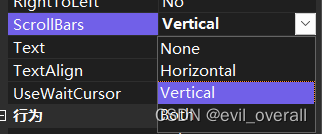
这个设置要不要多行显示

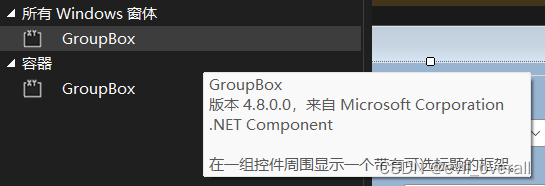
groupbox:
划分一块区域并写上标题(例如设置)
panel:
把几个单独的控件整合为一组(例如开关或者图片那样),使控件之间会相互影响





 扫一扫
扫一扫


 1246
1246

 被折叠的 条评论
为什么被折叠?
被折叠的 条评论
为什么被折叠?
 到【灌水乐园】发言





