



 本文介绍了Properties类,它是Hashtable的子类,无泛型,键值为字符串,可持久化,有和流结合的方法。还阐述了其特有方法,如load和store。通过实例演示了将集合内容存储到文件,以及从文件读取数据到集合的操作,使用字符流可完成中文读取。
1.Properties类
Properties 类表示了一个持久的属性集。Properties 可保存在流中或从流中加载。属性列表中每个键及其对应值都是一个字符串。
特点:
1、Hashtable的子类,map集合中的方法都可以用。
2、该集合没有泛型。键值都是字符串。
3、它是一个可以持久化的属性集。键值可以存储到集合中,也可以存储到持久化的设备(硬盘、U盘、光盘)上。键值的来源也可以是持久化的设备。
4、有和流技术相结合的方法。
2.Propertise类的方法
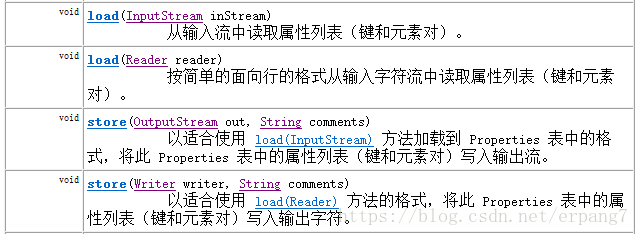
特有方法:
- load(InputStream) 把指定流所对应的文件中的数据,读取出来,保存到Propertie集合中
- load(Reader)
- store(OutputStream,commonts)把集合中的数据,保存到指定的流所对应的文件中,参数commonts代表对描述信息
- stroe(Writer,comments)。
3.Properties类的方法实例
代码演示:
/*
 *
 * Properties集合,它是唯一一个能与IO流交互的集合
 *
 * 需求:向Properties集合中添加元素,并遍历
 *
 * 方法:
 * public Object setProperty(String key, String value)调用 Hashtable 的方法 put。
 * public Set<String> stringPropertyNames()返回此属性列表中的键集,
 * public String getProperty(String key)用指定的键在此属性列表中搜索属性
 */
public class PropertiesDemo01 {
	public static void main(String[] args) {
		//创建集合对象
		Properties prop = new Properties();
		//添加元素到集合
		//prop.put(key, value);
		prop.setProperty("周迅", "张学友");
		prop.setProperty("李小璐", "贾乃亮");
		prop.setProperty("杨幂", "刘恺威");

		//System.out.println(prop);//测试的使用
		//遍历集合
		Set<String> keys = prop.stringPropertyNames();
		for (String key : keys) {
			//通过键 找值
			//prop.get(key)
			String value = prop.getProperty(key);
			System.out.println(key+"==" +value);
		}
	}
}
4.将集合中的内容存储到文件
需求:使用Properties集合,完成把集合内容存储到IO流所对应文件中的操作
分析步骤:
1,创建Properties集合
2,添加元素到集合
3,创建流
4,把集合中的数据存储到流所对应的文件中
stroe(Writer,comments)
store(OutputStream,commonts)
把集合中的数据,保存到指定的流所对应的文件中,参数commonts代表对描述信息
5,关闭流
案例:
public class PropertiesDemo02 {
	public static void main(String[] args) throws IOException {
		//1,创建Properties集合
		Properties prop = new Properties();
		//2,添加元素到集合
		prop.setProperty("周迅", "张学友");
		prop.setProperty("李小璐", "贾乃亮");
		prop.setProperty("杨幂", "刘恺威");

		//3,创建流
		FileWriter out = new FileWriter("prop.properties");
		//4,把集合中的数据存储到流所对应的文件中
		prop.store(out, "save data");
		//5,关闭流
		out.close();
	}
}
5.读取文件中的数据,并保存到集合
需求:从属性集文件prop.properties 中取出数据,保存到集合中
分析:
1,创建集合
2,创建流对象
3,把流所对应文件中的数据 读取到集合中
load(InputStream) 把指定流所对应的文件中的数据,读取出来,保存到Propertie集合中
load(Reader)
4,关闭流
5,显示集合中的数据
案例演示:
public class PropertiesDemo03 {
	public static void main(String[] args) throws IOException {
		//1,创建集合
		Properties prop = new Properties();
		//2,创建流对象
		FileInputStream in = new FileInputStream("prop.properties");
//FileReader in = new FileReader("prop.properties");
		//3,把流所对应文件中的数据 读取到集合中
		prop.load(in);
		//4,关闭流
		in.close();
		//5,显示集合中的数据
		System.out.println(prop);

	}
}
注意:使用字符流FileReader就可以完成文件中的中文读取操作了!





 扫一扫
扫一扫


 929
929

 被折叠的 条评论
为什么被折叠?
被折叠的 条评论
为什么被折叠?
 到【灌水乐园】发言





