



 本文介绍如何避免频繁创建ApplicationContext,通过在Web应用启动时配置ContextLoaderListener,使Spring自动加载并存储配置文件,从而在任何位置便捷获取应用上下文。
1. ApplicationContext应用上下文获取方式
应用上下文对象是通过 new ClasspathXmlApplicationContext(spring配置文件) 方式获取的,但
是每次从容器中获得Bean时都要编写 ,
这样的弊端是配置文件加载多次,应用上下文对象创建多次。
解决思路分析:
在Web项目中,可以使用ServletContextListener监听Web应用的启动,我们可以在Web应用启动 时,就加载Spring的配置文件,创建应用上下文对象ApplicationContext,在将其存储到最大的域servletContext域中,这样就可以在任意位置从域中获得应用上下文ApplicationContext对象了.
2.Spring提供获取应用上下文的工具
上面的分析不用手动实现,Spring提供了一个监听器ContextLoaderListener就是对上述功能的封 装,该监听器内部加载Spring配置文件,创建应用上下文对象,并存储到ServletContext域中,提供 了一个客户端工具WebApplicationContextUtils供使用者获得应用上下文对象.
所以我们需要做的只有两件事:
- 在web.xml中配置ContextLoaderListener监听器(导入spring-web坐标)
- 使用WebApplicationContextUtils获得应用上下文对象ApplicationContext
3. 实现
(1)pom.xml中导入Spring集成web的坐标
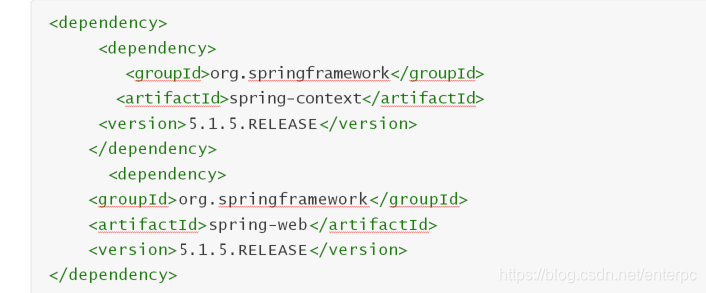
<?xml version="1.0" encoding="UTF-8"?>
<project xmlns="http://maven.apache.org/POM/4.0.0"
         xmlns:xsi="http://www.w3.org/2001/XMLSchema-instance"
         xsi:schemaLocation="http://maven.apache.org/POM/4.0.0 http://maven.apache.org/xsd/maven-4.0.0.xsd">
    <modelVersion>4.0.0</modelVersion>

    <groupId>com.lagou</groupId>
    <artifactId>spring_web</artifactId>
    <version>1.0-SNAPSHOT</version>

    <packaging>war</packaging>

  <dependencies>
      <dependency>
          <groupId>org.springframework</groupId>
          <artifactId>spring-context</artifactId>
          <version>5.1.5.RELEASE</version>
      </dependency>

      <dependency>
          <groupId>org.springframework</groupId>
          <artifactId>spring-web</artifactId>
          <version>5.1.5.RELEASE</version>
      </dependency>


  </dependencies>


</project>
(2)web.xml中配置ContextLoaderListener监听器
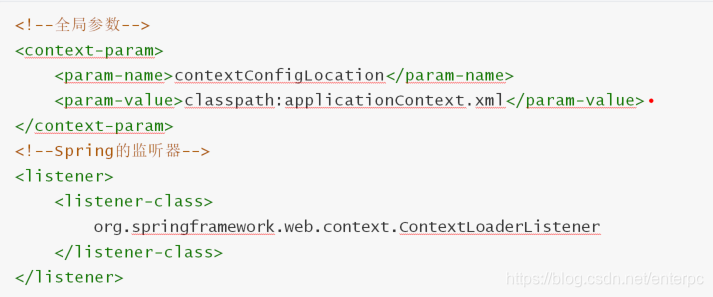
<?xml version="1.0" encoding="UTF-8"?>
<web-app xmlns="http://xmlns.jcp.org/xml/ns/javaee"
         xmlns:xsi="http://www.w3.org/2001/XMLSchema-instance"
         xsi:schemaLocation="http://xmlns.jcp.org/xml/ns/javaee http://xmlns.jcp.org/xml/ns/javaee/web-app_4_0.xsd"
         version="4.0">


    <servlet>
        <servlet-name>AccountServlet</servlet-name>
        <servlet-class>com.lagou.servlet.AccountServlet</servlet-class>
    </servlet>
    <servlet-mapping>
        <servlet-name>AccountServlet</servlet-name>
        <url-pattern>/AccountServlet</url-pattern>
    </servlet-mapping>


    <!--全局参数:指定applciationContext.xml文件的路径-->
    <context-param>
        <param-name>contextConfigLocation</param-name>
        <param-value>classpath:applicationContext.xml</param-value>
    </context-param>

    <!--spring的监听器 contextLoaderListenere-->
    <listener>
        <listener-class>org.springframework.web.context.ContextLoaderListener</listener-class>
    </listener>


</web-app>
(3)通过工具获得应用上下文对象

package com.lagou.servlet;

import com.lagou.domain.Account;
import org.springframework.context.ApplicationContext;
import org.springframework.web.context.support.WebApplicationContextUtils;

import java.io.IOException;

public class AccountServlet extends javax.servlet.http.HttpServlet {

    protected void doPost(javax.servlet.http.HttpServletRequest request, javax.servlet.http.HttpServletResponse response) throws javax.servlet.ServletException, IOException {
        doGet(request,response);
    }

    protected void doGet(javax.servlet.http.HttpServletRequest request, javax.servlet.http.HttpServletResponse response) throws javax.servlet.ServletException, IOException {

        // classPathXmlApplicationContext对象存到servletContext域中
     /*   ClassPathXmlApplicationContext classPathXmlApplicationContext = new ClassPathXmlApplicationContext("applicationContext.xml");
        Account account = (Account) classPathXmlApplicationContext.getBean("account");
        System.out.println(account);
*/
        ApplicationContext webApplicationContext = WebApplicationContextUtils.getWebApplicationContext(request.getServletContext());
        Account account = (Account) webApplicationContext.getBean("account");
        System.out.println(account);

    }
}
节选自拉钩教育Java系列课程





 扫一扫
扫一扫


 981
981

 被折叠的 条评论
为什么被折叠?
被折叠的 条评论
为什么被折叠?
 到【灌水乐园】发言





