


 本文介绍如何在IIS中不使用.svc文件部署WCF服务,通过自定义虚拟路径提供者、虚拟文件及服务宿主工厂实现动态加载服务。适用于希望简化部署流程的开发者。
For hosting WCF Services in IIS you usually need a .svc file. This File exposes your Service.
With ASP.NET virtual Paths you have the opportunity to load your service without a .svc file.
You can put the WCF Service inside a DLL without adding a reference to the ASP.NET WebApp.
Implementation:
- Create a Class derived from VirtualPathProvider and override the MethodsGetFile and FileExists. |
- Create a Class derived from VirtualFile and override the Method Open. |
- Create a Class derived from ServiceHostFactory and override the MethodCreateServiceHost. |
- The VirtualPathProvider manages the calling URLs and returns a VirtualFile,
if the client calls a WCF Service. |
- The VirtualFile generates the .svc Content. |
- The ServiceHostFactory hosts the WCF Service. |
- Register the VirtualPathProvider in global.asax |
Here is the code: (VirtualPathProvider)
|
1
2
3
4
5
6
7
8
9
10
11
12
13
14
15
16
17
18
19
20
21
22
23
|
public
class
ServicePathProvider : VirtualPathProvider{ public
override
VirtualFile GetFile(string
virtualPath) { if
(!this.IsServiceCall(virtualPath)) return
this.Previous.GetFile(virtualPath); return
new
ServiceFile(virtualPath); } private
bool
IsServiceCall(string
virtualPath) { //
Check if it is a wcf service call virtualPath
= VirtualPathUtility.ToAppRelative(virtualPath); return
(virtualPath.ToLower().StartsWith("~/srv_")); } public
override
bool
FileExists(string
virtualPath) { if
(!this.IsServiceCall(virtualPath)) return
this.Previous.FileExists(virtualPath); return
true; }} |
VirtualFile
|
1
2
3
4
5
6
7
8
9
10
11
12
13
14
15
16
17
18
19
20
21
22
23
24
25
26
27
28
29
30
31
32
33
34
35
36
37
38
|
public
class
ServiceFile : VirtualFile{ public
ServiceFile(string
virtualPath) :
base(virtualPath) {
} public
string
GetCallingServiceName { get { //
Return class name. srv_hello.svc => hello return
base.VirtualPath.Replace("/srv_",
string.Empty) .Replace(".svc",
string.Empty).ToLower(); } } public
string
GetService() { string
srv = this.GetCallingServiceName; //
hello => Hello return
srv[0].ToString().ToUpper() + srv.Substring(1); } public
override
Stream Open() { var
serviceDef = new
MemoryStream(); var
defWriter = new
StreamWriter(serviceDef); //
Write host definition defWriter.Write("<%@
ServiceHost Language=\"C#\" Debug=\"true\" Service=\"Services."+
this.GetService()
+ "\"
"
+ "Factory=\"DynamicServices.DynamicHostFactory,
DynamicServices\" %>"); defWriter.Flush(); serviceDef.Position
= 0; return
serviceDef; }} |
ServiceHostFactory
|
1
2
3
4
5
6
7
8
9
10
11
12
13
14
15
16
17
18
19
20
21
22
23
24
25
26
27
|
public
class
DynamicHostFactory : ServiceHostFactory{ public
DynamicHostFactory() { } public
override
ServiceHostBase CreateServiceHost(string
constructorString, Uri[] baseAddresses) { //
Load bin/services.dll var
asm = Assembly.Load("Services"); var
serviceType = asm.GetType(constructorString); var
host = new
ServiceHost(serviceType, baseAddresses); //
Add endpoints. (In this example only IHello interface) foreach
(Type contract in
serviceType.GetInterfaces()) { var
attribute = (ServiceContractAttribute) Attribute.GetCustomAttribute(contract,
typeof(ServiceContractAttribute)); if
(attribute != null) host.AddServiceEndpoint(contract,
new
BasicHttpBinding(), ""); } //
Add metdata behavior for generating wsdl var
metadata = new
ServiceMetadataBehavior(); metadata.HttpGetEnabled
= true; host.Description.Behaviors.Add(metadata); return
host; }} |
Global.asax
|
1
2
3
4
|
void
Application_Start(object
sender, EventArgs e){ HostingEnvironment.RegisterVirtualPathProvider(new
ServicePathProvider());} |
Example:
I created a DLL (Services.dll) with a WCF service. Here the Code:
|
1
2
3
4
5
6
7
8
9
10
11
12
13
14
|
[ServiceContract]public
interface
IHello{ [OperationContract] string
SayHello(string
name);}public
class
Hello : IHello{ public
string
SayHello(string
name) { return
"Hello "
+ name; }} |
I compiled the DLL and copied it into the bin Folder of the ASP.NET Application.
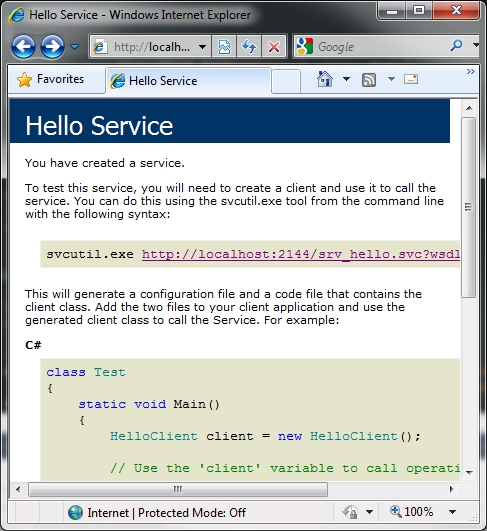
When I start the WebApp and call the URL “http://localhost:{Port}/srv_hello.svc” the Service UI of the Hello Service (Services.dll) will be generated. Voila! 
EDIT:
Since WCF 4.0 there is another way to achieve the same thing. It is called “file less activation”. 
Example:
|
1
2
3
4
5
6
7
|
<system.servicemodel> <servicehostingenvironment> <serviceactivations> <add
relativeaddress="/Hello"
service="“svc_Hello.svc"/"> </add></serviceactivations> </servicehostingenvironment> </system.servicemodel> |





 扫一扫
扫一扫


 2451
2451

 被折叠的 条评论
为什么被折叠?
被折叠的 条评论
为什么被折叠?
 到【灌水乐园】发言





