



前言
有一个业务需求是需要一个步骤条,但是发现开源的都不太合适,所以就自己写了一个。
开始
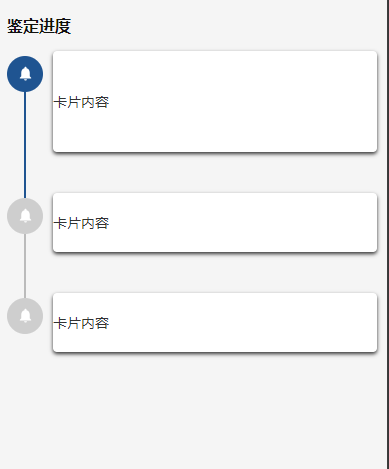
test.vue
<template>
	<view class="authenticateRecordDetails_container">
		<!-- 进度 -->
		<view class="authenticateStep_content">
			<view class="title_content"><text class="text_default" style="font-size: 32rpx; font-weight: bold;">鉴定进度</text></view>

			<view class="step_content">
				<view class="left">
					<view class="circle circle_succ">
						<image src="/static/images/jianbao/step/1.png" mode=""></image>
					</view>
					<view class="line line_succ"></view>
				</view>
				<view class="right">
					<view class="card_content" style="padding: 80rpx 0;">
						<text>卡片内容</text>
					</view>
				</view>
			</view>

			<view class="step_content">
				<view class="left">
					<view class="circle circle_defult">
						<image src="/static/images/jianbao/step/1.png" mode=""></image>
					</view>
					<view class="line circle_defult"></view>
				</view>
				<view class="right">
					<view class="card_content" style="padding: 40rpx 0;">
						<text>卡片内容</text>
					</view>
				</view>
			</view>

			<view class="step_content">
				<view class="left">
					<view class="circle circle_defult">
						<image src="/static/images/jianbao/step/1.png" mode=""></image>
					</view>
				</view>
				<view class="right">
					<view class="card_content" style="padding: 40rpx 0;">
						<text>卡片内容</text>
					</view>
				</view>
			</view>


		</view>
		<!-- 进度end -->

	</view>
</template>

<script>
	export default {
		data() {
			return {
			}
		},
		components: {},

		onLoad(options) {},
		onShow() {},
		methods: {

		}
	}
</script>

<style scoped lang="scss">
	.authenticateRecordDetails_container {
		margin: 20rpx 20rpx;
		// 鉴定进度
		.authenticateStep_content {
			margin-top: 40rpx;
			.title_content {
				margin-bottom: 40rpx;
			}
			.step_content {
				display: flex;
				// justify-content: flex-start;
				// align-items: center;
				.left {
					width: 70rpx;
					// background-color: blue;
					.circle {
						width: 70rpx;
						height: 70rpx;
						line-height: 80rpx;
						text-align: center;
						border-radius: 100%;
						image {
							width: 34rpx;
							height: 34rpx;
						}
					}
					.circle_succ {
						background-color: #1F5491;
					}
					.circle_defult {
						background-color: #CECECE;
					}
					.line {
						width: 4rpx;
						height: calc(100% - 70rpx);
						margin: 0 auto;
						background-color: #bbb;
					}
					.line_succ {
						background-color: #1F5491;
					}
					.line_defult {
						background-color: #bbb;
					}
				}
				.right {
					flex: 1;
					margin-bottom: 80rpx;
					margin-left: 20rpx;
					.card_content {
						width: 100%;
						position: relative;
						top: -10rpx;
						background-color: #fff;
						box-shadow: 0rpx 4rpx 8rpx 0rpx;
						border-radius: 8rpx;
					}
				}
			}
		}
	}
</style>
总结
可把它进行封装成组件





 扫一扫
扫一扫


 787
787

 被折叠的 条评论
为什么被折叠?
被折叠的 条评论
为什么被折叠?
 到【灌水乐园】发言





