


- 如何检测我的VPS服务器是否支持DD Windows
- 在Debian/Ubuntu 下
- 安装: apt-get install virt-what
- 执行命令: virt-what
- 两串命令,就知道能不能ddwin
- 只要显示为kvm/xen/hyper-v
- 这三个都可以,其他不行。
- 然后就是检测 UEFI 或 BIOS 引导启动
- 安装: apt-get install efibootmgr
- 执行命令: efibootmgr
- 显示为:
- EFI variables are not supported on this system.
- 则是BIOS引导启动
- 显示为其他则是UEFI引导启动
- 其实上面的可有可无,因为我发现我运行了,并没有出现成功的标志,但是我依然成功了,所以上面那些是为了确保万无一失
- 开始
- 切换用户为超级管理员
- sudo su
- 更新系统源
- apt-get update && apt-get upgrade
- 安装必须的软件包
- apt-get install -y xz-utils openssl gawk file wget screen && screen -S os
- 下载dd脚本
wget --no-check-certificate -qO InstallNET.sh 'https://sunpma.com/other/oss/InstallNET.sh' && bash InstallNET.sh -dd 'http://a.qwq.ovh/natee/guajibao/guajibao-win7-sp1-ent-x64-cn/guajibao-win7-sp1-ent-x64-cn.vhd.gz'
————————————————

# DD Windows7 sp1 64位 企业精简版 [账户Administrator密码nat.ee]
wget --no-check-certificate -qO InstallNET.sh 'https://sunpma.com/other/oss/InstallNET.sh' && bash InstallNET.sh -dd 'https://oss.sunpma.com/Windows/Oracle_Win7_sp1_64_Administrator_nat.ee.gz'

# DD Windows8.1 64位 企业精简版 [账户Administrator密码nat.ee]
wget --no-check-certificate -qO InstallNET.sh 'https://sunpma.com/other/oss/InstallNET.sh' && bash InstallNET.sh -dd 'https://oss.sunpma.com/Windows/Oracle_Win8.1_64_Administrator_nat.ee.gz'

# DD Windows10 2016LTSB 64位 企业深度精简版 [账户Administrator密码nat.ee]
wget --no-check-certificate -qO InstallNET.sh 'https://sunpma.com/other/oss/InstallNET.sh' && bash InstallNET.sh -dd 'https://oss.sunpma.com/Windows/Oracle_Win10_2016LTSB_64_Administrator_nat.ee.gz'

# DD Windows10 2019LTSC 64位 企业深度精简版 [账户Administrator密码nat.ee]
wget --no-check-certificate -qO InstallNET.sh 'https://sunpma.com/other/oss/InstallNET.sh' && bash InstallNET.sh -dd 'https://oss.sunpma.com/Windows/Oracle_Win10_2019LTSC_64_Administrator_nat.ee.gz'

# DD Windows10 2021LTSC 64位 企业深度精简版 [账户Administrator密码nat.ee]
wget --no-check-certificate -qO InstallNET.sh 'https://sunpma.com/other/oss/InstallNET.sh' && bash InstallNET.sh -dd 'https://oss.sunpma.com/Windows/Oracle_Win10_2021LTSC_64_Administrator_nat.ee.gz'

# DD Windows Server 2008 R2 64位 精简版 [账户Administrator密码nat.ee]
wget --no-check-certificate -qO InstallNET.sh 'https://sunpma.com/other/oss/InstallNET.sh' && bash InstallNET.sh -dd 'https://oss.sunpma.com/Windows/Oracle_Win_Server2008R2_sp1_64_Administrator_nat.ee.gz'

# DD Windows Server 2012 R2 64位 精简版 [账户Administrator密码nat.ee]
wget --no-check-certificate -qO InstallNET.sh 'https://sunpma.com/other/oss/InstallNET.sh' && bash InstallNET.sh -dd 'https://oss.sunpma.com/Windows/Oracle_Win_Server2012R2_64_Administrator_nat.ee.gz'

# DD Windows Server 2016 64位 精简版 [账户Administrator密码nat.ee]
wget --no-check-certificate -qO InstallNET.sh 'https://sunpma.com/other/oss/InstallNET.sh' && bash InstallNET.sh -dd 'https://oss.sunpma.com/Windows/Oracle_Win_Server2016_64_Administrator_nat.ee.gz'
由于社区原因,就手打命令吧
- 上面的dd 的源,自己也可以改成自己所需的,什么你想要win10,上面没有提供win10,不妨试一试上面的网址,看看他的网站里有没有你所需要的?
- 等待重启,如果不能重启,自己手动在控制面板里进行重启,然后登陆web版vnc进行查看(web端就能看到)
- 速度慢,慢性等待,看到有网友说,需要40分钟左右,1C2G5M的小鸡
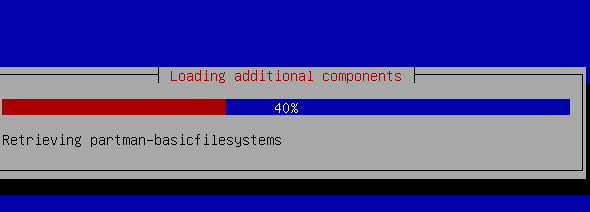
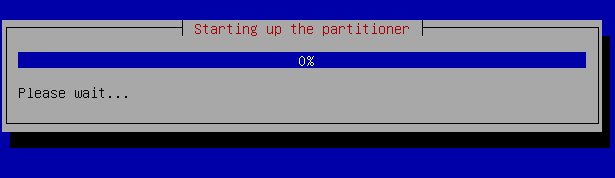
- 会在 Starting up the partitioner 这个界面卡挺长时间的,不要管他,完事后会自动重启,据不知名网友说,至少需要30分钟。这个时候,其实你可以玩一局lol,或者几局王者,然后就是见证奇迹的时候了





 扫一扫
扫一扫


 4万+
4万+

 被折叠的 条评论
为什么被折叠?
被折叠的 条评论
为什么被折叠?
 到【灌水乐园】发言





