


服务器ip:192.168.66.128
测试主机能否连接虚拟机
ping 192.168.66.128
修改虚拟机hadoop中core-site.xml
vim ./etc/hadoop/core-site.xml
<property>
    <name>fs.defaultFS</name>
    <value>hdfs://192.168.66.128:9000</value>
</property>
启动hadoop集群
/usr/local/hadoop/hadoop-3.1.3/sbin/start-all.sh
在windows下的idea创建maven项目,添加下面依赖(对应自己的hadoop版本)
<dependency>
    <groupId>org.apache.hadoop</groupId>
    <artifactId>hadoop-client</artifactId>
    <version>3.1.3</version>
</dependency>
将虚拟机下的core-site.xml和hdfs-site.xml拖到maven项目中。
注意:core-site.xml中的ip也要改为服务器的ip

在虚拟机下的hdfs中创建下面文件
cd /usr/local/hadoop/hadoop-3.1.3/sbin
./bin/hdfs dfs -put 你要复制的文件 复制到hdfs对应的目录
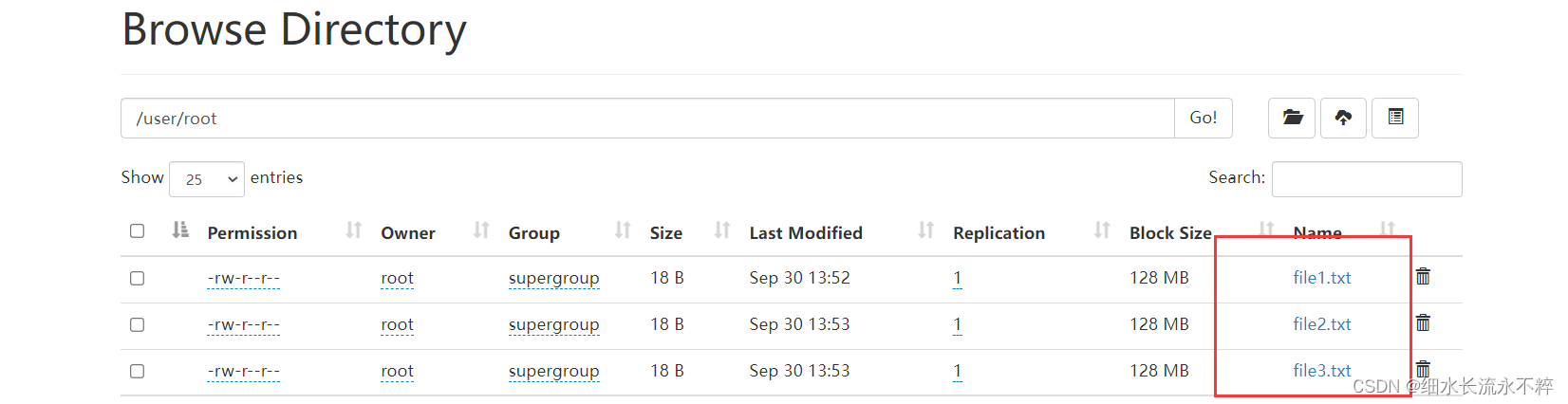
删除output文件
./bin/hdfs dfs -put -rm -r /output
复制下面代码
注意:ip地址和文件路径要改为自己的
import java.io.IOException;
import java.io.PrintStream;
import java.net.URI;

import org.apache.hadoop.conf.Configuration;
import org.apache.hadoop.fs.*;
import org.apache.log4j.BasicConfigurator;

/**
 * 过滤掉文件名满足特定条件的文件
 */
class MyPathFilter implements PathFilter {
    String reg = null;
    MyPathFilter(String reg) {
        this.reg = reg;
    }
    public boolean accept(Path path) {
        if (!(path.toString().matches(reg)))
            return true;
        return false;
    }
}
/***
 * 利用FSDataOutputStream和FSDataInputStream合并HDFS中的文件
 */
public class MergeFile {
    Path inputPath = null; //待合并的文件所在的目录的路径
    Path outputPath = null; //输出文件的路径
    public MergeFile(String input, String output) {
        this.inputPath = new Path(input);
        this.outputPath = new Path(output);
    }
    public void doMerge() throws IOException {
        Configuration conf = new Configuration();
        conf.set("fs.defaultFS","hdfs://192.168.66.128:9000");
        conf.set("fs.hdfs.impl","org.apache.hadoop.hdfs.DistributedFileSystem");
        FileSystem fsSource = FileSystem.get(URI.create(inputPath.toString()), conf);
        FileSystem fsDst = FileSystem.get(URI.create(outputPath.toString()), conf);
        //下面过滤掉输入目录中后缀为.abc的文件
        FileStatus[] sourceStatus = fsSource.listStatus(inputPath,
                new MyPathFilter(".*\\.abc"));
        FSDataOutputStream fsdos = fsDst.create(outputPath);
        PrintStream ps = new PrintStream(System.out);
        //下面分别读取过滤之后的每个文件的内容,并输出到同一个文件中
        for (FileStatus sta : sourceStatus) {
            //下面打印后缀不为.abc的文件的路径、文件大小
            System.out.print("路径:" + sta.getPath() + "    文件大小:" + sta.getLen()
                    + "   权限:" + sta.getPermission() + "   内容:");
            FSDataInputStream fsdis = fsSource.open(sta.getPath());
            byte[] data = new byte[1024];
            int read = -1;

            while ((read = fsdis.read(data)) > 0) {
                ps.write(data, 0, read);
                fsdos.write(data, 0, read);
            }
            fsdis.close();
        }
        ps.close();
        fsdos.close();
    }
    public static void main(String[] args) throws IOException {
        BasicConfigurator.configure();//自动快速地使用缺省Log4j环境。
        MergeFile merge = new MergeFile(
                "hdfs://192.168.66.128:9000/user/root/",
                "hdfs://192.168.66.128:9000/user/root/merge.txt");
        merge.doMerge();
    }
}
可能出现的问题:ermission denied: user=e5bb96, access=WRITE, inode="/user/root":root:supergroup:drwxr-xr-x
IDEA 操作虚拟机中 HDFS 提示 Permission denied
解决
在代码中设置系统变量,需在加载配置类创建 fileSystem 对象前
System.setProperty("HADOOP_USER_NAME", "root");
Configuration configuration = new Configuration();





 扫一扫
扫一扫


 1648
1648

 被折叠的 条评论
为什么被折叠?
被折叠的 条评论
为什么被折叠?
 到【灌水乐园】发言





