


 本文详细介绍了如何在Spring Cloud环境中搭建Feign作为服务消费者,包括环境准备、依赖导入、配置文件编写、启动类与服务接口的创建,以及控制器的编写过程。
一、环境准备
Ribbon是一个基于Http和TCP的负载均衡工具,Feign(音:菲恩)是一个声明式的伪Http客户端,它比Ribbon更加的优雅。Feign使用的是接口的方式。Feign默认集成了Ribbon,并和Eureka结合,默认实现了负载均衡的效果。
在第二小节的基础上,我们开始搭建Fegin作为服务消费者。
右击项目根目录,New--Module--选择左侧的Maven,点击next--输入新模块的名字feign,我的创建后的效果是下面那样。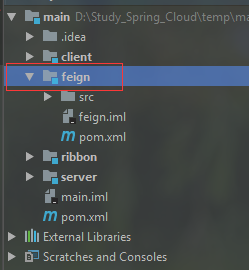
1.1 导入feign依赖
   <dependencies>
        <dependency>
            <groupId>org.springframework.cloud</groupId>
            <artifactId>spring-cloud-starter-netflix-eureka-client</artifactId>
        </dependency>
        <dependency>
            <groupId>org.springframework.boot</groupId>
            <artifactId>spring-boot-starter-web</artifactId>
        </dependency>
        <dependency>
            <groupId>org.springframework.cloud</groupId>
            <artifactId>spring-cloud-starter-openfeign</artifactId>
        </dependency>
    </dependencies>
1.2 编写application.yml配置文件
#指明注册中心的位置
eureka:
  client:
    serviceUrl:
      defaultZone: http://localhost:8761/eureka/
#当前项目部署的端口
server:
  port: 8765
#当前项目的名称
spring:
  application:
    name: service-feign
1.3 编写启动类
@EnableFeignClients注解是开启feign负载均衡工具。
package com.safesoft.feign;

import org.springframework.boot.SpringApplication;
import org.springframework.boot.autoconfigure.SpringBootApplication;
import org.springframework.cloud.client.discovery.EnableDiscoveryClient;
import org.springframework.cloud.netflix.eureka.EnableEurekaClient;
import org.springframework.cloud.openfeign.EnableFeignClients;

/**
 * @author jay.zhou
 * @date 2019/1/25
 * @time 9:44
 */
@SpringBootApplication
@EnableEurekaClient
@EnableDiscoveryClient
@EnableFeignClients
public class ApplicationFeign {
    public static void main(String[] args) {
        SpringApplication.run(ApplicationFeign.class, args);
    }
}
1.4 编写服务接口
这里自己手写才会发现问题。原来,在编写obtainOtherServerJsonData这个接口的时候,它的方法参数name,如果不加上@RequestParam注解,就不能正确的携带参数去调用"SERVICE-CLIENT"服务器。所以,必须要为接口方法上的参数,添加@RequestParam注解。
package com.safesoft.feign.service;

import org.springframework.cloud.openfeign.FeignClient;
import org.springframework.web.bind.annotation.RequestMapping;
import org.springframework.web.bind.annotation.RequestParam;

/**
 * @author jay.zhou
 * @date 2019/1/25
 * @time 9:46
 */
@FeignClient(value = "SERVICE-CLIENT")
public interface HelloService {

    /**
     * 从SERVICE-CLIENT服务器的/hi接口获取JSON数据
     *
     * @param name
     * @return
     */
    @RequestMapping("/hi")
    String obtainOtherServerJsonData(@RequestParam(value = "name") String name);
}
1.5 编写Controller
package com.safesoft.feign.web;

import com.safesoft.feign.service.HelloService;
import org.springframework.beans.factory.annotation.Autowired;
import org.springframework.web.bind.annotation.RequestMapping;
import org.springframework.web.bind.annotation.RestController;

/**
 * @author jay.zhou
 * @date 2019/1/25
 * @time 9:48
 */
@RestController
public class HelloController {

    /**
     * 因为HelloService仅仅使用了@FeiginClient注解
     * 没有使用@Bean类型的注解,比如@Service @Component等
     * 所以编译器会警告,其实可以忽视它
     */
    @Autowired
    private HelloService helloService;

    @RequestMapping("/sayHello")
    public String sayHello(String name) {
        return helloService.obtainOtherServerJsonData(name);
    }
}
1.6 启动Feign服务器
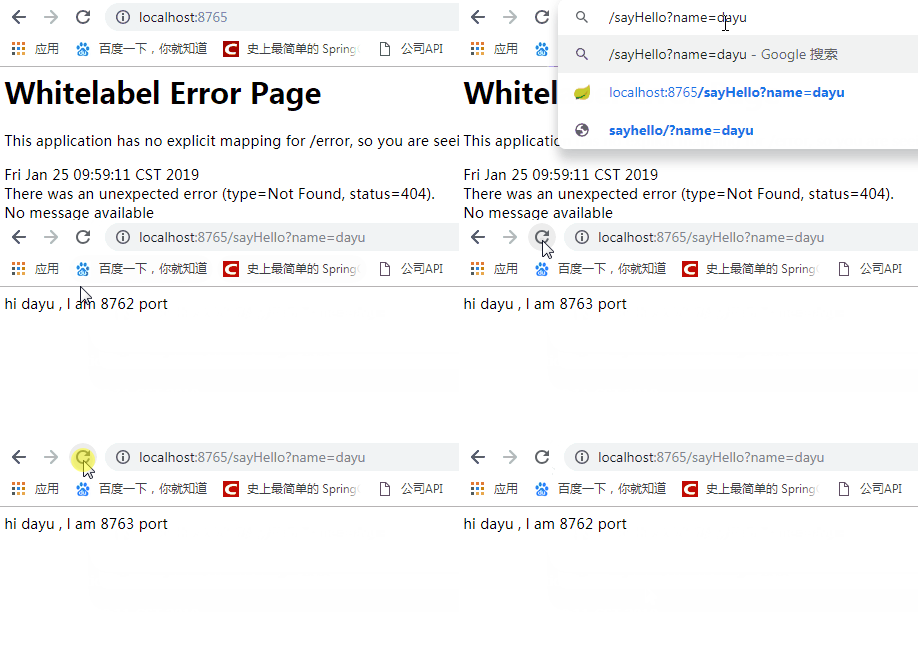
在浏览器上输入http://localhost:8765/sayHello?name=dayu,尝试从8765端口获取JSON数据。此请求会被Feign服务器负载均衡到部署在8762端口与8763端口的服务器上。
三、源码下载
https://github.com/hairdryre/Study_SpringCloud
参考文章:史上最简单的SpringCloud教程 | 第三篇: 服务消费者(Feign)(Finchley版本)
参考文章:https://blog.youkuaiyun.com/yanluandai1985/article/details/86636313





 扫一扫
扫一扫


 2471
2471

 被折叠的 条评论
为什么被折叠?
被折叠的 条评论
为什么被折叠?
 到【灌水乐园】发言





