



 介绍一个基于Java的Excel解析工具,利用反射、自定义注解和POI库,实现任意List对象与Excel表格的双向转换。该工具支持不同版本的Excel文件,提供数据校验功能,适用于批量数据处理。
工具:jdk1.8+maven
知识点:反射+自定义注解+poi使用+使用了一点guava编程(膜拜下谷歌大哥)
功能:可以解析任意List对象-excel表格;解析任意的Excel的表格-》list对象
地址:https://github.com/a1145798605/poiUtil.git
下面是一些写的过程的思路和讲解,代码我发布到git上,因为自己的写的不足之处很多,还麻烦有看到的大佬们,能给指正一下。
csdn地址:https://download.youkuaiyun.com/download/drsbbbl/11925522
首先,先解释下注解的实体类:
//表格的注解
public @interface TableEntity {
	//导出表格的表格名字 就是输出表格的时候
	String tableName() default "tableName.xlsx";
	//创建sheet的时候sheet的名字
	String sheetName() default "sheet1";
	//解析sheet的下标
	int sheetIndex() default 0;
	//开始从第几行开始解析
	int startIndex() default 2;
	//输出表格的时候是否有表格头部 合并单元格的时候的头部
	String tableHead() default "";

}
表格中的列的属性
public @interface ExcelColumn {
	/**
	 * 导出的 列的名字
	 *
	 * @return
	 */
	String columnName() default "";

	/**
	 * 对应的 列的下标 必填
	 *
	 * @return
	 */
	int columnIndex();

	/**
	 * 日期的类型
	 *
	 * @return
	 */
	ColumnType columnType() default ColumnType.notDateType;

	/**
	 * 是否验证数据 是不是可以为空 可以自己添加多种验证
	 */
	ColumnValiDataIsNull valiData() default ColumnValiDataIsNull.CanEmpty;
}
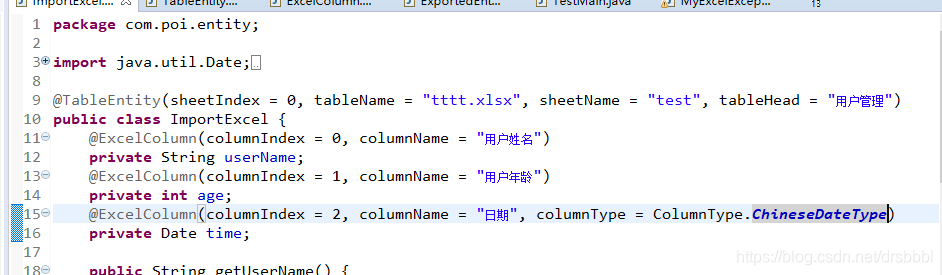
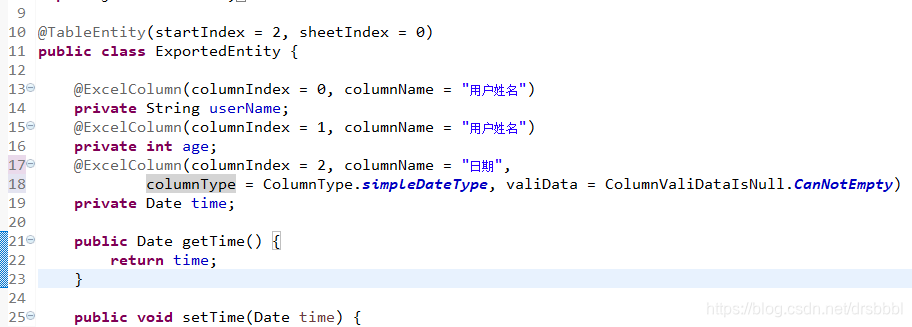
注解的使用简单截个图
导出数据到表格的时候的注解使用
解析excel表数据到list的时候的使用
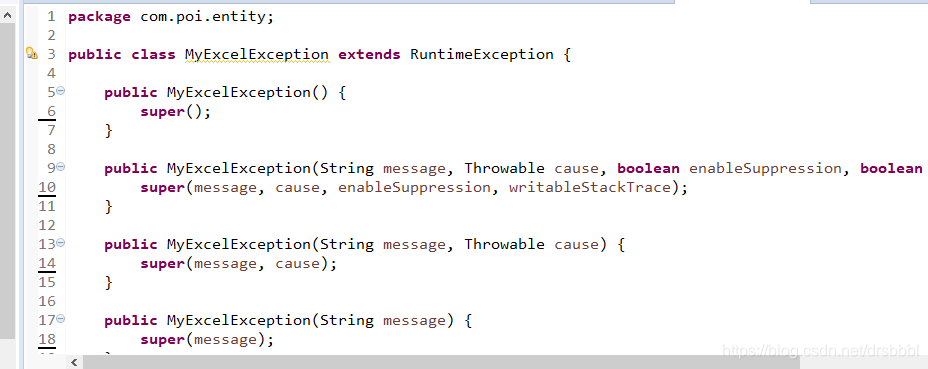
写了个自定义异常 用于处理表格解析或者导入的时候会出现的异常情况
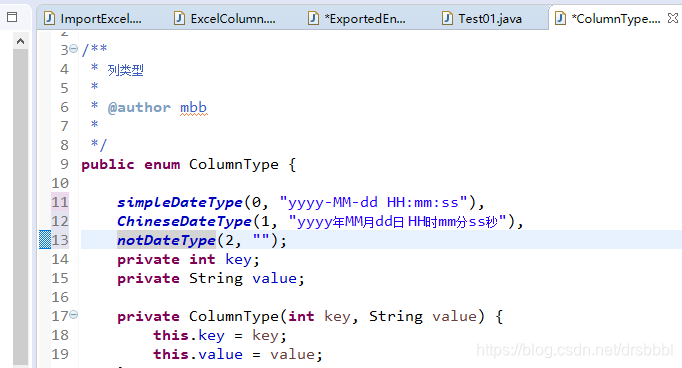
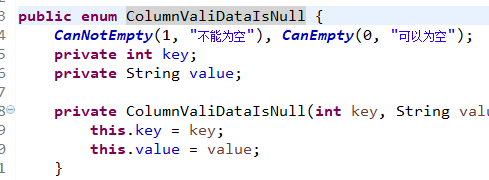
关于枚举:
用于解析日期的情况,可以自己在先里面添加自己的格式要求,其中key随意,value 为日期的格式;
表格的数据验证:注解在字段上,默认可以为空,默认的情况,遇到空值,赋值默认的值。
不能为空的时候,会抛出异常,并且提示错误的行数,我现在没有写继续解析的情况。
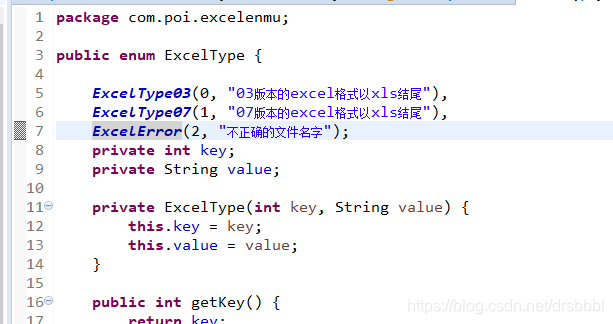
不同版本的excel表格情况
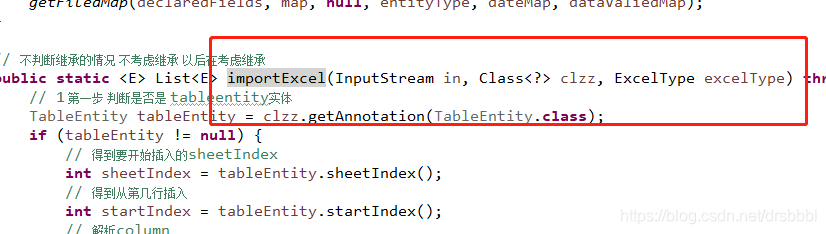
表格 导入开始:
方法参数:input字节流,需要转成对应的对象,excel表格类型03还是07
//第一步解析 表格注解
TableEntity tableEntity = clzz.getAnnotation(TableEntity.class);
		if (tableEntity != null) {
			// 得到要开始插入的sheetIndex
			int sheetIndex = tableEntity.sheetIndex();
			// 得到从第几行插入
			int startIndex = tableEntity.startIndex();
			// 解析column
			Field[] declaredFields = clzz.getDeclaredFields();
			/**
			 * 列 和 field 的对应
			 */
			Map<Integer, String> fieldmap = Maps.newHashMap();
			/**
			 * 列和 类型的对应
			 */
			Map<Integer, String> entityType = Maps.newHashMap();
			/**
			 * 日期对应格式
			 */
			Map<Integer, ColumnType> dateMap = Maps.newHashMap();
			/**
			 * 数据校验
			 */
			Map<Integer, ColumnValiDataIsNull> dataValiedMap = Maps.newHashMap();
			//把得到的字段和对应 属性对应起来
			getFiledMap(declaredFields, fieldmap, entityType, dateMap, dataValiedMap);
对应关系的代码:
for (Field field : declaredFields) {
			if (field != null) {
			//忽略访问修饰符
				field.setAccessible(true);
				//解析字段注解(要判空)
				ExcelColumn annotation = field.getAnnotation(ExcelColumn.class);
				//解析当前字段的类型 为了set属性的时候使用
				Class<?> type = field.getType();
				//解析对应的 注解属性
				String columnName = annotation.columnName();
				int columnIndex = annotation.columnIndex();
				String name = field.getName();
				entityType.put(columnIndex, type.getSimpleName());
				//对应日期做特殊处理 要得到对应的日期类型的解析格式
				if ("Date".equals(type.getSimpleName())) {
					ColumnType columnType = annotation.columnType();
					dateMap.put(columnIndex, columnType);
				}
				ColumnValiDataIsNull valiData = annotation.valiData();
				// 为0不需要判空,1 需要判空
				dataValiedMap.put(columnIndex, valiData);
				//有无表头
				if (tableHeadMap != null) {
					tableHeadMap.put(columnIndex, columnName);
				}
				map.put(columnIndex, name);
			}
		}
开始解析excel表:
List<E> result = Lists.newArrayList();
		Workbook workBook = getWorkBook(in, excelType);
		Sheet sheet = workBook.getSheetAt(sheetIndex);
		if (sheet == null) {
			return result;
		}
		for (int rowIndex = startIndex; rowIndex <= sheet.getLastRowNum(); rowIndex++) {
			// 获得当前行
			Row row = sheet.getRow(rowIndex);
			if (row == null) {
				continue;
			}
			// new 出当前实体类
			Object newInstance = clzz.newInstance();
			for (int index = 0; index < row.getLastCellNum(); index++) {
				Cell cell = row.getCell(index);
				String indexName = map.get(index);
				String columnType = entityType.get(index);
				Field declaredField = clzz.getDeclaredField(indexName);
				declaredField.setAccessible(true);
				// 获取当前行的数据 要判断类型
				Object cellValue = getCellValue(cell, columnType, dataValiedMap, index, rowIndex);
				//new的对应 set进去
				declaredField.set(newInstance, cellValue);
			}
			//添加到 list中
			result.add((E) newInstance);
			// 获得当前行的每一列的列名

		}
		return result;
解析数据的过程
private static Object getCellValue(Cell cell, String cellType, Map<Integer, ColumnValiDataIsNull> dataValiedMap,
			int index, int rowIndex) {
		try {
			boolean flag = false;
			if (dataValiedMap.get(index).getKey() == 1) {
				// 需要验证
				flag = true;
			}
			switch (cellType) {
			case "Double":
			case "double":
				if (flag) {
					if (cell == null) {
						// 进行容忍
						throw new MyExcelException(
								"数据不能为空!!!!第" + (rowIndex + 1) + "行" + "中的,第" + (index + 1) + "列,数据为空");
					}
				} else {
					if (cell == null) {
						// 进行容忍
						return 0.0;
					}
				}
				return cell.getNumericCellValue();
			case "String":

				if (flag) {
					if (cell == null) {
						throw new MyExcelException(
								"数据不能为空!!!!第" + (rowIndex + 1) + "行" + "中的,第" + (index + 1) + "列,数据为空");
					}
					if (cell.getStringCellValue() != null && cell.getStringCellValue().trim().length() > 0) {
						return cell.getStringCellValue();
					} else {
						throw new MyExcelException(
								"数据不能为空!!!!第" + (rowIndex + 1) + "行" + "中的,第" + (index + 1) + "列,数据为空");
					}
				} else {
					if (cell == null) {
						return "";
					}
					return cell.getStringCellValue();
				}

			case "Date":
				if (flag) {
					if (cell == null) {
						throw new MyExcelException(
								"数据不能为空!!!!第" + (rowIndex + 1) + "行" + "中的,第" + (index + 1) + "列,数据为空");
					}
					if (cell.getDateCellValue() != null) {
						return cell.getDateCellValue();
					}
					throw new MyExcelException("数据不能为空!!!!第" + (rowIndex + 1) + "行" + "中的,第" + (index + 1) + "列,数据为空");

				} else {
					if (cell == null) {
						return new Date();
					} else {
						return cell.getDateCellValue();
					}
				}

			case "Boolean":
			case "boolean":
				if (flag) {
					if (cell == null) {
						throw new MyExcelException(
								"数据不能为空!!!!第" + (rowIndex + 1) + "行" + "中的,第" + (index + 1) + "列,数据为空");
					}
				} else {
					if (cell == null) {
						return true;
					}
				}
				return cell.getBooleanCellValue();
			case "int":
			case "Integer":
				if (flag) {
					if (cell == null) {
						throw new MyExcelException(
								"数据不能为空!!!!第" + (rowIndex + 1) + "行" + "中的,第" + (index + 1) + "列,数据为空");
					}
				} else {
					if (cell == null) {
						return 0;
					}
				}
				String split = (cell.getNumericCellValue() + "").split("\\.")[0];
				return Integer.parseInt(split);
			}

		} catch (IllegalStateException e) {
			throw new MyExcelException(
					"类型转换异常" + e.getMessage() + "第" + (rowIndex + 1) + "行" + "中的,第" + (index + 1) + "列");
		}
		return "";
	}
自己的写的肯定 有很多的不足,请看到的大佬给出指导意见。代码我放到git上。谢谢指正或者补充。





 扫一扫
扫一扫


 1763
1763

 被折叠的 条评论
为什么被折叠?
被折叠的 条评论
为什么被折叠?
 到【灌水乐园】发言





