


BS版图形系统 - 属性浏览器
** QQ: 282397369 **
原理示教项目基本没跑,6月初确定动手。
两条线同时进展:管理系统和图形系统。
管理系统有正常前后端即可,图形系统还是主要的业务展示场合,一般的管理系统并不涵盖这些功能,所以干脆从头开发。
经过半个月的摸索尝试,最终选定TypeScript
作为图形工具,首先就要解决属性修改需求,即PropertyGrid。网上也有现成的PropertyGrid,但用起来代价太大,那就自己来做一个,也算是BS系统入个门。在以前用uniGUI的基础上,半个月跌跌撞撞,边做边发现,借鉴VCL的思路来实现TypeScript中的控件类库。当然,不会全搬VCL过来,太大,择其有用的就OK。
现在PropertyGrid的效果:
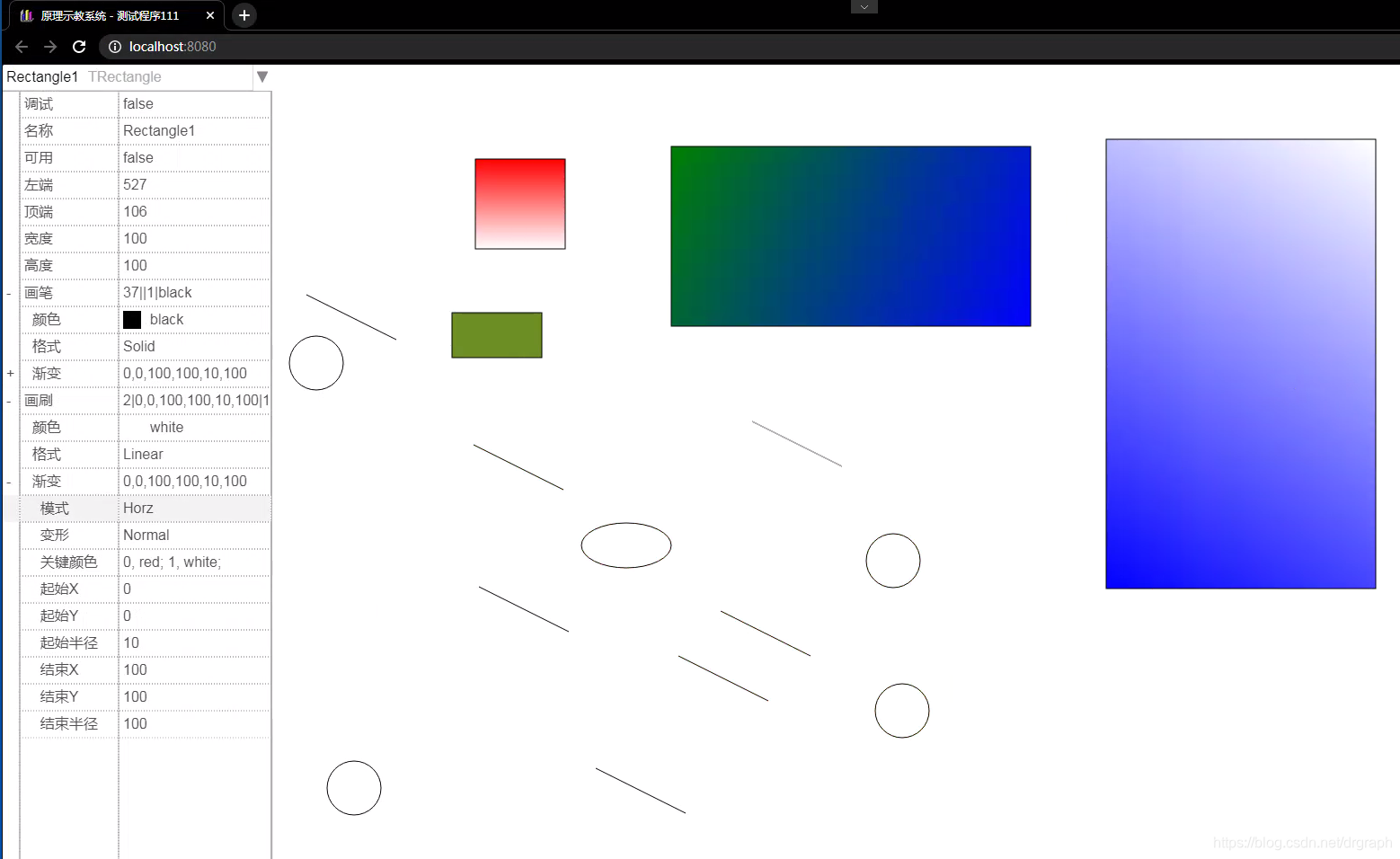
按VCL思路来实现,最终调用方式感觉也还是之前的效果,不过用多了,发现用vs code来开发,比C++效率还要高,更快。
唯一不爽的是,进行界面设计的时候,没有可视化界面,只能从实际效果中一点点找问题。
export class PropertyGrid extends TContainer {
    private tvPropertyItems: TTreeItem = new TTreeItem("DrGraphProperty");
    private selectedObjects: TObject[] = []
    private collapsedItems: string[] = ["Pen.Gradient", "Brush.Gradient"]
    cbAllObjects: TComboBox;
    gridPanel: TScrollBox;
    gridControl: TScrollPanel_Grid;

    txtEditor: TEdit;
    cbEditor: TComboBox;

    constructor(parent: TContainer | null) {
        super(parent);
        this.tvPropertyItems.collapsed = false;
        this.SetBounds(0, 0, 300, 500);
        this.cbAllObjects = new TComboBox(this);
        this.cbAllObjects.Align = NAlign.Top;
        this.cbAllObjects.EditStyle = NEditStyle.EmphasizeFirst;

        this.gridPanel = new TScrollBox(this);
        this.gridPanel.Align = NAlign.Client;
        this.gridPanel.horzScrollBar.Visible = false;
        this.gridPanel.vertScrollBar.Visible = false;
        this.gridControl = new TScrollPanel_Grid(this.gridPanel);
        this.gridControl.RowHeight = 30;
        this.gridPanel.AttachPanel(this.gridControl);

        this.cbAllObjects.Parent = this;
        this.cbAllObjects.AddEvent(NControlEvent.OnChange, this.onChangeSelectObject, this);
        this.gridPanel.AddEvent(NControlEvent.OnCellClick, this.onCellClick, this);

        this.txtEditor = new TEdit(this.gridControl);
        this.txtEditor.AllowDoDescendantFlag = false;
        this.txtEditor.SetBounds(0, 0, 10, 10);
        this.txtEditor.Visible = false;
        this.txtEditor.AddEvent(NControlEvent.OnKillFocus, this.onAutoHideEditor, this);

        this.cbEditor = new TComboBox(this.gridControl);
        this.cbEditor.AllowDoDescendantFlag = false;
        this.cbEditor.SetBounds(0, 0, 10, 10);
        this.cbEditor.Visible = false;
        this.cbEditor.AddEvent(NControlEvent.OnKillFocus, this.onAutoHideEditor, this); // 失去焦点即隐藏

        this.txtEditor.AddEvent(NControlEvent.OnChange, this.modifyPropertyValue, this);
        this.cbEditor.AddEvent(NControlEvent.OnChange, this.modifyPropertyValue, this);
        this.cbEditor.AddEvent(NControlEvent.OnDblClick, this.onDblClick_cbEditor, this);
    }

    private onAutoHideEditor(msg: TMessage) {
        this.txtEditor.Visible = false;
        this.cbEditor.Visible = false;
    }

    onCellClick(msgCell: TMessage_Cell) {
        let treeItem: TTreeItem | null = null;
        let index: number = 0;
        [treeItem, index] = this.destPropertyItem(msgCell.row + 1, this.tvPropertyItems, index);
        this.tvPropertyItems.selected = treeItem;
        if (!treeItem)
            return;
        let propertyItem: TPropertyItem | null = <TPropertyItem>(treeItem.object); // treeItem >>> PropertyItem
        if (!propertyItem)
            return;
        if (msgCell.col == 0 && propertyItem.type == NProperty.Object) {
            treeItem.collapsed = !treeItem.collapsed;
            if (treeItem.collapsed) {
                if (this.collapsedItems.indexOf(treeItem.Path) == -1)
                    this.collapsedItems.push(treeItem.Path);
            }
            else {
                let index = this.collapsedItems.indexOf(treeItem.Path);
                if (index != -1)
                    this.collapsedItems.splice(index, 1);
            }
            this.RefreshDisplay();
        } else if (msgCell.col == 2) {
            let rect = msgCell.relRect;
            let destEditor: TControl = this.txtEditor;
            if (DrGraph.HelperObject.IS_IN_RANGE(propertyItem.type, NProperty.Boolean, NProperty.DateTime))
                destEditor = this.cbEditor;
            destEditor.SetBounds(rect.left, rect.top, rect.width, rect.height);
            destEditor.Visible = true;
            this.Root!.focusedControl = destEditor;

            if (destEditor == this.txtEditor) {
                this.txtEditor.Text = propertyItem.value.toString();
                this.txtEditor.ReadOnly = (propertyItem.type == NProperty.Object);
                this.txtEditor.isDebugging = true;
            }

            if (destEditor == this.cbEditor) {
                this.cbEditor.Text = propertyItem.value.toString();
                this.cbEditor.EditStyle = NEditStyle.Normal;
                this.cbEditor.listPanel.RowHeight = 30;
                this.cbEditor.choosePanel.vertScrollBar.Height = this.cbEditor.listPanel.Height;

                this.cbEditor.Items.Clear();
                if (propertyItem.type == NProperty.Boolean) {
                    this.cbEditor.Items.Add("true");
                    this.cbEditor.Items.Add("false");
                }
                if (propertyItem.type == NProperty.Enum) {
                    let enums = Object.getOwnPropertyNames(propertyItem.enumtype);
                    let len = enums.length;
                    enums.splice(0, len / 2);
                    enums.forEach((value) => { this.cbEditor.Items.Add(value); })
                    this.cbEditor.Text = propertyItem.enumtype[propertyItem.value];
                }
                if (propertyItem.type == NProperty.Color) {
                    this.cbEditor.EditStyle = NEditStyle.Color;
                    TColor.FillColorStrings(this.cbEditor.Items);
                }
            }
        }
    }

    onChangeSelectObject(eventInfo: TMessage) {
        let index = this.cbAllObjects.ItemIndex;
        let object = this.cbAllObjects.Items.ObjectAt(index);
        this.SelectObject(object);
    }

    onDblClick_cbEditor(eventInfo: TMessage) {
        this.cbEditor.ItemIndex = (this.cbEditor.ItemIndex + 1) % this.cbEditor.Items.Length;
        this.RefreshDisplay();
    }

    private buildPropertyItems(parentTvItem: TTreeItem, object: TObject | null) {
        if (object == null) return;
        let pItems: TPropertyItem[] = [];
        object.BuildPropertyList(pItems);
        pItems.forEach((item, idx) => {
            let subItem = parentTvItem.Add(item.name, item);
            if (item.type == NProperty.Object) {
                let subObject: TObject = <TObject>(item.value);
                this.buildPropertyItems(subItem, subObject);
            }
        })
    }

    AddObject(object: TObject) {
        if (!object) return;
        let objectName = object.Name + " " + object.ClassName();
        this.cbAllObjects.Items.Add(objectName, object);
    }

    SelectObject(object: TObject | null) {
        if (!this.Visible) return;
        this.tvPropertyItems.Clear();
        this.selectedObjects = []
        if (object)
            this.selectedObjects.push(object);
        this.buildPropertyItems(this.tvPropertyItems, object);
        this.cbAllObjects.ItemIndex = this.cbAllObjects.Items.IndexOf(object);
        this.gridControl.Strings = []
        this.FillGrid(this.gridControl.Strings, this.gridControl.delimiter, this.tvPropertyItems);
        this.gridPanel.vertScrollBar.Max = this.gridControl.RowCount;
        this.gridPanel.RefreshScrollBar();
        this.txtEditor.Visible = false;
        this.cbEditor.Visible = false;
    }

    FillGrid(destStrings: string[], delimiter: string, parentTvItem: TTreeItem) {
        parentTvItem.items.forEach((item, idx) => {
            let level: number = item.Level - 1;
            let identation = "";
            for (let i = 0; i < level; ++i)
                identation += "  ";
            let propretyItem: TPropertyItem = <TPropertyItem>(item.object);
            let value = ((typeof propretyItem.value == "undefined") ? "" : propretyItem.value.toString());
            if (propretyItem.type == NProperty.Enum)
                value = propretyItem.enumtype[propretyItem.value];
            let pName = item.str;
            pName = propretyItem.description;
            if (propretyItem.type == NProperty.Color)
                pName += DrGraph.COLOR_SUFFIX;
            let str = delimiter + identation + pName + delimiter + value;
            if (propretyItem.type == NProperty.Object) {
                item.collapsed = item.collapsed || (this.collapsedItems.indexOf(item.Path) != -1);
                str = (item.collapsed ? "+" : "-") + str;
            }
            destStrings.push(str);

            if ((propretyItem.type == NProperty.Object) && (item.collapsed == false) &&
                this.collapsedItems.indexOf(item.Path) == -1)
                this.FillGrid(destStrings, delimiter, item);
        })
    }

    private destPropertyItem(row: number, currentTreeItem: TTreeItem, index: number): [TTreeItem | null, number] {
        let result: TTreeItem | null = null;
        if (currentTreeItem.collapsed == false) {
            currentTreeItem.items.forEach((item) => {
                let propretyItem: TPropertyItem = <TPropertyItem>(item.object);
                if (result == null && index < row) {
                    if (++index == row)
                        result = item;
                    else if (propretyItem && propretyItem.type == NProperty.Object && (item.collapsed == false)) {
                        [result, index] = this.destPropertyItem(row, item, index);
                    }
                }
            })
        }
        return [result, index];
    }

    modifyPropertyValue(e: TMessage_Change) {
        let propertyItem: TPropertyItem = this.tvPropertyItems.selected!.object;
        let destObject: TObject = propertyItem.object;
        let objectIndex = this.cbAllObjects.Items.IndexOf(destObject);
        if (propertyItem.name == "Name" && objectIndex != -1) {
            let index = -1;
            this.cbAllObjects.Items.items.forEach((item, idx) => {
                if (index == -1) {
                    let name = DrGraph.String.GetStringAt(item.str, " ");
                    if (name == e.currentValue)
                        index = idx;
                }
            })
            if (index != -1) {
                alert(`已有对象名为 ${e.currentValue}\n无法重命名,请检查确认!!!`);
                return;
            }
        }
        let currentValue = e.currentValue;
        if (propertyItem.type == NProperty.Enum) {
            let enums = Object.getOwnPropertyNames(propertyItem.enumtype);
            let len = enums.length;
            enums.splice(0, len / 2);
            let index = -1;
            enums.forEach((value, idx) => {
                if (index == -1 && value == e.currentValue)
                    index = idx;
            })
            currentValue = index;
        }
        destObject.ChangeProperty(propertyItem.name, currentValue);

        this.RefreshDisplay();
        if (propertyItem.name == "Name" && objectIndex != -1) {
            let originIndex = this.cbAllObjects.ItemIndex;
            if (originIndex != -1) {
                this.cbAllObjects.Items.items[originIndex].str = destObject.Name + " " + destObject.ClassName();
                this.cbAllObjects.ItemIndex = originIndex;
            }
        }
    }

    RefreshDisplay() {
        this.SelectObject(this.selectedObjects[0]);
    }
}
使用时,只需要创建一个PropertyGrid
propertyGrid: PropertyGrid = new PropertyGrid(this.objectManager);
然后,在生成新对象的时候,将其加入到propertyGrid中
    addChild(shape: any) {
        Array.isArray(shape) ?
            this.objects.push.apply(this.objects, shape) :
            this.objects.push.call(this.objects, shape);
        this.propertyGrid.AddObject(shape);
        return this;
    }
选择的时候,根据被选择对象情况确认一下,暂先处理单对象情况。
   DoSelectObjects() {
        if (this.selectedObjects.length == 1) {
            let propertyList: CustomTypes.TPropertyItem[] = []
            let selectObject = this.selectedObjects[0];
            this.propertyGrid.SelectObject(selectObject);
        } else
            this.propertyGrid.SelectObject(null);
    }
支持下一步开发足够,再边用边完善。


 4万+


 扫一扫


 被折叠的 条评论
为什么被折叠?
 到【灌水乐园】发言


