



简介
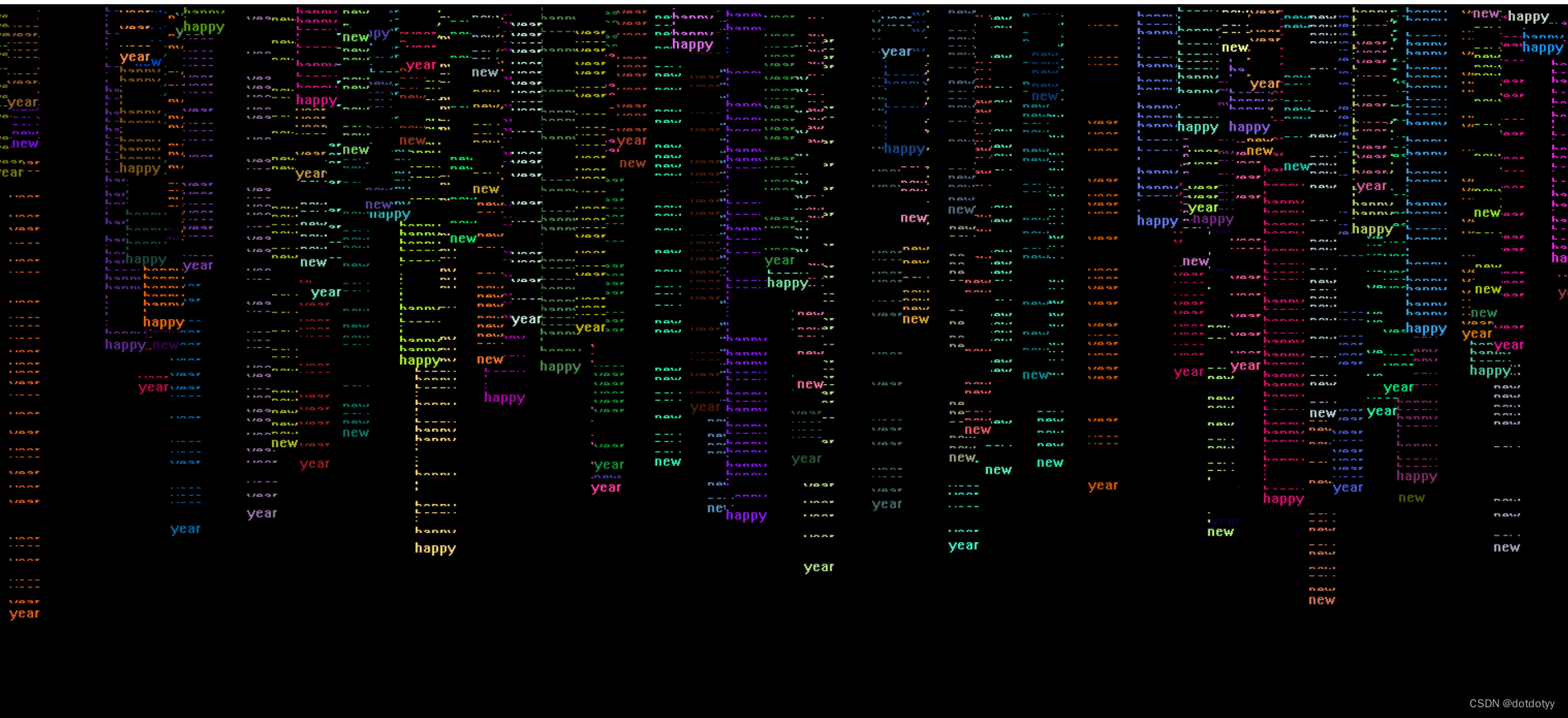
简单链表动态存储和管理节点的示例文字雨
用于理解单向链表类的基本构建
结点内容
每个节点包含一个字符串、一个颜色值以及在窗口中的x和y坐标
主要功能
- 链表动态生成文字节点,每个节点:
数据为随机选择的字符串(如“happy”、“new”、“year”)
随机颜色和随机x坐标,初始y坐标为0
文字节点逐渐向下移动,直到填满整个图形窗口 - 当画布窗口被填满后,清空链表和画布,再重新生成链表
- 对链表操作的基本功能:
如判断链表是否为空、在链表末尾添加节点、遍历链表以及清空链表
说明
需要安装EasyX库,官网 https://easyx.cn/easyx
EasyX Graphics Library 是针对 Visual C++ 的免费绘图库,支持 VC6.0 ~ VC2022,简单易用
“下载 -> 安装 -> 使用”,这个库的安装本质是把头文件h和库文件lib拷贝到系统目录下,所以不复杂也不需要配置,全过程一分钟
EasyX官方作品库 https://codebus.cn ,有很多用该库完成的游戏、画图类的小作品,适于学习。例如橘子钟表、樱花树、烟花、玫瑰花、跳动的爱心、贪吃蛇、俄罗斯方块、数字游戏、数独、棋类游戏等
源码
/* 原创,转载请注明出处*/
#define _CRT_SECURE_NO_WARNINGS //回避VS需要strcpy_s等更安全要求
#include<iostream>
#include<ctime>
#include<string>
#include<graphics.h> //EasyX
using namespace std;

struct Data
{
	int x, y;
	string ch;
	int color;
	Data():x(0), y(0), ch(""), color(0) {}
	Data(int nx, int ny, string nch, int ncolor) : x(nx), y(ny), ch(nch), color(ncolor) {}
};
struct Node
{
	Data data;
	Node* pnext;
	Node() : data(), pnext(nullptr) {}
	Node(const Data& ndata, Node* npnext) : data(ndata), pnext(npnext) {}
};
class MyList
{
public:
	MyList() :head(nullptr), tail(nullptr), size(0) {} //初始化一个空链表
	~MyList() { Clear(); }
	bool IsEmpty();//判断链表是否为空
	void Append(Node* pNode);//链表末尾插入一个结点
	void Travel(void(*dosth)(Node* pNode));//遍历链表,修改或访问
	void Clear();
	bool LastNodeYLessOrEqualTo(int value) //检查末尾节点的 y 值
	{
		if (tail == nullptr)
			return false;

		return tail->data.y <= value;
	}
private:
	Node* head;
	Node* tail;
	int size;
};

//判断链表是否为空
/*为空返回true,反之返回false*/
bool MyList::IsEmpty()
{ return size==0;}
//链表末尾插入一个结点
void MyList::Append(Node* pNode)
{
	if (size == 0)
	{		head = tail = pNode;	}
	else
	{	tail->pnext = pNode;
		tail = pNode;
	}
	size++;
}
void MyList::Clear()
{
	while (!IsEmpty())
	{
		Node* temp = head;
		head = head->pnext;
		delete temp;
		size--;
	}
	head = tail = nullptr;
}
//遍历链表,修改或访问
void MyList::Travel(void(*dosth)(Node* pNode))
{
	Node* ptemp = head;
	while (ptemp)
	{
		dosth(ptemp);
		ptemp = ptemp->pnext;
	}
}
void ShowNode(Node* pNode)
{
	settextcolor(pNode->data.color);
	moveto(pNode->data.x, pNode->data.y);
	wstring wS(pNode->data.ch.begin(), pNode->data.ch.end());
	outtext(wS.c_str());
}
void ModifyY(Node* pNode)
{
	pNode->data.y += rand() % 10;
}
int main()
{
	initgraph(1800, 800);
	srand((unsigned)time(NULL));

	MyList list1;
	Node* pnode = nullptr;

	string words[3] = { "happy","new","year"};//单词数组

	clock_t start_time = clock();  // 获取开始时间
	const clock_t delay = CLOCKS_PER_SEC * 5;  // 设置5秒延时


	while (true)
	{//随机生成结点,填满画布
		do
		{
			pnode = new Node;
			pnode->data.x = rand() % 1800;
			pnode->data.y = 0;

			int wordIndex = rand() % 3;
			pnode->data.ch = words[wordIndex];

			pnode->data.color = RGB(rand() % 256, rand() % 256, rand() % 256);
			pnode->pnext = nullptr;
			list1.Append(pnode);
			list1.Travel(ShowNode);
			list1.Travel(ModifyY);


			//清空画布
			clock_t current_time = clock();  // 获取当前时间
			if (current_time - start_time >= delay) {
				cleardevice();  // 每5秒清除一次画布
				start_time = current_time;  // 重置开始时间
			}
			Sleep(20);

		} while (list1.LastNodeYLessOrEqualTo(800));

		//清除链表
		list1.Clear();
	}
		// 关闭图形界面
		closegraph();
	return 0;
}
运行结果是动态在屏幕顶端出现文字结点,直到屏幕最底端





 扫一扫
扫一扫


 被折叠的 条评论
为什么被折叠?
被折叠的 条评论
为什么被折叠?
 到【灌水乐园】发言





