



操作
关联仓库
https://blog.youkuaiyun.com/weixin_38239050/article/details/113250772
克隆
git clone https://github.com/ChenaniahMe/codes.git
一般地,克隆后再下拉到自己的分支,git pull origin 分支名,然后就可以了
这个是我创建的仓库:
https://github.com/ChenaniahMe/codes.git
git push -u origin master #将本地项目传到github上
显示git仓库地址:
git remote -v
删除远程仓库
git remote rm main
下拉操作
git pull origin
恢复操作
git reset --hard HEAD^
不存在dali
echo "# codes" >> README.md
git init
git add README.md
#每次提交需要写提交注释,否则不行
git commit -m "first commit"
git branch -M main
git remote add origin https://github.com/ChenaniahMe/codes.git
git push -u origin main
存在daili
git add README.md
git commit -m "first commit"
git push -u origin main
产看所处的分支
git branch
核对分支信息
git checkout 分支名
需要通过浏览器进行授权
Windows访问google代理设置
set https_proxy=socks5://127.0.0.1:10808
查看代理
env|grep -i proxy
将代理全部置空
https://blog.youkuaiyun.com/xunan003/article/details/79233147
检查是否含有分支
git branch

检查状态
git status
配置dali
git config --global https.proxy http://127.0.0.1:10808
10808是下面的端口
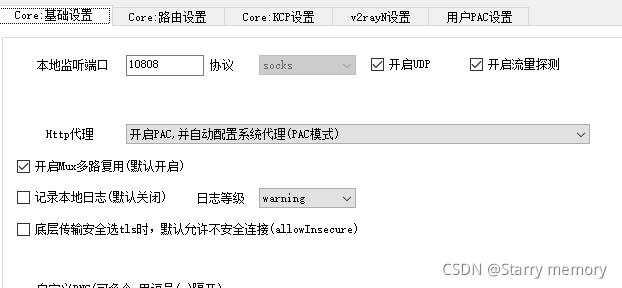
对比两个分支文件的不同
下载git
https://git-scm.com/downloads
错误
1.如果文件夹为空则不可以上传
相关链接
https://blog.youkuaiyun.com/jianpengxuexikaifa/article/details/91414072 (有详细的操作流程,以及git的下载过程)
https://www.cnblogs.com/xiaotaiyang/p/4581401.html (参考链接)





 扫一扫
扫一扫


 1849
1849

 被折叠的 条评论
为什么被折叠?
被折叠的 条评论
为什么被折叠?
 到【灌水乐园】发言





