


1. FastChat框架简介和特点
1.1 FastChat概述
FastChat是一个开源平台,专为训练、服务与评估对话式大模型而设计。该平台由加州大学伯克利分校和CMU共建的LMSYS实验室开发,是前文提到的基于vLLM推理引擎后端的Chatbot Arena打擂平台的开源版本。FastChat在GitHub上的官方仓库为lm-sys/FastChat,项目旨在提供一个全面的解决方案,用于大型语言模型聊天机器人的开发与应用。
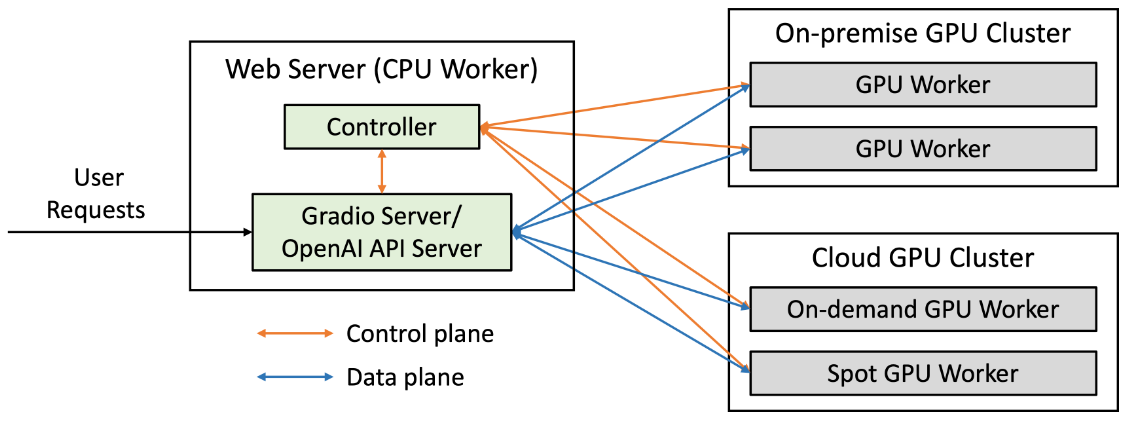
FastChat服务的架构如下图所示:
1.2 核心特点
FastChat作为一个综合性的大语言模型平台,具有以下核心特点:
- 全方位功能覆盖:
- 提供最先进的大型语言模型(LLM)的权重、训练代码和评估代码(例如Vicuna、MT-Bench等)
- 提供分布式多模型服务系统,配备Web用户界面以及与OpenAI兼容的RESTful API
- 支持模型训练、服务部署和性能评估的完整流程
- 灵活的部署选项:
- 支持在本地环境、服务器和云平台上部署
- 适用于个人开发者到企业级应用的各种规模
- 优秀的兼容性和扩展性:
- 提供与OpenAI API兼容的接口,便于集成到现有系统中
- 支持多种模型架构和第三方模型集成
- 丰富的功能组件:
- Web界面(Gradio)进行交互式聊天
- 对战模式和排行榜功能,可以比较不同模型的性能
- 工具/代理、RAG管道等高级功能模块
FastChat的核心定位是作为一个介于纯研究与应用之间的平台,既支持模型训练和评估,又提供生产级的服务能力,使研究人员和开发者能够轻松构建、评估和部署高质量的聊天机器人。
2. 环境安装和配置要求
2.1 系统要求
根据多个教程和实践经验,FastChat的最低和推荐系统要求如下:
| 硬件组件 | 最低配置 | 推荐配置 | 极端配置 |
|---|---|---|---|
| CPU | 4核8线程 | 8核16线程 | 2核4线程 |
| 内存 | 16GB | 32GB | 8GB(需启用swap) |
| 存储 | 取决于模型大小 | 视情况而定 | 最低8GB |
| GPU | 非必需 | 支持多GPU | 可选配 |
2.2 软件环境准备
2.2.1 操作系统
FastChat支持以下操作系统:
- Linux:推荐使用Ubuntu、Debian等主流发行版
- macOS:在Mac上也可以正常运行
- Windows:可能需要额外配置,不推荐作为生产环境
2.2.2 Python版本
FastChat要求使用Python 3.8或更高版本,不支持Python 2.x系列:
# 检查Python版本
python --version
2.2.3 安装管理工具
为确保依赖包管理的便捷性,推荐使用以下工具:
- Miniconda:轻量级的conda管理工具,适合环境管理
- Anaconda:完整的Python科学计算环境,包含更多预装包
2.3 安装FastChat
2.3.1 通过pip安装(推荐方式)
FastChat提供两种pip安装方式,根据需求选择:
- 基础安装(仅核心功能):
pip3 install fastchat
- 完整安装(包含Web界面和模型工作器):
pip3 install "fastchat[model_worker,webui]"
2.3.2 源码安装(可选,适合贡献者)
- 克隆GitHub仓库:
git clone <https://github.com/lm-sys/FastChat.git>
cd FastChat
- 根据需要安装依赖(通常还是使用pip安装):
# 可以选择性地安装不同组件的依赖
pip3 install -e .[model_worker,webui]
2.3.3 使用Docker部署(适合快速测试)
FastChat提供了Docker镜像,可以快速部署:
# 拉取镜像
docker pull fastchat/fastchat:latest

# 启动服务
docker run -it --rm -p 8080:8080 fastchat/fastchat:latest
2.4 环境配置优化
2.4.1 加速国内下载
在国内外网络环境下下载模型和依赖包时,可以配置加速源:
# 配置国内pip镜像源(如阿里云)
pip config set global.index-url https:// mirrors.aliyun.com/pypi/simple/

# 对于conda环境
conda config --add channels <国内镜像地址>
conda config --set show_channel_urls yes
2.4.2 模型下载配置
FastChat支持多种模型,可以从HuggingFace下载:
# 配置HuggingFace下载加速export HF_ENDPOINT=<国内镜像地址>
3. 基本使用方法和API接口
3.1 FastChat架构概述
FastChat的架构设计分为三个核心组件,理解这一架构对于有效使用框架至关重要:
- Controller(控制器):
- 负责协调整个系统
- 管理模型工作器的注册和任务分发
- 监控系统状态和负载均衡
- Model Worker(模型工作器):
- 实际运行大语言模型的组件
- 处理推理请求并返回生成结果
- 支持多GPU并行计算和模型加速
- Server(服务端):
- 提供对外接口,包括Web UI和API
- 接收用户请求并转发给相应的模型工作器
- 返回处理结果给用户
3.2 启动FastChat服务
3.2.1 启动基本流程
启动FastChat的基本流程包括三个主要步骤:
- 启动Controller:
python -m fastchat.serve.controller
- 启动Model Worker:
python -m fastchat.serve.model_worker \\
  --model <MODEL_PATH> \\
  --controller <http://localhost:21001>
- 启动Gradio Web UI:
python -m fastchat.serve.gradio_web_server \\
  --controller <http://localhost:21001> \\
  --share <optional: enable public sharing>
3.2.2 常用启动参数
| 参数 | 说明 | 默认值 |
|---|---|---|
--model | 指定模型路径或名称 | - |
--controller | 指定控制器地址 | http://localhost:21001 |
--worker-address | 指定工作器地址 | - |
--share | 允许公开访问Web UI | False |
--port | 指定服务端口 | - |
--gpu | 指定使用的GPU设备 | All available GPUs |
3.3 使用FastChat API
FastChat提供了与OpenAI兼容的API接口,可以通过RESTful方式访问。
3.3.1 API服务器启动
python -m fastchat.serve.openai_api_server \\
  --controller <http://localhost:21001> \\
  --model-names <MODEL_NAME_1>,<MODEL_NAME_2>
3.3.2 基本API调用示例
以下是一个使用OpenAI SDK调用FastChat API的示例:
import openai

# 配置API密钥(FastChat不需要密钥,但API格式保持一致)
openai.api_key = "dummy-key"
openai.api_base = "<http://localhost:8000>"# FastChat API地址# 发送聊天请求
response = openai.ChatCompletion.create(
    model="vicuna-13b",
    messages=[
        {"role": "user", "content": "Hello, how are you?"}
    ]
)

print(response.choices[0].message.content)
3.3.3 API接口规范
FastChat API与OpenAI API保持兼容,支持以下主要接口:
- ChatCompletion:用于生成聊天回复
- Completion:用于非聊天格式的文本生成
- Models:用于列出可用模型和查看模型信息
API的请求参数和响应格式与OpenAI保持一致,便于现有应用迁移。
3.4 Web界面使用
FastChat提供了基于Gradio的Web界面,使用简单直观:
- 启动Web界面:
python -m fastchat.serve.gradio_web_server \\
  --controller <http://localhost:21001> \\
  --share True# 启用外部访问
- 访问界面:启动后会自动打开浏览器,访问生成的URL
- 使用界面:
- 选择模型
- 输入聊天内容
- 查看生成回复
- 支持多轮对话
3.5 核心交互流程(以一次 chat 请求为例)
sequenceDiagram
    participant User
    participant Server
    participant Controller
    participant Worker

    User->>Server: POST /v1/chat/completions
    Server->>Controller: 获取可用 Worker(带模型名)
    Controller-->>Server: 返回 Worker 地址(如:worker-3)
    Server->>Worker: 发送推理请求(含 prompt、参数)
    Worker-->>Server: 返回生成结果(流式或一次性)
    Server-->>User: 返回给用户(SSE 或 JSON)
关键点:
- Server 不直接感知 Worker 的存活,全靠 Controller 的路由表
- Worker 故障时,Controller 会将其标记为不可用,Server 下次请求会拿到新的 Worker
- 支持 retry:Server 可设置超时重试(如 3 次)
4. 实际使用示例和代码演示
4.1 部署本地模型完整流程
以下是从环境准备到服务运行的完整示例,以Baichuan-13B-Chat模型为例:
# 1. 创建虚拟环境
conda create -n fastchat python=3.9
conda activate fastchat

# 2. 安装FastChat
pip3 install "fastchat[model_worker,webui]"

# 3. 下载模型# 方式一:手动下载# 方式二:使用HuggingFace自动下载export HF_ENDPOINT=<国内镜像地址>

# 4. 启动Controller(在终端1运行)
python -m fastchat.serve.controller

# 5. 启动Model Worker(在终端2运行)
python -m fastchat.serve.model_worker \\
  --model baichuan-13b-chat \\
  --controller <http://localhost:21001>

# 6. 启动Web UI(在终端3运行)
python -m fastchat.serve.gradio_web_server \\
  --controller <http://localhost:21001> \\
  --share True
4.2 部署Vicuna模型示例
Vicuna是LMSYS实验室推出的高性能聊天模型,FastChat是其官方部署平台:
# 1. 安装FastChat(如未安装)
pip3 install "fastchat[model_worker,webui]"

# 2. 启动Controller
python -m fastchat.serve.controller

# 3. 启动Vicuna模型工作器
python -m fastchat.serve.model_worker \\
  --model lmsys/vicuna-13b \\
  --controller <http://localhost:21001>

# 4. 启动Web界面
python -m fastchat.serve.gradio_web_server \\
  --controller <http://localhost:21001> \\
  --share True
4.3 通过API使用FastChat服务
以下是一个完整的Python示例,演示如何通过API使用FastChat服务:
import openai
import os

# 配置API客户端
openai.api_key = "dummy"# FastChat不需要密钥,但需要设置此值
openai.api_base = "<http://localhost:8000>"# FastChat API服务器地址# 定义聊天函数def chat_with_model(model_name, messages):
    """与指定模型进行对话"""
    response = openai.ChatCompletion.create(
        model=model_name,
        messages=messages
    )
    return response.choices[0].message.content

# 聊天示例if __name__ == "__main__":
# 聊天历史
    conversation = [
        {"role": "user", "content": "你好,请介绍一下自己"},
        {"role": "assistant", "content": "我是Vicuna,一个大型语言模型,我在这里帮助你回答问题。"},
        {"role": "user", "content": "你会做什么?"
    ]

# 询问模型
    response = chat_with_model("vicuna-13b", conversation)
    print(f"模型回答:{response}")
4.4 Docker部署示例
对于希望快速部署FastChat的用户,Docker是一个省时的选择:
# 1. 拉取FastChat Docker镜像
docker pull fastchat/fastchat:latest

# 2. 启动FastChat服务容器
docker run -it --rm \\
  -p 8080:8080 \\# 映射Web界面端口
  -p 8000:8000 \\# 映射API端口
  fastchat/fastchat:latest

# 访问Web界面# 浏览器打开 <http://localhost:8080>
或者,使用自定义配置:
# 使用自定义模型和配置启动
docker run -it --rm \\
  -p 8080:8080 \\
  -p 8000:8000 \\
  -v /path/to/models:/app/models \\# 挂载本地模型
  fastchat/fastchat:latest \\
  serve \\
    --controller <http://localhost:21001> \\
    --model-path /app/models/vicuna-13b
5. 高级功能和自定义配置
5.1 模型微调与训练
FastChat不仅支持部署预训练模型,还支持模型微调:
# 1. 准备训练数据(JSONL格式)# 格式: {"instruction": "任务描述", "input": "输入", "output": "期望输出"}# 2. 启动微调任务
python -m fastchat.train.train \\
  --model_name_or_path <基础模型路径> \\
  --data_path <训练数据路径> \\
  --output_dir <输出路径> \\
  --num_train_epochs 3 \\
  --per_device_train_batch_size 4 \\
  --learning_rate 2e-5 \\
  --warmup_ratio 0.03 \\
  --weight_decay 0.01 \\
  --logging_steps 10 \\
  --save_strategy "steps" \\
  --save_steps 100 \\
  --save_total_limit 3 \\
  --evaluation_strategy "steps" \\
  --eval_steps 100 \\
  --eval_num_beams 5
5.2 多GPU分布式部署
对于拥有多个GPU的服务器,FastChat支持分布式部署以提高性能:
# 1. 启动Controller
python -m fastchat.serve.controller

# 2. 在多个GPU上启动多个Model Worker# GPU 0
CUDA_VISIBLE_DEVICES=0 python -m fastchat.serve.model_worker \\
  --model <MODEL_PATH> \\
  --controller <http://localhost:21001> &

# GPU 1
CUDA_VISIBLE_DEVICES=1 python -m fastchat.serve.model_worker \\
  --model <MODEL_PATH> \\
  --controller <http://localhost:21001> &

# GPU 2
CUDA_VISIBLE_DEVICES=2 python -m fastchat.serve.model_worker \\
  --model <MODEL_PATH> \\
  --controller <http://localhost:21001> &
5.3 自定义Web界面
FastChat的Web界面可以进行定制化修改:
-
修改源码:
- 克隆FastChat仓库
- 修改
fastchat/serve/gradio_web_server.py中的界面代码
-
添加新功能:
# 示例:在gradio_web_server.py中添加新功能with gr.Tab("自定义功能"): custom_input = gr.Textbox(label="输入") custom_output = gr.Textbox(label="输出") def custom_function(text): # 自定义处理逻辑return f"处理结果: {text}" custom_input.change(fn=custom_function, inputs=custom_input, outputs=custom_output) -
启动自定义界面:
python -m fastchat.serve.gradio_web_server \\
  --controller <http://localhost:21001> \\
  --share True
5.4 与第三方系统集成
FastChat可以通过API与第三方系统集成:
import requests
import json

# API端点
API_ENDPOINT = "<http://localhost:8000/v1/chat/completions>"

# 请求头
headers = {
    "Content-Type": "application/json",
    "Authorization": "Bearer dummy"# FastChat不需要密钥,但需要此头部
}

# 请求体
payload = {
    "model": "vicuna-13b",
    "messages": [
        {"role": "user", "content": "解释什么是量子计算"}
    ],
    "temperature": 0.7
}

# 发送请求
response = requests.post(API_ENDPOINT, headers=headers, data=json.dumps(payload))

# 处理响应if response.status_code == 200:
    result = response.json()
    reply = result["choices"][0]["message"]["content"]
    print(reply)
else:
    print(f"错误: {response.status_code} - {response.text}")
6. 常见问题和解决方案
6.1 安装问题
| 问题描述 | 可能原因 | 解决方案 |
|---|---|---|
| 安装依赖包失败 | 网络连接问题 | 配置国内镜像源,如阿里云或清华镜像 |
| 版本兼容性问题 | Python或依赖版本不兼容 | 使用虚拟环境,参考官方推荐的环境配置 |
| GPU不被识别 | CUDA版本与显卡不匹配 | 检查CUDA版本,安装匹配的cuDNN和相关驱动 |
解决依赖安装问题的命令示例:
# 使用国内镜像源安装
pip install -i <https://pypi.tuna.tsinghua.edu.cn/simple> <package_name>

# 递归安装依赖
pip install --upgrade <package_name>
6.2 模型下载问题
| 问题描述 | 可能原因 | 解决方案 |
|---|---|---|
| 模型下载速度慢 | 国际网络限制 | 配置国内HuggingFace镜像或手动下载 |
| 模型文件损坏 | 下载过程中断或网络问题 | 使用--force参数重新下载 |
| 模型格式不兼容 | 模型格式与框架要求不匹配 | 使用转换工具转换模型格式 |
解决模型下载问题的命令示例:
# 配置国内HuggingFace镜像export HF_ENDPOINT=https://hf-mirror.com

# 手动下载模型后放置到正确位置# 通常为 ~/.cache/huggingface/hub/
6.3 运行问题
| 问题描述 | 可能原因 | 解决方案 |
|---|---|---|
| 内存不足 | 模型过大或系统内存不够 | 使用更小的模型、减少批处理大小或增加系统内存 |
| GPU内存不足 | 模型参数量大或生成长度过长 | 使用梯度检查点、减少生成长度或使用更小模型 |
| 服务启动失败 | 端口被占用或权限不足 | 检查端口使用情况,使用netstat -ano查看占用进程 |
| 响应时间过长 | 系统负载过高或模型复杂度高 | 增加GPU数量、优化模型或减少并发请求数 |
解决运行问题的命令示例:
# 检查端口使用情况
lsof -i :8080# 检查端口8080是否被占用# 杀死占用进程kill -9 <PID>

# 查看GPU使用情况
nvidia-smi
6.4 性能优化
提高FastChat性能的几种方法:
- 使用vLLM后端:
# 安装vLLM
pip install vllm

# 启动支持vLLM的模型工作器
python -m fastchat.serve.model_worker \\
  --model <MODEL_PATH> \\
  --worker-type vllm \\
  --controller <http://localhost:21001>
- 优化模型加载:
# 使用量化减少内存占用
python -m fastchat.serve.model_worker \\
  --model <MODEL_PATH> \\
  --quantization awq \\# 或nf4
  --controller <http://localhost:21001>
- 调整生成参数:
# 在API调用中优化生成参数
response = openai.ChatCompletion.create(
    model="vicuna-13b",
    messages=[{"role": "user", "content": "解释量子计算"}],
    max_tokens=200,# 减少生成长度
    temperature=0.7,
    top_p=0.9,
    typical_p=1,# 对于一些模型可提高速度
    repetition_penalty=1.0
)
7. 与其他聊天框架的对比
在AI大模型部署领域,存在多个优秀的框架和平台。以下是FastChat与其他主流框架的对比:
7.1 功能对比
| 特性 | FastChat | vLLM | Xinference | OpenLLM |
|---|---|---|---|---|
| 训练能力 | ✓ 完整支持 | ✗ 仅推理 | 部分支持 | 部分支持 |
| 服务部署 | ✓ Web UI + API | ✓ API | ✓ Web UI + API | ✓ Web UI + API |
| 多模型支持 | ✓ 多种模型 | ✓ 多种模型 | ✓ 多种模型 | ✓ 多种模型 |
| 分布式能力 | ✓ 支持 | ✓ 支持 | ✓ 企业级支持 | 部分支持 |
| 模型微调 | ✓ 完整支持 | ✗ | 部分支持 | 部分支持 |
| 对战/评估 | ✓ Chatbot Arena | ✗ | ✗ | ✗ |
| 开源许可 | Apache 2.0 | Apache 2.0 | Apache 2.0 | BSD 3-clause |
| 易用性 | 中高 | 高(仅推理) | 中(企业级) | 高 |
7.2 性能对比
根据公开基准测试,各框架的性能表现大致如下:
| 框架 | 吞吐量 | 资源占用 | 延迟 |
|---|---|---|---|
| vLLM | ★★★★★ | ★★★★ | ★★★★★ |
| FastChat | ★★★★ | ★★★★ | ★★★★ |
| Xinference | ★★★★ | ★★★ | ★★★ |
| OpenLLM | ★★★★ | ★★★ | ★★★ |
vLLM在吞吐量和延迟方面表现最佳,但仅专注于推理;而FastChat提供了更全面的训练到部署的解决方案。
7.3 选择建议
根据不同场景,推荐选择不同的框架:
- 研究和开发场景:
- 推荐:FastChat
- 理由:提供完整的训练、微调和评估功能
- 生产环境部署:
- 高性能需求:vLLM + FastChat API
- 多模型管理:Xinference
- 简单易用:OpenLLM
- 企业级应用:
- 需求多样:结合FastChat进行训练和Xinference进行部署
7.4 框架组合使用
这些框架可以组合使用,发挥各自优势:
# 组合使用示例:FastChat训练,vLLM部署# 1. 使用FastChat训练模型
python -m fastchat.train.train ...# 训练模型# 2. 使用vLLM进行高效部署
vllm --model <MODEL_PATH> ...

# 3. 使用FastChat API接口统一管理
python -m fastchat.serve.openai_api_server ...
8. 部署建议与最佳实践
| 场景 | 推荐配置 | 备注 |
|---|---|---|
| 开发测试 | 单节点 All-in-One(Controller + Server + Worker) | Docker Compose 一键启动 |
| 生产环境 | 分层部署 + K8s | Controller 3 副本 + Worker HPA + Server Ingress |
| 多模型服务 | 每个模型独立 Deployment | 通过 --model-names 区分,如 llama-3-70b,qwen2-72b |
| 高并发 | vLLM + Tensor 并行 | 单 Worker 多卡(如 8×A100),吞吐量可达 2000+ req/s |
| 低成本 | AWQ 4bit + 单卡 24G | 可部署 70B 模型在 3090/4090 上 |
总结
FastChat是一个功能全面、开源免费的大语言模型训练和部署框架,它提供了从模型训练、服务部署到性能评估的完整解决方案。通过FastChat,开发者可以轻松构建、评估和部署高质量的聊天机器人,并通过与OpenAI兼容的API或直观的Web界面进行交互。
FastChat的核心优势在于其综合性——不仅是一个推理框架,更是覆盖AI应用开发全流程的平台。对于需要灵活定制且涵盖训练与部署的场景,FastChat是极佳选择。然而,对于仅需要高性能推理服务的用户,vLLM等专用框架可能是更轻量级的解决方案。
选择合适的框架应基于具体项目需求,综合考虑功能完整性、性能要求、资源限制以及开发团队的技术背景。





 扫一扫
扫一扫


 20万+
20万+

 被折叠的 条评论
为什么被折叠?
被折叠的 条评论
为什么被折叠?
 到【灌水乐园】发言





