


 工厂方法模式是一种创建型设计模式,解决在不指定具体类的情况下创建产品对象的问题。此模式定义了一个方法,子类可重写该方法来更改将被创建的对象所属类。Java中广泛应用,如java.util.Calendar#getInstance()等。
工厂方法是一种创建型设计模式, 解决了在不指定具体类的情况下创建产品对象的问题。
工厂方法定义了一个方法, 且必须使用该方法代替通过直接调用构造函数来创建对象 ( new 操作符) 的方式。 子类可重写该方法来更改将被创建的对象所属类。
在 Java 中使用模式
复杂度: ⭐
流行度: ⭐⭐⭐
使用示例: 工厂方法模式在 Java 代码中得到了广泛使用。 当你需要在代码中提供高层次的灵活性时, 该模式会非常实用。
核心 Java 程序库中有该模式的应用:
java.util.Calendar#getInstance()java.util.ResourceBundle#getBundle()java.text.NumberFormat#getInstance()java.nio.charset.Charset#forName()java.net.URLStreamHandlerFactory#createURLStreamHandler(String)(根据协议返回不同的单例对象)java.util.EnumSet#of()javax.xml.bind.JAXBContext#createMarshaller()及其他类似的方法。
识别方法: 工厂方法可通过构建方法来识别, 它会创建具体类的对象, 但以抽象类型或接口的形式返回这些对象。
生成跨平台的 GUI 元素
在本例中, 按钮担任产品的角色, 对话框担任创建者的角色。
不同类型的对话框需要其各自类型的元素。 因此我们可为每个对话框类型创建子类并重写其工厂方法。
现在, 每种对话框类型都将对合适的按钮类进行初始化。 对话框基类使用其通用接口与对象进行交互, 因此代码更改后仍能正常工作。
buttons
buttons/Button.java: 通用产品接口
package refactoring_guru.factory_method.example.buttons;

/**
 * Common interface for all buttons.
 */
public interface Button {
    void render();
    void onClick();
}
buttons/HtmlButton.java: 具体产品
package refactoring_guru.factory_method.example.buttons;

/**
 * HTML button implementation.
 */
public class HtmlButton implements Button {

    public void render() {
        System.out.println("<button>Test Button</button>");
        onClick();
    }

    public void onClick() {
        System.out.println("Click! Button says - 'Hello World!'");
    }
}
buttons/WindowsButton.java: 另一个具体产品
package refactoring_guru.factory_method.example.buttons;

import javax.swing.*;
import java.awt.*;
import java.awt.event.ActionEvent;
import java.awt.event.ActionListener;

/**
 * Windows button implementation.
 */
public class WindowsButton implements Button {
    JPanel panel = new JPanel();
    JFrame frame = new JFrame();
    JButton button;

    public void render() {
        frame.setDefaultCloseOperation(JFrame.EXIT_ON_CLOSE);
        JLabel label = new JLabel("Hello World!");
        label.setOpaque(true);
        label.setBackground(new Color(235, 233, 126));
        label.setFont(new Font("Dialog", Font.BOLD, 44));
        label.setHorizontalAlignment(SwingConstants.CENTER);
        panel.setLayout(new FlowLayout(FlowLayout.CENTER));
        frame.getContentPane().add(panel);
        panel.add(label);
        onClick();
        panel.add(button);

        frame.setSize(320, 200);
        frame.setVisible(true);
        onClick();
    }

    public void onClick() {
        button = new JButton("Exit");
        button.addActionListener(new ActionListener() {
            public void actionPerformed(ActionEvent e) {
                frame.setVisible(false);
                System.exit(0);
            }
        });
    }
}
factory
factory/Dialog.java: 基础创建者
package refactoring_guru.factory_method.example.factory;

import refactoring_guru.factory_method.example.buttons.Button;

/**
 * Base factory class. Note that "factory" is merely a role for the class. It
 * should have some core business logic which needs different products to be
 * created.
 */
public abstract class Dialog {

    public void renderWindow() {
        // ... other code ...

        Button okButton = createButton();
        okButton.render();
    }

    /**
     * Subclasses will override this method in order to create specific button
     * objects.
     */
    public abstract Button createButton();
}
factory/HtmlDialog.java: 具体创建者
package refactoring_guru.factory_method.example.factory;

import refactoring_guru.factory_method.example.buttons.Button;
import refactoring_guru.factory_method.example.buttons.HtmlButton;

/**
 * HTML Dialog will produce HTML buttons.
 */
public class HtmlDialog extends Dialog {

    @Override
    public Button createButton() {
        return new HtmlButton();
    }
}
factory/WindowsDialog.java: 另一个具体创建者
package refactoring_guru.factory_method.example.factory;

import refactoring_guru.factory_method.example.buttons.Button;
import refactoring_guru.factory_method.example.buttons.WindowsButton;

/**
 * Windows Dialog will produce Windows buttons.
 */
public class WindowsDialog extends Dialog {

    @Override
    public Button createButton() {
        return new WindowsButton();
    }
}
Demo.java: 客户端代码
package refactoring_guru.factory_method.example;

import refactoring_guru.factory_method.example.factory.Dialog;
import refactoring_guru.factory_method.example.factory.HtmlDialog;
import refactoring_guru.factory_method.example.factory.WindowsDialog;

/**
 * Demo class. Everything comes together here.
 */
public class Demo {
    private static Dialog dialog;

    public static void main(String[] args) {
        configure();
        runBusinessLogic();
    }

    /**
     * The concrete factory is usually chosen depending on configuration or
     * environment options.
     */
    static void configure() {
        if (System.getProperty("os.name").equals("Windows 10")) {
            dialog = new WindowsDialog();
        } else {
            dialog = new HtmlDialog();
        }
    }

    /**
     * All of the client code should work with factories and products through
     * abstract interfaces. This way it does not care which factory it works
     * with and what kind of product it returns.
     */
    static void runBusinessLogic() {
        dialog.renderWindow();
    }
}
OutputDemo.txt: 执行结果 (HtmlDialog)
<button>Test Button</button>
Click! Button says - 'Hello World!'
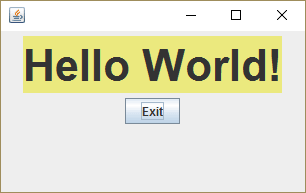
OutputDemo.png: 执行结果 (WindowsDialog)





 扫一扫
扫一扫


 761
761

 被折叠的 条评论
为什么被折叠?
被折叠的 条评论
为什么被折叠?
 到【灌水乐园】发言





