


 探讨一个前端项目中涉及单选框与其他原因输入框联动的问题,点击单选框时按钮状态变化逻辑出现异常,具体表现为按钮禁用状态无法正确更新。
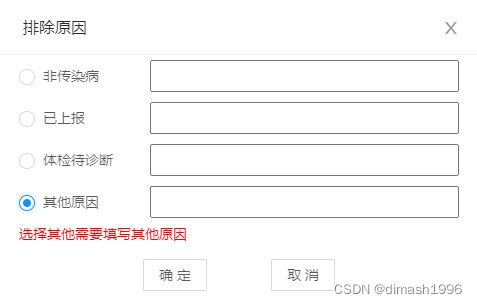
实现效果:点击前三个单选框时, 可以直接点击确定,
选择其他原因且输入框为空按钮禁用,disabled为true,当输入框有数据时,disabled为false可用
输入框输入数据时,disabled已经为false但按钮依然为禁用状态,就很奇怪。
这是在一个项目中的对话框,摘取出来的代码不好看懂,主要用于记录项目中的问题,这个功能可以用别的方法解决,但是效果没有这个方便,可是遇到这个bug也解决不了,以后有空单独写一个类似的功能试试看到底是哪里的问题。
主要代码如下:
html部分
<input v-model="property.reason" style="width:65%;margin-right:20px;" class="input"

            @input="func.inputConChange">
script部分

 let property = {

      reason: '',

      disabled: false,

    }

reasonChange: (index) => {

        console.log(property.disabled)

        value.value = reasonArr[index]

        property.reason = ''

        if (reasonArr[index] == '其他原因' && property.reason == "") {

          // property.disabled = true

          console.log(property.disabled)

        } else if (reasonArr[index] != '其他原因') {

          property.disabled = false

          console.log(property.disabled)

        }

      },

      inputConChange: () => {

        console.log(property.reason)

        property.disabled = false

        console.log(property.disabled)//false

      },





 扫一扫
扫一扫


 7952
7952

 被折叠的 条评论
为什么被折叠?
被折叠的 条评论
为什么被折叠?
 到【灌水乐园】发言





