


lnmp架构
安装nginx
创建系统用户nginx
[root@czh ~]# useradd -r -M -s /sbin/nologin nginx
安装相关的依赖包
[root@czh ~]# yum -y install pcre-devel openssl openssl-devel gd-devel gcc gcc-c++ vim wget make
创建日志存放目录
[root@czh ~]# mkdir -p /var/log/nginx
[root@czh ~]# chown -R nginx.nginx /var/log/nginx
下载nginx
wget http://nginx.org/download/nginx-1.12.0.tar.gz
[root@czh ~]# ls
anaconda-ks.cfg  nginx-1.20.1.tar.gz
编译安装
[root@czh nginx-1.20.1]# ./configure \
> --prefix=/usr/local/nginx \
> --user=nginx \
> --group=nginx \
> --with-debug \
> --with-http_ssl_module \
> --with-http_realip_module \
> --with-http_image_filter_module \
> --with-http_gunzip_module \
> --with-http_gzip_static_module \
> --with-http_stub_status_module \
> --http-log-path=/var/log/nginx/access.log \
> --error-log-path=/var/log/nginx/error.log

[root@czh nginx-1.20.1]# make install
设置环境变量
[root@czh nginx-1.20.1]# echo 'export PATH=/usr/local/nginx/sbin:$PATH' > /etc/profile.d/nginx.sh
[root@czh nginx-1.20.1]# . /etc/profile.d/nginx.sh
启动
[root@czh ~]#  nginx
[root@czh ~]# ss -antl
State   Recv-Q  Send-Q   Local Address:Port   Peer Address:Port Process
LISTEN  0       128            0.0.0.0:22          0.0.0.0:*
LISTEN  0       128            0.0.0.0:80          0.0.0.0:*
LISTEN  0       128               [::]:22             [::]:*
安装mysql
下载依赖
[root@czh ~]# dnf -y install wget make tree ncurses-compat-libs vim ncurses-compat-libs
下载安装包
[root@czh ~]# wget https://downloads.mysql.com/archives/get/p/23/file/mysql-5.7.33-linux-glibc2.12-x86_64.tar.gz
--2021-05-05 02:50:16--  https://downloads.mysql.com/archives/get/p/23/file/mysql-5.7.33-linux-glibc2.12-x86_64.tar.gz
正在解析主机 downloads.mysql.com (downloads.mysql.com)... 137.254.60.14
正在连接 downloads.mysql.com (downloads.mysql.com)|137.254.60.14|:443... 已连接。
已发出 HTTP 请求,正在等待回应... 302 Found
位置:https://cdn.mysql.com/archives/mysql-5.7/mysql-5.7.33-linux-glibc2.12-x86_64.tar.gz [跟随至新的 URL]
--2021-05-05 02:50:17--  https://cdn.mysql.com/archives/mysql-5.7/mysql-5.7.33-linux-glibc2.12-x86_64.tar.gz
正在解析主机 cdn.mysql.com (cdn.mysql.com)... 104.75.165.42
正在连接 cdn.mysql.com (cdn.mysql.com)|104.75.165.42|:443... 已连接。
已发出 HTTP 请求,正在等待回应... 200 OK
长度:661718255 (631M) [application/x-tar-gz]
正在保存至: “mysql-5.7.33-linux-glibc2.12-x86_64.tar.gz”

mysql-5.7.33-linux- 100%[=================>] 631.06M  3.84MB/s  用时 3m 0s

2021-05-05 02:53:17 (3.51 MB/s) - 已保存 “mysql-5.7.33-linux-glibc2.12-x86_64.tar.gz” [661718255/661718255])
创建新的一个用户
[root@czh ~]# useradd -r -M -s /sbin/nologin mysql
解压到指定的位置上面
[root@czh ~]# tar xf mysql-5.7.33-linux-glibc2.12-x86_64.tar.gz
[root@czh ~]# ls
公共  图片  音乐             initial-setup-ks.cfg
模板  文档  桌面             mysql-5.7.33-linux-glibc2.12-x86_64
视频  下载  anaconda-ks.cfg  mysql-5.7.33-linux-glibc2.12-x86_64.tar.gz
[root@czh ~]# mv mysql-5.7.33-linux-glibc2.12-x86_64 /usr/local/
[root@czh ~]# cd /usr/local/
[root@czh local]# ls
bin  games    lib    libexec                              sbin   src
etc  include  lib64  mysql-5.7.33-linux-glibc2.12-x86_64  share
修改目录的名字或者添加软连接
[root@czh local]# mv mysql-5.7.33-linux-glibc2.12-x86_64/ mysql
[root@czh local]# ls
bin  etc  games  include  lib  lib64  libexec  mysql  sbin  share  src
修改文件文件的属组和属主
[root@czh local]# ll |grep mysql
drwxr-xr-x. 9 root root 129 5月   5 15:13 mysql
[root@czh local]# chown -R mysql.mysql /usr/local/mysql/
[root@czh local]# ll |grep mysql
drwxr-xr-x. 9 mysql mysql 129 5月   5 15:13 mysql
设置环境变量
[root@czh mysql]# vim /etc/profile.d/mysql.sh
[root@czh mysql]# cat /etc/profile.d/mysql.sh
export PATH=/usr/local/mysql/bin:$PATH
[root@czh mysql]# . /etc/profile.d/mysql.sh
[root@czh mysql]# which mysql
/usr/local/mysql/bin/mysql
创建一个存放数据的目录
[root@czh mysql]# mkdir /opt/mysql_data
[root@czh mysql]# chown -R mysql.mysql /opt/mysql_data/
[root@czh mysql]# ll /opt/
总用量 0
drwxr-xr-x. 2 mysql mysql 6 5月   5 15:25 mysql_data
初始化并会生成初始密码
[root@czh mysql]# /usr/local/mysql/bin/mysqld --initialize --user=mysql --datadir=/opt/mysql_data/
2021-05-05T07:28:22.085737Z 0 [Warning] TIMESTAMP with implicit DEFAULT value is deprecated. Please use --explicit_defaults_for_timestamp server option (see documentation for more details).
2021-05-05T07:28:22.383660Z 0 [Warning] InnoDB: New log files created, LSN=45790
2021-05-05T07:28:22.441499Z 0 [Warning] InnoDB: Creating foreign key constraint system tables.
2021-05-05T07:28:22.502711Z 0 [Warning] No existing UUID has been found, so we assume that this is the first time that this server has been started. Generating a new UUID: 78d56077-ad73-11eb-8a03-000c29284f0e.
2021-05-05T07:28:22.505086Z 0 [Warning] Gtid table is not ready to be used. Table 'mysql.gtid_executed' cannot be opened.
2021-05-05T07:28:23.405193Z 0 [Warning] CA certificate ca.pem is self signed.
2021-05-05T07:28:23.500882Z 1 [Note] A temporary password is generated for root@localhost: (?qFv=aIt1?x
生成配置文件
[root@czh mysql]# cat > /etc/my.cnf <<EOF
> [mysqld]
> basedir = /usr/local/mysql
> datadir = /opt/mysql_data
> socket = /tmp/mysql.sock
> port = 3306
> pid-file = /opt/mysql_data/mysql.pid
> user = mysql
> skip-name-resolve
> EOF
[root@czh ~]# cat /etc/my.cnf
[mysqld]
basedir = /usr/local/mysql
datadir = /opt/mysql_data
socket = /tmp/mysql.sock
port = 3306
pid-file = /opt/mysql_data/mysql.pid
user = mysql
skip-name-resolve
配置服务启动脚本 ,并且设置开机自动启动,并且启动mysql服务
[root@czh mysql]# cp -a /usr/local/mysql/support-files/mysql.server /etc/init.d/mysqld
[root@czh mysql]# sed -ri 's#^(basedir=).*#\1/usr/local/mysql#g' /etc/init.d/mysqld
[root@czh mysql]# sed -ri 's#^(datadir=).*#\1/opt/data#g' /etc/init.d/mysqld
[root@czh mysql]#  head -47 /etc/init.d/mysqld |tail -2
basedir=/usr/local/mysql
datadir=/opt/data
[root@czh mysql]#  service mysqld start
Starting MySQL.Logging to '/opt/data/czh.err'.
 SUCCESS!
[root@czh mysql]# chkconfig mysqld on
[root@czh mysql]# chkconfig --list
mysqld          0:关    1:关    2:开    3:开    4:开    5:开    6:关
[root@czh mysql]# ss -antl
State   Recv-Q  Send-Q     Local Address:Port     Peer Address:Port  Process
LISTEN  0       128              0.0.0.0:111           0.0.0.0:*
LISTEN  0       32         192.168.122.1:53            0.0.0.0:*
LISTEN  0       128              0.0.0.0:22            0.0.0.0:*
LISTEN  0       5              127.0.0.1:631           0.0.0.0:*
LISTEN  0       80                     *:3306                *:*
LISTEN  0       128                 [::]:111              [::]:*
LISTEN  0       128                 [::]:22               [::]:*
LISTEN  0       5                  [::1]:631              [::]:*
安装php
    yum -y install php*
    service php-fpm start
[root@czh ~]# vim /etc/php-fpm.d/www.conf
//搜索listen = /run/php-fpm/www.sock
进行修改
··········
;listen = /run/php-fpm/www.sock
listen = 0.0.0.0:9000
··········
[root@czh ~]# systemctl restart php-fpm.service
配置nginx
[root@czh html]# vim /usr/local/nginx/conf/nginx.conf

        location / {
            root   html;
            index  index.html index.htm index.php;  添加个index.php
        }

        location ~ \.php$ {
            root           html;
            fastcgi_pass   127.0.0.1:9000;
            fastcgi_index  index.php;
            fastcgi_param  SCRIPT_FILENAME  /scripts$fastcgi_script_name;
            include        fastcgi.conf; //修改这里
        }
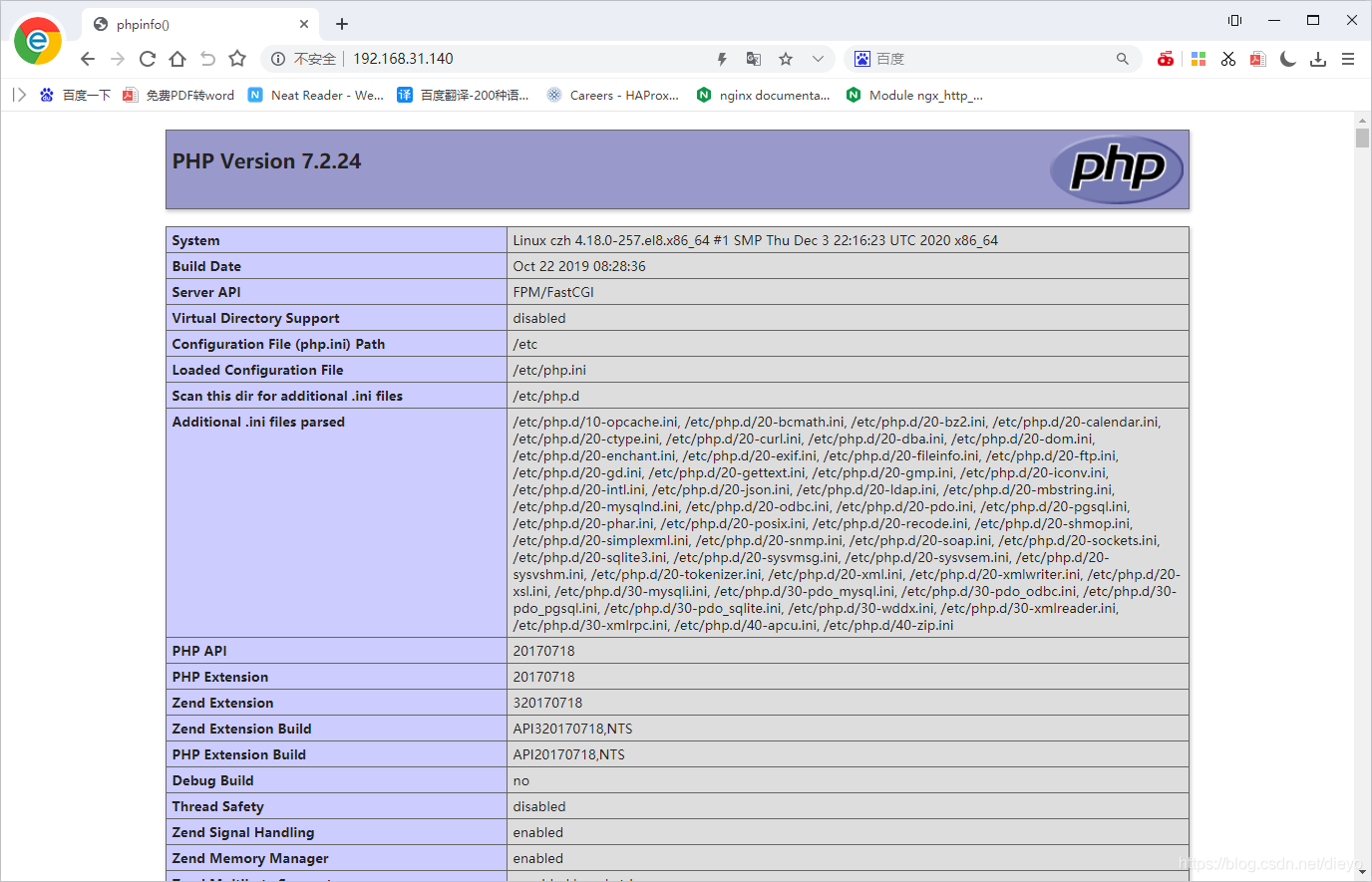
[root@czh ~]# vim /usr/local/nginx/html/index.php
<?php
        phpinfo();
?>
重启服务
[root@czh html]# nginx -s reload
[root@czh html]# systemctl restart php-fpm





 扫一扫
扫一扫


 964
964

 被折叠的 条评论
为什么被折叠?
被折叠的 条评论
为什么被折叠?
 到【灌水乐园】发言





