


 本文详细介绍如何使用Python操作RabbitMQ消息队列,包括安装配置、基础用法、消息持久化、发布订阅模式及不同交换机类型的使用案例。
本篇博客主要介绍如何通过Python来操作管理RabbitMQ消息队列,大家在工作中可能遇到很多类似RabbitMQ这种消息队列的中间件,如:ZeroMQ、ActiveMQ、MetaMQ等,我们学会了如何操作RabbitMQ的话基本上操作其他的队列都是一通百通。
一、RabbitMQ安装
RabbitMQ是一个在AMQP基础上完整的,可复用的企业消息系统,它遵循Mozilla Pulic License开源协议。
MQ全称为Message Queue,消息队列(MQ)是一种应用程序对应用程序的通信方法。应用程序通过读写出入队列的消息(针对应用程序的数据)来通信,而无需专用链接来链接它们。消息传递指的是程序之间通过在消息中发送数据进行通信,而不是通过直接调用彼此来通信,直接调用通常是用于诸如远程过程调用的技术。排队指的是应用程序通过队列来通信。队列的使用除去了接收和发送应用程序同时执行的要求。
1,yum安装rabbitmq
|
1
2
3
4
5
6
7
8
9
10
11
|
#安装配置epel源
rpm
-
ivh http:
/
/
dl.fedoraproject.org
/
pub
/
epel
/
6
/
i386
/
epel
-
release
-
6
-
8.noarch
.rpm
#安装Erlang
yum
-
y insatll erlang
#安装RabbitMQ
yum
-
y install rabbitmq
-
server
#注意:
service rabbitmq
-
server start
/
stop
|
2,安装API
|
1
2
3
4
5
|
#pip安装:
pip install pika
#源码安装:
https:
/
/
pypi.python.org
/
pypi
/
pika
#官网地址
|
之前我们在介绍线程,进程的时候介绍过python中自带的队列用法,下面我们通过一段代码复习一下:
|
1
2
3
4
5
6
7
8
9
10
11
12
13
14
15
16
17
18
19
20
21
|
#生产者消费者模型,解耦的意思就是两个程序之间,互相没有关联了,互不影响。
import
queue
import
threading
import
time
q
=
queue.Queue(
20
)
#队列里最多存放20个元素
def
productor(arg):
#生成者,创建30个线程来请求吃包子,往队列里添加请求元素
q.put(
str
(arg)
+
'- 包子'
)
for
i
in
range
(
30
):
t
=
threading.Thread(target
=
productor,args
=
(i,))
t.start()
def
consumer(arg):
#消费者,接收到队列请求以后开始生产包子,来消费队列里的请求
while
True
:
print
(arg,q.get())
time.sleep(
2
)
for
j
in
range
(
3
):
t
=
threading.Thread(target
=
consumer,args
=
(j,))
t.start()
|
二、通过Python来操作RabbitMQ队列
上面我们已经将环境装备好,下面我们通过Pika模块来对Rabbitmq队列来进行操作,对于RabbitMQ来说,生产和消费不再针对内存里的一个Queue对象,而是某台服务器上的RabbitMQ Server实现的消息队列。
1,基本用法
|
1
2
3
4
5
6
7
8
9
10
11
12
13
14
15
16
17
|
####################################生产者#####################################
import
pika
connection
=
pika.BlockingConnection(pika.ConnectionParameters(host
=
'192.168.10.131'
))
#创建一个链接对象,对象中绑定rabbitmq的IP地址
channel
=
connection.channel()
#创建一个频道
channel.queue_declare(queue
=
'name1'
)
#通过这个频道来创建队列,如果MQ中队列存在忽略,没有则创建
channel.basic_publish(exchange
=
'',
routing_key
=
'name1'
,
#指定队列名称
body
=
'Hello World!'
)
#往该队列中发送一个消息
print
(
" [x] Sent 'Hello World!'"
)
connection.close()
#发送完关闭链接
|
|
1
2
3
4
5
6
7
8
9
10
11
12
13
14
15
16
17
18
19
20
|
#####################################消费者######################################
import
pika
connection
=
pika.BlockingConnection(pika.ConnectionParameters(host
=
'192.168.10.131'
))
#创建一个链接对象,对象中绑定rabbitmq的IP地址
channel
=
connection.channel()
#创建一个频道
channel.queue_declare(queue
=
'name1'
)
#通过这个频道来创建队列,如果MQ中队列存在忽略,没有则创建
def
callback(ch, method, properties, body):
#callback函数负责接收队列里的消息
print
(
" [x] Received %r"
%
body)
channel.basic_consume(callback,
#从队列里去消息
queue
=
'name1'
,
#指定队列名
no_ack
=
True
)
print
(
' [*] Waiting for messages. To exit press CTRL+C'
)
channel.start_consuming()
|
acknowledgment 消息不丢失
上面的例子中如果我们将no-ack=False ,那么当消费者遇到情况(its channel is closed, connection is closed, or TCP connection is lost)挂掉了,那么RabbitMQ会重新将该任务添加到队列中。
|
1
2
3
4
5
6
7
8
9
10
11
12
13
14
15
16
17
18
19
20
21
|
import
pika
connection
=
pika.BlockingConnection(pika.ConnectionParameters(host
=
'192.168.10.131'
))
channel
=
connection.channel()
channel.queue_declare(queue
=
'name1'
)
def
callback(ch, method, properties, body):
print
(
" [x] Received %r"
%
body)
import
time
time.sleep(
10
)
print
(
'ok'
)
ch.basic_ack(delivery_tag
=
method.delivery_tag)
#向生成者发送消费完毕的确认信息,然后生产者将此条消息同队列里剔除
channel.basic_consume(callback,
queue
=
'name1'
,
no_ack
=
False
)
#如果no_ack=False,当消费者down掉了,RabbitMQ会重新将该任务添加到队列中
print
(
' [*] Waiting for messages. To exit press CTRL+C'
)
channel.start_consuming()
|
上例如果消费者中断后如果不超过10秒,重新链接的时候数据还在。当超过10秒之后,消费者往生产者发送了ack,重新链接的时候数据将消失。
durable消息不丢失
消费者down掉后我们知道怎么处理了,如果我的RabbitMQ服务down掉了该怎么办呢?
消息队列是可以做持久化,如果我们在生产消息的时候就指定某条消息需要做持久化,那么RabbitMQ发现有问题时,就会将消息保存到硬盘,持久化下来。
|
1
2
3
4
5
6
7
8
9
10
11
12
13
14
15
16
17
18
19
|
####################################生产者#####################################
#!/usr/bin/env python
import
pika
connection
=
pika.BlockingConnection(pika.ConnectionParameters(host
=
'192.168.10.131'
))
channel
=
connection.channel()
channel.queue_declare(queue
=
'name2'
, durable
=
True
)
#指定队列持久化
channel.basic_publish(exchange
=
'',
routing_key
=
'name2'
,
body
=
'Hello World!'
,
properties
=
pika.BasicProperties(
delivery_mode
=
2
,
#指定消息持久化
))
print
(
" [x] Sent 'Hello World!'"
)
connection.close()
|
|
1
2
3
4
5
6
7
8
9
10
11
12
13
14
15
16
17
18
19
20
21
22
23
24
25
|
#####################################消费者######################################
#!/usr/bin/env python
# -*- coding:utf-8 -*-
import
pika
connection
=
pika.BlockingConnection(pika.ConnectionParameters(host
=
'192.168.10.131'
))
channel
=
connection.channel()
channel.queue_declare(queue
=
'name2'
, durable
=
True
)
def
callback(ch, method, properties, body):
print
(
" [x] Received %r"
%
body)
import
time
time.sleep(
10
)
print
(
'ok'
)
ch.basic_ack(delivery_tag
=
method.delivery_tag)
channel.basic_consume(callback,
queue
=
'name2'
,
no_ack
=
False
)
print
(
' [*] Waiting for messages. To exit press CTRL+C'
)
channel.start_consuming()
|
消息获取顺序
默认消息队列里的数据是按照顺序被消费者拿走的,例如:消费者1去队列中获取奇数序列任务,消费者2去队列中获取偶数序列的任务,消费者1处理的比较快而消费者2处理的比较慢,那么消费者1就会一直处于繁忙的状态,为了解决这个问题在需要加入下面代码:
channel.basic_qos(prefetch_count=1) :表示谁来获取,不再按照奇偶数 排列
|
1
2
3
4
5
6
7
8
9
10
11
12
13
14
15
16
17
18
19
20
21
22
23
24
25
26
|
#!/usr/bin/env python
# -*- coding:utf-8 -*-
import
pika
connection
=
pika.BlockingConnection(pika.ConnectionParameters(host
=
'localhost'
))
channel
=
connection.channel()
channel.queue_declare(queue
=
'name1'
)
def
callback(ch, method, properties, body):
print
(
" [x] Received %r"
%
body)
import
time
time.sleep(
10
)
print
'ok'
ch.basic_ack(delivery_tag
=
method.delivery_tag)
channel.basic_qos(prefetch_count
=
1
)
channel.basic_consume(callback,
queue
=
'name1'
,
no_ack
=
False
)
print
(
' [*] Waiting for messages. To exit press CTRL+C'
)
channel.start_consuming()
|
2,发布订阅
发布订阅和简单的消息队列区别在于,发布订阅会将消息发送给所有的订阅者,而消息队列中的数据被消费一次便消失。所以,RabbitMQ实现发布和订阅时,会为每一个订阅者创建一个队列,二发布者发布消息时,会将消息放置在所有相关队列中。
在RabbitMQ中,所有生产者提交的消息都有Exchange来接收,然后Exchange按照特定的策略转发到Queue进行存储,RabbitMQ提供了四种Exchange:fanout、direct、topic、header。由于header模式在实际工作中用的比较少,下面主要对前三种进行比较。
exchange type = fanout :任何发送到Fanout Exchange的消息都会被转发到与该Exchange绑定(Binding)的所有Queue上
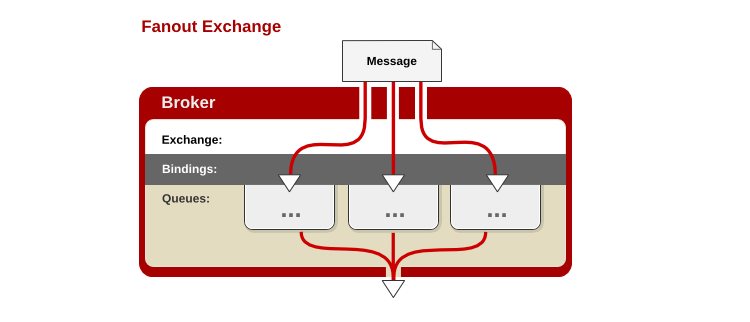
为了方便理解,应用了上面这张图,可以清晰的看到相互之间的关系,当我们设置成fanout模式时,如何操作请看下面代码:
|
1
2
3
4
5
6
7
8
9
10
11
12
13
14
15
|
####################################发布者#####################################
import
pika
connection
=
pika.BlockingConnection(pika.ConnectionParameters(host
=
'localhost'
))
channel
=
connection.channel()
channel.exchange_declare(exchange
=
'test_fanout'
,
type
=
'fanout'
)
message
=
'4456'
channel.basic_publish(exchange
=
'test_fanout'
,
routing_key
=
'',
body
=
message)
print
(
' [x] Sent %r'
%
message)
connection.close()
|
|
1
2
3
4
5
6
7
8
9
10
11
12
13
14
15
16
17
18
19
20
21
22
23
24
25
26
27
|
####################################订阅
者#####################################
import
pika
connection
=
pika.BlockingConnection(pika.ConnectionParameters(host
=
'localhost'
))
channel
=
connection.channel()
channel.exchange_declare(exchange
=
'test_fanout'
,
#创建一个exchange
type
=
'fanout'
)
#任何发送到Fanout Exchange的消息都会被转发到与该Exchange绑定(Binding)的所有Queue上
#随机创建队列
result
=
channel.queue_declare(exclusive
=
True
)
queue_name
=
result.method.queue
#绑定
channel.queue_bind(exchange
=
'test_fanout'
,
queue
=
queue_name)
#exchange绑定后端队列
print
(
'<------------->'
)
def
callback(ch,method,properties,body):
print
(
' [x] %r'
%
body)
channel.basic_consume(callback,
queue
=
queue_name,
no_ack
=
True
)
channel.start_consuming()
|
exchange type = direct:任何发送到Direct Exchange的消息都会被转发到RouteKey中指定的Queue上(关键字发送)
之前事例,发送消息时明确指定了某个队列并向其中发送消息,RabbitMQ还支持根据关键字发送,即:队列绑定关键字,发送者将数据关键字发送到消息Exchange,Exchange根据关键字判定应该将数据发送至指定队列。
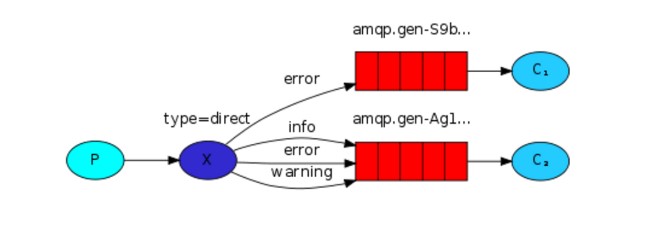
发布者:
|
1
2
3
4
5
6
7
8
9
10
11
12
13
14
15
16
17
18
|
#!/usr/bin/env python
import
pika
import
sys
connection
=
pika.BlockingConnection(pika.ConnectionParameters(host
=
'localhost'
))
channel
=
connection.channel()
channel.exchange_declare(exchange
=
'direct_test'
,
type
=
'direct'
)
severity
=
'info'
#设置一个key,
message
=
'99999'
channel.basic_publish(exchange
=
'direct_test'
,
routing_key
=
severity,
body
=
message)
print
(
" [x] Sent %r:%r"
%
(severity, message))
connection.close()
|
订阅者1:
|
1
2
3
4
5
6
7
8
9
10
11
12
13
14
15
16
17
18
19
20
21
22
23
24
25
26
27
28
29
30
|
#!/usr/bin/env python
import
pika
import
sys
connection
=
pika.BlockingConnection(pika.ConnectionParameters(host
=
'localhost'
))
channel
=
connection.channel()
channel.exchange_declare(exchange
=
'direct_test'
,
type
=
'direct'
)
result
=
channel.queue_declare(exclusive
=
True
)
queue_name
=
result.method.queue
severities
=
[
'error'
,
'info'
,]
#绑定队列,并发送关键字error,info
for
severity
in
severities:
channel.queue_bind(exchange
=
'direct_test'
,
queue
=
queue_name,
routing_key
=
severity)
print
(
' [*] Waiting for logs. To exit press CTRL+C'
)
def
callback(ch, method, properties, body):
print
(
" [x] %r:%r"
%
(method.routing_key, body))
channel.basic_consume(callback,
queue
=
queue_name,
no_ack
=
True
)
channel.start_consuming()
|
订阅者2:
|
1
2
3
4
5
6
7
8
9
10
11
12
13
14
15
16
17
18
19
20
21
22
23
24
25
26
27
28
29
30
|
#!/usr/bin/env python
import
pika
import
sys
connection
=
pika.BlockingConnection(pika.ConnectionParameters(host
=
'localhost'
))
channel
=
connection.channel()
channel.exchange_declare(exchange
=
'direct_test'
,
type
=
'direct'
)
result
=
channel.queue_declare(exclusive
=
True
)
queue_name
=
result.method.queue
severities
=
[
'error'
,]
for
severity
in
severities:
channel.queue_bind(exchange
=
'direct_test'
,
queue
=
queue_name,
routing_key
=
severity)
print
(
' [*] Waiting for logs. To exit press CTRL+C'
)
def
callback(ch, method, properties, body):
print
(
" [x] %r:%r"
%
(method.routing_key, body))
channel.basic_consume(callback,
queue
=
queue_name,
no_ack
=
True
)
channel.start_consuming()
|
结论:当我们将发布者的key设置成Error的时候两个队列对可以收到Exchange的消息,当我们将key设置成info后,只有订阅者1可以收到Exchange的消息。
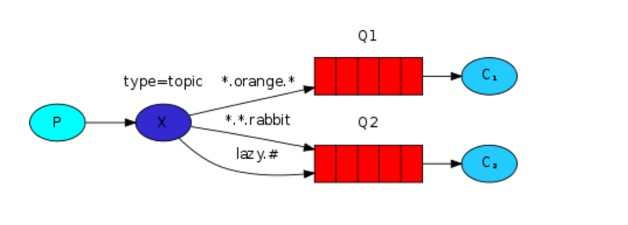
在topic类型下,可以让队列绑定几个模糊的关键字,之后发送者将数据发送到exchange,exchange将传入"路由值"和"关键字"进行匹配,匹配成功,则将数据发送到指定队列。
-
# :表示可以匹配0个或多个单词;
-
* :表示只能匹配一个单词。
|
1
2
3
4
5
|
#发送路由值 队列中
www.cnblogs.com www.
*
-
-
-
>
#无法匹配
www.cnblogs.com www.
# --->#匹配成功
|
发布者:
|
1
2
3
4
5
6
7
8
9
10
11
12
13
14
15
16
17
18
19
20
21
22
23
24
25
|
#!/usr/bin/env python
import
pika
import
sys
connection
=
pika.BlockingConnection(pika.ConnectionParameters(host
=
'localhost'
))
channel
=
connection.channel()
channel.exchange_declare(exchange
=
'topic_logs'
,
type
=
'topic'
)
routing_key
=
sys.argv[
1
]
if
len
(sys.argv) >
1
else
'anonymous.info'
message
=
' '
.join(sys.argv[
2
:])
or
'Hello World!'
channel.basic_publish(exchange
=
'topic_logs'
,
routing_key
=
routing_key,
body
=
message)
print
(
" [x] Sent %r:%r"
%
(routing_key, message))
connection.close()
#执行方式:
python xxx.py name1
#name1为routing_key
|
订阅者:
|
1
2
3
4
5
6
7
8
9
10
11
12
13
14
15
16
17
18
19
20
21
22
23
24
25
26
27
28
29
30
31
32
33
34
35
36
37
|
#!/usr/bin/env python
import
pika
import
sys
connection
=
pika.BlockingConnection(pika.ConnectionParameters(host
=
'localhost'
))
channel
=
connection.channel()
channel.exchange_declare(exchange
=
'topic_logs'
,
type
=
'topic'
)
result
=
channel.queue_declare(exclusive
=
True
)
queue_name
=
result.method.queue
binding_keys
=
sys.argv[
1
:]
if
not
binding_keys:
sys.stderr.write(
"Usage: %s [binding_key]...\n"
%
sys.argv[
0
])
sys.exit(
1
)
for
binding_key
in
binding_keys:
channel.queue_bind(exchange
=
'topic_logs'
,
queue
=
queue_name,
routing_key
=
binding_key)
print
(
' [*] Waiting for logs. To exit press CTRL+C'
)
def
callback(ch, method, properties, body):
print
(
" [x] %r:%r"
%
(method.routing_key, body))
channel.basic_consume(callback,
queue
=
queue_name,
no_ack
=
True
)
channel.start_consuming()
#执行方式:
python xxx,py name1
|
更多相关内容请参考以下连接:
http://www.rabbitmq.com/documentation.html
http://blog.youkuaiyun.com/songfreeman/article/details/50945025





 扫一扫
扫一扫


 1106
1106

 被折叠的 条评论
为什么被折叠?
被折叠的 条评论
为什么被折叠?
 到【灌水乐园】发言





