



pg_basebackup 是 PostgreSQL 提供的用于物理备份和恢复数据库的工具。
执行pg_basebackup会做两个事情:
- 落盘内存中的脏数据,备份全部数据
- 将wal日志归档,并备份归档文件
常用参数
-D, --pgdata=DIRECTORY 接收基本备份到目录,如果不存在会自动创建
-F, --format=p|t 输出格式(plain,直接拷贝数据文件,tar 配合 -z -Z 进行打包压缩)
其它参数查看 pg_basebackup --help
- 只能全库备份,不能细粒度的备份
- 不能备份归档日志, 归档日志需要单独备份
- 必须在pg_hba.conf配置允许连接,非超级用户需要赋予replication权限
- 需要配置max_wal_senders参数
常用示例
数据库物理备份:
(1)以完整文件的形式备份数据库
pg_basebackup -U postgres -Fp -v -D /data/dbbak/pgdata20250930
(2)以压缩的文件形式备份数据库
pg_basebackup -U postgres -Ft -v -D /data/dbbak/pgdata20250930tar
执行完成后 此目录下生成3个文件
[postgres@mysql001 ~]$ pg_basebackup -U postgres -Ft -v -D /data/dbbak/pgtar20250930
pg_basebackup: initiating base backup, waiting for checkpoint to complete
pg_basebackup: checkpoint completed
pg_basebackup: write-ahead log start point: 0/E000028 on timeline 1
pg_basebackup: starting background WAL receiver
pg_basebackup: created temporary replication slot "pg_basebackup_18572"
pg_basebackup: write-ahead log end point: 0/E000120
pg_basebackup: waiting for background process to finish streaming ...
pg_basebackup: syncing data to disk ...
pg_basebackup: renaming backup_manifest.tmp to backup_manifest
pg_basebackup: base backup completed
[postgres@mysql001 ~]$ ll /data/dbbak/pgtar20250930
total 48072
-rw------- 1 postgres postgres   183491 Sep 30 14:57 backup_manifest
-rw------- 1 postgres postgres 32253440 Sep 30 14:57 base.tar
-rw------- 1 postgres postgres 16778752 Sep 30 14:57 pg_wal.tar
[postgres@mysql001 ~]$
backup_manifest记录的信息如下:
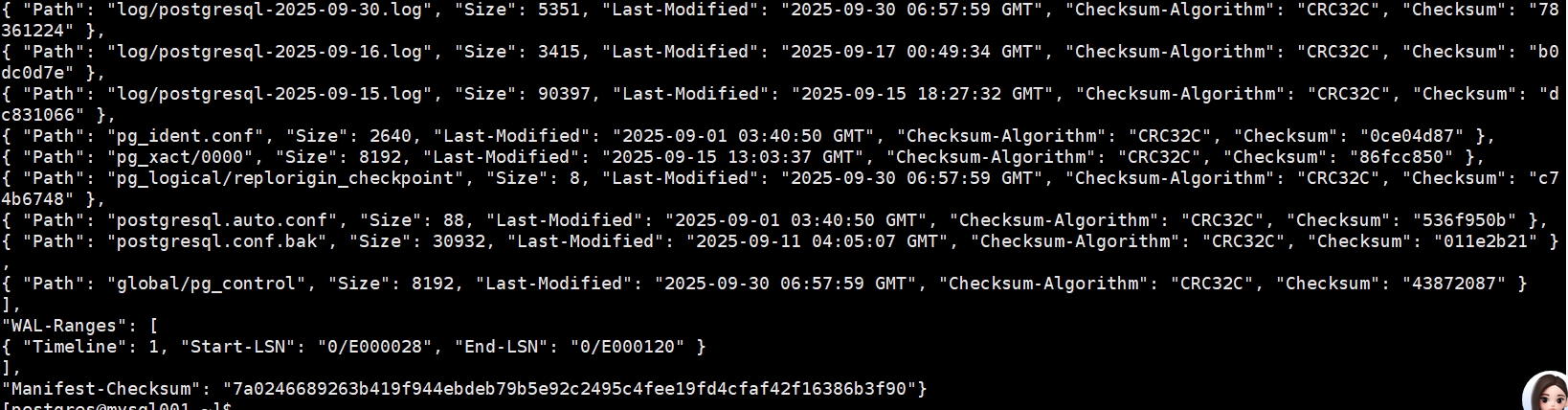
base.rar 包含除pg_wal外的所有pgdata目录下文件
pg_wal.rar 包含 原pg_wal下的wal日志
(3)存在创建的新表空间时,进行备份数据库(如下原表空间为/data/pg17/pgdata/ceshi)
pg_basebackup -U sysdba -Fp -v -D /data/dbbak/pgdata20250930 -T "/data/pg17/pgdata/ceshi=/data/pg17/pgdata/ceshiDB"
注意:
1、每执行一次pg_basebackup都会在 pg_wal及archivelog下生成一个类似00000001000000000000000C.00000028.backup的文件,记录了备份的一些信息
[root@mysql001 data]# cat pg17/archivelog/00000001000000000000000C.00000028.backup
START WAL LOCATION: 0/C000028 (file 00000001000000000000000C)
STOP WAL LOCATION: 0/C000120 (file 00000001000000000000000C)
CHECKPOINT LOCATION: 0/C000080
BACKUP METHOD: streamed
BACKUP FROM: primary
START TIME: 2025-09-29 20:10:25 CST
LABEL: pg_basebackup base backup
START TIMELINE: 1
STOP TIME: 2025-09-29 20:10:25 CST
STOP TIMELINE: 1
恢复
1)如果数据库备份为文件的形式,未进行压缩可直接进行数据库文件的替换
mv /data/pg17/dbbak/pgdata20250930 $PGDATA/
恢复后启动
pg_ctl start -D $PGDATA
(2) 如果数据库备份为压缩的形式,需解压到数据文件夹内
mkdir -p $PGDATA
tar -xvf /data/pg17/dbbak/pgdata20250930tar/base.tar -C $PGDATA
tar -xvf /data/pg17/dbbak/pgdata20250930tar/pg_wal.tar -C $PGDATA/pg_wal/
启动数据库
pg_ctl start -D $PGDATA
模拟
删除正在运行中 $PGDATA 目录下的内容,删除前进行过一次pg_database备份
cd $PGDATA
rm -rf *
再到刚才打开的psql窗口查看发现

恢复刚才的tar到$PGDATA 目录
[postgres@mysql001 pgtar20250930]$ ps -xf |grep postgres
 19006 pts/2    S+     0:00  \_ grep --color=auto postgres
[postgres@mysql001 pgtar20250930]$ tar -xf base.tar -C /data/pg17/pgdata/
[postgres@mysql001 pgtar20250930]$ tar -xf pg_wal.tar -C $PGDATA/pg_wal
[postgres@mysql001 pgtar20250930]$ ll $PGDATA -th
total 164K
drwx------ 4 postgres postgres 4.0K Sep 30 17:06 pg_wal
drwx------ 2 postgres postgres 4.0K Sep 30 17:05 global
-rw------- 1 postgres postgres  227 Sep 30 16:05 backup_label
drwx------ 4 postgres postgres 4.0K Sep 30 16:05 pg_logical
drwx------ 2 postgres postgres 4.0K Sep 30 16:05 pg_replslot
-rw------- 1 postgres postgres    0 Sep 30 16:05 tablespace_map
-rw------- 1 postgres postgres   37 Sep 30 09:14 current_logfiles
drwx------ 2 postgres postgres 4.0K Sep 30 09:14 log
drwx------ 6 postgres postgres 4.0K Sep 15 20:34 base
drwx------ 2 postgres postgres 4.0K Sep 15 20:00 pg_stat
-rw------- 1 postgres postgres  31K Sep 11 12:05 postgresql.conf.bak
-rw------- 1 postgres postgres  31K Sep  8 20:08 postgresql.conf
-rw------- 1 postgres postgres 5.7K Sep  1 12:04 pg_hba.conf
drwx------ 2 postgres postgres 4.0K Sep  1 11:40 pg_commit_ts
drwx------ 2 postgres postgres 4.0K Sep  1 11:40 pg_dynshmem
-rw------- 1 postgres postgres 2.6K Sep  1 11:40 pg_ident.conf
drwx------ 4 postgres postgres 4.0K Sep  1 11:40 pg_multixact
drwx------ 2 postgres postgres 4.0K Sep  1 11:40 pg_notify
drwx------ 2 postgres postgres 4.0K Sep  1 11:40 pg_serial
drwx------ 2 postgres postgres 4.0K Sep  1 11:40 pg_snapshots
drwx------ 2 postgres postgres 4.0K Sep  1 11:40 pg_stat_tmp
drwx------ 2 postgres postgres 4.0K Sep  1 11:40 pg_subtrans
drwx------ 2 postgres postgres 4.0K Sep  1 11:40 pg_tblspc
drwx------ 2 postgres postgres 4.0K Sep  1 11:40 pg_twophase
-rw------- 1 postgres postgres    3 Sep  1 11:40 PG_VERSION
drwx------ 2 postgres postgres 4.0K Sep  1 11:40 pg_xact
-rw------- 1 postgres postgres   88 Sep  1 11:40 postgresql.auto.conf
[postgres@mysql001 pgtar20250930]$ ll $PGDATA/pg_wal -th
total 17M
-rw------- 1 postgres postgres  16M Sep 30 16:05 000000010000000000000010
drwx------ 2 postgres postgres 4.0K Sep 30 16:05 archive_status
drwx------ 2 postgres postgres 4.0K Sep 30 16:05 summaries
[postgres@mysql001 pgtar20250930]$ pg_ctl start -D $PGDATA
psql 进入数据库,查看是否可以写入
postgres=# \c db01
You are now connected to database "db01" as user "postgres".
db01=# \dt
        List of relations
 Schema | Name | Type  |  Owner
--------+------+-------+----------
 public | t1   | table | postgres
(1 row)

db01=# \d t1;
                 Table "public.t1"
 Column |  Type   | Collation | Nullable | Default
--------+---------+-----------+----------+---------
 id     | integer |           |          |
db01=# select count(*)from t1;
 count
-------
     0
(1 row)

db01=# insert into t1 values(1);
INSERT 0 1
恢复后不能写处理:
如果在postgresql.auto.conf设置
## 默认情况下,恢复将会一直恢复到 WAL 日志的末尾。
restore_command = 'cp /data/pg17/archivelog/%f %p'
## recovery_target、recovery_target_lsn、recovery_target_name、recovery_target_time和recovery_target_xid中, 最多只能使用一个,如果在配置文件中使用了多个,将会产生一个错误。
## 参数指定恢复应该在达到一个一致状态后尽快结束,即尽早结束。
recovery_target = 'immediate'
会出现不能写的情况,是由于 指定在达到恢复目标时服务器应该立刻采取的动作 的参数recovery_target_action 默认动作是pause,这表示恢复将会被暂停。

处理如下:
select pg_wal_replay_resume();
这会让恢复终结。使用pause设置的目的是:如果这个恢复目标就是恢复最想要的位置,就允许对数据库执行查询。
归档丢失
如果做pg_basebackup时的归档日志丢失了,在做恢复(解压base.rar及pg_wal.rar到pgdata目录)后,启动实例会一直报错

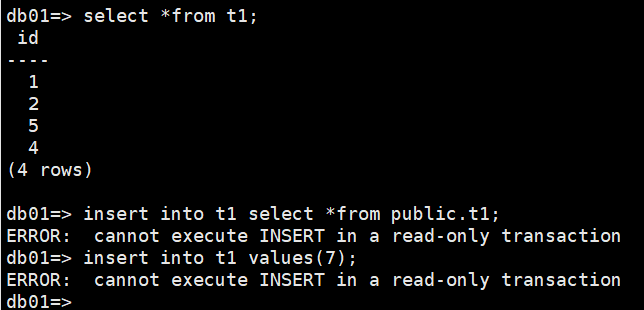
且数据库变的不可写





 扫一扫
扫一扫


 6249
6249

 被折叠的 条评论
为什么被折叠?
被折叠的 条评论
为什么被折叠?
 到【灌水乐园】发言





