


Apache的作用
在web被访问时通常使用http://的方式
http:// ##超文本传输协议
http:// 超文本传输协议提供软件:
Apache
nginx
stgw
jfe
Tengine
Apache的安装
dnf install httpd.x86_64 -y

Apache的启用
systemctl enable --now httpd
##开启服务并设定服务位开机启动
firewall-cmd --list-all ##查看火墙信息
firewall-cmd --permanent --add-service=http ##在火墙中永久开启http访问
firewall-cmd --permanent --add-service=https ##在火墙中永久开启https访问
firewall-cmd --reload ##刷新火墙使设定生效
Apache的基本信息
服务名称:httpd
配置文件:
/etc/httpd/conf/httpd.conf ##主配置文件
/etc/httpd/conf.d/*.conf ##子配置文件
默认发布目录: /var/www/html
默认发布文件: index.html
默认端口:80 #http
443 #https
用户: apache
日志: /etc/httpd/logs
Apache的基本配置
#1.Apache端口修改#
vim /etc/httpd/conf/httpd.conf
Listen 8080
firewall-cmd --permanent --add-port=8080/tcp
firewall-cmd --reload
systemctl restart httpd
http://172.25.254.100:8080
#2.默认发布文件##
vim /etc/httpd/conf/httpd.conf
DirectoryIndex westos.html index.html
systemctl restart httpd

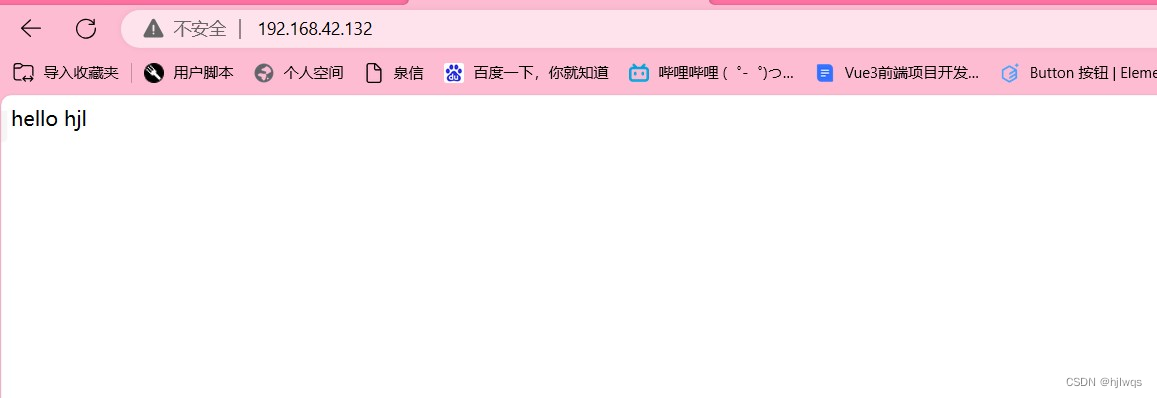
#3.默认发布目录
mkdir /var/www/westos
mv /var/www/westos /var
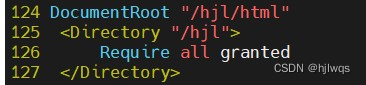
vim /etc/httpd/conf/httpd.conf
DocumentRoot "/var/westos"
<Directory "/var/westos">
Require all granted
</Directory>
systemctl restart httpd
firefox http://192.168.0.11

Apache的访问控制
#实验素材#
mkdir /var/www/html/westos
vim /var/www/html/westos/index.html
<h1>westosdir's page</h1>
firefox http://192.168.0.11/westos
#1.基于客户端ip的访问控制#
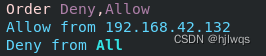
#ip白名单#
<Directory "/var/www/html/westos">
Order Deny,Allow
Allow from 192.168.0.10
Deny from All
</Directory>
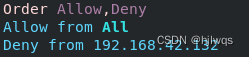
#ip黑名单#
<Directory "/var/www/html/westos">
Order Allow,Deny
Allow from All
Deny from 192.168.0.10
</Directory>
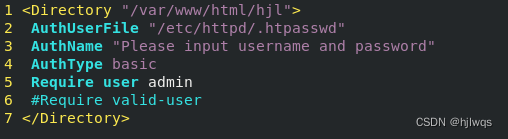
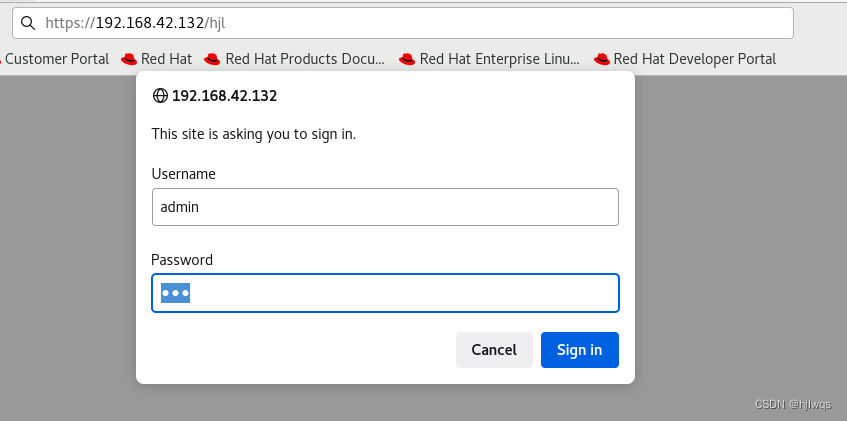
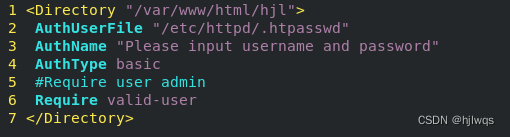
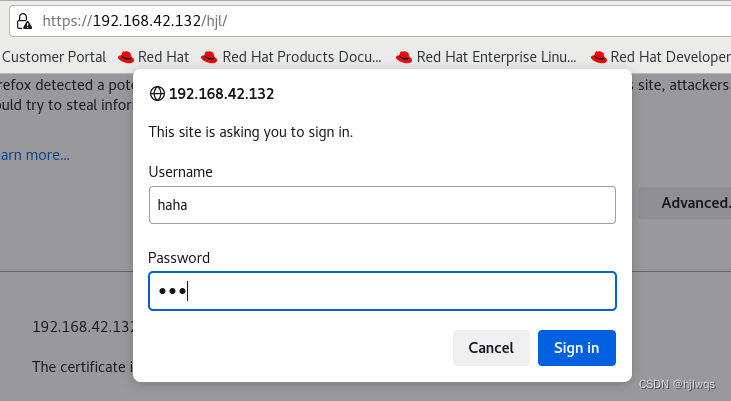
#2.基于用户认证#
vim /etc/httpd/conf/httpd.conf
<Directory "/var/www/html/westos">
AuthUserfile /etc/httpd/htpasswdfile ##指定认证文件
AuthName "Please input your name and password" ##认证提示语
AuthType basic ##认证类型
Require user admin ##允许通过的认证用户 2选1
Require valid-user ##允许所有用户通过认证 2选1
</Directory>
htpasswd -cm /etc/httpd/htpasswdfile admin
##生成认证文件
注意:
当/etc/httpd/htpasswdfile存在那么在添加用户时不要加-c参数否则会覆盖源文件内容
Apache的虚拟主机
mkdir -p /var/www/westos.com/{news,wenku}
echo "wenku's page" >/var/www/westos.com/wenku/index.html
echo "news's page" > /var/www/westos.com/news/index.html
echo "default's page" > /var/www/html/index.html
<VirtualHost _default_:80>
DocumentRoot "/var/www/html"
CustomLog logs/default.log combined
DocumentRoot "/var/www/html"
CustomLog logs/default.log combined
</VirtualHost>
<VirtualHost *:80>
ServerName news.oldlee.org
DocumentRoot "/var/www/virtual/oldlee.org/news/html"
CustomLog logs/news.log combined
</VirtualHost>
<VirtualHost *:80>
ServerName bbs.oldlee.org
DocumentRoot "/var/www/virtual/oldlee.org/bbs/html"
CustomLog logs/bbs.log combined
</VirtualHost>
<VirtualHost *:80>
ServerName news.oldlee.org
DocumentRoot "/var/www/virtual/oldlee.org/news/html"
CustomLog logs/news.log combined
</VirtualHost>
<VirtualHost *:80>
ServerName bbs.oldlee.org
DocumentRoot "/var/www/virtual/oldlee.org/bbs/html"
CustomLog logs/bbs.log combined
</VirtualHost>

测试:
在浏览器所在主机中
vim /etc/hosts
192.168.0.11 www.westos.com wenku.westos.ocm news.westos.com

firefox http://www.westos.com
firefox http://wenku.westos.com
firefox http://news.westos.com
Apache的语言支持
#php#
vim /var/www/html/index.php
<?php
phpinfo();
?>

dnf install php -y
systemctl restart httpd
firefox http://192.168.0.11/index.php

#cgi#
mkdir /var/www/html/cgidir
vim /var/www/html/cgidir/index.cgi
#!/usr/bin/perl
print "Content-type: text/html\n\n";
print `date`;

vim /etc/httpd/conf.d/vhost.conf
<Directory "/var/www/html/cgidir">
Options +ExecCGI
AddHandler cgi-script .cgi
</Directory>

firefox http://192.168.0.11/cgidir/index.cgi

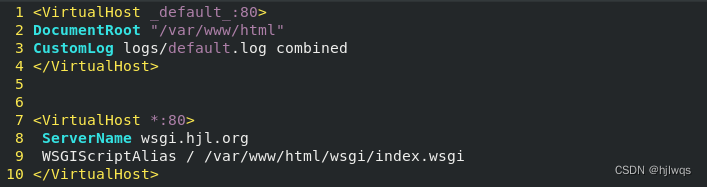
#wsgi#
书写wsgi的测试文件
vim /var/www/html/wsgi/index.wsgi
def application(env, westos):
westos('200 ok',[('Content-Type', 'text/html')])
return [b'hello westos ahhahahahah!']
dnf install python3-mod_wsgi
systemctl restart httpd

vim /etc/httpd/conf.d/vhost
<VirtualHost *:80>
ServerName wsgi.westos.org
WSGIScriptAlias / /var/www/html/wsgi/index.wsgi
</VirtualHost>

Apache的加密访问
##安装加密插件
dnf install mod_ssl -y##生成证书
##command 1
openssl genrsa -out /etc/pki/tls/private/www.westos.com.key 2048 #生成私钥
openssl req -new -key /etc/pki/tls/private/www.westos.com.key \
-out /etc/pki/tls/certs/www.westos.com.csr
##生成证书签名文件
openssl x509 -req -days 365 -in \
/etc/pki/tls/certs/www.westos.com.csr \
-signkey /etc/pki/tls/private/www.westos.com.key \
-out /etc/pki/tls/certs/www.westos.com.crt #生成证书
x509 证书格式
-req 请求
-in 加载签证名称
-signkey /etc/pki/tls/private/www.westos.com.key
##command 2
openssl req --newkey rsa:2048 \
-nodes -sha256 -keyout /etc/httpd/westos.org.key \
-x509 -days 365 -out /etc/httpd/westos.org.crt
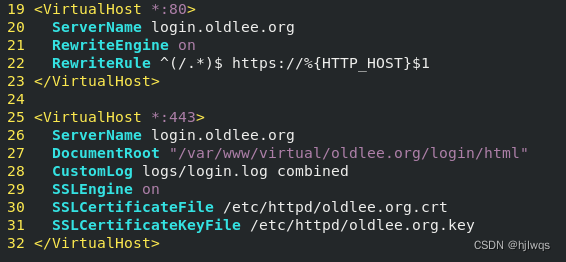
vim /etc/httpd/conf.d/vhost.conf
<VirtualHost *:80>
ServerName login.westos.com
RewriteEngine on
RewriteRule ^(/.*)$ https://%{HTTP_HOST}$1
</VirtualHost>
<VirtualHost *:443>
ServerName login.westos.com
DocumentRoot "/www/westos.com/login"
CustomLog logs/login.log combined
SSLEngine on
SSLCertificateFile /etc/pki/tls/certs/www.westos.com.crt
SSLCertificateKeyFile /etc/pki/tls/private/www.westos.com.key
</VirtualHost>
systemctl restart httpd
^(/.*)$ ##客户地址栏中输入的地址
%{HTTP_HOST} ##客户主机
$1 ##RewriteRule后面跟的第一串字符的值

Squid+Apache
#squid反向代理#
实验环境:
192.168.42.132 ##Apache服务器
192.168.42.133 ##squid,没有数据负责缓存
vim /etc/squid/squid.conf
http_port 80 vhost vport ##vhost 支持虚拟域名 vport 支持虚拟端口
#当192.168.42.133的80端口被访问会从192.168.42.132的80端口缓存数据
cache_peer 192.168.42.132 parent 80 0 proxy-only

systemctl restart squid
测试:
firefox http://192.168.42.133
访问看到的是192.168.42.132上的数据







 扫一扫
扫一扫


 213
213

 被折叠的 条评论
为什么被折叠?
被折叠的 条评论
为什么被折叠?
 到【灌水乐园】发言





