



 本文介绍了SpringCloudRibbon在SpringBoot中的应用,包括其作为NetflixRibbon的实现,如何与Eureka集成实现服务发现和负载均衡,以及如何使用IRule自定义轮询策略。同时展示了RestTemplate的两种调用方式及其在负载均衡中的作用。

目录
1.什么是Ribbo❤️❤️❤️
2.eureka自带Ribbon ❤️❤️❤️
3. RestTemplate❤️❤️❤️
4.IRule❤️❤️❤️
5.负载均衡算法❤️❤️❤️
1.什么是Ribbo
- 1.Spring Cloud Ribbon是基于Netflix Ribbon实现的一套客户端,负载均衡的工具。
- 2.主要功能是提供客户端的软件负载均衡算法和服务调用。
- 3.Ribbon客户端组件提供一系列完善的配置项如连接超时,重试等。
- 4.在配置文件中列出Load Balancer (简称LB)后面所有的机器,Ribbon会自动的帮助你基于某种规则(如简单轮询,随机连接等)去连接这些机器。
2.eureka自带Ribbon
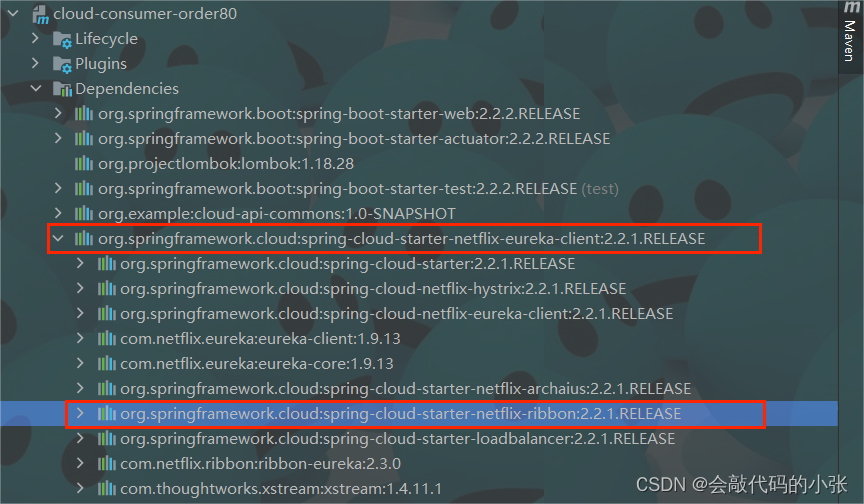
之前没引入Ribbon为啥也能负载均衡?
因为我们引入eureka时,eureka自动引入了ribbon
3. RestTemplate
restTemplate有两种方式:
- 1.restTempalte.getForObject
- 2.restTemplate.getForEntity
  @GetMapping("/payment/get/{id}")
    public CommonResult<Payment> getPayment(@PathVariable("id") Integer id) {
        log.info("进入查询功能成功");
        return restTemplate.getForObject(PAYMENT_URL + "/payment/selectById/" + id, CommonResult.class);
    }

    @GetMapping("/payment/get2/{id}")
    public CommonResult<Payment> getPayment2(@PathVariable("id") Integer id) {
        log.info("进入查询功能成功");
        ResponseEntity<CommonResult> entity = restTemplate.getForEntity(PAYMENT_URL + "/payment/selectById/" + id, CommonResult.class);
        if (entity.getStatusCode().is2xxSuccessful()){
            log.info(entity.getStatusCode()+"\t"+entity.getHeaders());
            return entity.getBody();
        }else {
            return new CommonResult<>(404,"查询失败~");
        }
    }
4.IRule
4.1轮询策略
- 1.RoundRobinRule --------轮询
- 2.RandomRule ---------随机
- 3.RetryRule ---------重试 (先轮询,如果失败,在执行时间内重试)

4.2如何替换
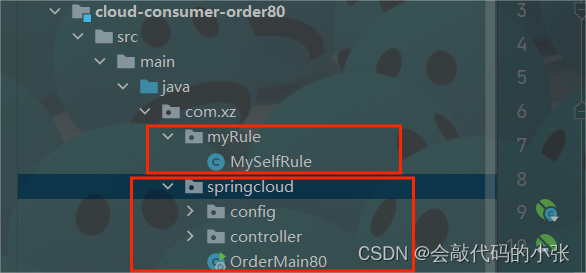
1.创建配置类
注意:创建的配置类,不能被@ComponentSacn所扫描(不能与主启动类同包)
2.创建IRule对象
使用@Bean创建对象,根据要求返回具体实现类
@Configuration
public class MySelfRule {
    @Bean
    public IRule myRule(){
        return new RandomRule();//定义为随机
    }
}
3.添加@RibbonClient
name属性:表示要访问服务的名称。(必须与Eureka中的名称一致,包括大小写)
configuration属性:表示要访问的自定义IRUle配置类
@SpringBootApplication
@EnableDiscoveryClient
@RibbonClient(name = "COULD-PAYMENT-SERVICE",configuration = MySelfRule.class)
public class OrderMain80 {
    public static void main(String[] args) {
        SpringApplication.run(OrderMain80.class);
    }
}
5.负载均衡算法
5.1原理
- 算法:rest接口第几次请求数 % 服务器集群总数量 = 实际调用服务器位置下标,每次服务重启动后rest接口计数从1开始。
例如:
List<ServiceInstance> instances = discoveryClient.getInstances("CLOUD-PAYMENT-SERVICE");
获取实例:
List [0] instances = 127.0.0.1:8002
List [1] instances = 127.0.0.1:8001
8001和8002组成集群,共两台机器:
当总请求数为1时: 1%2=1对应下标位置为1 ,则获得服务地址为127.0.0.1:8001
当总请求数位2时: 2%2=0对应下标位置为0,则获得服务地址为127.0.0.1:8002
当总请求数位3时: 3%2=1对应下标位置为1 ,则获得服务地址为127.0.0.1:8001
当总请求数位4时: 4%2=0对应下标位置为0,则获得服务地址为127.0.0.1:8002
5.2手写轮询
- 自定义轮询算法
@Component
public class MyLb implements LoadBalance {

    private AtomicInteger atomicInteger = new AtomicInteger(0);

    public final int getAndIncrement() {
        int current;
        int next;
        do {
            current = this.atomicInteger.get();
            next = current >= Integer.MAX_VALUE ? 0 : current + 1;
        } while (!this.atomicInteger.compareAndSet(current, next));
        System.out.println("next:" + next);
        return next;
    }

    @Override
    public ServiceInstance instances(List<ServiceInstance> serviceInstance) {
        int index = getAndIncrement() % serviceInstance.size();

        return serviceInstance.get(index);
    }
}
- 80服务使用自定义轮询
    //自己的负载均衡算法
    @Autowired
    private LoadBalance loadBalance;

    @Autowired
    private DiscoveryClient discoveryClient;

    @GetMapping("/payment/lb")
    public String getPaymentLb() {
        List<ServiceInstance> instances = discoveryClient.getInstances("COULD-PAYMENT-SERVICE");
        if (instances == null || instances.size() < 0) {
            return null;
        }
        ServiceInstance serviceInstance=loadBalance.instances(instances);
        URI uri = serviceInstance.getUri();
        return restTemplate.getForObject(uri+"/payment/lb",String.class);
    }





 扫一扫
扫一扫


 1676
1676

 被折叠的 条评论
为什么被折叠?
被折叠的 条评论
为什么被折叠?
 到【灌水乐园】发言





