亚马逊 Alexa for Shopping 搜索结果数据采集实战:Python 调用 Pangolinfo Alexa API 完整指南

Pandas入门教程(二十二):股票数据分析实战——yfinance 获取数据、技术指标与收益率分析 把 Pandas 用在真实场景,才能体会它的价值。本文以茅台股票为例,用 yfinance 获取历史行情,完成缺失值处理与列筛选,绘制收盘价曲线,计算 SMA 移动平均线与 RSI 相对强弱指数,并通过日收益率、累计收益率和波动率完成完整的量化分析流程。 阅读详情

在这里插入图片描述

摘要:
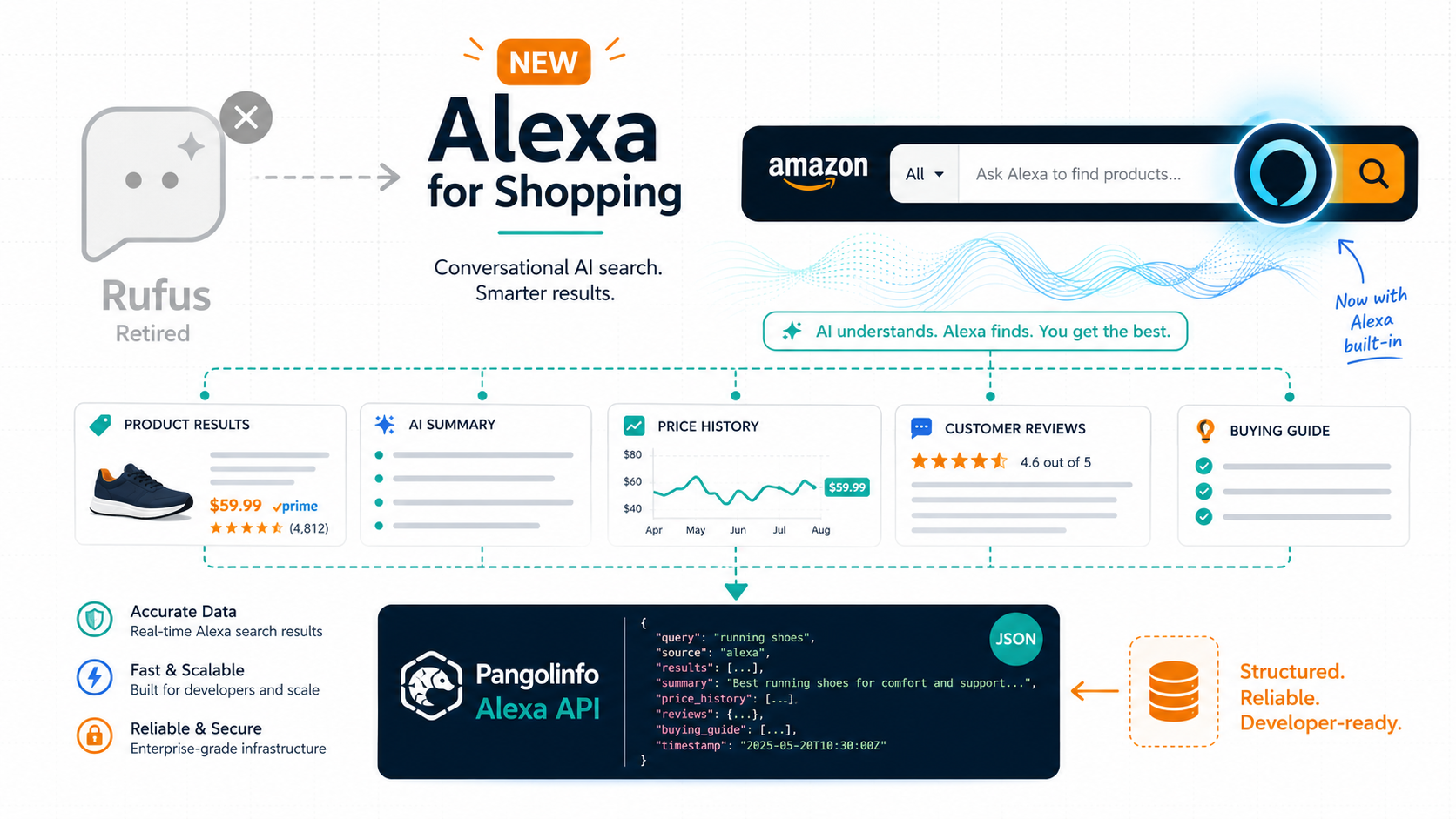
2026年5月,亚马逊将 Rufus 并入 Alexa for Shopping,AI 购物助手正式嵌入主搜索栏。本文从技术视角解析 Alexa for Shopping 的前端数据结构(AI摘要模块、推荐商品卡片、Prompts 广告位),并提供完整 Python 代码示例,展示如何通过 Pangolinfo Alexa API(全球首个第三方 Alexa 搜索数据采集服务)系统性地获取结构化数据,用于竞品监控、品牌曝光追踪和 Listing 优化验证。


一、 技术背景:Alexa for Shopping 的页面结构变化

在 Rufus 时代,亚马逊搜索结果页(SERP)的结构相对固定:顶部广告位 → 自然排名商品 → 底部 Rufus 聊天入口(角落图标)。

Alexa for Shopping 上线后,SERP 的层次结构发生了本质变化,新增了至少三个 AI 驱动的数据模块:

  1. Alexa AI 搜索摘要(AI Summary Module): 出现在搜索栏下方、广告位之前,展示 AI 生成的品类选购建议、推荐理由和关键考量维度。这是流量最高、用户最先接触的内容区域。
  2. Alexa AI 推荐商品卡片(AI-Recommended Products): AI 摘要下方的商品卡片,通常展示 3-6 款,每张卡片包含 ASIN、价格、评分和 AI 推荐理由文本。
  3. Prompts 广告位(AI Native Ads): AI 摘要区域内或紧随其后的 CPC 广告位,于 2026年3月正式转为付费模式。

对于数据采集方,这三个模块的 HTML 结构与传统商品排名结果截然不同,需要专门的解析模板才能稳定采集。


二、 为什么需要专用 API?自建爬虫的技术挑战

许多开发者首先考虑自建爬虫来采集 Alexa 搜索结果。以下是实际工程中遭遇的核心难点:

难点1:Alexa AI 内容的动态渲染

Alexa AI 摘要不是静态 HTML,而是通过 JavaScript 异步渲染的动态内容。标准的 requests + BeautifulSoup 组合无法获取完整的 AI 摘要文本,必须使用 Playwright 或 Selenium 等无头浏览器方案,工程复杂度大幅上升。

难点2:亚马逊的高强度反爬系统

亚马逊针对自动化访问部署了多层防御:

  • JA3 TLS 指纹检测: 标准 Python requests 库的 TLS 握手特征与真实浏览器差异显著,会被迅速识别
  • 高频行为检测: 单 IP 短时间内重复访问搜索结果页,极易触发 Robot 验证码
  • Geoblocking: 数据中心 IP 段的通过率不足 5%,必须使用住宅代理,成本高昂

难点3:AI 模块的 HTML 类名动态变化

亚马逊对 AI 摘要模块的 CSS 类名和 DOM 结构频繁进行 A/B 测试,导致硬编码的选择器在维护成本上远超价值。Pangolinfo 的工程团队需要持续更新解析规则,这正是自建团队难以独立承担的维护负担。


三、 解决方案:Pangolinfo Alexa API 技术架构

Pangolinfo Scrape API作为全球首家支持 Amazon Alexa for Shopping 搜索结果数据采集的第三方 API 服务,在云端完整处理上述工程挑战:

  • 住宅代理池自动轮换: 无需自购代理,API 后端维护全球分布的住宅 IP 资源
  • 浏览器指纹伪装: 模拟真实 Chrome 浏览器的 TLS 握手和行为特征
  • 动态内容渲染: AI 摘要等 JavaScript 渲染内容在返回数据前已完成渲染
  • 实时解析规则维护: Pangolinfo 工程团队持续跟踪亚马逊页面结构变动,用户无需关心解析器维护

四、 完整 Python 代码实战

4.1 环境准备

pip install requests python-dotenv

.env 文件配置:

PANGOLINFO_API_KEY=your_api_key_here

4.2 核心采集模块

import requests
import json
import os
import time
from datetime import datetime
from dotenv import load_dotenv

load_dotenv()

class PangolinAlexaAPI:
    """
    Pangolinfo Alexa API 封装类
    用于采集 Amazon Alexa for Shopping 搜索结果数据
    """
    BASE_URL = "https://scrapeapi.pangolinfo.com/api/v2/scrape"  # 官方文档: https://docs.pangolinfo.com/cn-api-reference/amazonAlexaAPI/amazonAlexaAPI
    
    def __init__(self):
        self.api_key = os.getenv("PANGOLINFO_API_KEY")
        if not self.api_key:
            raise ValueError("未找到 PANGOLINFO_API_KEY,请在 .env 文件中配置")
        self.session = requests.Session()
        self.session.headers.update({
            "Authorization": f"Bearer {self.api_key}",
            "Content-Type": "application/json"
        })
    
    def search(self, prompts, screenshot=False):
        """
        向 Alexa for Shopping 发起对话式搜索
        
        Args:
            prompts    : 提示词列表,支持自然语言(如:["适合小户型的 queen 床架"]),每条 6 积点
            screenshot : 是否需要页面截图,默认 False
        Returns:
            dict: 完整 API 响应;data.json[] 为每轮对话结果
        注意: 平均响应时间约 30 秒,timeout 建议设为 90s 以上
        """
        payload = {
            "parserName": "amazonAlexa",
            "param": prompts,          # 提示词数组,每个元素一轮对话
            "screenshot": screenshot
        }
        
        try:
            response = self.session.post(
                self.BASE_URL,
                json=payload,
                timeout=90  # Alexa 响应慢,建议 ≥ 90 秒
            response.raise_for_status()
            return response.json()
        
        except requests.exceptions.HTTPError as e:
            error_msg = f"HTTP 错误 [{response.status_code}]"
            if response.status_code == 429:
                error_msg += " - 请求频率超限,请降低并发或增加请求间隔"
            elif response.status_code == 401:
                error_msg += " - API Key 无效,请检查 .env 配置"
            print(error_msg)
            return None
        
        except requests.exceptions.Timeout:
            print("请求超时,目标页面渲染时间过长,建议稍后重试")
            return None
        
        except Exception as e:
            print(f"未知异常: {str(e)}")
            return None
    
    def batch_search(self, keyword_groups, delay_seconds=35.0):
        """
        批量关键词采集(每次最多 5 个提示词,含请求间隔控制)
        
        Args:
            keyword_groups: 关键词分组列表,每组最多 5 个(Alexa API param 上限)
            delay_seconds : 每次请求之间的等待时间(秒),建议 ≥ 35 秒(响应约 30s)
        Returns:
            list: 每组请求的完整结果列表
        """
        results = []
        total = len(keyword_groups)
        
        for i, group in enumerate(keyword_groups, 1):
            print(f"[{i}/{total}] 正在采集: {group}")
            result = self.search(group)
            results.append(result)
            
            if i < total:
                time.sleep(delay_seconds)
        
        return results


class AlexaDataAnalyzer:
    """
    Alexa 搜索数据分析模块
    用于从 API 返回数据中提取竞争情报
    """
    
    @staticmethod
    def extract_round_summary(round_data):
        """提取单轮对话的核心信息(prompt、Alexa 回复、follow_up_questions)"""
        if not round_data:
            return {}
        return {
            "prompt": round_data.get("prompt", ""),
            "content": round_data.get("content", ""),
            "follow_up_questions": round_data.get("follow_up_questions", [])
        }
    
    @staticmethod
    def check_brand_visibility(round_data, brand_name):
        """
        检查指定品牌是否出现在 Alexa 推荐商品或回复正文中
        
        Args:
            round_data : 单轮对话数据(json[i])
            brand_name : 要检查的品牌名称(大小写不敏感)
        Returns:
            dict: 品牌可见性分析结果
        """
        brand_lower = brand_name.lower()
        content = round_data.get("content", "") if round_data else ""
        groups = round_data.get("products", []) if round_data else []
        
        brand_in_content = brand_lower in content.lower()
        brand_in_products = any(
            brand_lower in item.get("title", "").lower() or
            brand_lower in item.get("describe", "").lower()
            for group in groups
            for item in group.get("items", [])
        )
        is_visible = brand_in_content or brand_in_products
        
        return {
            "brand": brand_name,
            "visible_in_alexa_result": is_visible,
            "action_needed": not is_visible
        }
    
    @staticmethod
    def extract_top_products(round_data, limit=5):
        """提取单轮对话中 Alexa 推荐商品列表(按分类展开)"""
        if not round_data:
            return []
        
        rows = []
        for group in round_data.get("products", []):
            group_title = group.get("title", "")
            for i, item in enumerate(group.get("items", [])[:limit]):
                rows.append({
                    "group_title": group_title,
                    "asin": item.get("asin"),
                    "title": item.get("title", "")[:80],
                    "price": item.get("price"),
                    "score": item.get("score"),
                    "ratings_count": item.get("ratingsCount"),
                    "describe": item.get("describe", "")[:150],
                    "original_price": item.get("originalPrice", "")
                })
        return rows


def generate_competitive_report(prompts, your_brand, api_client):
    """
    生成 Alexa 竞争情报报告(支持多轮对话批量分析)
    """
    print(f"\n{'='*60}")
    print(f"Alexa 竞争情报报告")
    print(f"时间: {datetime.now().strftime('%Y-%m-%d %H:%M')}")
    print(f"提示词数量: {len(prompts)}")
    print(f"{'='*60}")
    
    # 采集数据
    response = api_client.search(prompts)
    if not response or response.get("code") != 0:
        print("数据采集失败,请检查 API Key 和网络连接")
        return
    
    results = response.get("data", {}).get("json", [])
    task_id = response.get("data", {}).get("taskId", "")
    print(f"任务 ID: {task_id}")
    
    analyzer = AlexaDataAnalyzer()
    
    for round_data in results:
        prompt = round_data.get("prompt", "")
        print(f"\n{'─'*55}")
        print(f"提示词: {prompt}")
        print(f"{'─'*55}")
        
        # 1. 品牌可见性
        visibility = analyzer.check_brand_visibility(round_data, your_brand)
        print(f"\n📊 品牌可见性")
        print(f"  '{your_brand}': {'✅ 出现在推荐结果中' if visibility['visible_in_alexa_result'] else '❌ 未出现 — 建议优化 Listing 的 AI 可读性'}")
        
        # 2. Alexa 回复正文
        summary = analyzer.extract_round_summary(round_data)
        print(f"\n📝 Alexa 回复(前200字)")
        print(f"  {summary['content'][:200]}...")
        
        # 3. 推荐商品
        products = analyzer.extract_top_products(round_data, limit=5)
        print(f"\n🛍️  Alexa 推荐商品(按分类展示)")
        for p in products:
            print(f"\n  [{p['group_title']}] ASIN: {p['asin']} | {p['price']} | ⭐{p['score']}")
            print(f"  标题: {p['title']}")
            print(f"  AI 描述: {p['describe'][:100]}")
        
        # 4. AI 追问问题
        if summary['follow_up_questions']:
            print(f"\n🔍 Alexa AI 追问问题(AEO 决策路径)")
            for q in summary['follow_up_questions']:
                print(f"  · {q}")
    
    # 保存数据
    filename = f"alexa_report_{datetime.now().strftime('%Y%m%d')}.json"
    with open(filename, "w", encoding="utf-8") as f:
        json.dump(response, f, ensure_ascii=False, indent=4)
    print(f"\n📁 完整数据已保存至: {filename}")
    
    return response


if __name__ == "__main__":
    # 初始化 API 客户端
    client = PangolinAlexaAPI()
    
    # 多轮对话竞品情报报告
    generate_competitive_report(
        prompts=[
            "queen bed frame easy assembly apartment storage",
            "platform bed frame no box spring"
        ],
        your_brand="YourBrandName",
        api_client=client
    )
    
    # 批量关键词监控(每组最多 5 个,建议按品类分组)
    keyword_groups = [
        ["queen bed frame under 100", "platform bed frame no box spring"],
        ["king bed frame with storage", "bed frame easy assembly"]
    ]
    
    print(f"\n{'='*60}")
    print("批量关键词监控")
    batch_results = client.batch_search(keyword_groups, delay_seconds=35)
    
    analyzer = AlexaDataAnalyzer()
    for i, result in enumerate(batch_results):
        if result and result.get("code") == 0:
            for round_data in result.get("data", {}).get("json", []):
                visibility = analyzer.check_brand_visibility(round_data, "YourBrandName")
                status = "✅ 可见" if visibility['visible_in_alexa_result'] else "❌ 未见"
                print(f"  {status} | {round_data.get('prompt', '')[:50]}")

五、 数据字段说明与最佳实践

API 返回数据结构(简化版)

{
  "code": 0,
  "message": "ok",
  "data": {
    "taskId": "1779712950213-66c47c8a3bb862d5",
    "json": [
      {
        "prompt": "queen bed frame easy assembly apartment",
        "content": "Here are some great options for queen bed frames that are easy to assemble and perfect for apartments! Are you looking for one with storage, or do you need it to work without a box spring?",
        "products": [
          {
            "title": "Top Picks for Apartment Living",
            "items": [
              {
                "asin": "B0XXXXXX",
                "url": "https://www.amazon.com/dp/B0XXXXXX",
                "title": "Example Queen Bed Frame Easy Assembly No Box Spring",
                "cover": "https://m.media-amazon.com/images/I/example.jpg",
                "score": "4.6",
                "ratingsCount": "12,345",
                "price": "$89.99",
                "originalPrice": "$129.99",
                "describe": "Tool-free assembly in 10 minutes, 12-inch clearance for under-bed storage."
              }
            ]
          }
        ],
        "follow_up_questions": [
          "Does it work without a box spring?",
          "Compare with similar",
          "What do customers say about assembly?"
        ]
      }
    ]
  }
}

生产环境最佳实践

  1. 请求频率控制: API 默认 QPS 为 3,建议批量任务每次请求间隔 ≥ 35 秒(Alexa 平均响应约 30 秒)
  2. 积点管理: 每轮对话(param 数组每个元素)消耗 6 积点,批量任务前请确认账户余额
  3. 数据存储: 建议将原始 JSON 写入 PostgreSQL 或 MongoDB,便于时序分析
  4. 监控调度: 使用 Celery + Redis 搭建定时任务,实现每日/每周自动化采集
  5. Timeout 配置: Alexa 平均响应 30 秒,Python requests 的 timeout 建议设为 90 秒以上

六、 总结

在大数据的时代洪流中,真正拉开跨境企业差距的,不仅是获取公开数据的技术速度,更是深谙合规边界、将海量信息转化为敏捷决策的商业智慧。

Grey Hack v0.7.3618 保姆级教程:手把手教你用metaxploit.so写一个自动提权脚本 本文详细介绍了如何在Grey Hack v0.7.3618中使用metaxploit.so库编写自动化提权脚本。从环境准备到核心功能解析,再到漏洞利用链构建和权限提升的智能处理,手把手教你掌握游戏中的高级黑客技巧。通过多库联合利用和错误处理优化,提升脚本的效率和成功率。 阅读详情

相关推荐

大模型驱动时序量化因子自动优化:从WorldQuant回测到实战策略

本文探讨了如何利用大模型驱动时序量化因子的自动优化,构建从创意生成到实战验证的完整流程。通过结合WorldQuant回测平台,搭建自动化流水线,详细拆解了因子生成、回测验证与迭代优化的核心模块。文章分享了从初版实现到进阶优化的实践经验,并指出提示词工程与领域知识注入是关键,旨在实现人机智能协作,提升量化策略研发效率。

wdx012345的博客 803

Sorftime Alexa 自定义任务列表实战

Sorftime Alexa 自定义任务列表: MCP 实战教程 作为一名长期和亚马逊数据打交道的程序员,我太清楚那种"想看 200 个 ASIN 的 Alexa 提问,结果熬到凌晨三点还在复制粘贴"的绝望。直到我接入了 Sorftim

2601_96080792的博客 315

微信公众号数据采集实战:历史文章、互动数据与评论详情全解析

本文提供了一套完整的微信公众号数据采集实战方案,详细解析了如何通过接口调用获取公众号的历史文章列表、单篇文章的互动数据以及详细的用户评论。文章从环境准备、核心参数解析到分页逻辑、批量处理和异常处理,提供了可运行的Python代码示例,旨在帮助开发者高效、稳定地构建自动化采集工具,用于竞品分析、内容研究和舆情监控。

u5v6w7的博客 1595

AI全栈实战 | 3.9-01 爬虫入门:requests 加 BeautifulSoup 三分钟跑通,但 90% 的人栽在这 4 个“礼貌“问题上

⚠️:本文内容仅用于。请遵守目标站点的服务条款与相关法律法规,不得对目标服务造成负担,不得采集、传播个人隐私数据。技术是中性的,边界在你手里。爬虫的入门技术(requests 发请求 + BeautifulSoup 解析)三分钟就能学会。真正区分"会用爬虫"和"会做爬虫的人"的,是这篇我们跑通"请求→解析→存储"的最小闭环,然后重点把"合规与礼貌"这根弦给你绷上。

源码获取 | 运行部署 | 定制二开修改,如果回复不及时请耐心等待,请见谅。 399

S32K3 MCAL配置 【MCU、PORT、DIO】

1、s32k3时钟源可由PLL, FXOSC, FIRC, SIRC, and SXOSC五种时钟源生成,可按照手册推荐配置。目标是在在S32K344板子上点亮红色LED灯,需要配置的有MCU、PORT、DIO模块。MCU最主要的是时钟配置,要翻看芯片手册,理解时钟树。1、通用配置中,没有什么特殊需求按照demo配置就好。1、配置MC_CGM mux 0 clocks时钟。1、外部晶振配置按照实际项目原理图进行配置。1、外部晶振配置,按照实际项目配置。1、PLL时钟按照手册进行配置。

weixin_43741076的博客 3243

从加权最小二乘(WLS)到IAA:手把手推导DOA估计中的迭代自适应核心公式

本文深入解析了从加权最小二乘(WLS)到迭代自适应算法(IAA)在DOA估计中的数学推导与应用。通过动态调整加权矩阵,IAA在低快拍数、相干源等复杂场景中展现出卓越性能,显著提升角度分辨率和检测概率。文章详细介绍了算法核心步骤、工程优化策略及前沿发展,为雷达探测和无线通信领域提供重要参考。

weixin_30847865的博客 287

从一段视频到可漫游的 4D 有声场景:思路拆解与最小复现手记

只需一段手机视频,你就能生成可"走进去"的 4D 有声场景:转头时狗叫声方向随之变化,走近时声音更清晰。本文拆解 Video-to-4DAVScene 的核心思路,手把手带你用几十行 Python 搭出最小管线,把视频中的运动物体变成带空间位置的声源,并附上三个真实踩坑的排障经验,代码可直接跑。🎧

helloagent的博客 232

GB28181协议心跳机制:从标准解读到代码实现的保活策略

本文深入解析GB28181协议中的心跳机制,从标准解读到代码实现,详细介绍了保活策略的核心价值和底层逻辑。通过实战案例和技术要点,帮助开发者优化心跳间隔、超时次数等参数配置,提升安防监控系统的可靠性和性能。文章还提供了代码实现的防坑指南和特殊场景处理建议,适用于各类网络环境下的设备在线状态管理。

weixin_29611239的博客 105

Python+Agent入门笔记(二):列表推导式、模块和异常,这些写 Agent 前得会

接上一篇《Python+Agent入门笔记(一)》。基础语法跑通之后,这篇聊几块日常写脚本绕不开的东西。还是按 JS/Go 开发者的视角写,尽量记录我实际卡过的地方。

qq_41241612的博客 430

YOLOv13优化Faster_Block:卷积(Partial Convolution)、多层感知机(MLP)结构和残差连接

Faster_Block 代表了现代深度学习中效率与性能平衡的一个典型案例。它通过部分卷积技术巧妙地减少了计算开销,同时通过精心设计的架构保持了强大的特征学习能力。这种设计思想对于移动端部署、实时应用和大规模模型训练都具有重要意义。 未来的发展方向可能包括更智能的动态分割策略、与新兴硬件的深度适配,以及与其他先进技术(如自注意力机制、神经架构搜索等)的结合。Faster_Block 的成功展示了在深度学习领域,创新往往来自于对问题本质的深刻理解和巧妙的工程实现。

FJN110的博客 427

月薪30k+的工业视觉,必备Java+YOLO技能(工业级落地全拆解)

30k+工业视觉岗的核心不是算法调参,而是用Java把YOLO落地到工业场景的能力——稳运行、能对接、可管理是高薪的核心壁垒;必备技能分五层:模型工业级适配、Java推理核心、SpringBoot后端、工业部署运维、场景适配,每层都要练到“能落地、能讲清、能避坑”;学习路径的核心是“实战驱动”:不要只学理论,从一个完整的工业项目(如锂电缺陷检测)入手,练完就能对标高薪岗。

2601_94871597的博客 524

【每天一个 Python 小案例30】Python 基础知识综合小项目:我的工具盒

作为系列收官,本篇把前 29 篇的知识点合成一个能直接用的命令行工具"我的工具盒":计算器(用 ast 解析表达式,不碰 eval)、单位换算与温度转换(一张换算表 + 特例分支)、记账与分类统计(Decimal + JSON 持久化)、以及用"字典当命令表"把菜单和业务逻辑解耦的主循环。文中对比了 eval 的安全隐患与 ast 白名单的做法,解释了 lambda 闭包在字典里的写法与晚绑定陷阱,并在最后给出整个系列的知识地图,把变量、数据结构、控制流、函数、类、异常、文件、标准库八块内容对应到具体篇目。

xinjiyaya的博客 419

硬件工程师笔记——运算放大电路Multisim电路仿真实验汇总

本文系统介绍了运算放大电路的基础知识及其应用。主要内容包括:1)运算放大器的基本结构、理想特性及分析方法(虚短、虚断、叠加定理);2)比例运算电路(同向、反向、差分)的工作原理与仿真分析;3)求和运算、加减运算电路的实现方法;4)积分、微分、指数和对数运算电路的基本原理;5)过零电压比较器的功能特点。通过理论分析和仿真实验,详细阐述了各类运算放大电路的输入输出特性、相位关系和增益计算,为硬件工程师提供了实用的电路设计参考。

XU157303764的博客 2478

详解Python条件语句

在 Python 中,if...else 是一种条件语句,可以根据给定的条件执行不同的操作。这个语句通常用于控制程序的流程。

2601_96798737的博客 205

深度学习工具包 DeepLearningToolbox

深度学习工具包Deprecation notice.-----This toolbox is outdated and no longer maintained.There are much better tools available for deep learning than this toolbox, e.g. [Theano](http://deeplearning.net/software/theano/), [torch](http://torch.ch/) or [tensorflow](http://www.tensorflow.org/)I would suggest you use one of the tools mentioned above rather than use this toolbox.Best, Rasmus.DeepLearnToolbox================A Matlab toolbox for Deep Learning.Deep Learning is a new subfield of machine learning that focuses on learning deep hierarchical models of data.It is inspired by the human brain's apparent deep (layered, hierarchical) architecture.A good overview of the theory of Deep Learning theory is[Learning Deep Architectures for AI](http://www.iro.umontreal.ca/~bengioy/papers/ftml_book.pdf)For a more informal introduction, see the following videos by Geoffrey Hinton and Andrew Ng.* [The Next Generation of Neural Networks](http://www.youtube.com/watch?v=AyzOUbkUf3M) (Hinton, 2007)* [Recent Developments in Deep Learning](http://www.youtube.com/watch?v=VdIURAu1-aU) (Hinton, 2010)* [Unsupervised Feature Learning and Deep Learning](http://www.youtube.com/watch?v=ZmNOAtZIgIk) (Ng, 2011)If you use this toolbox in your research please cite [Prediction as a candidate for learning deep hierarchical models of data](http://www2.imm.dtu.dk/pubdb/views/publication_details.php?id=6284)```@MASTERSTHESIS\{IMM2012-06284, author = "R. B. Palm", title = "Prediction as a candidate for learning deep hierarchical models of data", year = "2012",}```Contact: rasmusbergpalm at gmail dot comDirectories included in the toolbox-----------------------------------`NN/` - A library for Feedforward Backpropagation Neural Networks`CNN/` - A library for Convolutional Neural Networks`DBN/` - A library for Deep Belief Networks`SAE/` - A library for Stacked Auto-Encoders`CAE/` - A library for Convolutional Auto-Encoders`util/` - Utility functions used by the libraries`data/` - Data used by the examples`tests/` - unit tests to verify toolbox is workingFor references on each library check REFS.mdSetup-----1. Download.2. addpath(genpath('DeepLearnToolbox'));Example: Deep Belief Network---------------------```matlabfunction test_example_DBNload mnist_uint8;train_x = double(train_x) / 255;test_x = double(test_x) / 255;train_y = double(train_y);test_y = double(test_y);%% ex1 train a 100 hidden unit RBM and visualize its weightsrand('state',0)dbn.sizes = [100];opts.numepochs = 1;opts.batchsize = 100;opts.momentum = 0;opts.alpha = 1;dbn = dbnsetup(dbn, train_x, opts);dbn = dbntrain(dbn, train_x, opts);figure; visualize(dbn.rbm{1}.W'); % Visualize the RBM weights%% ex2 train a 100-100 hidden unit DBN and use its weights to initialize a NNrand('state',0)%train dbndbn.sizes = [100 100];opts.numepochs = 1;opts.batchsize = 100;opts.momentum = 0;opts.alpha = 1;dbn = dbnsetup(dbn, train_x, opts);dbn = dbntrain(dbn, train_x, opts);%unfold dbn to nnnn = dbnunfoldtonn(dbn, 10);nn.activation_function = 'sigm';%train nnopts.numepochs = 1;opts.batchsize = 100;nn = nntrain(nn, train_x, train_y, opts);[er, bad] = nntest(nn, test_x, test_y);assert(er < 0.10, 'Too big error');```Example: Stacked Auto-Encoders---------------------```matlabfunction test_example_SAEload mnist_uint8;train_x = double(train_x)/255;test_x = double(test_x)/255;train_y = double(train_y);test_y = double(test_y);%% ex1 train a 100 hidden unit SDAE and use it to initialize a FFNN% Setup and train a stacked denoising autoencoder (SDAE)rand('state',0)sae = saesetup([784 100]);sae.ae{1}.activation_function = 'sigm';sae.ae{1}.learningRate = 1;sae.ae{1}.inputZeroMaskedFraction = 0.5;opts.numepochs = 1;opts.batchsize = 100;sae = saetrain(sae, train_x, opts);visualize(sae.ae{1}.W{1}(:,2:end)')% Use the SDAE to initialize a FFNNnn = nnsetup([784 100 10]);nn.activation_function = 'sigm';nn.learningRate = 1;nn.W{1} = sae.ae{1}.W{1};% Train the FFNNopts.numepochs = 1;opts.batchsize = 100;nn = nntrain(nn, train_x, train_y, opts);[er, bad] = nntest(nn, test_x, test_y);assert(er < 0.16, 'Too big error');```Example: Convolutional Neural Nets---------------------```matlabfunction test_example_CNNload mnist_uint8;train_x = double(reshape(train_x',28,28,60000))/255;test_x = double(reshape(test_x',28,28,10000))/255;train_y = double(train_y');test_y = double(test_y');%% ex1 Train a 6c-2s-12c-2s Convolutional neural network %will run 1 epoch in about 200 second and get around 11% error. %With 100 epochs you'll get around 1.2% errorrand('state',0)cnn.layers = { struct('type', 'i') %input layer struct('type', 'c', 'outputmaps', 6, 'kernelsize', 5) %convolution layer struct('type', 's', 'scale', 2) %sub sampling layer struct('type', 'c', 'outputmaps', 12, 'kernelsize', 5) %convolution layer struct('type', 's', 'scale', 2) %subsampling layer};cnn = cnnsetup(cnn, train_x, train_y);opts.alpha = 1;opts.batchsize = 50;opts.numepochs = 1;cnn = cnntrain(cnn, train_x, train_y, opts);[er, bad] = cnntest(cnn, test_x, test_y);%plot mean squared errorfigure; plot(cnn.rL);assert(er<0.12, 'Too big error');```Example: Neural Networks---------------------```matlabfunction test_example_NNload mnist_uint8;train_x = double(train_x) / 255;test_x = double(test_x) / 255;train_y = double(train_y);test_y = double(test_y);% normalize[train_x, mu, sigma] = zscore(train_x);test_x = normalize(test_x, mu, sigma);%% ex1 vanilla neural netrand('state',0)nn = nnsetup([784 100 10]);opts.numepochs = 1; % Number of full sweeps through dataopts.batchsize = 100; % Take a mean gradient step over this many samples[nn, L] = nntrain(nn, train_x, train_y, opts);[er, bad] = nntest(nn, test_x, test_y);assert(er < 0.08, 'Too big error');%% ex2 neural net with L2 weight decayrand('state',0)nn = nnsetup([784 100 10]);nn.weightPenaltyL2 = 1e-4; % L2 weight decayopts.numepochs = 1; % Number of full sweeps through dataopts.batchsize = 100; % Take a mean gradient step over this many samplesnn = nntrain(nn, train_x, train_y, opts);[er, bad] = nntest(nn, test_x, test_y);assert(er < 0.1, 'Too big error');%% ex3 neural net with dropoutrand('state',0)nn = nnsetup([784 100 10]);nn.dropoutFraction = 0.5; % Dropout fraction opts.numepochs = 1; % Number of full sweeps through dataopts.batchsize = 100; % Take a mean gradient step over this many samplesnn = nntrain(nn, train_x, train_y, opts);[er, bad] = nntest(nn, test_x, test_y);assert(er < 0.1, 'Too big error');%% ex4 neural net with sigmoid activation functionrand('state',0)nn = nnsetup([784 100 10]);nn.activation_function = 'sigm'; % Sigmoid activation functionnn.learningRate = 1; % Sigm require a lower learning rateopts.numepochs = 1; % Number of full sweeps through dataopts.batchsize = 100; % Take a mean gradient step over this many samplesnn = nntrain(nn, train_x, train_y, opts);[er, bad] = nntest(nn, test_x, test_y);assert(er < 0.1, 'Too big error');%% ex5 plotting functionalityrand('state',0)nn = nnsetup([784 20 10]);opts.numepochs = 5; % Number of full sweeps through datann.output = 'softmax'; % use softmax outputopts.batchsize = 1000; % Take a mean gradient step over this many samplesopts.plot = 1; % enable plottingnn = nntrain(nn, train_x, train_y, opts);[er, bad] = nntest(nn, test_x, test_y);assert(er < 0.1, 'Too big error');%% ex6 neural net with sigmoid activation and plotting of validation and training error% split training data into training and validation datavx = train_x(1:10000,:);tx = train_x(10001:end,:);vy = train_y(1:10000,:);ty = train_y(10001:end,:);rand('state',0)nn = nnsetup([784 20 10]); nn.output = 'softmax'; % use softmax outputopts.numepochs = 5; % Number of full sweeps through dataopts.batchsize = 1000; % Take a mean gradient step over this many samplesopts.plot = 1; % enable plottingnn = nntrain(nn, tx, ty, opts, vx, vy); % nntrain takes validation set as last two arguments (optionally)[er, bad] = nntest(nn, test_x, test_y);assert(er < 0.1, 'Too big error');```[![Bitdeli Badge](https://d2weczhvl823v0.cloudfront.net/rasmusbergpalm/deeplearntoolbox/trend.png)](https://bitdeli.com/free "Bitdeli Badge")

IDEA的使用指南

IDEA基于java的使用手册,可以最快速的上手,在使用中不断的丰富自己的使用技巧.

Python3 协程:异步编程的核心机制与实战

协程是解决I/O密集型任务等待瓶颈的高效机制,相比线程更轻量、无锁开销。从yield到async/await的演进,使异步编程语义清晰、易于理解。通过async/await可实现并发执行多个任务(如gather、create_task),显著提升网络请求、爬虫等场景性能。关键在于使用异步库(如aiohttp)替代同步库,避免阻塞事件循环。合理控制超时与并发数,才能发挥协程最大优势。

Lxn2zh的博客 159

WINCC7.3破解文件

WINCC7.3硬件够破解文件,有需要的下载!WINCC7.3硬件够破解文件,有需要的下载!

python如何控制浏览器

Python 可以通过 Selenium、Playwright 等工具实现浏览器自动化,从打开网页到执行复杂交互操作均可脚本化完成。Selenium生态成熟

2601_96797912的博客 76

torch.compile 差异仅 1e-6,边界样本预测为何翻转

torch.compile 加速后输出与 eager 不一致,部分预测翻转。逐层对比与 graph break 分析定位到动态分支翻转根因。容差回归仅适用于无分支翻转场景,零容忍场景应禁用编译。

昨日种种,皆成今我。今日种种,皆成新我。 158

二进制木马免杀-Python 分离免杀与 Web 挂马

二进制木马免杀-Python 分离免杀与 Web 挂马

2503_94637398的博客 267

Python 100讲课程导航:第08篇《Python input 与类型转换:构建可靠的交互程序》

本文详解Python中input()的返回类型为字符串,强调必须通过int()、float()等函数进行类型转换。重点讲解了输入验证的重要性,结合try-except处理ValueError等异常,实现可靠的交互程序。通过购物预算计算器实战,演示如何防范非法输入、处理边界值,并推荐使用Decimal避免浮点精度问题,提升程序健壮性。

铭渊老黄 134

【Python】国家中小学智慧教育平台电子教材批量下载与 PDF 合成实战

成果:两本语文电子课本(一年级上册 118 页 / 23MB、三年级上册 130 页 / 30.3MB),合计 248 页、约 54MB,单本下载加合成 40~60 秒,PDF 页数校验全部通过。经验教训SPA 站点的数据接口优先从 bundle 里挖,比抓页面稳得多;资源链接要按 private/public 分组看待,只取平台公开部分;页数、目录名这类“可推断”的信息,永远用实际响应验证一次;受限环境里“能不能跑浏览器”要在方案定稿前确认。后续计划:这版 PDF 是图片版,没有文字层;

木头大左的博客 125

魔塔社区微调训练Qwen2-1.5B-Instruct模型并烧录到‌RK3568开发板教程

本文基于Ubuntu 22.04 + CUDA 13.0.3环境,使用LLaMA-Factory框架对Qwen2-1.5B-Instruct模型进行LoRA微调,训练儿童故事生成专用模型。通过配置qwen模板、制作alpaca格式数据集、执行sft训练并合并LoRA权重,最终将模型转换为GGUF格式,并量化为Q4_K_M以适配RK3568嵌入式平台。全程支持国产镜像加速下载与显存优化,实现高效轻量化部署。

浅清秋慕夏的博客 185

【回眸】DeepSeek V4.1 Flash 快速上手与实战

本文介绍如何高效本地部署开源大模型,通过现代化工具链实现分钟级环境搭建。聚焦显存优化、一键安装、代码调用与多轮对话实现,解决“显存不足”“连接超时”等痛点,提供参数调优与结构化输出技巧,助力开发者在离线场景下快速构建稳定、高效的本地推理系统。

啤酒鸭的物联网开发记录博客 222

智叟云集-手机证据抓取系统的工程结构与应用入口

本文系统阐述手机证据抓取系统的工程结构与应用入口,涵盖四大层面:工程目录划分(Android、Python服务、Web页面、测试与构建工具);Android组件通过Manifest声明可启动页面,主界面由MainActivity管理;Python服务通过run.py解析参数并启动FastAPI应用,支持远程访问;浏览器页面采用HTML/CSS/JS分离架构,静态资源通过路径关联,实现动态交互。各模块分工明确,协同构建可运行的采集系统。

2301_77178996的博客 231

Java Arrays.asList 常见坑详解|UnsupportedOperationException、数组联动、基本类型 bug

解析 Arrays.asList 常见开发陷阱,演示 UnsupportedOperationException、底层数组引用共享、基本类型数组问题,区分 Arrays 内部 ArrayList 与 java.util.ArrayList,给出数组转 List 的各种场景正确代码。

weixin_42617033的博客 450

利用python中matplotlib.pyplot库绘制图

plt.plot(x,y) # x,y是每个点的坐标,plot()把每个点按顺序画折线。plt.subplots(2,2)表示绘制2*2的子图布局,axs[0,0]表示在第0行第0列绘制子图...coordinates_i[:,0]表示获取每一行(每一个spot)的第0列(x坐标)coordinates_i[:,1]表示获取每一行(每一个spot)的第0列(y坐标)plot.subplot(2,2,1) 表示子图布局是2*2的,开始绘制第一个。也可以导入数据绘制。可以设置color属性,设置颜色。

qq_46147236的博客 102

【每天一个 Python 小案例29】Python 实现商品购物车

本篇实现一个购物车:商品目录、加入商品、修改数量、移除商品、查看小计、计算满减与 VIP 折扣、结算扣库存。核心设计是"目录与购物车分离"——目录存商品主数据,购物车只存 {商品编号: 数量};金额一律用 Decimal 并做 ROUND_HALF_UP 舍入。折扣部分讲清阶梯满减的匹配顺序(阈值从高到低、命中即停)与叠加顺序(先满减、后打折),并用一次完整结算演示 706 元如何变成 613.70 元。

xinjiyaya的博客 192

Spring Boot 自动配置原理

Spring Boot 自动配置由 @EnableAutoConfiguration 导入选择器,读取 jar 中 .imports 候选清单,经去重、排序、排除后逐类做条件判断,通过才注册 Bean。延迟导入让用户 Bean 优先,@ConditionalOnMissingBean 使默认配置让位。失效时查清单和 Negative matches。

2401_89855466的博客 372
上一篇: 亚马逊卖家公开信息数据提取:反爬攻防战与 Python 批量采集实战
下一篇: 亚马逊实时数据接入 AI 运营:Pangolinfo API / MCP / Skill 完整实战指南(2026)
devnullcoffee
博客等级 码龄1年 165粉丝 107原创
评论
成就一亿技术人!
拼手气红包6.0元
还能输入1000个字符
 
 条评论被折叠 查看
添加红包

请填写红包祝福语或标题

个

红包个数最小为10个

元

红包金额最低5元

当前余额3.43元 前往充值 >
需支付:10.00元
成就一亿技术人!
领取后你会自动成为博主和红包主的粉丝 规则
hope_wisdom
发出的红包
实付元
使用余额支付
点击重新获取
扫码支付
钱包余额 0

抵扣说明:

1.余额是钱包充值的虚拟货币,按照1:1的比例进行支付金额的抵扣。
2.余额无法直接购买下载,可以购买VIP、付费专栏及课程。

余额充值