



1.打开cmd,输入 ping github.com
查看原地址
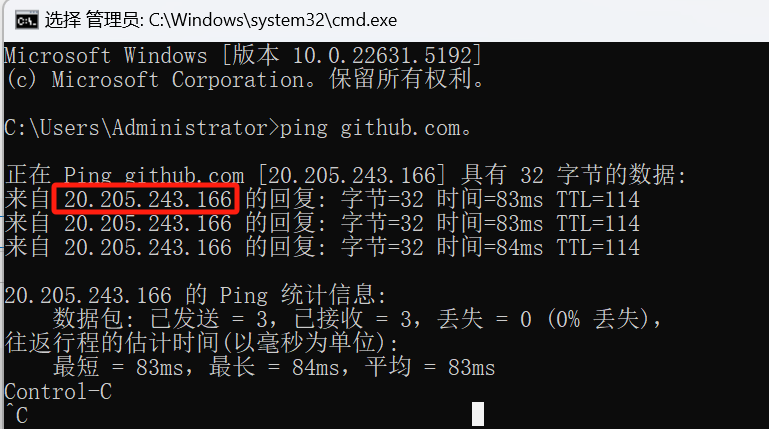
获取到原地址为 20.205.243.166
2.然后配置到host文件中即可
C:\Windows\System32\drivers\etc目录中host没有手动创建即可
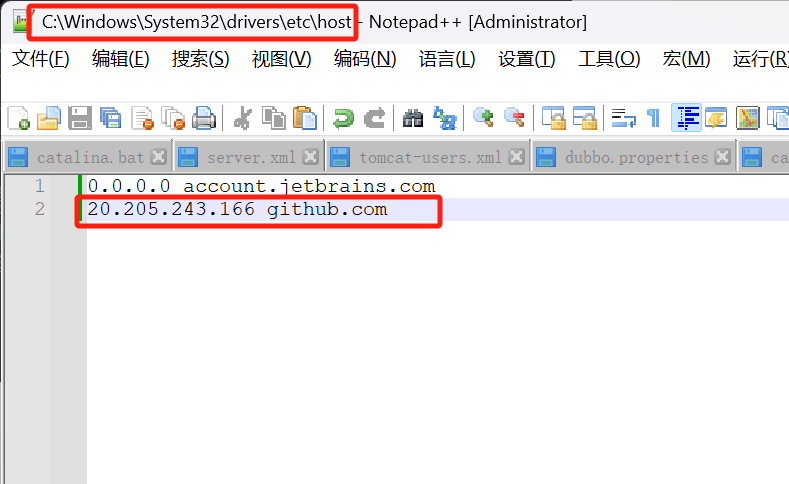
3.cmd中输入ipconfig /flushdns 刷新DNS以确保更改生效
然后就能成功访问了 GitHub · Build and ship software on a single, collaborative platform · GitHub

1.打开cmd,输入 ping github.com
查看原地址
获取到原地址为 20.205.243.166
2.然后配置到host文件中即可
C:\Windows\System32\drivers\etc目录中host没有手动创建即可
3.cmd中输入ipconfig /flushdns 刷新DNS以确保更改生效
然后就能成功访问了 GitHub · Build and ship software on a single, collaborative platform · GitHub
 763
1万+
1455
2万+
1519
763
1万+
1455
2万+
1519





 扫一扫
扫一扫


 到【灌水乐园】发言



