使用Azure Automation(自动化)定时关闭和启动虚拟机

虚拟机自动启动 windows系统上,设置VMware开机自动启动,虚拟机也启动。 立即下载

1. 概述

作为Windows Azure的用户,使用Azure的过程中,最担心的事情就是还没到月底,预设的费用就快消耗完了(下面两张账单图是我最讨厌看到的)。但是仔细分析自己的费用列表,发现绝大部分费用消耗在虚拟机上,而Azure的虚拟机是按照开机时间来计费的,因此迫切需要找到一个方案来节省虚拟机的开销。最简单的方案就是在不需要的时候将虚拟机自动关闭,需要的时间让其自动开机。在Google了一通以后,发现可以通过Azure的自动化(Automation)功能达到上述目的。下面介绍我在Azure上的实践,通过设置Azure Automation,实现定时自动启动和关闭虚拟机。

image
 
image

2. 必要条件

1. Windows Azure的订阅账户

2. 在Azure中有可以正常启动和关闭的虚拟机。可以参考这个链接创建一个虚拟机https://azure.microsoft.com/en-us/documentation/articles/virtual-machines-windows-tutorial/ 

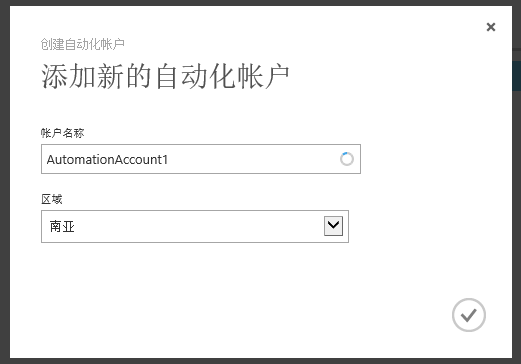
3. 创建自动化账户 Automation

按照Azure的描述,Automation自动化账户是自动化资源的容器,使用Automation自动化账户可以将自动化的资源与分配给其他自动化账户的资源隔离。如果你从未在Azure订阅中创建过自动化账户,参考下面介绍创建一个:

image

image

4. 创建和管理证书

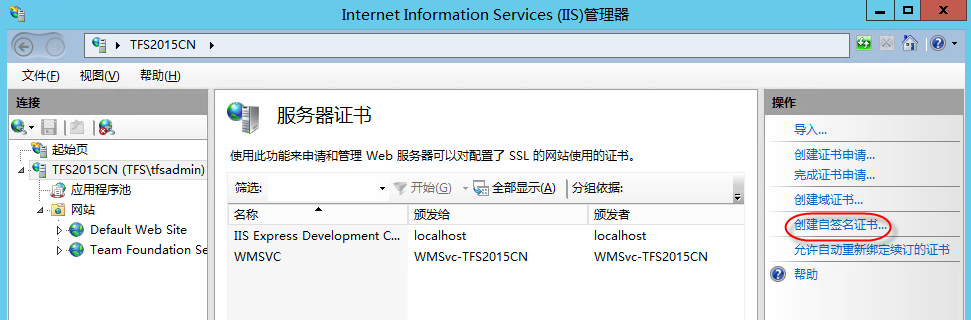
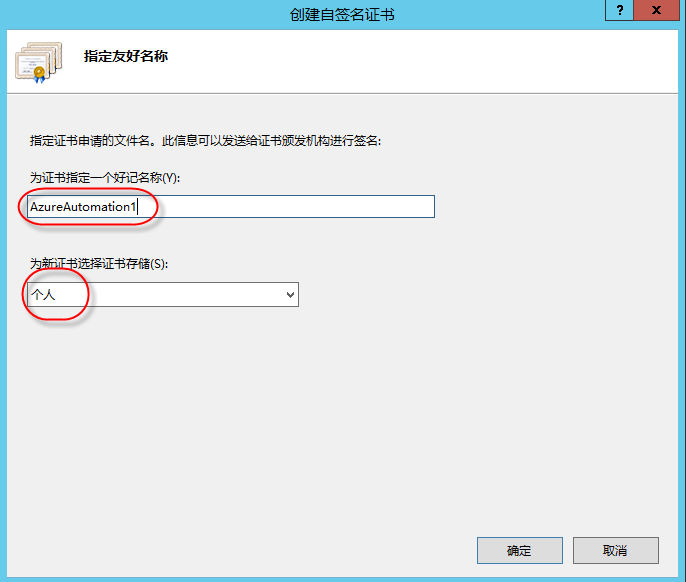
4.1 在IIS中创建证书

在Azure订阅中运行自动化的任务(脚本),需要使用基于证书的认证。你可以使用第三方的商业证书,也可以在任意一台安装了Internet Infomation Services (IIS)的服务器上创建一个证书。下面介绍如何在Windows Server 2012中使用IIS创建一个自签名的证书:

image

image

image

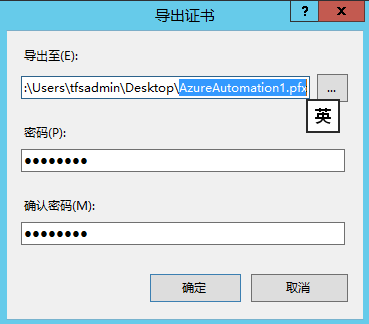
4.2 从IIS中导出.pfx证书

image

image

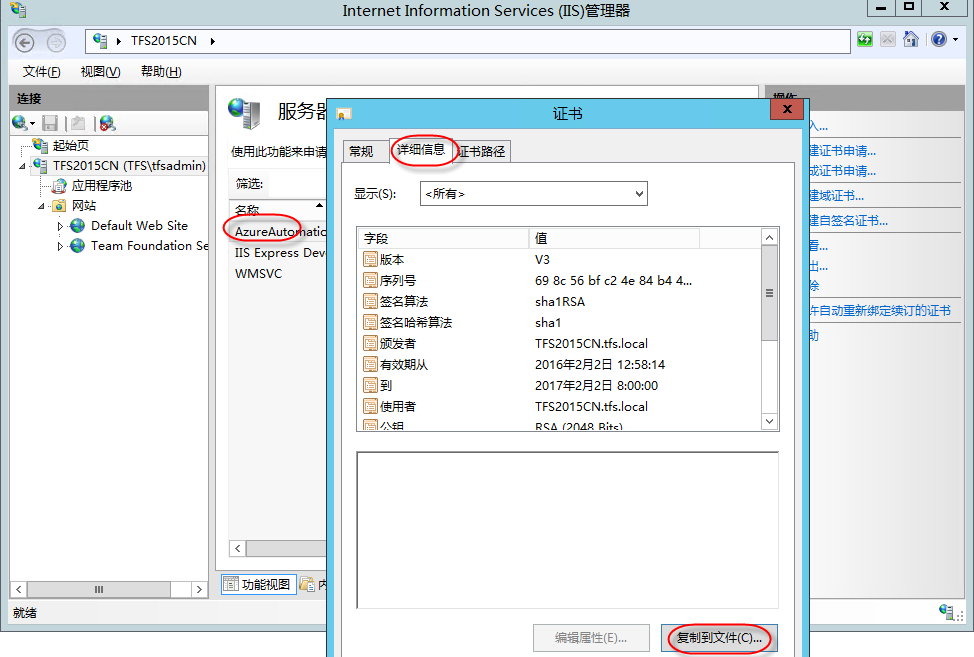
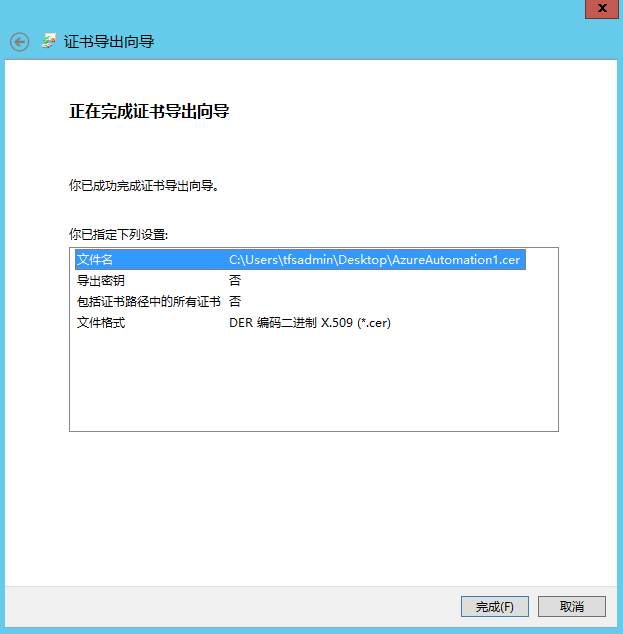
4.3 从IIS中导出.cer证书

image

image

image

image

image

image

4.4 将.cer证书上传到订阅账户

image

image

5. 配置自动化脚本

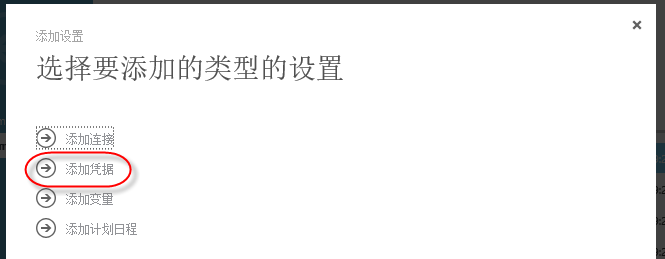
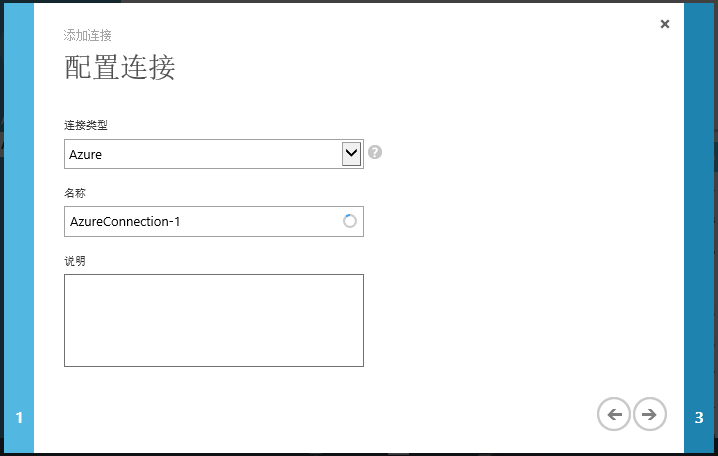
  5.1 配置资产,准备自动化脚本运行过程中需要的素材

image

image

image

image

image

(上传之前导出的.pfx证书)

image

image

SNAGHTML56ba82c

(自动化证书名称需要使用证书在IIS中的友好名称;订阅ID可以在Azure的设置中查询到)

5.2 配置自动化脚本

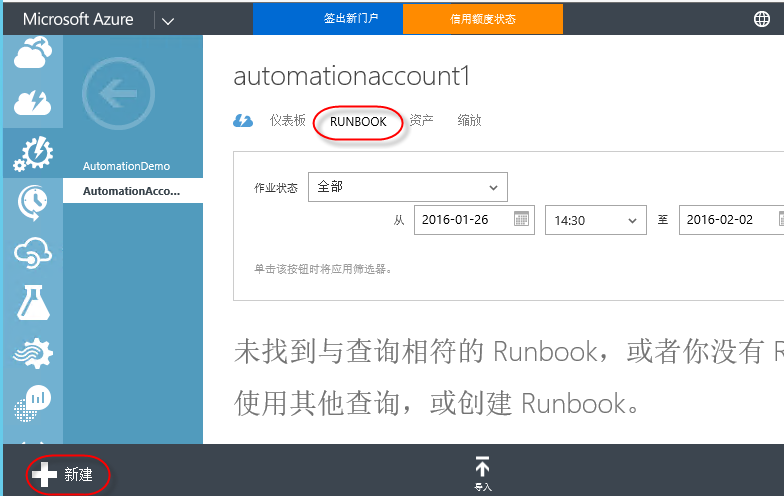
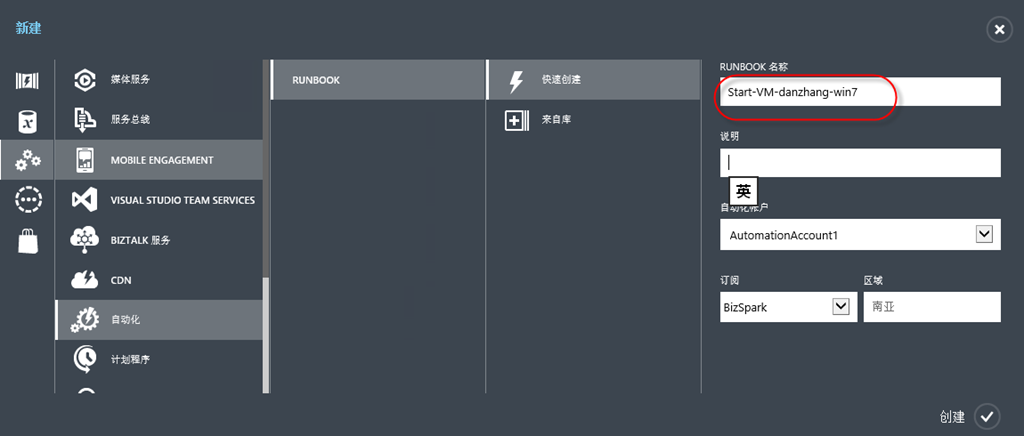
Runbook是执行自动化操作的脚本。可以通过左下角的“新建”按钮从脚本库中快速创建一个脚本,也可以完全自定义一个脚本:

image

image

(创建好脚本后,选择脚本,进入编辑页面)

image

image

(在“创作”中编辑自动化运行的脚本,脚本如下,其中高亮部分是需要根据实际情况修改的内容:)

workflow Start-VM-danzhang-win7
{
    param()
    #connection      
       $MyConnection = "AzureConnection-1"
       $MyCert = "AutomationCredential-1"
    # Get the Azure Automation Connection
    $Con = Get-AutomationConnection -Name $MyConnection
    if ($Con -eq $null)
    {
        Write-Output "Connection entered: $MyConnection does not exist in the automation service. Please create one `n"  
    }
    else
    {
        $SubscriptionID = $Con.SubscriptionID
        $ManagementCertificate = $Con.AutomationCertificateName
    }  

    # Get Certificate & print out its properties
    $Cert = Get-AutomationCertificate -Name $MyCert
    if ($Cert -eq $null)
    {
        Write-Output "Certificate entered: $MyCert does not exist in the automation service. Please create one `n"  
    }
    else
    {
        $Thumbprint = $Cert.Thumbprint
    }

        #Set and Select the Azure Subscription
         Set-AzureSubscription `
            -SubscriptionName "My Azure Subscription" `
            -Certificate $Cert `
            -SubscriptionId $SubscriptionID `

        #Select Azure Subscription
         Select-AzureSubscription `
            -SubscriptionName "My Azure Subscription"


    Write-Output "-------------------------------------------------------------------------"

       Write-Output "Starting the VM.."

       # Please type the name of your Domain Controllers

   
    inlinescript{
# function to get local time (example Convert UTC tome to Indian Time Zone)
Function Get-LocalTime($UTCTime)
{
$strCurrentTimeZone = 'India Standard Time'
$TZ = [System.TimeZoneInfo]::FindSystemTimeZoneById($strCurrentTimeZone)
$LocalTime = [System.TimeZoneInfo]::ConvertTimeFromUtc($UTCTime, $TZ)
Return $LocalTime
}

#convert date time to UTC time Zone
$date = (Get-Date).ToUniversalTime()
# call function to get local time
$locatTime= Get-LocalTime($date)
#get day of week eg. Friday
$locatTimeDayOfWeek= ($locatTime).DayOfWeek
#get current day of the date eg. if current date is 21 November 2014 09:55:18 then day will be 21
$localTimeDay= ($locatTime).Day

#$locatTimeDayOfWeek
#$localTimeDay


#do not start VM on saturday and Sunday

if($locatTimeDayOfWeek -ne "Saturday" -and $locatTimeDayOfWeek -ne "Sunday")
{
#$sample = Get-AzureWinRMUri -ServiceName $Using:CloudServiceName -Name $Using:VMName
$StartOutPut = Start-AzureVM -ServiceName "danzhang-win7" -Name "danzhang-win7"
Write-Output $"Virtual Machine danzhang-win7 started."
Write-Output $StartOutPut

}
elseif($localTimeDay -le 7 -and $locatTimeDayOfWeek -eq "Saturday")
{
$StartOutPut = Start-AzureVM -ServiceName "danzhang-win7" -Name "danzhang-win7"

Write-Output $"Virtual Machine danzhang-win7 started."
Write-Output $StartOutPut
}
else{
Write-Output "Virtual Machine is not started, because today is not a working day."
}
}
}

image

(保存并点击“测试”按钮运行脚本)

image

(如果脚本正确,你会在输出窗口中看到成功的提示,同时看到虚拟机已经启动了;点击“发布”按钮发布脚本)

创建关闭虚拟机脚本的过程与上面完全一致,脚本的内容参考下表:

workflow Stop-VM-danzhang-win7
{
    param()
    #connection
       $MyConnection = "AzureConnection-1"
       $MyCert = "AutomationCredential-1"
    # Get the Azure Automation Connection
    $Con = Get-AutomationConnection -Name $MyConnection
    if ($Con -eq $null)
    {
        Write-Output "Connection entered: $MyConnection does not exist in the automation service. Please create one `n"  
    }
    else
    {
        $SubscriptionID = $Con.SubscriptionID
        $ManagementCertificate = $Con.AutomationCertificateName
    }  

    # Get Certificate & print out its properties
    $Cert = Get-AutomationCertificate -Name $MyCert
    if ($Cert -eq $null)
    {
        Write-Output "Certificate entered: $MyCert does not exist in the automation service. Please create one `n"  
    }
    else
    {
        $Thumbprint = $Cert.Thumbprint
    }

        #Set and Select the Azure Subscription
         Set-AzureSubscription `
            -SubscriptionName "My Azure Subscription" `
            -Certificate $Cert `
            -SubscriptionId $SubscriptionID `

        #Select Azure Subscription
         Select-AzureSubscription `
            -SubscriptionName "My Azure Subscription"


    Write-Output "-------------------------------------------------------------------------"

       Write-Output "Stoping the VM.."

       # Please type the name of your Domain Controllers

   
    inlinescript{
# function to get local time (example Convert UTC tome to Indian Time Zone)
Function Get-LocalTime($UTCTime)
{
$strCurrentTimeZone = 'India Standard Time'
$TZ = [System.TimeZoneInfo]::FindSystemTimeZoneById($strCurrentTimeZone)
$LocalTime = [System.TimeZoneInfo]::ConvertTimeFromUtc($UTCTime, $TZ)
Return $LocalTime
}

#convert date time to UTC time Zone
$date = (Get-Date).ToUniversalTime()
# call function to get local time
$locatTime= Get-LocalTime($date)
#get day of week eg. Friday
$locatTimeDayOfWeek= ($locatTime).DayOfWeek
#get current day of the date eg. if current date is 21 November 2014 09:55:18 then day will be 21
$localTimeDay= ($locatTime).Day

#$locatTimeDayOfWeek
#$localTimeDay


#do not start VM on saturday and Sunday

if($locatTimeDayOfWeek -ne "Saturday" -and $locatTimeDayOfWeek -ne "Sunday")
{

#$StopOutPut = Start-AzureVM -ServiceName "mkadamvm" -Name $Using:test

#$sample = Get-AzureWinRMUri -ServiceName $Using:CloudServiceName -Name $Using:VMName

$StopOutPut = Stop-AzureVM -ServiceName "danzhang-win7" -Name "danzhang-win7" -Force
Write-Output $"Virtual Machine danzhang-win7 Stopped."
Write-Output $StopOutPut

}
elseif($localTimeDay -le 7 -and $locatTimeDayOfWeek -eq "Saturday")
{
$StopOutPut = Stop-AzureVM -ServiceName "danzhang-win7" -Name "danzhang-win7" -Force

Write-Output $"Virtual Machine danzhang-win7 Stopped."
Write-Output $StartOutPut
}
else{
Write-Output "Virtual Machine is not started, because today is not a working day."
}
}
}

  5.3配置日程,实现定时运行脚本

脚本调试成功以后,就可以通过“计划日程”定期运行脚本,以实现定期启动和关机的目标。

image

image

image

(注意这里的时间是20小时格式的,并且你不需要考虑时区,系统会自动按照你本地的时区做转换)

可以按照上面的操作,设置关闭虚拟机的时间。

http://www.cnblogs.com/danzhang/  ALM MVP 张洪君

VBA一键汇总多个工作簿-名称相同的工作表-的指定区域数据 VBA一键汇总多个工作簿-名称相同的工作表-的指定区域数据 日常工作,我们经常需要汇总相同格式的工作簿的某个工作表的数据 如1月业绩、2月业绩。。。。12月业绩等 姓名 数量 数据22 22 数据23 23 数据24 24 数据25 25 数据26 26 数据27 27 数据28 28 数据29 29 数据30 30 数据31 31 数据32 32 数据33 33 数据34 阅读详情

相关推荐

每天10分钟,混剪视频Agent产出50条爆款,单月变现6位数(喂饭级教程)

混剪视频是指将多个视频片段、图片或音频素材进行剪辑组合,创造出新的视频内容。随着Coze上线联动剪映功能,混剪视频制作正在进入自动化时代,为创作者带来巨大便利。高效自动化处理:AI可以自动完成琐碎的剪辑工作,让创作者省下大量时间专注于项目策划和创意。批量素材产出:特别适用于抖音、小红书和视频号等平台上的养生、科普、心理、疗愈等垂直领域,可以自动化批量生产图片和视频素材。引流获客:通过优质内容吸引目标受众知识变现:通过教学传授技术工具变现:将搭建好的工作流作为产品销售。

汤师爷的博客 868

如何利用Azure Automation以及Tag自动开关Azure VM

这是本博客第一篇技术相关的小贴士,在这里我不会详细介绍所涉及的技术组件的具体使用细节,因为我相信这些大家都可以通过官方文档了解到。如果你是一个看了官方文档依然一脸茫然的IT小白,个人建议是先从基础重新学起再来看具体的需求和方案。在这片文章里我们会涉及到两个概念,一个是Azure automation,另外就是resource的tag。Tag这个我就不多说了,绝大多数系统或者平...

cenyiran1580的博客 339

Zemax物理光学实战:3分钟搞定高斯光束传播模拟(附菲涅尔局部分析技巧)

本文详细介绍了在Zemax中进行高斯光束传播模拟与菲涅尔局部分析的实战技巧。通过3分钟快速设置指南和参数解析,帮助光学工程师准确模拟激光光束特性,避免常见误区。特别分享了菲涅尔局部分析的关键技巧和传播参数优化策略,提升光学系统设计的精度与效率。

lambda的博客 806

Azure Service Bus 实现定时器以及按序执行任务

using System; using System.Threading.Tasks; using Azure.Messaging.ServiceBus; using System.Collections; using Newtonsoft.Json.Linq; using System.Collections.Generic; namespace ServiceBusConsole { internal class Program { // connection str.

exu131g的博客 677

从零开始:用摩尔线程S4000运行开源AI项目的完整流程

本文详细介绍了如何使用摩尔线程S4000 GPU从零开始运行开源AI项目的完整流程,包括硬件选择、驱动安装、容器化环境配置以及典型AI项目的实战部署。通过性能优化技巧,显著提升推理速度,适合开发者快速上手国产GPU的AI应用开发。

weixin_29231725的博客 584

基于MATLAB编程的LSTM的时间序列预测

时间序列预测,回归分析,LSTM详细原理

abc991835105的博客 362

ESXi虚拟机定时关机

1.获取虚拟机和每个虚拟机的虚拟机 ID 列表,执行自动关机脚本中需要用到。在有停电情况下,可提前写好脚本,到点查看执行情况即可,下班准时闪人。输入以下内容(虚拟机的ID列表根据实际情况列入)输入以下内内容(即为周二凌晨一点执行该脚本)ESXi主机重启后会改执行任务会自动失效。2.切换至如下目录并新建脚本。3.添加脚本执行任务。

zz960226的博客 4086

uniapp [微信小程序] - 详解微信小程序端接入mqtt全流程及示例源码教程,uniApp微信小程序端如何接入MQTT插件并实现连接/断开+发布订阅+消息队列+离线重连等各种示例代码(开箱即用)

uniapp微信小程序接入MQTT,uniapp中使用mqtt,uniapp 微信小程序端接入mqtt示例代码教程,适用于微信小程序的MQTT插件,uniapp开发微信小程序连接mqtt,uniApp微信小程序接入MQTT协议,uniapp vue3微信小程序使用MQTT的小例子接入流程,使用uniapp开发小程序接入mqtt,如何在uniapp项目中使用mqtt,uniapp mqtt的使用示例,mqtt连接报错,如何在项目里集成mqtt,Mqtt协议,主动连接mqtt,订阅消息,实现发布,订阅和接收消息

🏆 前端领域优质创作者 2884

PVE定时开启关闭虚拟机,实现PVE中群晖虚拟机的定时开机和关闭

创建新文件 vi /etc/systemd/system/vm-start.timer,我设置的每天6.40运行,可以改时间,Timer里面除了Oncalendar还有其他选项,可以自行百度。创建新文件 vi /etc/systemd/system/vm-start.service。创建新文件 vi /etc/systemd/system/vm-stop.service。创建新文件 vi /etc/systemd/system/vm-stop.timer。执行命令启动vm-stop.timer。

qq994877603的博客 5714

从 Chat 提示词到可运行 Fiori 应用,ADT for VS Code 正在把 RAP 开发带进 Agent 时代

本文探讨了在VS Code中使用AI辅助进行ABAP RAP开发的新模式。文章指出,传统RAP开发需要手工创建数据库表、CDS视图、行为定义等十多个关联对象,命名和关联关系容易出错。现在通过GitHub Copilot Agent Mode配合ADT MCP Server,开发者可用自然语言描述业务场景直接生成完整的RAP业务对象。这种生成式开发的核心价值在于:1)通过标准化工具接口(MCP)连接ABAP后端,确保生成符合规范的RAP对象;2)能正确处理多实体组合场景下的命名一致性和关联关系;3)保持生成结

2007 年 ~ 2025 年,深耕 SAP 技术 18 年 89

【算法】克里金kriging参数值预测模型

模型中特征值2个,目标值1个,data数据集如图所示。搭建kriging参数值预测模型。

weixin_48618536的博客 5060

KVM虚拟机的定时逐次开机设定方法-systemd方式

KVM虚拟机系统是榨取服务器最大性能的一种好方法,但是谁也不想让服务器启动的时候要等待5分钟甚至以上的时间。 为了减轻服务器开机时的任务数量,需要虚拟机在开机后一段时间内,按顺序逐次启动,以达到各个服务间的依赖和功能衔接。

lggirls的博客 1421

OpenClaw进阶实战(二十一):工作流6:跨平台舆情监控与自动响应

摘要: 本文介绍基于OpenClaw构建自动化舆情监控系统,实现多平台数据采集、AI情感分析与智能预警。系统架构包含数据采集(微博/小红书/抖音)、消息队列、情感分析(SnowNLP/大模型API)、分级预警和自动响应模块。通过技能化开发(如微博API采集、小红书模拟登录)实现7×24小时监控,结合情感强度与传播速度分级处理负面舆情,形成"采集-分析-预警-处置"闭环,适用于企业私有化部署。

PeterPan的博客 301

[Azure]使用Azure Automation实现自动开关虚拟机的操作

 关于Azure Automation功能的使用请参考链接: http://www.windowsazure.cn/documentation/articles/automation-create-runbook-from-samples/   首先,我们需要创建一个自动化账号(Automation Account): 在弹出的界面中填写自动化账号名称(用

Han的小站 1333

jre9下载 jdk9

(Java SE Runtime Environment 9.0) 9.0u175 官方最新版 【x86|x64】

Data-Structures-and-Algorithm-Analysis-in-Java.pdf

作者: Weiss, Mark A. 出版社: Addison Wesley Data Structures and Algorithm Analysis in Java is an “advanced algorithms” book that fits between traditional CS2 and Algorithms Analysis courses. In the old ACM Curriculum Guidelines, this course was known as CS7. This text is for readers who want to learn good programming and algorithm analysis skills simultaneously so that they can develop such programs with the maximum amo...

Azure Automation 自动化-自动关闭Azure

Azure Automation可以提供一些自动化的功能,比如我们可以指定在每天早上6点开启虚拟机,每天晚上8点关闭虚拟机。 同时还提供一些基于监控参数的自动化配置。今天的主要内容是介绍通过Automation实现定时对虚拟机进行开机和关机操作。 Azure对不同状态下的虚拟机计费情况: workflowstartVM{$Cred=Get-AutomationPSCredential-Name"test-cred";...

vecloud的博客 274

C# WinForm 基于DirectShow.dll编写的程序,可边预览边保存视频,音频和图片

基于微软的DirectShow.dll的二次开发1.自动识别连接的摄像头跟麦克风且可以对其进行选择(默认选中第一个)2.可录制wmv和avi两种格式的视频并且都带有音频,avi可以录制的分辨率和帧数进行选择,wmv默认进行了淸晰度优化如不喜欢可去除代码中有相关提示3.可在预览点开之后进行拍照,也可边录制视频边拍照4.添加了视频和音频的压缩功能(酌情使用)这次二次开发发现C#对DirectShow的相关信息太少,这次做完也不敢藏私共享出来,还望大家指正

Azure Automation 实现JOB的自动运行

Azure Automation有三个非常重要的概念:   1.Automation,一组业务逻辑的集合。包含多个RunBook和多个Schedule。   2.RunBook,运行业务逻辑的主题   3.Schedule,调度RunBook的计划任务。一个Schedule可以调度多个RunBook   举个例子,假设我们每天早上9点上班之前把一个订阅下所有的虚拟机开启,然后在下午6点下班以后把所有的虚拟机关闭,这样是非常节省成本的。   以前我们需要通过单独某一台Azure虚拟机,定期执行Pow

shenghuiping2001的专栏 672

深度学习工具包 DeepLearningToolbox

深度学习工具包Deprecation notice.-----This toolbox is outdated and no longer maintained.There are much better tools available for deep learning than this toolbox, e.g. [Theano](http://deeplearning.net/software/theano/), [torch](http://torch.ch/) or [tensorflow](http://www.tensorflow.org/)I would suggest you use one of the tools mentioned above rather than use this toolbox.Best, Rasmus.DeepLearnToolbox================A Matlab toolbox for Deep Learning.Deep Learning is a new subfield of machine learning that focuses on learning deep hierarchical models of data.It is inspired by the human brain's apparent deep (layered, hierarchical) architecture.A good overview of the theory of Deep Learning theory is[Learning Deep Architectures for AI](http://www.iro.umontreal.ca/~bengioy/papers/ftml_book.pdf)For a more informal introduction, see the following videos by Geoffrey Hinton and Andrew Ng.* [The Next Generation of Neural Networks](http://www.youtube.com/watch?v=AyzOUbkUf3M) (Hinton, 2007)* [Recent Developments in Deep Learning](http://www.youtube.com/watch?v=VdIURAu1-aU) (Hinton, 2010)* [Unsupervised Feature Learning and Deep Learning](http://www.youtube.com/watch?v=ZmNOAtZIgIk) (Ng, 2011)If you use this toolbox in your research please cite [Prediction as a candidate for learning deep hierarchical models of data](http://www2.imm.dtu.dk/pubdb/views/publication_details.php?id=6284)```@MASTERSTHESIS\{IMM2012-06284, author = "R. B. Palm", title = "Prediction as a candidate for learning deep hierarchical models of data", year = "2012",}```Contact: rasmusbergpalm at gmail dot comDirectories included in the toolbox-----------------------------------`NN/` - A library for Feedforward Backpropagation Neural Networks`CNN/` - A library for Convolutional Neural Networks`DBN/` - A library for Deep Belief Networks`SAE/` - A library for Stacked Auto-Encoders`CAE/` - A library for Convolutional Auto-Encoders`util/` - Utility functions used by the libraries`data/` - Data used by the examples`tests/` - unit tests to verify toolbox is workingFor references on each library check REFS.mdSetup-----1. Download.2. addpath(genpath('DeepLearnToolbox'));Example: Deep Belief Network---------------------```matlabfunction test_example_DBNload mnist_uint8;train_x = double(train_x) / 255;test_x = double(test_x) / 255;train_y = double(train_y);test_y = double(test_y);%% ex1 train a 100 hidden unit RBM and visualize its weightsrand('state',0)dbn.sizes = [100];opts.numepochs = 1;opts.batchsize = 100;opts.momentum = 0;opts.alpha = 1;dbn = dbnsetup(dbn, train_x, opts);dbn = dbntrain(dbn, train_x, opts);figure; visualize(dbn.rbm{1}.W'); % Visualize the RBM weights%% ex2 train a 100-100 hidden unit DBN and use its weights to initialize a NNrand('state',0)%train dbndbn.sizes = [100 100];opts.numepochs = 1;opts.batchsize = 100;opts.momentum = 0;opts.alpha = 1;dbn = dbnsetup(dbn, train_x, opts);dbn = dbntrain(dbn, train_x, opts);%unfold dbn to nnnn = dbnunfoldtonn(dbn, 10);nn.activation_function = 'sigm';%train nnopts.numepochs = 1;opts.batchsize = 100;nn = nntrain(nn, train_x, train_y, opts);[er, bad] = nntest(nn, test_x, test_y);assert(er < 0.10, 'Too big error');```Example: Stacked Auto-Encoders---------------------```matlabfunction test_example_SAEload mnist_uint8;train_x = double(train_x)/255;test_x = double(test_x)/255;train_y = double(train_y);test_y = double(test_y);%% ex1 train a 100 hidden unit SDAE and use it to initialize a FFNN% Setup and train a stacked denoising autoencoder (SDAE)rand('state',0)sae = saesetup([784 100]);sae.ae{1}.activation_function = 'sigm';sae.ae{1}.learningRate = 1;sae.ae{1}.inputZeroMaskedFraction = 0.5;opts.numepochs = 1;opts.batchsize = 100;sae = saetrain(sae, train_x, opts);visualize(sae.ae{1}.W{1}(:,2:end)')% Use the SDAE to initialize a FFNNnn = nnsetup([784 100 10]);nn.activation_function = 'sigm';nn.learningRate = 1;nn.W{1} = sae.ae{1}.W{1};% Train the FFNNopts.numepochs = 1;opts.batchsize = 100;nn = nntrain(nn, train_x, train_y, opts);[er, bad] = nntest(nn, test_x, test_y);assert(er < 0.16, 'Too big error');```Example: Convolutional Neural Nets---------------------```matlabfunction test_example_CNNload mnist_uint8;train_x = double(reshape(train_x',28,28,60000))/255;test_x = double(reshape(test_x',28,28,10000))/255;train_y = double(train_y');test_y = double(test_y');%% ex1 Train a 6c-2s-12c-2s Convolutional neural network %will run 1 epoch in about 200 second and get around 11% error. %With 100 epochs you'll get around 1.2% errorrand('state',0)cnn.layers = { struct('type', 'i') %input layer struct('type', 'c', 'outputmaps', 6, 'kernelsize', 5) %convolution layer struct('type', 's', 'scale', 2) %sub sampling layer struct('type', 'c', 'outputmaps', 12, 'kernelsize', 5) %convolution layer struct('type', 's', 'scale', 2) %subsampling layer};cnn = cnnsetup(cnn, train_x, train_y);opts.alpha = 1;opts.batchsize = 50;opts.numepochs = 1;cnn = cnntrain(cnn, train_x, train_y, opts);[er, bad] = cnntest(cnn, test_x, test_y);%plot mean squared errorfigure; plot(cnn.rL);assert(er<0.12, 'Too big error');```Example: Neural Networks---------------------```matlabfunction test_example_NNload mnist_uint8;train_x = double(train_x) / 255;test_x = double(test_x) / 255;train_y = double(train_y);test_y = double(test_y);% normalize[train_x, mu, sigma] = zscore(train_x);test_x = normalize(test_x, mu, sigma);%% ex1 vanilla neural netrand('state',0)nn = nnsetup([784 100 10]);opts.numepochs = 1; % Number of full sweeps through dataopts.batchsize = 100; % Take a mean gradient step over this many samples[nn, L] = nntrain(nn, train_x, train_y, opts);[er, bad] = nntest(nn, test_x, test_y);assert(er < 0.08, 'Too big error');%% ex2 neural net with L2 weight decayrand('state',0)nn = nnsetup([784 100 10]);nn.weightPenaltyL2 = 1e-4; % L2 weight decayopts.numepochs = 1; % Number of full sweeps through dataopts.batchsize = 100; % Take a mean gradient step over this many samplesnn = nntrain(nn, train_x, train_y, opts);[er, bad] = nntest(nn, test_x, test_y);assert(er < 0.1, 'Too big error');%% ex3 neural net with dropoutrand('state',0)nn = nnsetup([784 100 10]);nn.dropoutFraction = 0.5; % Dropout fraction opts.numepochs = 1; % Number of full sweeps through dataopts.batchsize = 100; % Take a mean gradient step over this many samplesnn = nntrain(nn, train_x, train_y, opts);[er, bad] = nntest(nn, test_x, test_y);assert(er < 0.1, 'Too big error');%% ex4 neural net with sigmoid activation functionrand('state',0)nn = nnsetup([784 100 10]);nn.activation_function = 'sigm'; % Sigmoid activation functionnn.learningRate = 1; % Sigm require a lower learning rateopts.numepochs = 1; % Number of full sweeps through dataopts.batchsize = 100; % Take a mean gradient step over this many samplesnn = nntrain(nn, train_x, train_y, opts);[er, bad] = nntest(nn, test_x, test_y);assert(er < 0.1, 'Too big error');%% ex5 plotting functionalityrand('state',0)nn = nnsetup([784 20 10]);opts.numepochs = 5; % Number of full sweeps through datann.output = 'softmax'; % use softmax outputopts.batchsize = 1000; % Take a mean gradient step over this many samplesopts.plot = 1; % enable plottingnn = nntrain(nn, train_x, train_y, opts);[er, bad] = nntest(nn, test_x, test_y);assert(er < 0.1, 'Too big error');%% ex6 neural net with sigmoid activation and plotting of validation and training error% split training data into training and validation datavx = train_x(1:10000,:);tx = train_x(10001:end,:);vy = train_y(1:10000,:);ty = train_y(10001:end,:);rand('state',0)nn = nnsetup([784 20 10]); nn.output = 'softmax'; % use softmax outputopts.numepochs = 5; % Number of full sweeps through dataopts.batchsize = 1000; % Take a mean gradient step over this many samplesopts.plot = 1; % enable plottingnn = nntrain(nn, tx, ty, opts, vx, vy); % nntrain takes validation set as last two arguments (optionally)[er, bad] = nntest(nn, test_x, test_y);assert(er < 0.1, 'Too big error');```[![Bitdeli Badge](https://d2weczhvl823v0.cloudfront.net/rasmusbergpalm/deeplearntoolbox/trend.png)](https://bitdeli.com/free "Bitdeli Badge")

Azure Automation (3) 定期将某个Azure订阅下的所有虚拟机开关机

  《Windows Azure Platform 系列文章目录》     本文介绍的是国内由世纪互联运维的Azure China。     在笔者之前的文章中,我们介绍了使用Azure Automation可以定期开关机Azure虚拟机。因为Azure虚拟机是按照分钟计费的,为了节省成本,我们可以   (1)在白天9点之前将所有的虚拟机开启   (2)晚上7点以后将所有的虚拟机关闭 ...

weixin_33911824的博客 167

Azure 基础 : 使用 Automation 定时开机

不知何时 Azure 为虚机提供了自动关机的功能。这是一个很棒的功能,可以帮助我们定时关闭虚机并释放掉资源以节省开支。如果某台虚机在夜间不需要提供服务,我们就可以把它配置为晚上的某个时间点自动关机: 接下来让人郁闷的事情来了!在配置自动关机的时候我们没有发现定时开机的相关配置!不仅如此,笔者在新建虚机的时候发现默认的设置中居然打开了定时关机的功能: 到此为止笔者好像有些明白了,这一定又是套路!...

weixin_34419326的博客 233

Linux虚拟主机定时执行,如何在Azure Linux 虚拟机上定时执行Bash脚本

背景和方案选型我们在《 Azure云上SAP-灾备站点部署和配置 》一文中,演示了如何通过 Linux 内置的crontab来定时执行rsync脚本达到备份文件夹的目的。但是如果某个客户系统中有多个虚拟机需要定时执行脚本,通过Linux的内置crontab显然不合适。因此有一个能够集中化管理Job,查看Job运行历史的 工具 显得尤为重要,在微软的Azure云平台上, Azure Automati...

weixin_39722196的博客 434

Azure Automation (1) 入门

  《Windows Azure Platform 系列文章目录》   通过Azure Automation(自动化),开发人员可以自动完成通常要在云环境中执行的手动、长时间进行、易出错且重复性高的任务。你可以使用 Runbook 来创建、监视、管理和部署 Azure 环境中的资源。所谓的 Runbook,基本上就是指 Windows PowerShell 工作流。   Azure Au...

weixin_30444105的博客 414

利用Azure Automation实现云端自动化运维(4)

在上述基本准备工作做完后,wo们看看如何实现利用Azure Automation实现定时自动开关机的操作,这种场景非常适合Dev/Test环境,因为Azure的虚拟机是按照分钟收费的,所以我们可以在开发测试人员上班的时候打开虚拟机,而在下班,周末的时候关闭虚拟机,从而节约成本,从另外一个层面来讲,也是体现云的灵活性。 首先讲一下设计的基本原则,如何做能让你的自动化脚本更灵活,更具有可移植性: ...

weixin_30414635的博客 210
上一篇: TFS 与活动目录AD(Active Directory)的同步机制
下一篇: TFS 2015 Update 2功能探索
Azure DevOps
博客等级 码龄6年 219粉丝 296原创
评论
成就一亿技术人!
拼手气红包6.0元
还能输入1000个字符
 
 条评论被折叠 查看
添加红包

请填写红包祝福语或标题

个

红包个数最小为10个

元

红包金额最低5元

当前余额3.43元 前往充值 >
需支付:10.00元
成就一亿技术人!
领取后你会自动成为博主和红包主的粉丝 规则
hope_wisdom
发出的红包
实付元
使用余额支付
点击重新获取
扫码支付
钱包余额 0

抵扣说明:

1.余额是钱包充值的虚拟货币,按照1:1的比例进行支付金额的抵扣。
2.余额无法直接购买下载,可以购买VIP、付费专栏及课程。

余额充值