



在上一篇的 index.html 中我们引用了 /vue/dist/vue.js 来构建一个应用,这个 vue.js 是 Vue 使用 rollup 来打包生成的,在源码目录中可以根据 package.json 文件的 scripts 字段查看 Vue 的构建命令。
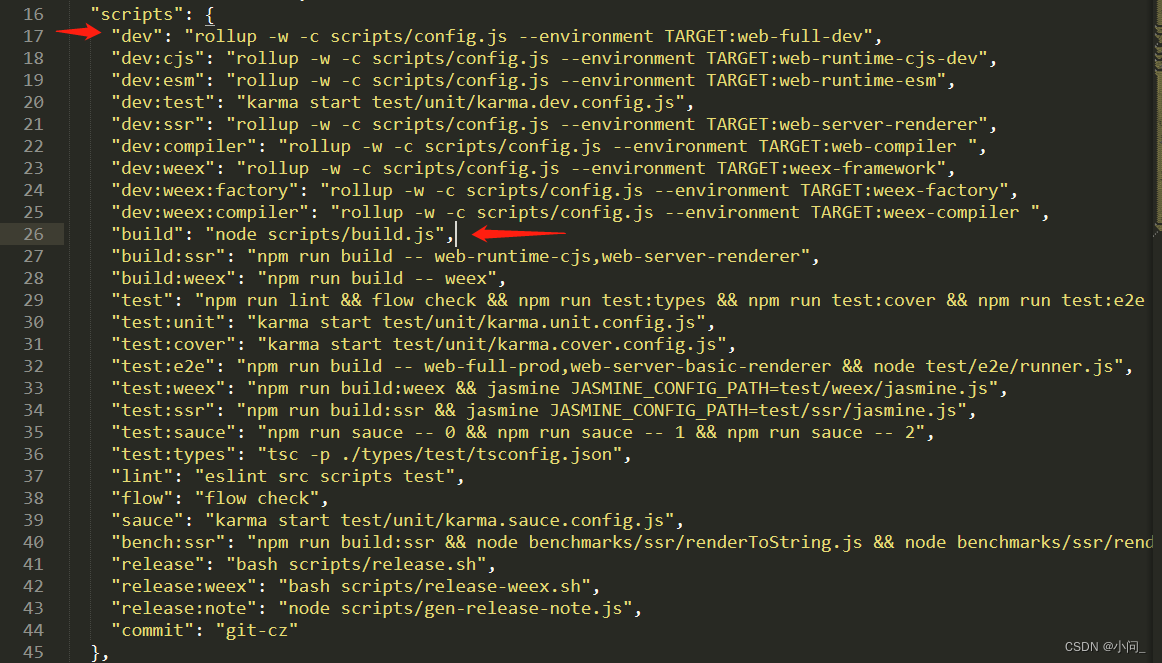
npm run build
以上就是 Vue 的构建命令,我们看看它到底执行了 scripts/build.js 里的啥,以下截取部分代码
// 引入当前目录下的 config.js 并调用导出函数 getAllBuilds
// 返回 build 配置对象赋给变量 builds
let builds = require('./config').getAllBuilds()

// 过滤配置内容 builds ,默认不生成 weex 的库
// filter builds via command line arg
if (process.argv[2]) {
  const filters = process.argv[2].split(',')
  builds = builds.filter(b => {
    return filters.some(f => b.output.file.indexOf(f) > -1 || b._name.indexOf(f) > -1)
  })
} else {
  // filter out weex builds by default
  builds = builds.filter(b => {
    return b.output.file.indexOf('weex') === -1
  })
}

// 调用 build 函数循环生成库
build(builds)

function build (builds) {
  let built = 0
  const total = builds.length
  const next = () => {
    buildEntry(builds[built]).then(() => {
      built++
      if (built < total) {
        next()
      }
    }).catch(logError)
  }

  next()
}

function buildEntry (config) {
  const output = config.output
  const { file, banner } = output
  const isProd = /(min|prod)\.js$/.test(file)
  return rollup.rollup(config)
    .then(bundle => bundle.generate(output))
    .then(({ output: [{ code }] }) => {
      if (isProd) {
        const minified = (banner ? banner + '\n' : '') + terser.minify(code, {
          toplevel: true,
          output: {
            ascii_only: true
          },
          compress: {
            pure_funcs: ['makeMap']
          }
        }).code
        return write(file, minified, true)
      } else {
        return write(file, code)
      }
    })
}
在 config.js 文件中定义了一个 builds 对象,存放有各种环境的配置。因为我们只学习带runtime和编译器的 web 版,所以我们只需关注 web-full-dev 的内容
const builds = {
  // Runtime only (CommonJS). Used by bundlers e.g. Webpack & Browserify
  'web-runtime-cjs-dev': {
    entry: resolve('web/entry-runtime.js'),
    dest: resolve('dist/vue.runtime.common.dev.js'),
    format: 'cjs',
    env: 'development',
    banner
  },
  'web-runtime-cjs-prod': {
    entry: resolve('web/entry-runtime.js'),
    dest: resolve('dist/vue.runtime.common.prod.js'),
    format: 'cjs',
    env: 'production',
    banner
  },
  ... 省略很多 ...
  // runtime-only build (Browser)
  'web-runtime-dev': {
    entry: resolve('web/entry-runtime.js'),
    dest: resolve('dist/vue.runtime.js'),
    format: 'umd',
    env: 'development',
    banner
  },
  // runtime-only production build (Browser)
  'web-runtime-prod': {
    entry: resolve('web/entry-runtime.js'),
    dest: resolve('dist/vue.runtime.min.js'),
    format: 'umd',
    env: 'production',
    banner
  },
  // ++++++++++++++++++++++++++++++++++++++++++++++++++++++++
  // Runtime+compiler development build (Browser)
  'web-full-dev': {
      // 编译入口文件 src/platforms/web/entry-runtime-with-compiler.js
    entry: resolve('web/entry-runtime-with-compiler.js'),
    dest: resolve('dist/vue.js'),// 编译后库的输出文件
    format: 'umd',
    env: 'development',
    alias: { he: './entity-decoder' },
    banner
  },
  // ++++++++++++++++++++++++++++++++++++++++++++++++++++++++
  // Runtime+compiler production build  (Browser)
  'web-full-prod': {
    entry: resolve('web/entry-runtime-with-compiler.js'),
    dest: resolve('dist/vue.min.js'),
    format: 'umd',
    env: 'production',
    alias: { he: './entity-decoder' },
    banner
  },
  // Web compiler (CommonJS).
  'web-compiler': {
    entry: resolve('web/entry-compiler.js'),
    dest: resolve('packages/vue-template-compiler/build.js'),
    format: 'cjs',
    external: Object.keys(require('../packages/vue-template-compiler/package.json').dependencies)
  },
  ... 省略很多 ...
}

function genConfig (name) {
  const opts = builds[name]
  const config = {
    input: opts.entry, // 编译入口文件
    external: opts.external,
    plugins: [
      flow(),
      alias(Object.assign({}, aliases, opts.alias))
    ].concat(opts.plugins || []),
    output: {
      file: opts.dest, // 编译后库的输出文件
      format: opts.format,
      banner: opts.banner,
      name: opts.moduleName || 'Vue'
    },
    onwarn: (msg, warn) => {
      if (!/Circular/.test(msg)) {
        warn(msg)
      }
    }
  }

  // built-in vars
  const vars = {
    __WEEX__: !!opts.weex,
    __WEEX_VERSION__: weexVersion,
    __VERSION__: version
  }
  // feature flags
  Object.keys(featureFlags).forEach(key => {
    vars[`process.env.${key}`] = featureFlags[key]
  })
  // build-specific env
  if (opts.env) {
    vars['process.env.NODE_ENV'] = JSON.stringify(opts.env)
  }
  config.plugins.push(replace(vars))

  if (opts.transpile !== false) {
    config.plugins.push(buble())
  }

  Object.defineProperty(config, '_name', {
    enumerable: false,
    value: name
  })

  return config
}

if (process.env.TARGET) {
  module.exports = genConfig(process.env.TARGET)
} else {
  exports.getBuild = genConfig
  // 导出 getAllBuilds 函数供 build.js 调用
  exports.getAllBuilds = () => Object.keys(builds).map(genConfig)
}
总结:
整个构建过程就是执行 npm run build 时调用 scripts/build.js 文件,里面获取 config.js 的配置,取得 web 的入口(src/platforms/web/entry-runtime-with-compiler.js)和库输出文件(dist/vue.js)等信息传参给 rollup 生成 /dist/vue.js 文件。





 扫一扫
扫一扫


 1472
1472

 被折叠的 条评论
为什么被折叠?
被折叠的 条评论
为什么被折叠?
 到【灌水乐园】发言





