
4.X.使用python解密zip文件

0.準備

準備一份加密的zip文件:

*.zip文件是一種壓縮檔, 可由7zip等主流解壓縮程序創建(強烈推薦7z這个軟件!!!)

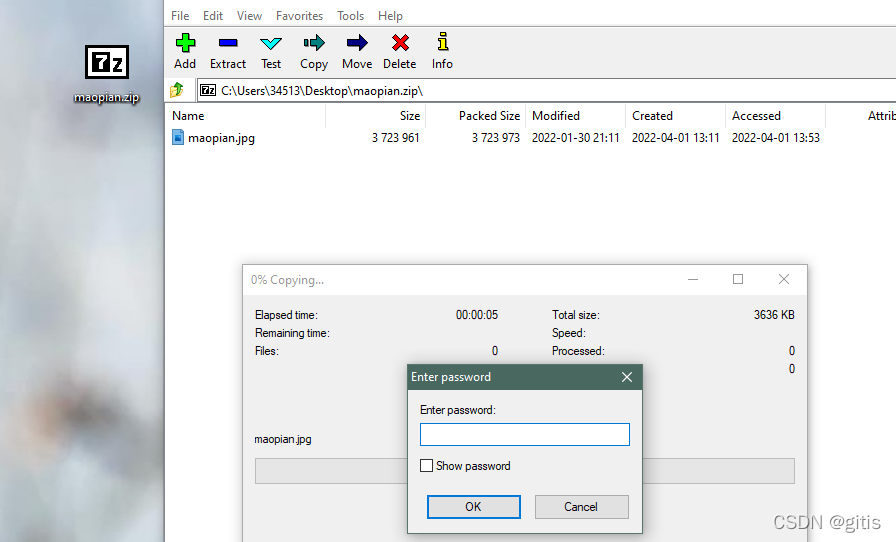
我使用的是名爲maopian.zip的文件, 有想試試的可以找我要, 如下, 一週前創建的, 密碼只記得是6位小寫字母+數字:


1.de_zip_V1

1.1思路

使用python自帶的迭代器模凷itertools窮舉密碼組合, 再不斷地用zipfile模凷去嘗試解壓.

1.2.代碼

# 暴力破解加密的zip文件, 不包含漢字字符和全角字符
import zipfile  # 解壓縮模凷
import itertools  # 迭代器模凷
import sys

# 獲取參數, 待解密文件和預期密碼長度
filename = input("----請輸入待解密文件 :")
length = int(input("----請輸入預期密碼長度:"))

# 嘗試解壓文件
def decompress(filename, password):
    """使用zipfile模凷解壓文件"""
    try:
        with zipf
首先,需要安装 `pycryptodome` 库来使用 AES 加密和解密。可以使用以下命令进行安装: ``` pip install pycryptodome ``` 然后,需要生成 AES 加密密钥和向量。可以使用以下代码: ```python import os from Crypto.Cipher import AES key = os.urandom(16) # 生成 16 个字节的随机密钥 iv = os.urandom(16) # 生成 16 个字节的随机向量 ``` 接下来,可以使用这些密钥和向量来加密和解密 zip 文件。以下是加密和解密的代码示例: ```python import os from Crypto.Cipher import AES import zipfile def encrypt_zipfile(filename, key, iv): with zipfile.ZipFile(filename, mode='r') as zip_file: with open(filename + '.enc', mode='wb') as encrypted_file: cipher = AES.new(key, AES.MODE_CBC, iv) for file in zip_file.namelist(): plaintext = zip_file.read(file) # 将文件数据填充为 AES 加密块大小的倍数 plaintext = plaintext + b'\0' * (AES.block_size - len(plaintext) % AES.block_size) ciphertext = cipher.encrypt(plaintext) encrypted_file.write(ciphertext) def decrypt_zipfile(filename, key, iv): with open(filename, mode='rb') as encrypted_file: with zipfile.ZipFile(filename + '.dec', mode='w') as zip_file: cipher = AES.new(key, AES.MODE_CBC, iv) while True: ciphertext = encrypted_file.read(AES.block_size) if not ciphertext: break plaintext = cipher.decrypt(ciphertext) zip_file.writestr('', plaintext) ``` 使用这些函数,可以加密和解密 zip 文件。例如,以下代码将加密 `example.zip` 文件并将结果写入 `example.zip.enc` 文件: ```python key = os.urandom(16) # 生成 16 个字节的随机密钥 iv = os.urandom(16) # 生成 16 个字节的随机向量 encrypt_zipfile('example.zip', key, iv) ``` 同样,以下代码将解密 `example.zip.enc` 文件并将结果写入 `example.zip.dec` 文件: ```python key = b'...' # 用于解密的 AES 密钥 iv = b'...' # 用于解密的 AES 向量 decrypt_zipfile('example.zip.enc', key, iv) ``` 注意,这些代码只支持加密和解密单个文件zip 文件。如果需要处理包含多个文件zip 文件,需要调整代码以处理每个文件
评论
添加红包

请填写红包祝福语或标题

红包个数最小为10个

红包金额最低5元

当前余额3.43前往充值 >
需支付:10.00
成就一亿技术人!
领取后你会自动成为博主和红包主的粉丝 规则
hope_wisdom
发出的红包
实付
使用余额支付
点击重新获取
扫码支付
钱包余额 0

抵扣说明:

1.余额是钱包充值的虚拟货币,按照1:1的比例进行支付金额的抵扣。
2.余额无法直接购买下载,可以购买VIP、付费专栏及课程。

余额充值



