


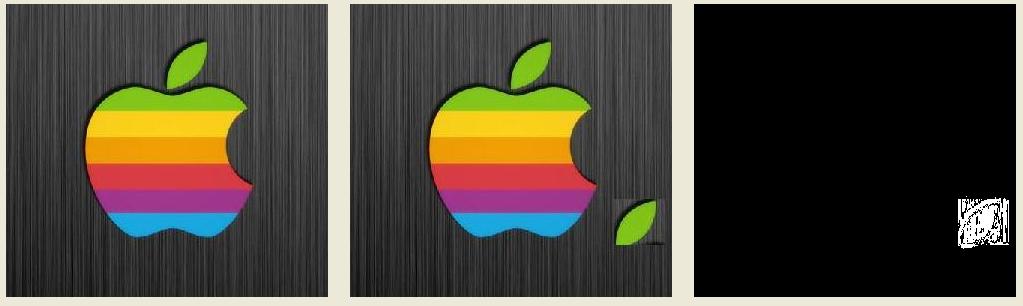
 本文介绍了一种用于比较两幅图像相似度的算法,通过计算像素之间的差异并设定容差阈值来确定图像间的差别程度。提供了两种实现方法,包括直接访问画布像素和使用扫描线进行快速比较,适用于图像处理和计算机视觉应用。
function Compare(bit1: TBitmap; bit2: TBitmap; nC: Integer; Img: TImage): Integer;
var
  x,y , nRe: Integer;
  bx, by, bbs: Byte;
  bColor: TColor;
  temBit: TBitmap;
begin
  if Img <> nil then
  begin
    temBit := TBitmap.Create;
    temBit.Width := bit1.Width;
    temBit.Height := bit1.Height;
  end;

  nRe := 0;
  for x := 0 to bit1.Width -1 do
  begin
    for y:= 0 to bit1.Height -1 do
    begin
      bx := GetBValue(bit1.Canvas.pixels[x,y]);
      by := GetBValue(bit2.Canvas.pixels[x,y]);
      bbs := abs(bx- by);
      if bbs < nC then
      begin
        bColor := clBlack;
      end else
      begin
        bColor := clWhite;
        Inc(nRe);
      end;
      if Img <> nil then
        temBit.Canvas.pixels[x,y]:= bColor;
    end;
  end;
  if Img <> nil then
    Img.Picture.Bitmap.Assign(temBit);
  temBit.Free;
  Result := nRe;
end;
//一种更快的方法
function Compare2(bit1: TBitmap; bit2: TBitmap; nC: Integer; Img: TImage): Integer;
var
  x,y , nRe: Integer;
  bbs: Byte;
  bColor: TColor;
  temBit: TBitmap;
  pix1, pix2: PByteArray;
begin
  if Img <> nil then
  begin
    temBit := TBitmap.Create;
    temBit.Width := bit1.Width;
    temBit.Height := bit1.Height;
  end;

  nRe := 0;
  for y:= 0 to bit1.Height -1 do
  begin
    pix1 := bit1.Scanline[y];
    pix2 := bit2.Scanline[y];
    for x:= 0 to bit1.Width-1 do
    begin
      bbs := abs(pix1[x*3]- pix2[x*3]);
      if bbs < nC then
      begin
        bColor := clBlack;
      end else
      begin
        bColor := clWhite;
        Inc(nRe);
      end;
      if Img <> nil then
        temBit.Canvas.pixels[x,y]:= bColor;
    end;
  end;
  if Img <> nil then
  begin
    Img.Picture.Bitmap.Assign(temBit);
    temBit.Free;
  end;
  Result := nRe;
end;
取灰度值, 设置容差, 返回差度





 扫一扫
扫一扫


 1万+
1万+

 被折叠的 条评论
为什么被折叠?
被折叠的 条评论
为什么被折叠?
 到【灌水乐园】发言





