import tkinter as tk
from tkinter import simpledialog, messagebox, filedialog, Menu
import time
import threading
import html
import uuid
from datetime import datetime
def render_html(content):
content = content.replace("<br>", "\n")
content = content.replace("<p>", "\n").replace("</p>", "")
content = content.replace("<h1>", "\n🔥 ").replace("</h1>", "\n")
content = content.replace("<h2>", "\n📌 ").replace("</h2>", "")
content = content.replace("<", "<").replace(">", ">").replace("&", "&")
return html.unescape(content)
class Win12UltraVM:
def __init__(self, root):
self.root = root
self.root.title("🌤️ Advanced Electronic Display OS v8.0 - Win12 Ultra (Light)")
self.root.geometry("1300x900")
self.root.configure(bg="#f3f3f3") # 浅色背景
self.root.resizable(True, True)
# === 系统状态 ===
self.powered_on = False
self.current_user = "User"
self.clipboard = ""
self.notification_log = []
self.browser_history = []
self.open_windows = {} # window_id: (window, cleanup_func)
self.showing_app_drawer = False
self.desktop_icons = []
# 字体(优先使用现代字体)
self.font_ui = ('Segoe UI', 10)
self.font_code = ('Consolas', 11)
self.font_title = ('Bahnschrift', 14, 'bold')
self.font_small = ('Segoe UI', 9)
# 虚拟文件系统
self.filesystem = {
"/": ["Documents", "Downloads", "Pictures"],
"/Documents": ["readme.txt", "report.html"],
"/Downloads": [],
"/Pictures": []
}
self.file_content = {
"readme.txt": "欢迎使用 Win12 超复杂虚拟机。\n这是一个完全可交互的操作系统原型。",
"report.html": "<h1>季度报告</h1><p>营收增长 15%</p><br><p>市场扩张至亚洲地区</p>"
}
self.recycle_bin = {}
# 启动
self.boot_animation()
# ========================
# 1. 开机动画(Win12 风格)
# ========================
def boot_animation(self):
self.splash = tk.Toplevel(self.root)
self.splash.overrideredirect(True)
w, h = 600, 350
x = (self.root.winfo_screenwidth() - w) // 2
y = (self.root.winfo_screenheight() - h) // 2
self.splash.geometry(f"{w}x{h}+{x}+{y}")
self.splash.configure(bg="white")
canvas = tk.Canvas(self.splash, bg="white", highlightthickness=0)
canvas.pack(fill=tk.BOTH, expand=True)
# Win12 徽标(四个圆环)
self.rings = []
for i in range(4):
x0, y0, x1, y1 = 250 + i * 25, 120, 290 + i * 25, 160
ring = canvas.create_oval(x0, y0, x1, y1, outline="#0078d7", width=6)
self.rings.append(ring)
label = tk.Label(self.splash, text="正在启动 Advanced OS v8.0...", fg="gray", bg="white", font=self.font_ui)
label.place(relx=0.5, rely=0.7, anchor=tk.CENTER)
self.animate_rings(canvas, 0)
self.root.after(3500, self.finish_boot)
def animate_rings(self, canvas, step):
if not self.splash or not self.splash.winfo_exists():
return
colors = ["#0078d7", "#e74856", "#107c10", "#ffb900"]
for i in range(4):
color = colors[(step + i) % 4]
canvas.itemconfig(self.rings[i], outline=color)
self.splash.update()
if step < 16:
self.root.after(200, lambda: self.animate_rings(canvas, step + 1))
def finish_boot(self):
self.splash.destroy()
self.powered_on = True
self.setup_desktop()
# ========================
# 2. 主桌面
# ========================
def setup_desktop(self):
self.clear_root()
self.root.configure(bg="#f3f3f3")
# --- 任务栏 ---
taskbar = tk.Frame(self.root, bg="#e0e0e0", height=40)
taskbar.pack(side=tk.TOP, fill=tk.X, pady=0)
taskbar.pack_propagate(False)
start_btn = tk.Button(taskbar, text="⊞ 开始", bg="#0078d7", fg="white", font=self.font_ui,
relief="flat", command=self.toggle_app_drawer)
start_btn.pack(side=tk.LEFT, padx=10, pady=5)
time_label = tk.Label(taskbar, text="", fg="black", bg="#e0e0e0", font=self.font_ui)
time_label.pack(side=tk.RIGHT, padx=15)
self.update_time(time_label)
# --- 桌面区域 ---
desktop_frame = tk.Frame(self.root, bg="#f3f3f3")
desktop_frame.pack(fill=tk.BOTH, expand=True, padx=40, pady=40)
self.create_desktop_icon(desktop_frame, "📄 记事本", self.open_notepad)
self.create_desktop_icon(desktop_frame, "🌐 浏览器", self.open_browser)
self.create_desktop_icon(desktop_frame, "⚙️ 设置", self.open_settings)
self.create_desktop_icon(desktop_frame, "🧮 计算器", self.open_calculator)
self.create_desktop_icon(desktop_frame, "🗑️ 回收站", self.open_recycle_bin)
self.create_desktop_icon(desktop_frame, "📁 文件管理", self.open_file_manager)
self.create_desktop_icon(desktop_frame, "📦 应用商店", self.open_store)
self.create_desktop_icon(desktop_frame, "💬 AI助手", self.open_ai_assistant)
# --- 状态栏 ---
self.status_bar = tk.Label(self.root, text="🟢 系统运行中 | 用户: " + self.current_user,
bg="#e8e8e8", fg="gray", font=self.font_small, anchor="w", height=2)
self.status_bar.pack(side=tk.BOTTOM, fill=tk.X)
self.status_bar.bind("<Button-1>", self.show_notifications)
self.add_notification("系统已就绪。欢迎使用 Win12 超复杂虚拟机。")
def update_time(self, label):
if not self.powered_on:
return
t = time.strftime("%H:%M:%S")
label.config(text=t)
self.root.after(1000, lambda: self.update_time(label))
def create_desktop_icon(self, parent, text, cmd):
frame = tk.Frame(parent, width=100, height=100)
frame.pack_propagate(False)
frame.pack(side=tk.LEFT, padx=25, pady=25)
btn = tk.Button(frame, text=text, bg="white", fg="black", font=('Segoe UI Symbol', 9),
relief="solid", bd=1, highlightbackground="#ddd",
command=cmd, justify="center", anchor="center", padx=5, pady=5)
btn.pack(fill=tk.BOTH, expand=True)
btn.bind("<Enter>", lambda e: btn.config(bg="#f0f0ff", highlightbackground="#0078d7"))
btn.bind("<Leave>", lambda e: btn.config(bg="white", highlightbackground="#ddd"))
self.desktop_icons.append(btn)
# ========================
# 3. 开始菜单 / 应用抽屉
# ========================
def toggle_app_drawer(self):
if self.showing_app_drawer and hasattr(self, 'drawer') and self.drawer.winfo_exists():
self.drawer.destroy()
self.showing_app_drawer = False
else:
self.drawer = tk.Toplevel(self.root)
self.drawer.geometry("220x400+10+50")
self.drawer.configure(bg="white")
self.drawer.overrideredirect(True)
self.drawer.attributes('-alpha', 0.95)
title = tk.Label(self.drawer, text="📱 所有应用", bg="white", fg="black", font=self.font_title)
title.pack(pady=10)
apps = [
("📄 记事本", self.open_notepad),
("🌐 浏览器", self.open_browser),
("⚙️ 设置", self.open_settings),
("🧮 计算器", self.open_calculator),
("🗑️ 回收站", self.open_recycle_bin),
("📁 文件管理", self.open_file_manager),
("📦 应用商店", self.open_store),
("💬 AI助手", self.open_ai_assistant),
("🔁 重启", self.reboot_system),
("⛔ 关机", self.shutdown_system),
]
for name, cmd in apps:
btn = tk.Button(self.drawer, text=name, bg="white", fg="black",
font=self.font_ui, relief="flat", anchor="w", padx=15,
command=cmd)
btn.pack(fill=tk.X, pady=2, padx=5)
btn.bind("<Enter>", lambda e, b=btn: b.config(bg="#e0e0ff"))
btn.bind("<Leave>", lambda e, b=btn: b.config(bg="white"))
self.showing_app_drawer = True
# ========================
# 4. 新建通用窗口
# ========================
def new_window(self, title, width=800, height=600):
win = tk.Toplevel(self.root)
win.title(title)
win.geometry(f"{width}x{height}")
win.configure(bg="white")
frame = tk.Frame(win, bg="white", padx=15, pady=15)
frame.pack(fill=tk.BOTH, expand=True)
window_id = str(uuid.uuid4())
self.open_windows[window_id] = (win, lambda: self.close_window(window_id))
win.protocol("WM_DELETE_WINDOW", lambda: self.close_window(window_id))
return window_id, win, frame
def close_window(self, wid):
if wid in self.open_windows:
win, _ = self.open_windows[wid]
win.destroy()
del self.open_windows[wid]
# ========================
# 5. 记事本
# ========================
def open_notepad(self):
wid, win, frame = self.new_window("📄 记事本", 700, 500)
text = tk.Text(frame, font=self.font_code, bg="white", fg="black", wrap=tk.WORD)
text.pack(fill=tk.BOTH, expand=True)
sb = tk.Scrollbar(text, command=text.yview)
sb.pack(side=tk.RIGHT, fill=tk.Y)
text.config(yscrollcommand=sb.set)
menu = Menu(win, tearoff=0)
menu.add_command(label="💾 保存", command=lambda: self.save_file_from_text(text))
menu.add_command(label="📋 复制", command=lambda: self.copy_text(text))
menu.add_command(label="✂️ 切除", command=lambda: self.cut_text(text))
menu.add_command(label="📌 粘贴", command=lambda: self.paste_text(text))
win.config(menu=menu)
def save_file_from_text(self, widget):
content = widget.get(1.0, tk.END).strip()
fname = simpledialog.askstring("保存", "输入文件名:", initialvalue="new.txt")
if fname:
path = "/" # 默认根目录
self.filesystem[path].append(fname)
self.file_content[fname] = content
self.add_notification(f"✅ 已创建文件: {fname}")
# ========================
# 6. 浏览器(多标签页)
# ========================
def open_browser(self):
wid, win, frame = self.new_window("🌐 浏览器", 900, 600)
notebook = tk.Frame(frame, bg="white")
notebook.pack(fill=tk.BOTH, expand=True)
addr_frame = tk.Frame(notebook, bg="#f0f0f0", height=40)
addr_frame.pack(fill=tk.X, pady=5)
addr_frame.pack_propagate(False)
url_var = tk.StringVar(value="about:start")
entry = tk.Entry(addr_frame, textvariable=url_var, font=self.font_code)
entry.pack(side=tk.LEFT, fill=tk.X, expand=True, padx=5)
entry.bind("<Return>", lambda e: self.load_webpage(url_var.get(), text_widget))
go_btn = tk.Button(addr_frame, text="前往", command=lambda: self.load_webpage(url_var.get(), text_widget))
go_btn.pack(side=tk.RIGHT, padx=5)
text_widget = tk.Text(notebook, bg="white", fg="black", font=self.font_code, wrap=tk.WORD)
text_widget.pack(fill=tk.BOTH, expand=True)
sb = tk.Scrollbar(text_widget, command=text_widget.yview)
sb.pack(side=tk.RIGHT, fill=tk.Y)
text_widget.config(yscrollcommand=sb.set)
self.load_webpage("about:start", text_widget)
def load_webpage(self, url, text_widget):
if url == "about:start":
content = "📘 欢迎使用 WinBrowse\n\n- 输入网址浏览\n- 使用 file:// 访问本地文件"
elif url.startswith("file://"):
fname = url[7:]
content = self.file_content.get(fname, "❌ 文件未找到")
else:
content = f"🌐 正在访问: {url}\n\n此为模拟浏览器,无真实网络连接。"
text_widget.config(state=tk.NORMAL)
text_widget.delete(1.0, tk.END)
text_widget.insert(tk.END, content)
text_widget.config(state=tk.DISABLED)
# ========================
# 7. 设置中心
# ========================
def open_settings(self):
wid, win, frame = self.new_window("⚙️ 设置", 600, 500)
tk.Label(frame, text="🔧 系统设置", font=self.font_title, fg="#0078d7").pack(anchor="w", pady=10)
settings = [
("🎨 主题", "浅色模式"),
("🔊 音量", "75%"),
("🔆 亮度", "60%"),
("👤 用户", self.current_user),
("📡 网络", "Wi-Fi 已连接"),
("💾 存储", "211 GB 可用")
]
for name, value in settings:
row = tk.Frame(frame, bg="white")
row.pack(fill=tk.X, pady=5)
tk.Label(row, text=name, font=self.font_ui, width=15, anchor="w").pack(side=tk.LEFT)
tk.Label(row, text=value, font=self.font_ui, fg="gray", anchor="w").pack(side=tk.LEFT, fill=tk.X)
# ========================
# 8. 计算器
# ========================
def open_calculator(self):
wid, win, frame = self.new_window("🧮 计算器", 300, 400)
self.calc_input = tk.Entry(frame, font=self.font_code, justify='right', bg="#f9f9f9")
self.calc_input.pack(fill=tk.X, pady=10)
buttons = [
['C', '±', '%', '÷'],
['7', '8', '9', '×'],
['4', '5', '6', '-'],
['1', '2', '3', '+'],
['0', '.', '=']
]
for row in buttons:
f = tk.Frame(frame, bg="white")
f.pack(fill=tk.X)
for txt in row:
btn = tk.Button(f, text=txt, font=self.font_code, width=4, height=2,
bg="white", command=lambda t=txt: self.calc_click(t))
btn.pack(side=tk.LEFT, padx=2, pady=2)
def calc_click(self, char):
if char == 'C':
self.calc_input.delete(0, tk.END)
elif char == '=':
try:
exp = self.calc_input.get().replace('×', '*').replace('÷', '/')
result = eval(exp)
self.calc_input.delete(0, tk.END)
self.calc_input.insert(0, str(result))
except:
self.calc_input.delete(0, tk.END)
self.calc_input.insert(0, "错误")
else:
self.calc_input.insert(tk.END, char)
# ========================
# 9. 回收站
# ========================
def open_recycle_bin(self):
wid, win, frame = self.new_window("🗑️ 回收站", 500, 400)
lb = tk.Listbox(frame, font=self.font_code)
lb.pack(fill=tk.BOTH, expand=True)
for name in self.recycle_bin.keys():
lb.insert(tk.END, name)
tk.Button(frame, text="🗙 清空", command=lb.delete(0, tk.END)).pack(pady=5)
tk.Button(frame, text="↩️ 还原", command=lambda: self.restore_file(lb)).pack(pady=5)
def restore_file(self, lb):
sel = lb.curselection()
if sel:
name = lb.get(sel[0])
path = "/" # 默认路径
if path not in self.filesystem:
self.filesystem[path] = []
self.filesystem[path].append(name)
self.file_content[name] = self.recycle_bin[name]
del self.recycle_bin[name]
lb.delete(sel[0])
self.add_notification(f"🔄 已还原文件: {name}")
# ========================
# 10. 文件管理器
# ========================
def open_file_manager(self):
wid, win, frame = self.new_window("📁 文件管理器", 600, 500)
lb = tk.Listbox(frame, font=self.font_code)
lb.pack(fill=tk.BOTH, expand=True)
for path, files in self.filesystem.items():
lb.insert(tk.END, f"[{path}]")
for f in files:
lb.insert(tk.END, f" 📄 {f}")
# ========================
# 11. 应用商店
# ========================
def open_store(self):
wid, win, frame = self.new_window("📦 应用商店", 700, 500)
tk.Label(frame, text="🏪 应用商店", font=self.font_title, fg="green").pack(pady=10)
apps = ["Office Suite", "Photo Editor", "Music Player", "Game Pack"]
for app in apps:
btn = tk.Button(frame, text=f"⬇️ 安装 {app}", bg="white", font=self.font_ui)
btn.pack(fill=tk.X, padx=20, pady=5)
# ========================
# 12. AI 助手
# ========================
def open_ai_assistant(self):
wid, win, frame = self.new_window("💬 AI 助手", 500, 400)
chat = tk.Text(frame, bg="white", fg="black", font=self.font_code)
chat.pack(fill=tk.BOTH, expand=True)
msg = simpledialog.askstring("AI 助手", "向 AI 提问:")
if msg:
response = f"🤖 我是一个模拟 AI。\n你问的是:'{msg}'\n建议集成真实 LLM API。"
chat.insert(tk.END, "👨💻: " + msg + "\n\n")
chat.insert(tk.END, "🤖: " + response + "\n")
# ========================
# 13. 电源管理
# ========================
def reboot_system(self):
self.fade_out()
self.root.after(600, self.do_reboot)
def do_reboot(self):
self.clear_root()
self.boot_animation()
self.root.after(3500, self.setup_desktop)
def shutdown_system(self):
self.fade_out()
self.root.after(600, self.do_shutdown)
def do_shutdown(self):
off_win = tk.Toplevel(self.root)
off_win.overrideredirect(True)
off_win.geometry(f"{self.root.winfo_screenwidth()}x{self.root.winfo_screenheight()}+0+0")
off_win.configure(bg="black")
tk.Label(off_win, text="👋 系统已关闭。你可以安全地关闭计算机。",
fg="white", bg="black", font=('Segoe UI', 16)).place(relx=0.5, rely=0.5, anchor=tk.CENTER)
self.root.after(3000, self.root.quit)
def fade_out(self):
for i in range(100, 0, -5):
self.root.attributes('-alpha', i / 100)
self.root.update()
time.sleep(0.03)
def fade_in(self):
for i in range(0, 101, 5):
self.root.attributes('-alpha', i / 100)
self.root.update()
time.sleep(0.03)
# ========================
# 14. 工具函数
# ========================
def clear_root(self):
for widget in self.root.winfo_children():
widget.destroy()
def add_notification(self, msg):
timestamp = datetime.now().strftime("%H:%M")
self.notification_log.append(f"[{timestamp}] {msg}")
if len(self.notification_log) > 100:
self.notification_log.pop(0)
def show_notifications(self, event):
win = tk.Toplevel(self.root)
win.title("🔔 通知中心")
win.geometry("400x300")
win.configure(bg="white")
lb = tk.Listbox(win, font=self.font_code, bg="white", fg="black")
lb.pack(fill=tk.BOTH, expand=True, padx=10, pady=10)
for msg in reversed(self.notification_log[-20:]):
lb.insert(0, msg)
def copy_text(self, widget):
try:
selected = widget.get(tk.SEL_FIRST, tk.SEL_LAST)
self.clipboard = selected
except tk.TclError:
pass
def cut_text(self, widget):
self.copy_text(widget)
try:
widget.delete(tk.SEL_FIRST, tk.SEL_LAST)
except tk.TclError:
pass
def paste_text(self, widget):
if self.clipboard:
widget.insert(tk.INSERT, self.clipboard)
if __name__ == "__main__":
root = tk.Tk()
app = Win12UltraVM(root)
root.mainloop()
升级开、关、重启动画,完整版代码


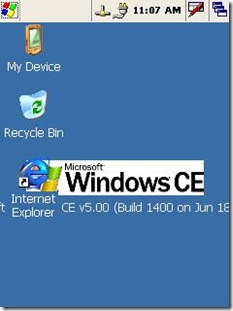
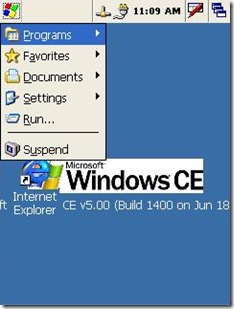
 本文介绍如何在Windows CE中将任务栏移至屏幕顶部,并调整开始菜单位置及桌面图标显示区域,确保桌面元素正常显示。





 扫一扫
扫一扫


 3083
3083

 被折叠的 条评论
为什么被折叠?
被折叠的 条评论
为什么被折叠?
 到【灌水乐园】发言





