



 在Android P中遇到`java.lang.RuntimeException: invalid channel for service notification`的问题,原因是API26后创建通知需要使用新的构造器。解决方法包括创建通知通道,静态注册权限,并正确构建前台服务通知。
问题描述
在APP中使用台前服务并创建通知,发现报错了——

问题解决
代码本身应该是没问题的,因为是照着Demo仿写的,看来是环境出了问题,运行在Android Q(API29)上就会出一些乱七八糟的问题。在查阅了Android文档之后发现原本的NotificationCompat.Builder (Context context)被废弃,在API26之后,创建通知需要使用新的构造器NotificationCompat.Builder (Context context, String channelId)——

关于通知ID的构造方法,文档上没有多讲,查了一下资料大概如下:
	String CHANNEL_ID = "com.example.recyclerviewtest.N1";
    String CHANNEL_NAME = "TEST";
    NotificationChannel notificationChannel = null;
    if(Build.VERSION.SDK_INT>=Build.VERSION_CODES.O){
        notificationChannel = new NotificationChannel(CHANNEL_ID, CHANNEL_NAME, NotificationManager.IMPORTANCE_HIGH);
        NotificationManager notificationManager = (NotificationManager) getSystemService(NOTIFICATION_SERVICE);
        notificationManager.createNotificationChannel(notificationChannel);
    }
其中,CHANNEL_ID和CHANNEL_NAME是自定义的,没有格式要求。那么完整的创建前台服务+通知的过程,大概如下:
		String CHANNEL_ID = "com.example.recyclerviewtest.N1";
    	String CHANNEL_NAME = "TEST";
    	NotificationChannel notificationChannel = null;
    	if(Build.VERSION.SDK_INT>=Build.VERSION_CODES.O){
    	    notificationChannel = new NotificationChannel(CHANNEL_ID, CHANNEL_NAME, NotificationManager.IMPORTANCE_HIGH);
    	    NotificationManager notificationManager = (NotificationManager) getSystemService(NOTIFICATION_SERVICE);
     	   notificationManager.createNotificationChannel(notificationChannel);
   		}
        Intent intent = new Intent(this, MainActivity.class);
        PendingIntent pendingIntent = PendingIntent.getActivity(this,0, intent, 0);

        Notification notification = new NotificationCompat.Builder(this,CHANNEL_ID).
                setContentTitle("This is content title").
                setContentText("This is content text").
                setWhen(System.currentTimeMillis()).
                setSmallIcon(R.mipmap.ic_launcher).
                setLargeIcon(BitmapFactory.decodeResource(getResources(),R.mipmap.ic_launcher)).
                setContentIntent(pendingIntent).build();
        startForeground(1, notification);
同时需要注意的是,API28以后,申请前台服务需要静态注册权限,不然的话会报错——
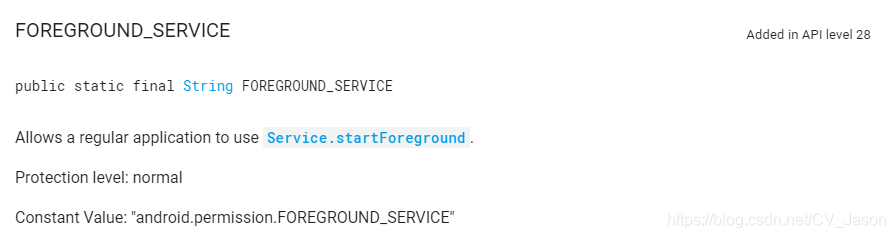
<uses-permission android:name="android.permission.FOREGROUND_SERVICE"/>
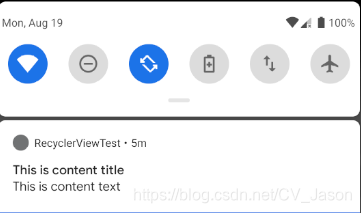
最终效果——
参考链接
- https://stackoverflow.com/questions/47531742/startforeground-fail-after-upgrade-to-android-8-1
- https://developer.android.com/reference/android/support/v4/app/NotificationCompat.Builder.html#NotificationCompat.Builder(android.content.Context,%20java.lang.String)





 扫一扫
扫一扫


 4098
4098

 被折叠的 条评论
为什么被折叠?
被折叠的 条评论
为什么被折叠?
 到【灌水乐园】发言





