from flask import Flask
from flask import jsonify, request
from flask_cors import CORS
from flask_sqlalchemy import SQLAlchemy
from werkzeug.utils import secure_filename
import os
import requests
from bs4 import BeautifulSoup
import re
import json
from snownlp import SnowNLP
from openpyxl import Workbook
import time
from selenium import webdriver
from selenium.webdriver.common.by import By
from selenium.common.exceptions import NoSuchElementException
from selenium.webdriver.edge.options import Options as EdgeOptions
import xml.etree.ElementTree as ET
from collections import Counter
import jieba # 中文分词库
from datetime import datetime
import pandas as pd
import matplotlib.pyplot as plt
import emoji
app = Flask(__name__)
app.config['SQLALCHEMY_DATABASE_URI'] = 'mysql+pymysql://root:root@127.0.0.1/analysisdb'
app.config['SQLALCHEMY_TRACK_MODIFICATIONS'] = True # 设置这一项是每次请求结束后都会自动提交数据库中的变动
app.config['UPLOAD_FOLDER'] = 'static/uploadfiles' # 上传文件保存目录
app.config['ALLOWED_EXTENSIONS'] = {'png', 'jpg', 'jpeg', 'gif'} # 允许的文件类型
app.config['MAX_CONTENT_LENGTH'] = 2 * 1024 * 1024 # 文件大小限制: 2MB
app.secret_key = 'asfda8r9q3y9qy#%GFSD^%WTAfasdfasqwe'
# r'/*' 是通配符,让本服务器所有的URL 都允许跨域请求
CORS(app, resources=r'/*')
# 实例化
db = SQLAlchemy(app)
# 确保上传目录存在
os.makedirs(app.config['UPLOAD_FOLDER'], exist_ok=True)
# 设置headers
headers = {
'User-Agent': 'Mozilla/5.0 (Windows NT 10.0; Win64; x64) AppleWebKit/537.36 (KHTML, like Gecko) Chrome/58.0.3029.110 Safari/537.3',
'Referer': 'https://www.bilibili.com/'
}
# 读取停用词表
stoppath = 'stoplist.txt'
stopwords = open(stoppath, "r", encoding='utf-8').read()
wordlist = [] # 存储弹幕信息
comments = [] # 存放评论信息
# 用户表
class Users(db.Model):
__tablename__ = "users"
id = db.Column(db.Integer, primary_key=True, autoincrement=True)
username = db.Column(db.String(50), nullable=False)
password = db.Column(db.String(10), nullable=False)
role = db.Column(db.String(10), nullable=False) #(admin:管理员 user:用户)
truename = db.Column(db.String(50))
sex = db.Column(db.String(10))
phone = db.Column(db.String(50))
headface = db.Column(db.String(255))
addtime = db.Column(db.String(20), nullable=False)
def __init__(self, username, password, truename, phone, sex, role, addtime):
self.username = username
self.password = password
self.truename = truename
self.phone = phone
self.sex = sex
self.role = role
self.addtime = addtime
# 视频表
class Videos(db.Model):
__tablename__ = "videos"
id = db.Column(db.Integer, primary_key=True, autoincrement=True)
cid = db.Column(db.String(100), nullable=False)
title = db.Column(db.String(255), nullable=False)
lovenum = db.Column(db.Integer)
playnum = db.Column(db.Integer)
addtime = db.Column(db.String(20), nullable=False)
userid = db.Column(db.Integer, db.ForeignKey('upinfo.id'))
bvid = db.Column(db.String(100), nullable=False)
aid = db.Column(db.String(100), nullable=False)
# 弹幕信息表
class Tanmu(db.Model):
__tablename__ = "tanmu"
id = db.Column(db.Integer, primary_key=True, autoincrement=True)
cid = db.Column(db.String(100), nullable=False)
txt = db.Column(db.String(255), nullable=False)
level = db.Column(db.String(10), nullable=False)
score = db.Column(db.String(10), nullable=False)
def __init__(self, cid, txt, level, score):
self.cid = cid
self.txt = txt
self.level = level
self.score = score
# 弹幕发表人员信息表
class Upinfo(db.Model):
__tablename__ = "upinfo"
id = db.Column(db.Integer, primary_key=True, autoincrement=True)
username = db.Column(db.String(100), nullable=False)
mid = db.Column(db.String(100), nullable=False)
face = db.Column(db.String(255), nullable=True)
videos = db.relationship('Videos', backref='upinfo', lazy=True)
# 视频评论表
class Comments(db.Model):
__tablename__ = "comments"
id = db.Column(db.Integer, primary_key=True, autoincrement=True)
cid = db.Column(db.String(100), nullable=False)
username = db.Column(db.String(100), nullable=False)
content = db.Column(db.TEXT, nullable=False)
likenum = db.Column(db.String(10))
sendtime = db.Column(db.String(20))
level = db.Column(db.String(10), nullable=False)
score = db.Column(db.String(10), nullable=False)
def __init__(self, cid, username, content, likenum, sendtime, level, score):
self.cid = cid
self.username = username
self.content = content
self.likenum = likenum
self.sendtime = sendtime
self.level = level
self.score = score
# 日志表
class Syslog(db.Model):
__tablename__ = "syslog"
id = db.Column(db.Integer, primary_key=True, autoincrement=True)
username = db.Column(db.String(100), nullable=False)
operation = db.Column(db.String(200), nullable=False)
method = db.Column(db.String(200), nullable=False)
addtime = db.Column(db.String(20), nullable=False)
def __init__(self, username, operation, method, addtime):
self.username = username
self.operation = operation
self.method = method
self.addtime = addtime
# 意见反馈表
class Feedbacks(db.Model):
__tablename__ = "feedbacks"
id = db.Column(db.Integer, primary_key=True, autoincrement=True)
username = db.Column(db.String(100), nullable=False)
phone = db.Column(db.String(20), nullable=False)
title = db.Column(db.String(255), nullable=False)
content = db.Column(db.TEXT, nullable=False)
addtime = db.Column(db.String(20), nullable=False)
def __init__(self, username, phone, title, content, addtime):
self.username = username
self.phone = phone
self.title = title
self.content = content
self.addtime = addtime
with app.app_context():
db.create_all()
# 登录
@app.route('/login', methods=['POST']) #'login'是接口路径,methods不写,则默认get请求
def login():
data = request.get_json()
username = data.get("account") # 用户名
password = data.get("password") # 密码
role = data.get("role") # 角色
user = Users.query.filter_by(username=username).first()
if user:
if user.password == password:
if user.role == role:
user_data = {}
user_data['id'] = user.id
user_data['username'] = user.username
user_data['password'] = user.password
user_data['role'] = user.role
user_data['truename'] = user.truename
user_data['phone'] = user.phone
user_data['sex'] = user.sex
user_data['addtime'] = user.addtime
return jsonify({"code": 200, "msg": "登录成功", "data": user_data})
else:
return jsonify({"code": 500, "msg": "用户身份错误!"})
else:
return jsonify({"code": 500, "msg": "密码错误!"})
else:
return jsonify({"code": 500, "msg": "用户不存在!"})
# 注册
@app.route('/register', methods=['POST'])
def register():
data = request.get_json() # 获取JSON数据
username = data.get("account") # 用户名
password = data.get("password") # 密码
user = Users.query.filter_by(username=username).first()
if user:
return jsonify({"code": 500, "msg": "用户已经存在!"})
else:
# 获取当前时间字符串
cur_time = datetime.now().strftime("%Y-%m-%d %H:%M:%S")
new_user = Users(username, password, '', '', '', 'user', cur_time)
db.session.add(new_user)
db.session.commit()
return jsonify({"code": 200, "msg": "注册成功"})
# 获取所有用户
@app.route('/showUser', methods=['POST','GET'])
def showUser():
# 接收查询条件
data = request.get_json()
query = data.get("params").get("accountName")
if query != "":
page_objs = Users.query.filter_by(role='user').filter(Users.username.like('%{}%'.format(query))).paginate(
page=int(data.get("params").get("page", 1)),
per_page=int(data.get("params").get("limit", 15)),
error_out=False,
max_per_page=50
).items
totalcount = Users.query.filter_by(role='user').filter(Users.username.like('%{}%'.format(query))).count()
else:
page_objs = Users.query.filter_by(role='user').paginate(
page=int(data.get("params").get("page", 1)),
per_page=int(data.get("params").get("limit", 15)),
error_out=False,
max_per_page=50
).items
totalcount = Users.query.filter_by(role='user').count()
output = []
for user in page_objs:
user_data = {}
user_data['id'] = user.id
user_data['username'] = user.username
user_data['truename'] = user.truename
user_data['sex'] = user.sex
user_data['phone'] = user.phone
user_data['headface'] = user.headface
user_data['addtime'] = user.addtime
output.append(user_data)
# 插入日志
cur_time = datetime.now().strftime("%Y-%m-%d %H:%M:%S")
new_log = Syslog('admin', 'query', 'showUser', cur_time)
db.session.add(new_log)
db.session.commit()
# 返回数据
data = {}
data['list'] = output
data['total'] = totalcount
if totalcount == 0:
return jsonify({"code": 200, "msg": "无数据", "data": []})
else:
return jsonify({"code": 200, "msg": "处理成功", "data": data})
# 删除指定用户
@app.route("/deleteUser",methods=['POST','GET'])
def deleteUser():
id = request.args.get("id")
user = Users.query.get(id)
if not user:
return jsonify({"code": 500, "msg": "用户不存在!"})
db.session.delete(user)
db.session.commit()
# 插入日志
cur_time = datetime.now().strftime("%Y-%m-%d %H:%M:%S")
new_log = Syslog('admin', 'delete', 'deleteUser', cur_time)
db.session.add(new_log)
db.session.commit()
return jsonify({"code": 200, "msg": "删除成功"})
# 获取所有视频
@app.route('/showVideo', methods=['POST','GET'])
def showVideo():
# 接收查询条件
data = request.get_json()
query = data.get("params").get("title")
if query != "":
page_objs = Videos.query.filter(Videos.title.like('%{}%'.format(query))).paginate(
page=int(data.get("params").get("page", 1)),
per_page=int(data.get("params").get("limit", 15)),
error_out=False,
max_per_page=50
).items
totalcount = Videos.query.filter(Videos.title.like('%{}%'.format(query))).count()
else:
page_objs = Videos.query.paginate(
page=int(data.get("params").get("page", 1)),
per_page=int(data.get("params").get("limit", 15)),
error_out=False,
max_per_page=50
).items
totalcount = Videos.query.count()
output = []
for video in page_objs:
video_data = {}
video_data['id'] = video.id
video_data['cid'] = video.cid
video_data['title'] = video.title
video_data['lovenum'] = video.lovenum
video_data['playnum'] = video.playnum
video_data['addtime'] = video.addtime
video_data['userid'] = video.userid
video_data['bvid'] = video.bvid
video_data['aid'] = video.aid
upinfo = Upinfo.query.filter_by(id=video.userid).first()
video_data['username'] = upinfo.username
output.append(video_data)
# 插入日志
cur_time = datetime.now().strftime("%Y-%m-%d %H:%M:%S")
new_log = Syslog('admin', 'query', 'showVideo', cur_time)
db.session.add(new_log)
db.session.commit()
# 返回数据
data = {}
data['list'] = output
data['total'] = totalcount
if totalcount == 0:
return jsonify({"code": 200, "msg": "无数据", "data": []})
else:
return jsonify({"code": 200, "msg": "处理成功", "data": data})
# 删除视频
@app.route("/deleteVideo",methods=['POST','GET'])
def deleteVideo():
id = request.args.get("id")
video = Videos.query.get(id)
if not video:
return jsonify({"code": 500, "msg": "视频不存在!"})
db.session.delete(video)
db.session.commit()
# 插入日志
cur_time = datetime.now().strftime("%Y-%m-%d %H:%M:%S")
new_log = Syslog('admin', 'delete', 'deleteVideo', cur_time)
db.session.add(new_log)
db.session.commit()
return jsonify({"code": 200, "msg": "删除成功"})
# 获取所有弹幕
@app.route('/showTanmu', methods=['POST','GET'])
def showTanmu():
data = request.get_json()
query = data.get("params").get("cid")
if query != "":
page_objs = Tanmu.query.filter_by(cid=query).paginate(
page=int(data.get("params").get("page", 1)),
per_page=int(data.get("params").get("limit", 15)),
error_out=False,
max_per_page=50
).items
totalcount = Tanmu.query.filter_by(cid=query).count()
else:
page_objs = Tanmu.query.paginate(
page=int(data.get("params").get("page", 1)),
per_page=int(data.get("params").get("limit", 15)),
error_out=False,
max_per_page=50
).items
totalcount = Tanmu.query.count()
output = []
for tanmu in page_objs:
video = Videos.query.filter_by(cid=tanmu.cid).first()
tanmu_data = {}
tanmu_data['id'] = tanmu.id
tanmu_data['cid'] = video.cid
tanmu_data['txt'] = tanmu.txt
tanmu_data['level'] = tanmu.level
tanmu_data['score'] = tanmu.score
output.append(tanmu_data)
# 插入日志
cur_time = datetime.now().strftime("%Y-%m-%d %H:%M:%S")
new_log = Syslog('admin', 'query', 'showTanmu', cur_time)
db.session.add(new_log)
db.session.commit()
# 返回数据
data = {}
data['list'] = output
data['total'] = totalcount
if totalcount == 0:
return jsonify({"code": 200, "msg": "无数据", "data": []})
else:
return jsonify({"code": 200, "msg": "处理成功", "data": data})
# 爬取弹幕
@app.route('/crawling', methods=['GET'])
def crawling():
pattern = r"^//(?:www\.)?bilibili\.com/video/BV(\w+)"
# 设置浏览器驱动
driver = setup_driver()
keyword = '人工智能'
baseurl = (
f"https://search.bilibili.com/all?keyword={keyword}&from_source=webtop_search&spm_id_from=333.1007&search_source=5")
driver.get(baseurl)
time.sleep(50) # 等待页面加载
for page in range(1, 10):
print(f"get {page} page...")
scroll_page(driver)
res = driver.page_source
# 提取数据
soup = BeautifulSoup(res, 'html.parser')
divs = soup.select('div.bili-video-card__wrap')
for div in divs:
alink = div.find('a')['href']
match = re.match(pattern, alink)
if match:
bvid = match.group(1)
get_video_info('BV' + bvid)
# 翻页
if page < 10:
try:
next_page = driver.find_element(By.CSS_SELECTOR, 'div.bili-video-card__wrap')
next_page.click()
time.sleep(5) # 等待新页面加载
except NoSuchElementException:
print("已到达最后一页")
break
save_excel()
return jsonify({"code": 200, "msg": "爬取成功"})
def setup_driver():
options = EdgeOptions()
options.add_experimental_option('excludeSwitches', ['enable-automation'])
driver = webdriver.Edge(options=options)
try:
with open('E://PyWorkspaces/AnalysisSys/stealth.min.js', 'r') as f:
js = f.read()
driver.execute_cdp_cmd('Page.addScriptToEvaluateOnNewDocument', {'source': js})
except Exception as e:
print(f"执行 JavaScript 脚本时出错: {e}")
return driver
def scroll_page(driver):
"""滚动页面以加载更多"""
last_height = driver.execute_script("return document.body.scrollHeight")
while True:
driver.execute_script("window.scrollTo(0, document.body.scrollHeight);")
time.sleep(2)
new_height = driver.execute_script("return document.body.scrollHeight")
if new_height == last_height:
break
last_height = new_height
def get_video_info(video_id):
# 构造视频信息的URL
video_url = f'https://api.bilibili.com/x/web-interface/view?bvid={video_id}'
print(video_url)
# 发送请求获取数据
response = requests.get(video_url, headers=headers)
data = response.text
# 解析JSON数据
video_info = json.loads(data)
# 提取所需信息,比如视频标题、播放量等
bvid = video_info['data']['bvid']
aid = video_info['data']['aid']
cid = video_info['data']['cid']
title = video_info['data']['title']
play_count = video_info['data']['stat']['view']
like_count = video_info['data']['stat']['like']
pubdate = video_info['data']['pubdate']
addtime = datetime.fromtimestamp(pubdate)
#获取up主信息
user_info = video_info['data']['owner']
mid = user_info['mid']
name = user_info['name']
face = user_info['face']
#检查up主在数据库中是否已经存在
up = Upinfo.query.filter_by(mid=mid).first()
if up:
userid = up.id
else:
#存储up主信息
upinfo = Upinfo(mid=mid, username=name, face=face)
db.session.add(upinfo)
db.session.commit()
up = Upinfo.query.filter_by(mid=mid).first()
userid = up.id
#存储视频信息
video = Videos.query.filter_by(cid=cid).first()
if video is None:
videos = Videos(cid=cid, title=title, lovenum=like_count, playnum=play_count, addtime=addtime, userid=userid, bvid=bvid, aid=aid)
db.session.add(videos) # 添加数据
db.session.commit() # 提交数据
get_bilibili_danmu(cid)
get_bilibili_comments(cid, bvid, max_count=20)
#爬取弹幕信息
def get_bilibili_danmu(cid):
danmu_url = f"https://api.bilibili.com/x/v1/dm/list.so?oid={cid}"
danmu_res = requests.get(danmu_url, headers=headers)
danmu_res.encoding = 'utf-8'
# 解析xml数据
root = ET.fromstring(danmu_res.text)
for d in root.iter('d'):
# 使用正则表达式去除标点符号和特殊字符
text = re.sub(r"[!\"#$%&'()*+,-./:;<=>?@[\]^_`{|}~]", "", d.text)
# 去除停用词
txt = remove_stopwords(text, stopwords)
if txt != "" and len(txt) > 4:
# 使用snownlp进行情感分析
s = SnowNLP(d.text)
score = "{:.2f}".format(s.sentiments)
if s.sentiments > 0.6:
level = "正面"
elif s.sentiments < 0.4:
level = "负面"
else:
level = "中性"
# 判断弹幕是否已经存在
istm = Tanmu.query.filter_by(cid=cid, txt=txt).first()
if istm:
continue
# 将弹幕信息存入数组
dict = {}
dict['cid'] = cid
dict['txt'] = txt
dict['level'] = level
dict['score'] = score
wordlist.append(dict)
# 为Tanmu类属性赋值
tanmu = Tanmu(cid=cid, txt=txt, level=level, score=score)
db.session.add(tanmu) # 添加数据
db.session.commit() # 提交数据
def remove_stopwords(text, stopwords):
words = text.split()
filtered_words = [word for word in words if word not in stopwords]
return " ".join(filtered_words)
def save_excel():
# 创建一个新的工作簿
wb = Workbook()
# 选择默认的工作表
ws = wb.active
ws.append(['cID', 'userID', 'txt', 'level', 'score'])
# 将弹幕信息存入excel文件
for item in wordlist:
# 向excel文件插入一行数据
ws.append([item['cid'], item['userid'], item['txt'], item['level'], item['score']])
# 获取当前时间
cur_time = datetime.now().strftime("%Y%m%d%H%M%S")
save_file_name = "tanmu_" + cur_time + ".xlsx"
# 保存工作簿到文件
wb.save(save_file_name)
wb1 = Workbook()
ws1 = wb1.active
ws1.append(['cID', 'user', 'content', 'like', 'time', 'level', 'score'])
for item in comments:
ws1.append(item['cid'], item['username'], item['content'], item['likenum'], item['sendtime'], item['level'], item['score'])
save_file_name1 = "comment_" + cur_time + ".xlsx"
wb1.save(save_file_name1)
def all_characters_same(s):
if len(s) == 0: # 先检查字符串是否为空
return True
return len(set(s)) == 1 # 将字符串转换为集合,检查长度是否为1
def remove_escape_sequences(text):
try:
# 解码转义序列
decoded_text = text.encode('latin1').decode('unicode-escape')
# 使用emoji库移除emoji
return emoji.replace_emoji(decoded_text, replace='')
except:
return text
# 爬取评论
def get_bilibili_comments(cid, video_bvid, max_count=200):
"""
获取B站视频评论
:param video_bvid: 视频BV号
:param max_count: 最大获取评论数
:return: 评论列表
"""
comments = []
url = f"https://api.bilibili.com/x/v2/reply/main?jsonp=jsonp&next=0&type=1&oid={video_bvid}&mode=3"
headers = {
"User-Agent": "Mozilla/5.0 (Windows NT 10.0; Win64; x64) AppleWebKit/537.36 (KHTML, like Gecko) Chrome/91.0.4472.124 Safari/537.36",
"Referer": f"https://www.bilibili.com/video/{video_bvid}"
}
page = 0
while len(comments) < max_count:
try:
response = requests.get(url, headers=headers)
data = response.json()
if data['code'] != 0:
print(f"获取评论失败: {data['message']}")
break
replies = data['data']['replies']
if not replies:
break
for reply in replies:
# 检查字符串整个内容是否重复
if all_characters_same(reply['content']['message']) == True:
continue
comments.append({
'user': reply['member']['uname'],
'content': reply['content']['message'],
'like': reply['like'],
'time': time.strftime("%Y-%m-%d %H:%M:%S", time.localtime(reply['ctime']))
})
# 情感分析
s = SnowNLP(reply['content']['message'])
score = "{:.2f}".format(s.sentiments)
if s.sentiments > 0.6:
level = "正面"
elif s.sentiments < 0.4:
level = "负面"
else:
level = "中性"
content = remove_escape_sequences(reply['content']['message'])
# 插入数据库
c = Comments(cid=cid, username=reply['member']['uname'], content=content, likenum=reply['like'], sendtime=time.strftime("%Y-%m-%d %H:%M:%S", time.localtime(reply['ctime'])), level=level, score=score)
db.session.add(c) # 添加数据
db.session.commit() # 提交数据
# 获取下一页评论
if 'cursor' in data['data'] and data['data']['cursor']['is_end'] == False:
next_page = data['data']['cursor']['next']
url = f"https://api.bilibili.com/x/v2/reply/main?jsonp=jsonp&next={next_page}&type=1&oid={video_bvid}&mode=3"
page += 1
print(f"正在获取第{page}页评论...")
time.sleep(1) # 礼貌性延迟,避免请求过快
else:
break
except Exception as e:
print(f"发生错误: {e}")
break
# 删除弹幕
@app.route("/deleteTanmu",methods=['POST','GET'])
def deleteTanmu():
id = request.args.get("id")
tanmu = Tanmu.query.get(id)
if not tanmu:
return jsonify({"code": 500, "msg": "弹幕记录不存在!"})
db.session.delete(tanmu)
db.session.commit()
# 插入日志
cur_time = datetime.now().strftime("%Y-%m-%d %H:%M:%S")
new_log = Syslog('admin', 'delete', 'deleteTanmu', cur_time)
db.session.add(new_log)
db.session.commit()
return jsonify({"code": 200, "msg": "删除成功"})
# 获取所有评论
@app.route('/showComment', methods=['POST', 'GET'])
def showComment():
data = request.get_json()
query = data.get("params").get("cid")
if query != "":
page_objs = Comments.query.filter_by(cid=query).paginate(
page=int(data.get("params").get("page", 1)),
per_page=int(data.get("params").get("limit", 15)),
error_out=False,
max_per_page=50
).items
totalcount = Comments.query.filter_by(cid=query).count()
else:
page_objs = Comments.query.paginate(
page=int(data.get("params").get("page", 1)),
per_page=int(data.get("params").get("limit", 15)),
error_out=False,
max_per_page=50
).items
totalcount = Comments.query.count()
output = []
for comment in page_objs:
video = Videos.query.filter_by(cid=comment.cid).first()
comment_data = {}
comment_data['id'] = comment.id
comment_data['vtitle'] = video.title
comment_data['username'] = comment.username
comment_data['content'] = comment.content
comment_data['likenum'] = comment.likenum
comment_data['sendtime'] = comment.sendtime
comment_data['level'] = comment.level
comment_data['score'] = comment.score
output.append(comment_data)
# 插入日志
cur_time = datetime.now().strftime("%Y-%m-%d %H:%M:%S")
new_log = Syslog('admin', 'query', 'showComment', cur_time)
db.session.add(new_log)
db.session.commit()
# 返回数据
data = {}
data['list'] = output
data['total'] = totalcount
if totalcount == 0:
return jsonify({"code": 200, "msg": "无数据", "data": []})
else:
return jsonify({"code": 200, "msg": "处理成功", "data": data})
# 删除评论
@app.route("/deleteComment",methods=['POST','GET'])
def deleteComment():
id = request.args.get("id")
comment = Comments.query.get(id)
if not comment:
return jsonify({"code": 500, "msg": "评论不存在!"})
db.session.delete(comment)
db.session.commit()
# 插入日志
cur_time = datetime.now().strftime("%Y-%m-%d %H:%M:%S")
new_log = Syslog('admin', 'delete', 'deleteComment', cur_time)
db.session.add(new_log)
db.session.commit()
return jsonify({"code": 200, "msg": "删除成功"})
# 获取所有日志
@app.route('/showSyslog', methods=['POST', 'GET'])
def showSyslog():
# 接收查询条件
data = request.get_json()
query = data.get("params").get("querydate")
if query != "":
page_objs = Syslog.query.filter(Syslog.addtime.like('{}%'.format(query))).order_by(Syslog.addtime.desc()).paginate(
page=int(data.get("params").get("page", 1)),
per_page=int(data.get("params").get("limit", 15)),
error_out=False,
max_per_page=50
).items
totalcount = Syslog.query.filter(Syslog.addtime.like('{}%'.format(query))).count()
else:
page_objs = Syslog.query.order_by(Syslog.addtime.desc()).paginate(
page=int(data.get("params").get("page", 1)),
per_page=int(data.get("params").get("limit", 15)),
error_out=False,
max_per_page=50
).items
totalcount = Syslog.query.count()
output = []
for log in page_objs:
log_data = {}
log_data['id'] = log.id
log_data['username'] = log.username
log_data['operation'] = log.operation
log_data['method'] = log.method
log_data['addtime'] = log.addtime
output.append(log_data)
# 插入日志
cur_time = datetime.now().strftime("%Y-%m-%d %H:%M:%S")
new_log = Syslog('admin', 'query', 'showSyslog', cur_time)
db.session.add(new_log)
db.session.commit()
# 返回数据
data = {}
data['list'] = output
data['total'] = totalcount
if totalcount == 0:
return jsonify({"code": 200, "msg": "无数据", "data": []})
else:
return jsonify({"code": 200, "msg": "处理成功", "data": data})
# 删除日志
@app.route("/deleteSyslog",methods=['POST','GET'])
def deleteSyslog():
id = request.args.get("id")
syslog = Syslog.query.get(id)
if not syslog:
return jsonify({"code": 500, "msg": "日志记录不存在!"})
db.session.delete(syslog)
db.session.commit()
# 插入日志
cur_time = datetime.now().strftime("%Y-%m-%d %H:%M:%S")
new_log = Syslog('admin', 'delete', 'deleteSyslog', cur_time)
db.session.add(new_log)
db.session.commit()
return jsonify({"code": 200, "msg": "删除成功"})
# 获取所有反馈
@app.route('/showFeedback', methods=['POST', 'GET'])
def showFeedback():
# 接收查询条件
data = request.get_json()
page_objs = Feedbacks.query.order_by(Feedbacks.addtime.desc()).paginate(
page=int(data.get("params").get("page", 1)),
per_page=int(data.get("params").get("limit", 15)),
error_out=False,
max_per_page=50
).items
totalcount = Feedbacks.query.count()
output = []
for feedback in page_objs:
feedback_data = {}
feedback_data['id'] = feedback.id
feedback_data['username'] = feedback.username
feedback_data['phone'] = feedback.phone
feedback_data['title'] = feedback.title
feedback_data['content'] = feedback.content
feedback_data['addtime'] = feedback.addtime
output.append(feedback_data)
# 插入日志
cur_time = datetime.now().strftime("%Y-%m-%d %H:%M:%S")
new_log = Syslog('admin', 'query', 'showFeedback', cur_time)
db.session.add(new_log)
db.session.commit()
# 返回数据
data = {}
data['list'] = output
data['total'] = totalcount
if totalcount == 0:
return jsonify({"code": 200, "msg": "无数据", "data": []})
else:
return jsonify({"code": 200, "msg": "处理成功", "data": data})
# 删除反馈
@app.route("/deleteFeedback", methods=['POST','GET'])
def deleteFeedback():
id = request.args.get("id")
feedback = Feedbacks.query.get(id)
if not feedback:
return jsonify({"code": 500, "msg": "反馈不存在!"})
db.session.delete(feedback)
db.session.commit()
# 插入日志
cur_time = datetime.now().strftime("%Y-%m-%d %H:%M:%S")
new_log = Syslog('admin', 'delete', 'deleteFeedback', cur_time)
db.session.add(new_log)
db.session.commit()
return jsonify({"code": 200, "msg": "删除成功"})
# 发布反馈
@app.route("/sendFeedback", methods=['POST'])
def sendFeedback():
data = request.get_json() # 获取JSON数据
username = data.get("username")
phone = data.get("phone")
title = data.get("title")
content = data.get("content")
cur_time = datetime.now().strftime("%Y-%m-%d %H:%M:%S")
feedback = Feedbacks(title, content, username, phone, cur_time)
db.session.add(feedback)
db.session.commit()
# 插入日志
cur_time = datetime.now().strftime("%Y-%m-%d %H:%M:%S")
new_log = Syslog(username, 'add', 'sendFeedback', cur_time)
db.session.add(new_log)
db.session.commit()
return jsonify({"code": 200, "msg": "反馈成功"})
#获取指定用户信息
@app.route('/getUser', methods=['POST','GET'])
def getUser():
data = request.get_json()
id = data.get("id")
user = Users.query.get(int(id))
if not user:
return jsonify({'message': '用户不存在!'})
user_data = {}
user_data['id'] = user.id
user_data['username'] = user.username
user_data['password'] = user.password
user_data['role'] = user.role
user_data['truename'] = user.truename
user_data['phone'] = user.phone
user_data['sex'] = user.sex
if user.headface:
user_data['headface'] = "http://localhost:5000/static/uploadfiles/" + user.headface
else:
user_data['headface'] = ""
# 插入日志
cur_time = datetime.now().strftime("%Y-%m-%d %H:%M:%S")
new_log = Syslog(user.username, 'query', 'getUser', cur_time)
db.session.add(new_log)
db.session.commit()
return jsonify({"code": 200, "data": user_data})
def allowed_file(filename):
"""检查文件扩展名是否合法"""
return '.' in filename and \
filename.rsplit('.', 1)[1].lower() in app.config['ALLOWED_EXTENSIONS']
# 上传头像
@app.route('/uploadAvatar', methods=['POST'])
def uploadAvatar():
# 检查是否有文件被上传
if 'file' not in request.files:
return jsonify({'error': 'No file part'}), 400
file = request.files['file']
# 检查是否选择了文件
if file.filename == '':
return jsonify({'error': 'No selected file'}), 400
# 检查文件类型和名称
if file and allowed_file(file.filename):
# 安全处理文件名
filename = secure_filename(file.filename)
# 生成唯一文件名防止冲突
unique_filename = f"{os.urandom(8).hex()}_{filename}"
save_path = os.path.join(app.config['UPLOAD_FOLDER'], unique_filename)
try:
# 保存文件
file.save(save_path)
return jsonify({
'success': True,
'url': unique_filename,
'message': 'File uploaded successfully'
})
except Exception as e:
return jsonify({'error': str(e)}), 500
else:
return jsonify({
'error': 'File type not allowed',
'allowed_types': list(app.config['ALLOWED_EXTENSIONS'])
}), 400
#修改用户信息
@app.route('/updateUser', methods=['POST', 'GET'])
def updateUser():
data = request.get_json()
id = data.get("id")
username = data.get("username")
truename = data.get("truename")
phone = data.get("phone")
sex = data.get("sex")
headface = data.get("headface")
user = Users.query.filter_by(id=int(id)).first()
user.username = username
user.truename = truename
user.phone = phone
user.sex = sex
user.headface = headface
db.session.commit()
# 插入日志
cur_time = datetime.now().strftime("%Y-%m-%d %H:%M:%S")
new_log = Syslog(user.username, 'update', 'updateUser', cur_time)
db.session.add(new_log)
db.session.commit()
return jsonify({"code": 200, "msg": "更新成功"})
@app.route('/piechart', methods=['POST','GET'])
def get_piechart():
data = request.get_json()
cid = data.get("cid")
positive = 0
neutral = 0
negative = 0
if cid == '':
list = db.session.query(Tanmu.level, db.func.count(Tanmu.id)).group_by(Tanmu.level)
else:
list = db.session.query(Tanmu.level, db.func.count(Tanmu.id)).filter_by(cid=cid).group_by(Tanmu.level)
for v in list:
if v[0] == '正面':
positive = v[1]
elif v[0] == '中性':
neutral = v[1]
else:
negative = v[1]
data = {
"positive": round(positive/(positive+neutral+negative)*100, 2),
"neutral": round(neutral/(positive+neutral+negative)*100, 2),
"negative": round(negative/(positive+neutral+negative)*100, 2)
}
return jsonify(data)
@app.route('/cpiechart', methods=['POST','GET'])
def get_comment_piechart():
data = request.get_json()
cid = data.get("cid")
positive = 0
neutral = 0
negative = 0
if cid == '':
list = db.session.query(Comments.level, db.func.count(Comments.id)).group_by(Comments.level)
else:
list = db.session.query(Comments.level, db.func.count(Comments.id)).filter_by(cid=cid).group_by(Comments.level)
for v in list:
if v[0] == '正面':
positive = v[1]
elif v[0] == '中性':
neutral = v[1]
else:
negative = v[1]
data = {
"positive": round(positive/(positive+neutral+negative)*100, 2),
"neutral": round(neutral/(positive+neutral+negative)*100, 2),
"negative": round(negative/(positive+neutral+negative)*100, 2)
}
return jsonify(data)
@app.route('/wordcloud', methods=['POST','GET'])
def wordcloud():
data = request.get_json()
cid = data.get("cid")
if cid == '':
tanmus = Tanmu.query.all()
comments = Comments.query.all()
else:
tanmus = Tanmu.query.filter_by(cid=cid).all()
comments = Comments.query.filter_by(cid=cid).all()
text_list = []
for t in tanmus:
text_list.append(t.txt)
for c in comments:
text_list.append(c.content)
# 中文分词处理
text = ' '.join(text_list)
words = jieba.cut(text)
# 统计词频
word_counts = Counter(words)
# 过滤停用词和单个字符
stop_words = {'的', '了', '和', '是', '我', '你', '他', '这', '那', '在', '不'}
filtered_words = [
{'name': word, 'value': count}
for word, count in word_counts.items()
if len(word) > 1 and word not in stop_words
]
# 按词频排序并取前100
filtered_words.sort(key=lambda x: x['value'], reverse=True)
return jsonify(filtered_words[:100])
@app.route('/barchart', methods=['POST','GET'])
def barchart():
videos = []
playnums = []
videolist = Videos.query.order_by(Videos.playnum.desc())[:10]
for v in videolist:
videos.append(v.bvid)
playnums.append(v.playnum)
data = {
'categories': videos,
'values': playnums
}
return jsonify(data)
@app.route('/zfchart', methods=['POST','GET'])
def zfchart():
data = request.get_json()
cid = data.get("cid")
text_list = []
if cid == '':
tanmus = Tanmu.query.all()[:30]
else:
tanmus = Tanmu.query.filter_by(cid=cid).all()[:30]
for v in tanmus:
text_list.append(v.txt)
df = pd.DataFrame(text_list)
# 将该列中的所有元素强制转换为字符串类型
df = df[0].astype(str)
# 对弹幕内容列进行情感分析
sentiment = df.apply(lambda x: SnowNLP(x).sentiments)
fig, ax = plt.subplots(figsize=(10, 6), facecolor='#1e1e1e')
# 绘制情感得分直方图
ax.hist(sentiment, bins=30, color='skyblue', edgecolor='white', alpha=0.8)
# 设置字体,以支持中文
plt.rcParams['font.sans-serif'] = ['SimHei'] # 设置中文字体为黑体
plt.rcParams['axes.unicode_minus'] = False # 用来正常显示负号
# 设置坐标轴标签和标题(白色)
ax.set_title('情感得分直方图', color='white', fontsize=14, pad=20)
ax.set_xlabel('得分', color='white', fontsize=14)
ax.set_ylabel('数量', color='white', fontsize=14)
# 设置坐标轴刻度值为白色
ax.tick_params(axis='both', which='both', colors='white')
# 设置坐标轴边框为白色
for spine in ax.spines.values():
spine.set_color('white')
spine.set_linewidth(1.5) # 设置边框线宽
# 设置网格线(可选)
ax.grid(True, color='white', alpha=0.2, linestyle='--')
cur_time = datetime.now().strftime("%Y%m%d%H%M%S")
imgname = cur_time + '.png'
imgpath = os.path.join('static', 'data', imgname)
plt.savefig(imgpath, transparent=True)
return jsonify({"imgname": imgname})
if __name__ == '__main__':
app.run(port=5000, debug=True, host='0.0.0.0')上述代码中有没有训练模型的代码,如果没有,上面代码是怎么引用的模型,把模型代码提取出来并且解释一下


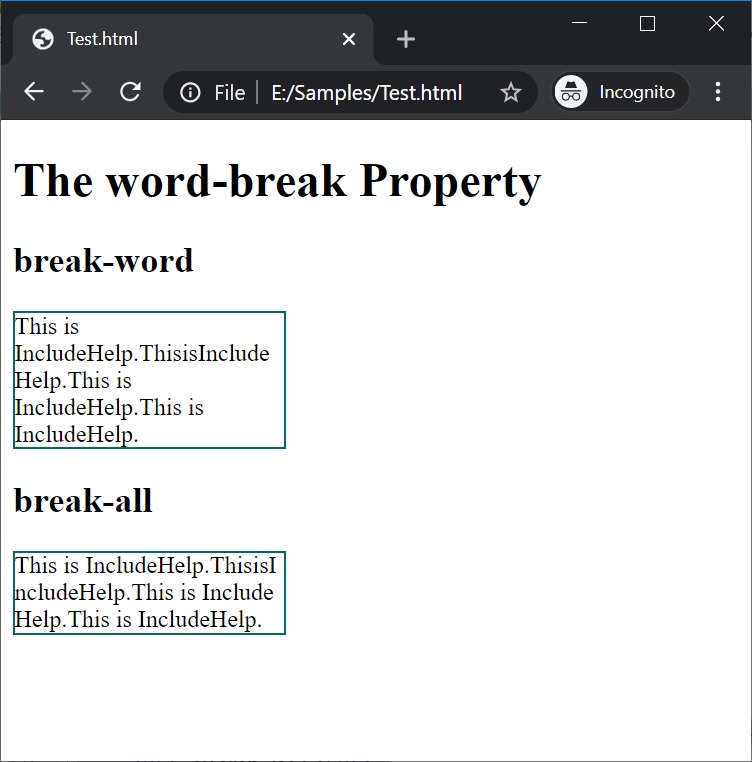
 本文深入探讨CSS中的word-break属性,对比分析'break-all'与'break-word'两个关键值的区别,通过实例演示如何有效避免文本溢出,为Web开发者提供全面的指导。





 扫一扫
扫一扫


 624
624

 被折叠的 条评论
为什么被折叠?
被折叠的 条评论
为什么被折叠?
 到【灌水乐园】发言





